• You've discovered RedGuides, an EverQuest multi-boxing and scripting community 🧙‍♀️⚙️. We want you to play several EQ characters at once, come join us and say hello! 👋

  • A TLP without truebox has thawed (Very Vanilla ready)
    Frostreaver
MQ2Eskay

Plugin - MQ2Eskay (1 Viewer) 3.1.52471.11

I understand what you're saying, but let me be clearer and I'll use Fight Fire task as an example. Prior to my last attempt at the Fight Fire task, this is what I would do:

Get task, zone in group and at zone-in type: /shd mode 0, then /shd mode 8. Run SK up to the waiting group of mobs, target any of them and go through the dialogue to start the event. Run SK back to group, and as you know, as soon as the mobs are within a few feet of my SK, the yellow target line pops up and SK starts beating on the targeted mob.

I have done that over 80 times and never had an issue. Today, I had an issue.

I couldn't run my SK up to the mobs before the yellow line pops up and it's targeting the quest giver way behind my group. SK takes off toward the quest giver (weird). I never tried to target the quest giver. Can't even get close to the group of mobs ahead.

No, I'm not on drugs. Something changed today and I'm guessing it has something to do with the update.
so when i asked you to confirm that you have never changed modes, and you confirmed and said yes that you never changed modes - that was actually not accurate?

I mean c'mon man, help me out here. I can only go off of what you say. if you tell me you have literally never changed modes, and i'm convinced that that is not possible and you double down and say that you have never changed modes and i try and replicate what you're saying, then later you say that yes, in fact you DO change modes.

how can i even help you with that.
 
lol - I misunderstood you. Sorry. Yes, I always start with /shd mode 0, then go to /shd mode 8. What I don't understand is if that 0 to 8 has worked every day for me and today it doesn't, what might have caused that?
 
the stuff that we updated today was a timer that chat had adjusted/moved with relation to the pull arc - so the hotfix we did this morning, moved that timer to the correct location so you pull properly again

the stuff before that was adding debug information for pullarc stuff when you do a /shd debugpull on or /shd debugpull on once to say if they are outside of the pull arc
 
lol - I misunderstood you. Sorry. Yes, I always start with /shd mode 0, then go to /shd mode 8. What I don't understand is if that 0 to 8 has worked every day for me and today it doesn't, what might have caused that?
I'm not sure how you misunderstood me - I was very straight forward in "and does this mean that you haven't changed your mode once since you purchased the plugin? " and you repsonded with Yes

this means when you did mode 8 you were closer to the quest guy than the other mobs. aka pulling the closes mob to you.

add the quest mob to ignore of you insist on just roaming around willy nilly in a tank puller mode, otherwise if he meets all the pull conditions, you are going to pull him (in your pull radius, in your level range, in your arc, etc)
 
Okay, that's interesting. I'll play around with moving him up before I switch modes. I haven't had to do that until today, but that's okay. Worth a try. Thanks.
 
Okay, that's interesting. I'll play around with moving him up before I switch modes. I haven't had to do that until today, but that's okay. Worth a try. Thanks.
I would also double check that you don't normally use SicTank (mode 7) which is a non-pull mode, but does tanking and allows you to move around - where as mode 8 is HunterTank mode where you literally roam around in your radius killing things where they stand and not pull them back anywhere.
 
your description of how you do things, makes me read you are using sictank mode, and not huntertank mode.
 
anyone getting error saying dll is missing when it isnt
the only time i've heard of .dll not loading when they should (assuming you have typed the name correctly /plugin mq2eskay load) is a windows situation where it can get added to your AppCompatFlag

you can check the registry keys and delete anything mq2 related from them
HKEY_CURRENT_USER\Software\Microsoft\Windows NT\CurrentVersion\AppCompatFlags\Layers
and
HKEY_LOCAL_MACHINE\Software\Microsoft\Windows NT\CurrentVersion\AppCompatFlags\Layers
 
Did you adjust your Zradius? and do you have a valid mesh of the zone?
 
Did you adjust your Zradius? and do you have a valid mesh of the zone?

yea i believe so. didnt adjust z for anything. but as the main assist and her main tank i started running around killing things (with 500 camp radius on) and after a few kills like that she went to work. sometimes though she just sits there. i may just use the tank mode with follow me on with the higher max radius and see if that works ju7st as good. was just curious to see how hunter was and then how it reacted
 
what happens when you do a /shd debugpulls on once ?
You should see why your sk isn't pulling.
 
what happens when you do a /shd debugpulls on once ?
You should see why your sk isn't pulling.

I'll try that. I am using an adaption of sics code for tank with camp but I am trying to adapt it so that with "follow me" on and sk tank following to not have a camp point but to follow me and stay with me in tank 4 mode. Can you suggest how I need to rework this macro because I cam getting "camphere is not a valid mode" in mq2eskay (i understand this is more for boxes using kissassist). I'm wondering what is a valid way to say don't use camp in this code for mq2eskay?

/bcg //camphere off (for characters that are running kissassist)
/noparse /bcga //docommand /${Me.Class.ShortName} pause off (for if you forget you have pauses on)
/noparse /bcg //docommand /${Me.Class.ShortName} mode 1
/bca //shd mode 4 (tank mode)
/noparse /bcga //docommand /${Me.Class.ShortName} camphere off

edited as I left out the /bca since I am maining with my necro
 
Last edited:
both radius and Zradius effect the ability to pull a creature. Zradius is the distance above and below you that you want to pull creatures. If you're in a zone with many hills and valley's it's good to set this to a high number, such a 500 or 1000 so as not to be specific, but just to say you're willing to pull anything. For zones like dungeons that have floors above and or below you (like velks) you'd likely want this number to be smaller.
 
I'll try that. I am using an adaption of sics code for tank with camp but I am trying to adapt it so that with "follow me" on and sk tank following to not have a camp point but to follow me and stay with me in tank 4 mode. Can you suggest how I need to rework this macro because I cam getting "camphere is not a valid mode" in mq2eskay (i understand this is more for boxes using kissassist). I'm wondering what is a valid way to say don't use camp in this code for mq2eskay?

/bcg //camphere off (for characters that are running kissassist)
/noparse /bcga //docommand /${Me.Class.ShortName} pause off (for if you forget you have pauses on)
/noparse /bcg //docommand /${Me.Class.ShortName} mode 1
/bca //shd mode 4 (tank mode)
/noparse /bcga //docommand /${Me.Class.ShortName} camphere off

edited as I left out the /bca since I am maining with my necro
I had already answered you when you pm'd me.

/camphere is a kissassist hotkey. that is for setting your camp in kissassist. I explain that in the videos i send you when you pm'd me these questions.

mode 4 is a tank mode where you tank and chill where you set the camp at (when you go into mode 4).

there is no "i just want to roam around and auto tank stuff as I'm following someone" mode.

best bet is to be in mode 7, and do a /shd resetcamp anytime you want to fight what is near you

as mentioned in pm, most folks drive with their tank for many reasons, and i would suggest doing the same - it will make boxing much easier, especially when you're doing more than just sitting in one spot
 
I'll try that. I am using an adaption of sics code for tank with camp but I am trying to adapt it so that with "follow me" on and sk tank following to not have a camp point but to follow me and stay with me in tank 4 mode. Can you suggest how I need to rework this macro because I cam getting "camphere is not a valid mode" in mq2eskay (i understand this is more for boxes using kissassist). I'm wondering what is a valid way to say don't use camp in this code for mq2eskay?

/bcg //camphere off (for characters that are running kissassist)
/noparse /bcga //docommand /${Me.Class.ShortName} pause off (for if you forget you have pauses on)
/noparse /bcg //docommand /${Me.Class.ShortName} mode 1
/bca //shd mode 4 (tank mode)
/noparse /bcga //docommand /${Me.Class.ShortName} camphere off

edited as I left out the /bca since I am maining with my necro

I find that using mode 7 with camp radius set to something large (i.e. cover the whole zone) works pretty well for this. Basically, you will tank anything that gets on your target list. I use this mode even when driving with my SK, and have the group follow on chase, e.g.
/noparse /bcg //docommand /${Me.Class.ShortName} mode 2
/bcg //chaseon
/shd campradius 2000
/shd mode 7

I suppose would work equally well with someone else driving and tank set to follow. I usually prefer this vs. manual mode for dungeon crawls as it automatically switches to the next target on multi-pulls and adds. Only drawback is the SK will run toward the mob after pulling with a ranged spell, which isn't always optimal.

On a related note, I find for tight quarters that chase mode does not always get casters close enough to get LoS on the mobs, and they just stand around corners doing nothing. I have to manually pull them to me when this happens. Is there a way to either make them follow at a closer distance or automatically navigate to get LoS? (caster toons are using KISS currently).
 
I find that using mode 7 with camp radius set to something large (i.e. cover the whole zone) works pretty well for this. Basically, you will tank anything that gets on your target list. I use this mode even when driving with my SK, and have the group follow on chase, e.g.
/noparse /bcg //docommand /${Me.Class.ShortName} mode 2
/bcg //chaseon
/shd campradius 2000
/shd mode 7

I suppose would work equally well with someone else driving and tank set to follow. I usually prefer this vs. manual mode for dungeon crawls as it automatically switches to the next target on multi-pulls and adds. Only drawback is the SK will run toward the mob after pulling with a ranged spell, which isn't always optimal.

On a related note, I find for tight quarters that chase mode does not always get casters close enough to get LoS on the mobs, and they just stand around corners doing nothing. I have to manually pull them to me when this happens. Is there a way to either make them follow at a closer distance or automatically navigate to get LoS? (caster toons are using KISS currently).
no chase distance is set at 15 units for the cwtn plugins - if you're asking about the kiss toons, would have to adjust your relevant kiss settings
 
no chase distance is set at 15 units for the cwtn plugins - if you're asking about the kiss toons, would have to adjust your relevant kiss settings
Thanks for the quick reply. Using MQ2Cleric and MQ2Berserker and they aren't a problem as cleric doesn't nee LoS to heal. Currently just having KISS toons on /afollow but causes some weird spinning when bard tries to melee. Stupid bard.
 
Thanks for the quick reply. Using MQ2Cleric and MQ2Berserker and they aren't a problem as cleric doesn't nee LoS to heal. Currently just having KISS toons on /afollow but causes some weird spinning when bard tries to melee. Stupid bard.
well yes, if you have toons trying to afollow and stick a mob they're going to have conflicting behavior - you should just use /chaseon for kiss and have it do the chasing and sticking that way (still bugs with that, but better than nothing).

this is, of course, the mq2eskay thread tho, so if you need help with those kiss specifics you should post up in the kiss thread areas
 
Is there a way while set to "Hunter Tank" mode to have him focus on only specific mobs? I need to farm a bunch of Brownie Parts and would like to turn him loose in LFay and ONLY hunt down and kill Brownies and not waste time on anything else.
 
Is there a way while set to "Hunter Tank" mode to have him focus on only specific mobs? I need to farm a bunch of Brownie Parts and would like to turn him loose in LFay and ONLY hunt down and kill Brownies and not waste time on anything else.
I think you are looking for this:
 
And that works in conjunctions with MQ2Eskay and the rest of CWTN's plugins? If so, that is EXACTLY what I'm looking for!
 
Is there a way while set to "Hunter Tank" mode to have him focus on only specific mobs? I need to farm a bunch of Brownie Parts and would like to turn him loose in LFay and ONLY hunt down and kill Brownies and not waste time on anything else.
no

but as others have said - you can run a farm macro while in mode 0
 
so i don't think it is directly this plugin that is acting up but i have tried looking around and cannot find an answer. When i sent my SK to puller tank sometimes while he is pathing to the mob he gets stuck on nothing and just spazzes out in one spot. If you tap the movement forward or jump he will continue to path to a mob for the pulls. He only freezes on pulling and never returning to camp. If you alt + left click on the map he will navigate through the areas fine to wherever. It is only when set to pulling that i see the issue. I have tried deleting all my nav meshes. I use the auto update tool in redguides to auto download/reload the meshes. I have tried the check box in nav ui to get yourself unstuck but that does not change anything. When looking at the nav mesh overlay while pulling there is no breaks in the mesh that i can see. Any assistance would be appreciated
 
Where it is currently happening is Great Divide in the Coldain Mines in the se corner of zone in the end cave with the 3 named spawns. It doesn't happen on every pull, usually ones that happen when pulling stuff heading to the ones that spawn just in the tunnel before the cave. Sometimes on spawns on the far west side of the cave. I have had this issue happen in Ry'gorr mines as well and sometimes in Eastern Wastes. Happened in a quite a few burning lands zones as well.
 
so i don't think it is directly this plugin that is acting up but i have tried looking around and cannot find an answer. When i sent my SK to puller tank sometimes while he is pathing to the mob he gets stuck on nothing and just spazzes out in one spot. If you tap the movement forward or jump he will continue to path to a mob for the pulls. He only freezes on pulling and never returning to camp. If you alt + left click on the map he will navigate through the areas fine to wherever. It is only when set to pulling that i see the issue. I have tried deleting all my nav meshes. I use the auto update tool in redguides to auto download/reload the meshes. I have tried the check box in nav ui to get yourself unstuck but that does not change anything. When looking at the nav mesh overlay while pulling there is no breaks in the mesh that i can see. Any assistance would be appreciated
Where it is currently happening is Great Divide in the Coldain Mines in the se corner of zone in the end cave with the 3 named spawns. It doesn't happen on every pull, usually ones that happen when pulling stuff heading to the ones that spawn just in the tunnel before the cave. Sometimes on spawns on the far west side of the cave. I have had this issue happen in Ry'gorr mines as well and sometimes in Eastern Wastes. Happened in a quite a few burning lands zones as well.
this sounds like a mesh issue with dynamically update path. do you just see the nav line and then end up wiggling back and forth?
that area of your mesh is bad - often times happens when there are parts of a mesh that are overlapping in a way that as you pass over it mq2nav is trying to recalculate a different direction to go, and gets stuck in a loop. This is a frequent issue with out-of-the-box meshes and water, but can happen in overland areas.

You will likely need to determine where it is happening, and then add a connector or a pref path / avoid path to your mesh.
 
yea, i see the nav line and the screen just jiggles and you see him trying to walk forward. So i dont know much about the navmesh tool but i played with it a little just for the GD zone and changed cell size from .6 to .4 and i dont have the stutter issue anymore. Looks like ill have to play with each zone and rebuild to fix the issue i am having. Thanks
 
Last edited:
How hard would it be to add some code to make your view Auto "home" after a battle? I always end up staring up in the air or down at the ground post fight.
 
yea, i see the nav line and the screen just jiggles and you see him trying to walk forward. So for most part would it be better to just scrap all my meshes again and rebuild them one by one instead of the auto updater through redguides launcher? It happens in a lot of zones why i ususally dont use the pull tank feature much and would do bard pulling manually. Just is nice to use once in a while.
well no that's not going to do much.

there is probably a bad spot in the mesh at that area - re-downloading the same mesh is going to give you the same area, again.

you likely need to edit your mesh, or change settings and then regenerate it.

open your mesh and take a look at it at that location and see if there is anything you can visually see, and figure out how you want to handle fixing it.

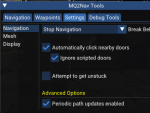
you can also just turn off "Periodic path updates enabled" by un-checking it in your /nav ui menu

keep in mind, turning this off, you won't recalculate your path as your moving, so if you get summoned, or stuck, you won't try and fix it.
1598729772929.png

I recommend just looking at your mesh, and fixing it in it
 
from what i could see in my mesh nothing was overlapping or looked bad or had any breaks. From what i noticed at least
 
from what i could see in my mesh nothing was overlapping or looked bad or had any breaks. From what i noticed at least
sometimes you can't even "see" it on the mesh - i don't understand fully what it is, but it has something to do where nodes, or points, or "plates" connect to others, and when you hit it with dynamic updates turned on, you get caught in a loop.

this happens a ton in places that have water/lava - one spot that comes to mind is trying to run from neriak to commonlands, get stuck in a loop in the water near commonlands, as an example
 
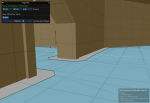
Here is an example of weirdness to deal with meshes. In PoAir (not sky) there are 4 temples, each of these temples has a layer of world that you can walk on. If you attempt to use a hunter or puller mode in these areas your puller will constantly run into walls and various objects. The reason for it in this case is because there is another layer of the world directly under the layer you are walking on which is just a flat plane. Nav is for some reason using that plane instead of the hallways portion of the mesh to determine a route for you. Because of this I was required to make an adjustment to my mesh.

When I look at the spot where my character was making questionable path choices everything looks fine at first look.
1598804725476.png

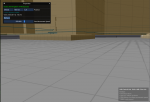
However, if I go under the path and look below it we can see the other plane I mentioned above.
1598804766161.png

Now in this picture I have already added the "Non-Walkable" area to the mesh, you can see the black lines on the far end of the plane which are keeping nav from considering this lower plane for movement. I ended up wrapping that entire plane with a non-walkable to correct the issue, and I repeated this for all 4 of these temple areas in order to correct the issue in the whole zone for all the areas that caused this.
1598804881252.png

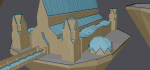
There are also areas where a mesh will have too many verticies in a single location that will appear to be fine, but ultimately cause nav to short circuit trying to navigate the location because it's a point on the mesh where several tiles all converge to a point. This is usually due to something like a lot of geometry in a single area where it causes the mesh to deform too much. I'll post an example of that from tempest temple.

1598805084382.png

The white lines are the normal "tiles" and all the grey looking lines that all converge on a single black dot is where it's creating bends in the tile. Too many bends in too many directions can -Sometimes- cause nav to freak out running back and forth in a single spot, or just have a meltdown in general.

While neither of these may be the issue you were having, these are both instances where you might feel the mesh is fine, but where it is not.
 
Puller tank mode seemed to bug out when I had a lot of /shd ignore and they were in range. If tank went to the mob to aggro it at all (often just medded, spaming that it was going to wait) it would aggro then just tank out there instead of pulling back.
 
Puller tank mode seemed to bug out when I had a lot of /shd ignore and they were in range. If tank went to the mob to aggro it at all (often just medded, spaming that it was going to wait) it would aggro then just tank out there instead of pulling back.
ignore only effects what mob it pulls - it doesn't effect what mobs get fought if they are in your camp and doing stuff that you would be fighting. it also doesn't effect returning back to camp.
you can always do a /shd debugpull on once to spit out what you're skipping and why. the most common culprits for mobs not getting pulled that should are either A: user has not set their Z-Radius appropriate for the zone, or B: they have a break somewhere on their mesh, or the mob is off-mesh for some reason

I would double check that you had your camp settings adjusted appropriately - campradius, radius, and in pullertank and not huntertank mode. Don't forget, that if you are zoning around in a mode with a camp, you'll spit a new camp at that location - so ensure you either switch to mode 0 and then back to your camp mode (like pullertank) or utilize the /shd resetcamp if you need to adjust your camp location
 
Plugin - MQ2Eskay

Users who are viewing this thread

Back
Top
Cart