
-
 Hail, we're RedGuides. We want you to play six (yes, 6!) EverQuest characters at once. We have scripts and a friendly community to help, please join our playstyle and say hello! 👋
You are using an out of date browser. It may not display this or other websites correctly.
You should upgrade or use an alternative browser.
You should upgrade or use an alternative browser.

Plugin - MQ2BerZerker (1 Viewer) 3.1.52471.42
- Thread starter ChatWithThisName
- Start date
I just started using it yesterday with 2 zerks and it works awesome for a while then the zerks start taking breaks. I have them on chase mode and was flipping gmm darkness for exp. One zerk will refuse to move with the group. The zerk gets locked in place. You can see the path for it to follow but I cant budge them until I drag a mob over to it. Then everything goes on like normal until the next one decides to take a break. Maybe they started a zerk union? I am not running kiss. I am using IHC on the other toons. I tried setting the other toons to chase but I still get zerks getting stuck. Using followme works better but they still get stuck. I can maybe get 1 full clearing before I have to camp and come back. When I tried a camp spot in the static zone and put them on assist things went flawless minus one time I was a little out of range with a pull. Any ideas to what is going on? I remade meshes and it didn't help.

sounds like frenzied resolve. this ability roots you in place for big deeps (but if a mob is close enough you will battl leap and drawn to battle to get closer to the mob). you can turn this off, but it is a big dps loss. if you're doing chase mode it is worth considering either turning it off or using something that will cancel the buff if he is too far from the tank (i do that with a near empty macro running while in chase mode)I just started using it yesterday with 2 zerks and it works awesome for a while then the zerks start taking breaks. I have them on chase mode and was flipping gmm darkness for exp. One zerk will refuse to move with the group. The zerk gets locked in place. You can see the path for it to follow but I cant budge them until I drag a mob over to it. Then everything goes on like normal until the next one decides to take a break. Maybe they started a zerk union? I am not running kiss. I am using IHC on the other toons. I tried setting the other toons to chase but I still get zerks getting stuck. Using followme works better but they still get stuck. I can maybe get 1 full clearing before I have to camp and come back. When I tried a camp spot in the static zone and put them on assist things went flawless minus one time I was a little out of range with a pull. Any ideas to what is going on? I remade meshes and it didn't help.
Thank you. Is there a way to verify that this is the cause? Is there a spell icon to look for? I have never actually ran a zerker so I don't know how their abilities work. If it wasn't for this site I doubt I would have ever made one but I am sure happy to have 2 now. They really destroy stuff.sounds like frenzied resolve. this ability roots you in place for big deeps (but if a mob is close enough you will battl leap and drawn to battle to get closer to the mob). you can turn this off, but it is a big dps loss. if you're doing chase mode it is worth considering either turning it off or using something that will cancel the buff if he is too far from the tank (i do that with a near empty macro running while in chase mode)
You will see the Frenzied Resolve Disc running - and if you havent' blocked it, you will look like a giant rock monsterThank you. Is there a way to verify that this is the cause? Is there a spell icon to look for? I have never actually ran a zerker so I don't know how their abilities work. If it wasn't for this site I doubt I would have ever made one but I am sure happy to have 2 now. They really destroy stuff.
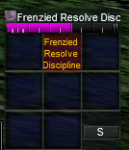

I will have to watch for the combat ability to grey out as I blocked the monster form as I like to shrink my toons for easier pulling and that always undoes shrink.You will see the Frenzied Resolve Disc running - and if you havent' blocked it, you will look like a giant rock monster
View attachment 18039
View attachment 18040
Yep frenzied resolve. Thanks for the education.sounds like frenzied resolve. this ability roots you in place for big deeps (but if a mob is close enough you will battl leap and drawn to battle to get closer to the mob). you can turn this off, but it is a big dps loss. if you're doing chase mode it is worth considering either turning it off or using something that will cancel the buff if he is too far from the tank (i do that with a near empty macro running while in chase mode)

- Commits
- 191
- Seller
- #529
Sometimes I get bored. When I get bored I decide to learn new things. When I learn new things, I put them in things. Good news. I'm putting them in my plugins. Starting with the most popular plugin on Redguides!
I added a new datatype with my plugin. Soon you'll be able to do things like:
/if (${Berzerker.Mode.Equal[Chase]} && ${Berzerker.UseFrenzied}) /zerk usefrenzied off
and a number of other things. Here's the list.
Any of those member, ${Berzerker.OneOfThoseMembers} with the return type listed next to it.
So you're sitting there thinking FINALLY! And were probably about to tell me it was awesome and were going to thank me. But hang on....I'm not done yet.
I also have been meaning to learn more about windows in MQ2. So I did. What's the current result?
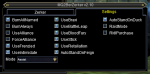
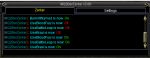
The first tab, if I can pull it off will be Berzerker's own chatbox so we can pull some of that spam out of the MQ2 window and put it somewhere on it's own.
Currently those are all checkboxes that I've both added, and got to work. In addition to the single ComboBox that I've added and got to work.
I'm missing UseAoE (I noticed like 2 mins ago) and I still need to incorporate the the one that take a number value. I'm trying to decide between sliders (if I can find anything that has a slider anyway) and drop input boxes where you type in what you want to use.
Just know that I approve of the continued support for this plugin and wanted to add some more quality of life features to it as I learn them.
Happy Wednesday!
CWTN
I added a new datatype with my plugin. Soon you'll be able to do things like:
/if (${Berzerker.Mode.Equal[Chase]} && ${Berzerker.UseFrenzied}) /zerk usefrenzied off
and a number of other things. Here's the list.
C++:
    MQ2ZerkerType() :MQ2Type("Berzerker")
    {
        TypeMember(Version);//1,Float
        TypeMember(Mode);//2,String
        TypeMember(AssistAt);//3,Int
        TypeMember(CampRadius);//4,Int
        TypeMember(UseAOE);//5,bool
        TypeMember(AOECount);//6,Int
        TypeMember(BurnCount);//7,Int
        TypeMember(BurnAllNamed);//8,bool
        TypeMember(BurnAlways);//9,bool
        TypeMember(UseAlliance);//10,bool
        TypeMember(ForceAlliance);//11,bool
        TypeMember(UseFrenzied);//12,bool
        TypeMember(UseIntimidate);//13,bool
        TypeMember(UseBraxi);//14,bool
        TypeMember(UseBattleLeap);//15,bool
        TypeMember(UseBloodFury);//16,bool
        TypeMember(UseStick);//17,bool
        TypeMember(UseRetaliation);//1,bool
        TypeMember(AutoStandOnFeign);//19,bool
        TypeMember(AutoStandOnDuck);//20,bool
        TypeMember(RaidMode);//21,bool
        TypeMember(RaidAssist);//22,Int
        TypeMember(RkIIPurchase);//23,bool
    }
Any of those member, ${Berzerker.OneOfThoseMembers} with the return type listed next to it.
So you're sitting there thinking FINALLY! And were probably about to tell me it was awesome and were going to thank me. But hang on....I'm not done yet.
I also have been meaning to learn more about windows in MQ2. So I did. What's the current result?
The first tab, if I can pull it off will be Berzerker's own chatbox so we can pull some of that spam out of the MQ2 window and put it somewhere on it's own.
Currently those are all checkboxes that I've both added, and got to work. In addition to the single ComboBox that I've added and got to work.
I'm missing UseAoE (I noticed like 2 mins ago) and I still need to incorporate the the one that take a number value. I'm trying to decide between sliders (if I can find anything that has a slider anyway) and drop input boxes where you type in what you want to use.
Just know that I approve of the continued support for this plugin and wanted to add some more quality of life features to it as I learn them.
Happy Wednesday!
CWTN

DanteAlgier
Member
New window looks nice, will there be a checkbox to turn on/off AoE abilities as a generic "AoE" instead of having to go back and research which abilities are AoE and which are not?
But I love the plug-in does what I want it to do and then some...
But I love the plug-in does what I want it to do and then some...
- Commits
- 191
- Seller
- #534
Yeah I'll add the button for the UseAoE which works on all AoE abilities except Braxi, Braxi is a non-damaging AoE ability and vital to the DPS of a berzerker, thus it has it's own checkbox as you should only turn that one off for special circumstances like GMM to avoid aggroing something you otherwise have faction with.
- Commits
- 191
- Seller
- #535
ChatWithThisName updated MQ2BerZerker with a new update entry:
Crash fix
Read the rest of this update entry...
Crash fix
Apologies to anyone that got the crashes from the patch that happened just recently. I've tracked down the issues and implemented fixes for them. here's the updated file. Sorry for the inconvenience.
CWTN
Read the rest of this update entry...
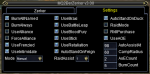
move raidmode close to raidassist to see if raidassist would even do anything, same with aoecount/burncountBeen working on the window some more. Trying to sort out the remaining options.
This seem okay to yall?
- Commits
- 191
- Seller
- #538
I hear your suggestion @jande and I raise you something else that I was working on before i saw your comment.
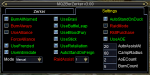
UseAlliance is off, so the checkbox for ForceAlliance isn't available and the text is red (even if it's on), similarly if RaidMode is unchecked, then RaidAssist label is red, probably going to set the combo box to not be visible as well. These are not static colors that I've set in the xml, they're altered on the fly as options are changed (though if you change stuff with a command and the settings window is open you won't see the change unless you click on the window somewhere so it loads reloads settings). I could potentially swap RaidMode and AutoStandOnFeign, but it's going to require changing quite a bit of logic at this point since all the labels are set in code in the plugin and not from the xml itself. Something a bit more elaborate I'm considering, is making things enabled or invisible if you don't have the ability to use it. IE: UseBloodFury checkbox will grey out once you have Open Wound, Ritual Scarification, or if you don't have the AA BloodFury. UseIntimidate would be unavailable until you have rank 2 of intimidate etc.
UseAlliance is off, so the checkbox for ForceAlliance isn't available and the text is red (even if it's on), similarly if RaidMode is unchecked, then RaidAssist label is red, probably going to set the combo box to not be visible as well. These are not static colors that I've set in the xml, they're altered on the fly as options are changed (though if you change stuff with a command and the settings window is open you won't see the change unless you click on the window somewhere so it loads reloads settings). I could potentially swap RaidMode and AutoStandOnFeign, but it's going to require changing quite a bit of logic at this point since all the labels are set in code in the plugin and not from the xml itself. Something a bit more elaborate I'm considering, is making things enabled or invisible if you don't have the ability to use it. IE: UseBloodFury checkbox will grey out once you have Open Wound, Ritual Scarification, or if you don't have the AA BloodFury. UseIntimidate would be unavailable until you have rank 2 of intimidate etc.
Do you really want to be cool? Add buy recommend AA's. I really don't want to spend the time researching their aa's
Check the beginning of this thread. I'm pretty sure I saw an aa list to best utilize this plugin.
I hear your suggestion @jande and I raise you something else that I was working on before i saw your comment.
That works for me, was not aware that you could make it different colors.
- Commits
- 191
- Seller
- #544
I wasn't either to be fair. But I'm playing with it as I go. I went ahead and moved RaidMode since the locations on the screen are linked only to where they are in the enumeration it ended up being pretty easy to move it.
I linked UseAlliance and ForceAlliance together, since you need UseAlliance for force alliance to matter at all, I also got it so that UseBloodFury blacks out once you own Open Wound or Ritual Scarification since having either of those replaces the use of BloodFury, and while I was at it, it's blacked out if you don't own bloodfury.
I linked UseAlliance and ForceAlliance together, since you need UseAlliance for force alliance to matter at all, I also got it so that UseBloodFury blacks out once you own Open Wound or Ritual Scarification since having either of those replaces the use of BloodFury, and while I was at it, it's blacked out if you don't own bloodfury.
MQ2Berzerker is one of the paid resources, so it is additionalis mq2 berserker and adition to very vanilla or added and how many characters can I use it on
there is no limit to how many characters you can use with it. I sometimes run 6+ zerkers

its instead of Kissassist and once you purchase a license you can use it on all your zerkers. its basically
a macro specific to Zerkers.
a macro specific to Zerkers.
Hey guys not sure if anyone is having any issues getting the new awesome window to stay where you want it to. For me it kept resetting to the upper left corner. If you set the new window where you want it, you can unload and reload the plugin to force it to keep your setting! Its an easy work around. Thanks Chat for all your work on this amazing plugin!
How do you even see the window? I can't figure out how to get it on my screen at all.Hey guys not sure if anyone is having any issues getting the new awesome window to stay where you want it to. For me it kept resetting to the upper left corner. If you set the new window where you want it, you can unload and reload the plugin to force it to keep your setting! Its an easy work around. Thanks Chat for all your work on this amazing plugin!

Mine doesn't and never has so what could be wrong?Yes mine pops to upper left every time I log out and back in. I just move it to its normal spot. It’s a minor inconvenience.


I might have put it in the wrong folder. I'll check later. thanks!Hmmm, I updated mine last night and ran zerker fine. Did you delete the old dll and download mq2zerker, unzip all over again, copy paste the dll into Release?
Users who are viewing this thread
Total: 2 (members: 0, guests: 2)
Share: