
-
 Hail, we're RedGuides. We want you to play several EverQuest characters at once. We have scripts and a friendly community to help, please join our playstyle and say hello! 👋
You are using an out of date browser. It may not display this or other websites correctly.
You should upgrade or use an alternative browser.
You should upgrade or use an alternative browser.
Resource icon
Release MQ2AutoForage (1 Viewer)
- Thread starter Redbot
- Start date


RedMan updated MQ2AutoForage with a new update entry:
20221229
Read the rest of this update entry...
20221229
Commits
- Deprecations
- PSPAWNINFO to PlayerClient*
- PCHAR to const char*
- GetCharInfo()->pSpawn to pLocalPlayer
- PITEMINFO to ItemDefinition* (8f604b4)
- Merge branch 'deprecations' into 'master'
Deprecations
See merge request redguides/plugins/MQ2Autoforage!2...
Read the rest of this update entry...
RedMan updated MQ2AutoForage with a new update entry:
20221230
Read the rest of this update entry...
20221230
- Deprecations
- Removed superfuous pChSpawn = pLocalPlayer and replaced with pLocalPlayer
- removed unnecessary char/sprintf_s when we already have the information available (5278468)
- Merge branch 'Deprecations' into 'master'
Deprecations
See merge request redguides/plugins/MQ2Autoforage!3...
Read the rest of this update entry...
redhero1000
Active member
I know it's an old question, but I use:Question: I am trying to make a hotkey to destroy an Item on the cursor. Using /destroyitem (name of Item) to set it to destroy the item when foraged. What or is their a way to have what is on the cursor to fill in the name part?
So when I get a foraged item and pick it up on the cursor then press the hotkey to destroy the item the item fills in the rest of the command. Example: I forage grubbs. I then click it to get it on the cursor. Then press the hotkey and the name of the item fills in the name in the hotkey. Can I make something like {Item.Name.(?)}
Zeb
<Click the foraged item you want to never keep, which places it on your cursor>
/destroyitem ${Cursor.Name}
/pause 4
/destroy
This first adds the item name to your destroy list, then deletes the item from your cursor forever.
Last edited:

Newly foraged as in it wasn't in the list before?Why does the plugin adds newly foraged items to a Global List? I am in The Broodlands and have a list of what to keep, but instead of using the list, the plugin created a "Global list" section and puts the foraged items there.

Berkz
Well-known member
Good clarification. So I had the item in the list under a zone, but when I foraged the item it got added to the Global list and ignored the zone list that had it set up to destroy the item. I am finding that it happens everywhere so maybe the macro was changed to have just one list regardless of region? I didn't see anything in the updates though.

Same thing happens to me. I’ve stopped adding items to destroy and just do it manually now. Annoying but less annoying than changing the ini constantly.Good clarification. So I had the item in the list under a zone, but when I foraged the item it got added to the Global list and ignored the zone list that had it set up to destroy the item. I am finding that it happens everywhere so maybe the macro was changed to have just one list regardless of region? I didn't see anything in the updates though.

Sic updated MQ2AutoForage with a new update entry:
20230219
Read the rest of this update entry...
20230219
(99cc9c0) ~Knightly
...Merge branch 'v143' into 'master'
Update for v143
See merge request redguides/plugins/MQ2Autoforage!4
Read the rest of this update entry...

Is it possible to have this plugin not try to forage if in a sitting state? The stand/sit spam is... odd.
It was requested a while ago and either ignored, forgotten about, or never looked at.
It was requested a while ago and either ignored, forgotten about, or never looked at.
Not that I’m likely to work on autoforage any time soon, but when I do work on plugins I don’t look in the forums. I look at the issues page: https://gitlab.com/redguides/plugins/MQ2Autoforage

Am I mistaken about the fact that a .ini file should be auto created for each toon as they forage in the different zones? If I am correct, then why is it not happening. There is only one .ini file for MQ2AutoForage and the appears to be the general one that looks like this:
[General]
AutoKeepAll=on
AutoAddAll=on
ForageOn=on
Thanks in advance for the help.
[General]
AutoKeepAll=on
AutoAddAll=on
ForageOn=on
Thanks in advance for the help.
There's a global and a zone setting if the guide is accurateAm I mistaken about the fact that a .ini file should be auto created for each toon as they forage in the different zones? If I am correct, then why is it not happening. There is only one .ini file for MQ2AutoForage and the appears to be the general one that looks like this:
[General]
AutoKeepAll=on
AutoAddAll=on
[Global]
Fishing Grubs=destroy
[The Emerald Jungle]
Pod of Water=keep
[The Feerrott]
Roots=keep
Tuft of Grizzly Bear Fur=destroy
Rabbit Meat=keep
[Plane of Fear]
Roots=keep
[Commonlands]
Roots=keep
Fishing Grubs=destroy
Tuft of Black Bear Fur=destroy
Black Bear Skull=destroy
[Temple of Veeshan]
Pod of Water=keep
Roots=keep
Wurm Egg=keep
Glob of Slush Water=keep
Lichen Roots=keep
Dragon Claw Sliver=keep
Drake Egg=keep
Dragon Egg=keep
Code:
[General]
AutoKeepAll=on
AutoAddAll=on
[Global]
Fishing Grubs=destroy
[The Emerald Jungle]
Pod of Water=keep
[The Feerrott]
Roots=keep
Tuft of Grizzly Bear Fur=destroy
Rabbit Meat=keep
[Plane of Fear]
Roots=keep
[Commonlands]
Roots=keep
Fishing Grubs=destroy
Tuft of Black Bear Fur=destroy
Black Bear Skull=destroy
[Temple of Veeshan]
Pod of Water=keep
Roots=keep
Wurm Egg=keep
Glob of Slush Water=keep
Lichen Roots=keep
Dragon Claw Sliver=keep
Drake Egg=keep
Dragon Egg=keepIt’s in the loot.ini file. I couldn’t find it originally either.Am I mistaken about the fact that a .ini file should be auto created for each toon as they forage in the different zones? If I am correct, then why is it not happening. There is only one .ini file for MQ2AutoForage and the appears to be the general one that looks like this:
[General]
AutoKeepAll=on
AutoAddAll=on
ForageOn=on
Thanks in advance for the help.
I'm not sure if this was commented on, when i start the autoforage it causes all of my toons to start foraging.....and that's annoying.
So is there a way to just have the one I type the command on to engage autoforage?
Figured out how....unload the plugin on all toons, load it on just the ones i want to forage!
So is there a way to just have the one I type the command on to engage autoforage?
Figured out how....unload the plugin on all toons, load it on just the ones i want to forage!

Rare Spawn
Well-known member
That's what I do too.Figured out how....unload the plugin on all toons, load it on just the ones i want to forage!

Antijaam
New member
nice plugin, just wanted to mention that it interrupts the /camp process....can this be fixed? thanks!

The /startforage command does not seem to work anymore. I get 'That is not a valid command' when I use /startforage. I have unloaded and reloaded the plugin, I do have forage on my ability window. When I use /startf it does start foraging.
I always .startf or .stopf to get it going or to disable it if I don't want random items getting stuck on my cursor (such as when I'm raiding).
I am not sure how long this has been an issue for me, I just noticed it today, but has anyone else noticed that Autoforage isn't working? I tried reloading and restarting but I can't seem to get it going. This could entirely be me doing something ridiculous and screwing it up, I was hoping someone else had an idea as to how to get it going again.

kronoislife
Active member
Necro posting
I have noticed that the commands to start and stop forge are slightly different:
/start forage
/stopforage
Note the space in the "start" command, but not in the "stop" command. Hope this helps you, it would be the first time I was able to answer soemthing, hehe.
Wow this just saved me lmao. Thank you from 18 years ago!

I am having this problem on One character, works fine on all other characters. cant figure it out.
Please post in the correct thread and not necropost some disjointed thread from 2008. It actually tells you that you're necroposting.Wow this just saved me lmao. Thank you from 18 years ago!
bumping something from 15+ years ago is wild too, because the code for autoforage clearly shows that, at least currently (which doesn't mean fifteen years ago it wasn't different) the commands are "/startforage" and "stopforage". a lot of things can change in such a long period of time
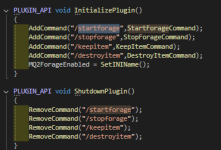
git history for autoforage only goes back to 2017, but as of at least april 2017 (8 years ago) it was also "/startforage"
but these commands are one of the reasons so many folks are insistent on doing something like "/plugin what-thing (setting-value)" like it *should* have been "/autoforage start" or something similar
"/start" will shortcut to any registered command that it finds so if you had something, an alias or bind that was /startdoingcoolstuff and nothing else with /start in it "/start" would execute the /startdoingcoolstuff
Last edited:
Did not realise it was an old thread to be honest just came up as a "whats new" and it was something I had noticed day before on one of my characters. So thought I would mention it in case it was a bug that needed sorting. Its a shammy so not really bothered about him Foraging and have loads more toons who i can forage on, but for some reason it just wont autoforage on this one toon, started two forageing at same time, one works perfect other doesnt, and yes bought the AA's in fact they are maxed lol.Please post in the correct thread and not necropost some disjointed thread from 2008. It actually tells you that you're necroposting.
bumping something from 15+ years ago is wild too, because the code for autoforage clearly shows that, at least currently (which doesn't mean fifteen years ago it wasn't different) the commands are "/startforage" and "stopforage". a lot of things can change in such a long period of time
View attachment 69170
git history for autoforage only goes back to 2017, but as of at least april 2017 (8 years ago) it was also "/startforage"
but these commands are one of the reasons so many folks are insistent on doing something like "/plugin what-thing (setting-value)" like it *should* have been "/autoforage start" or something similar
"/start" will shortcut to any registered command that it finds so if you had something, an alias or bind that was /startdoingcoolstuff and nothing else with /start in it "/start" would execute the /startdoingcoolstuff
yeah it was kronoislife who bumped it (last reply was 2008) which brought it to "whats new" which is where you repliedDid not realise it was an old thread to be honest just came up as a "whats new" and it was something I had noticed day before on one of my characters. So thought I would mention it in case it was a bug that needed sorting. Its a shammy so not really bothered about him Foraging and have loads more toons who i can forage on, but for some reason it just wont autoforage on this one toon, started two forageing at same time, one works perfect other doesnt, and yes bought the AA's in fact they are maxed lol.

Is there a method that can be called to 'see' if MQ2AutoForage is in a (started = true/false ) state?
I am able to check if it's enabled, but there is no call I've found to see what the current 'foragestate' is. (running/stopped)
Usecase: I'm trying to write a script that uses the cursor item. I'd like to be able to know if forage needs to be stopped, this way it doesn't interfere with the items I'm expecting to be on the cursor.
Then I can return it to the original state when I'm done.
Now I would need to rely on the user to restart it, or just log that it was stopped and they can restart it if required.
- M
I am able to check if it's enabled, but there is no call I've found to see what the current 'foragestate' is. (running/stopped)
Usecase: I'm trying to write a script that uses the cursor item. I'd like to be able to know if forage needs to be stopped, this way it doesn't interfere with the items I'm expecting to be on the cursor.
Then I can return it to the original state when I'm done.
Now I would need to rely on the user to restart it, or just log that it was stopped and they can restart it if required.
- M
The wiki above in the nav bar is a wonderful resource.Is there a method that can be called to 'see' if MQ2AutoForage is in a (started = true/false ) state?
I am able to check if it's enabled, but there is no call I've found to see what the current 'foragestate' is. (running/stopped)
Usecase: I'm trying to write a script that uses the cursor item. I'd like to be able to know if forage needs to be stopped, this way it doesn't interfere with the items I'm expecting to be on the cursor.
Then I can return it to the original state when I'm done.
Now I would need to rely on the user to restart it, or just log that it was stopped and they can restart it if required.
- M
You could just issue the /stopf command as part of your script, then start it back up at the end. If the plugin is not loaded., those commands won't work. It's not a great solution, but could be workable.
That is a very good option and the one I sort of have in place. This only checks if the plugin is loaded, but not running. I wouldn't want to assume it was running and force start it again.You could just issue the /stopf command as part of your script, then start it back up at the end. If the plugin is not loaded., those commands won't work. It's not a great solution, but could be workable.
Also if MQ2AutoForage is not loaded, it would spit out an error because /startf and /stopf are not valid commands.
What I am doing now is checking if the plugin is loaded, and if loaded provide a check box to /stopf. They could however close the app without un-checking the box. If they do I add a reminder to the log to start it and the command.
I just think it would be so much cleaner if I could capture the original state and return it to that state at the end.
You could also just see what is on your cursor and if it is the item you want to deal with it, then deal, or if not, just wait or other similar logic.That is a very good option and the one I sort of have in place. This only checks if the plugin is loaded, but not running. I wouldn't want to assume it was running and force start it again.
Also if MQ2AutoForage is not loaded, it would spit out an error because /startf and /stopf are not valid commands.
What I am doing now is checking if the plugin is loaded, and if loaded provide a check box to /stopf. They could however close the app without un-checking the box. If they do I add a reminder to the log to start it and the command.
I just think it would be so much cleaner if I could capture the original state and return it to that state at the end.
Or you can check to see if there is a forage "event" and then stop forage and restart.
It depends on how long your script is doing stuff.
These are all good workarounds if a foragestate option is not something that can be done.You could also just see what is on your cursor and if it is the item you want to deal with it, then deal, or if not, just wait or other similar logic.
Or you can check to see if there is a forage "event" and then stop forage and restart.
It depends on how long your script is doing stuff.
Thank you.
Came back after a while off. I used Redguides before but before I found it, I had also used MMOBugs before I found Redguides. They both use MQ so a number of the options seemed to copy over. Anyway, As far as I can tell, all of the plugins seem to work fine except Autoforage. I started a new server and it created the character ini files it was supposed to. Originally, I only used the Overseer plugin. A couple weeks ago, I started using more of the features to help run a second character and decided to try autoforaging overnight except, it's random on when it works. More often than not, it just doesn't. When I first enabled it a few months ago, my forage button was stuck down. I couldn't press it at all and it never popped back up. So I disabled it. I figured it wasn't going to work anyway because I didn't have an active subscription.
I have an active sub now so I enabled it again. The button was again stuck. I unloaded the plugin and then loaded it again and it started working. Only problem was, the /startforage and /stopforage commands didn't work. It also doesn't autodestroy items I have marked as such. The ini file lists the items that should be kept or destroyed but it keeps everything. Tonight, it just stopped working again. /startforage says it's not a valid command. I have unloaded and loaded the plugin a few times but it doesn't help. Logged all my characters out, made sure MQ and everything else was totally updated. Logged in again. No change. Tried another character that I just bought the AA for forage. No change. Autoforage simply does not want to work right now. Any ideas what to try next?
I have an active sub now so I enabled it again. The button was again stuck. I unloaded the plugin and then loaded it again and it started working. Only problem was, the /startforage and /stopforage commands didn't work. It also doesn't autodestroy items I have marked as such. The ini file lists the items that should be kept or destroyed but it keeps everything. Tonight, it just stopped working again. /startforage says it's not a valid command. I have unloaded and loaded the plugin a few times but it doesn't help. Logged all my characters out, made sure MQ and everything else was totally updated. Logged in again. No change. Tried another character that I just bought the AA for forage. No change. Autoforage simply does not want to work right now. Any ideas what to try next?

For some strange reason the command to stop and start foraging is truncated. You have to use /startf and /stopf IIRC.
@kaen01 Sorry, I didn't do a very good job explaining. I didn't copy mmobugs over. I had installed mmobugs to use years ago. Then I found redguides and when I installed it, it used the same default location for MQ. It worked fine for several months. Then I stopped playing EQ for a couple years. When I came back, it wasn't working but I also figured that was due to lack of sub. I activated my redguides account recently in hopes of using it and other features. Activated sub didn't do anything. I managed to get it working for about a week (in which time I just didn't log off) by unloading it then loading it. Last night I couldn't get it working again regardless if unloading, loading, zoning, etc. I do get where you're going though and perhaps cleaning out the MQ folder and starting over will help.
I'll try @Nightmare327 suggestion of the shorter commands first.
Sorry @Sic thought I posted in the right spot but stayed up way too late trying to get it working so apparently I wasn't thinking very clearly. I did check the wiki page but, other than the basic 4 commands, couldn't really find much else to try.
I'll try @Nightmare327 suggestion of the shorter commands first.
Sorry @Sic thought I posted in the right spot but stayed up way too late trying to get it working so apparently I wasn't thinking very clearly. I did check the wiki page but, other than the basic 4 commands, couldn't really find much else to try.
I would remove anything mq and rg related on your pc, if its been years and years since you played many changes have been made.
After uninstalling and removing everything, then you should install redfetch, and go from there, its the new rg launcher, and its so much cooler and nicer and funner!
After uninstalling and removing everything, then you should install redfetch, and go from there, its the new rg launcher, and its so much cooler and nicer and funner!
Awesome. I'll give that a shot!I would remove anything mq and rg related on your pc, if its been years and years since you played many changes have been made.
After uninstalling and removing everything, then you should install redfetch, and go from there, its the new rg launcher, and its so much cooler and nicer and funner!
Users who are viewing this thread
Total: 2 (members: 0, guests: 2)
Share: