
-
 Hail, we're RedGuides. We want you to play several EverQuest characters at once. We have scripts and a friendly community to help, please join our playstyle and say hello! 👋
You are using an out of date browser. It may not display this or other websites correctly.
You should upgrade or use an alternative browser.
You should upgrade or use an alternative browser.
Resource icon
Release MQ2AutoForage
- Thread starter Redbot
- Start date

- Commits
- 1
what do you mean by that so I can do the same
Added it to the React Collection

Is anyone currently maintaining this plugin?
It'd be nice to stop forage-spamming when dead, if that's a change that could be made!
It'd be nice to stop forage-spamming when dead, if that's a change that could be made!


This happens often if your forager is also your master looter. TLDR: looting at the same time that foraging happens can make the undesired item go into inventory before MQ2Forage can execute a delete command.I have used this plugin for a long time and never really had a problem until lately. I completed all the ranks of forage and now the refresh timer is down to like 40 seconds. I thought this would be great. Only downside is for some odd reason it will not always destroy items I forage that are in the ini to destroy. So I end up having to manually delete the chunks of Velium. funny thing is some times this times when I forage and it will delete it on my cursor. So does the timing of the destroy needed modified?
yup, if you have other stuff autoinventorying stuff before forage can get to itThis happens often if your forager is also your master looter. TLDR: looting at the same time that foraging happens can make the undesired item go into inventory before MQ2Forage can execute a delete command.

Redbot updated MQ2AutoForage with a new update entry:
foraging is for the living
Read the rest of this update entry...
foraging is for the living
No longer try and AutoForage while FD or Dead
Read the rest of this update entry...

morlucius
Well-known member
So after I start using MQ2AutoForage I get a new file now that I can add stuff in order to delete unwanted items correct?
Once I load this plugin, I know if i log out with it running when I log in it will make everyone i log in start foraging. Is there anyways to stop this as I only want certain toons foraging for me and not all 18 that i play
Once I load this plugin, I know if i log out with it running when I log in it will make everyone i log in start foraging. Is there anyways to stop this as I only want certain toons foraging for me and not all 18 that i play
you can have a .cfg file that unloads the plugin on those specific toons/classesSo after I start using MQ2AutoForage I get a new file now that I can add stuff in order to delete unwanted items correct?
Once I load this plugin, I know if i log out with it running when I log in it will make everyone i log in start foraging. Is there anyways to stop this as I only want certain toons foraging for me and not all 18 that i play
> info here <
- Commits
- 1
What I did to help with that issue, all my toons have a cfg file for when enter the world. All that cfg file does is run MyLauncher.mac
Rather than maintaining several cfgs I just maintain the one macro. For those toons I do not want foraging running on I have it unload the plugin when that toon enter the world.
Rather than maintaining several cfgs I just maintain the one macro. For those toons I do not want foraging running on I have it unload the plugin when that toon enter the world.
- Commits
- 1
I do not know how to make code review/change requests. So I'm gonna offer my thoughts here for someone smarter than I.
Modifying INI files for each toon is cumbersome, so to support a single server specific INI file, while not messing with people who wish to keep character specific, I make the following suggestion.
In the code change:
MQ2Autoforage.cpp - Line: 59
To:
MQ2Autoforage.cpp - Line: 59
If a character specific INI exists it will use that, otherwise it uses the server specific INI.
Gave it a quick spin and it seems to work. Not sure if there would be file locking issues with multiple toons hitting the same INI file.
I Borrowed the idea from the MQ2Events code.
Modifying INI files for each toon is cumbersome, so to support a single server specific INI file, while not messing with people who wish to keep character specific, I make the following suggestion.
In the code change:
MQ2Autoforage.cpp - Line: 59
C++:
bool SetININame()
{
    if (gGameState==GAMESTATE_INGAME && GetCharInfo())
    {
        sprintf_s(INIFileName,"%s\\MQ2Forage_%s_%s.ini", gszINIPath, GetCharInfo()->Name, EQADDR_SERVERNAME);
        Load_INI();
        return true;
    }

    return false;
}
To:
MQ2Autoforage.cpp - Line: 59
C++:
bool SetININame()
{
    if (gGameState==GAMESTATE_INGAME && GetCharInfo())
    {
        sprintf_s(INIFileName,"%s\\MQ2Forage_%s_%s.ini", gszINIPath, GetCharInfo()->Name, EQADDR_SERVERNAME);
        if (!_FileExists(INIFileName))
            sprintf_s(INIFileName,"%s\\MQ2Forage_%s.ini", gszINIPath, EQADDR_SERVERNAME);
        Load_INI();
        return true;
    }
    return false;
}

}
If a character specific INI exists it will use that, otherwise it uses the server specific INI.
Gave it a quick spin and it seems to work. Not sure if there would be file locking issues with multiple toons hitting the same INI file.
I Borrowed the idea from the MQ2Events code.
- Commits
- 1
Redbot updated MQ2AutoForage with a new update entry:
per server ini files
Read the rest of this update entry...
per server ini files
Support per server INI files to reduce the management of multiple per character INI files. If the MQ2Forage_.ini exists it will continue to use that. Otherwise it will create and use MQ2Forage.ini

Support for per-server INI file. (!409) · Merge Requests · RG Creators / VeryVanilla
Support per server INI files to reduce the management of multiple per character INI files. If the MQ2Forage_.ini exists it will continue to use that. Otherwise it will...gitlab.com
Read the rest of this update entry...

This would be absolutely perfect if we could have a section for for global settings. In other words there are some common forage items I'd like to destroy no matter what zone I'm in.

OK, according to update 1 master INI to rule them all!! Take my red cents please!
@JerkChicken & @Knightly
@JerkChicken & @Knightly

Have you tried reloading it? Have you tried restarting it after you loaded it? Does it say anything?My mq2 autoforage has stopped working on my 99 Ranger, can't figure out how I broke it
did you /stopforage and now need to /startforage?My mq2 autoforage has stopped working on my 99 Ranger, can't figure out how I broke it
That worked, thank you so much!did you /stopforage and now need to /startforage?
Redbot updated MQ2AutoForage with a new update entry:
Add Global option to MQ2AutoForage
Read the rest of this update entry...
Add Global option to MQ2AutoForage
Added default [Global] section to INI:
Items will read from or write to a global section, unless a zone-specific line exists.
INI:[Global] Roots=keep

Add Global option to MQ2AutoForage (!425) · Merge requests · RG Creators / LegacyMQ2 · GitLab
Added default [Global] section to INI: Items will read from or write to a global section, unless a zone-specific line exists.gitlab.com
Read the rest of this update entry...
Love e lyRedbot updated MQ2AutoForage with a new update entry:
Add Global option to MQ2AutoForage
Read the rest of this update entry...


craggyisland
Unwise Decision Designator
Someone add that new update
[Global]
Roots=keep
To the overview page. I almost missed that.
[Global]
Roots=keep
To the overview page. I almost missed that.

there is currently an eq bug - this is likely what you are seeing.Is it possible to get the buildin autoinventory to work flawless ? Sometimes it keeps the items on the cursor. it especially seems to do this if the client isn't in focus
you probably have your Max. Background FPS set to "min. CPU" which you absolutely do not want to do.this isn't foraging on background windows. the character just keeps standing and sitting until focus is put on that window then it forages fine.
any ideas?
eq works on the "fps cycles" and setting to min cpu is basically saying "my background toon isn't going to be doing anything, so basically ignore it".
trying to automate toons in the backgorund but having your eq set to min cpu is going to cause undesired results like skipping instructions, overshooting things when you navigate, generally piss-poor response to things etc.
you can check this in alt-o, for options, then Advanced
For example:
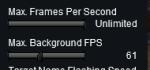
you probably have your Max. Background FPS set to "min. CPU" which you absolutely do not want to do.
eq works on the "fps cycles" and setting to min cpu is basically saying "my background toon isn't going to be doing anything, so basically ignore it".
trying to automate toons in the backgorund but having your eq set to min cpu is going to cause undesired results like skipping instructions, overshooting things when you navigate, generally piss-poor response to things etc.
you can check this in alt-o, for options, then Advanced
For example:
View attachment 31002
that worked. thanks man

- Commits
- 2
Unable to get my toon to destroy unwanted items. I have the player zone item ini set to =destroy , restarted the plugin, restarted, still doesn't destroy the item.

raven_warsong
Active member
I'm still having this same problem. Could Foraging Mastery and Luck be playing a part in why I am keeping things that are supposed to be destroyed?not sure for how long but tried using this a couple days ago to forage and its not writing to any ini's anymore for keep and destroy
Last edited:
U
userjds
Definitely, many items won't accept the command destroy, example is Small Chunk of Velium...single slot items are the devil...
Definitely, many items won't accept the command destroy, example is Small Chunk of Velium...single slot items are the devil...
In addition to the loot.ini setting you can add a React statement too!
INI:
  DestroySmallChunk:
    action: /destroy
    condition: "${Cursor.Name.Equal[Small Chunk of Velium]}"
keith
Member
My auto forage is working fine but only on some characters at some times. It wont work on one toon but will on another. Then at another time it may work on that toon that is wasn't the day before. I was wondering what I may have running or why it wont work on certain toons at certain times. It reads DoCommand couldn't parse startforage. But works on others, Thx much
if it cant parse the command, the plugin isnt running.My auto forage is working fine but only on some characters at some times. It wont work on one toon but will on another. Then at another time it may work on that toon that is wasn't the day before. I was wondering what I may have running or why it wont work on certain toons at certain times. It reads DoCommand couldn't parse startforage. But works on others, Thx much
U
userjds
Appreciate the feedback.In addition to the loot.ini setting you can add a React statement too!
INI:DestroySmallChunk: action: /destroy condition: "${Cursor.Name.Equal[Small Chunk of Velium]}"
turnittotheright
Well-known member
Just started messing with this again but it keeps rebuilding the mq2forage_charname_server.ini instead of just using the mq2forage_server.ini. Its only for some of my toons not the entire set. Is there a way to stop this?
- Commits
- 1
dumb question; does mq2forage_server.ini exist?
Last i remember it will:
If mq2forage.ini exists use mq2forage.ini
elseIf mq2forage_server.ini exists use mq2forage_server.ini
elseIf mq2forage_charname_server.ini exists use mq2forage_charname_server.ini
else create mq2forage_charname_server.ini
Last i remember it will:
If mq2forage.ini exists use mq2forage.ini
elseIf mq2forage_server.ini exists use mq2forage_server.ini
elseIf mq2forage_charname_server.ini exists use mq2forage_charname_server.ini
else create mq2forage_charname_server.ini

Question: I am trying to make a hotkey to destroy an Item on the cursor. Using /destroyitem (name of Item) to set it to destroy the item when foraged. What or is their a way to have what is on the cursor to fill in the name part?
So when I get a foraged item and pick it up on the cursor then press the hotkey to destroy the item the item fills in the rest of the command. Example: I forage grubbs. I then click it to get it on the cursor. Then press the hotkey and the name of the item fills in the name in the hotkey. Can I make something like {Item.Name.(?)}
Zeb
So when I get a foraged item and pick it up on the cursor then press the hotkey to destroy the item the item fills in the rest of the command. Example: I forage grubbs. I then click it to get it on the cursor. Then press the hotkey and the name of the item fills in the name in the hotkey. Can I make something like {Item.Name.(?)}
Zeb

Burdsjm try this..... /stopforage (you might have it already working) /startforage and /stopforage is like pause on or pause off. You have the plugin loaded so it should be working and you should be foraging. Using /startforage when the plugin is working is like trying to start a car while its running. As far as I know you first stop (or pause) the plugin by using the /stopforage command. Then to get it running again once it has been stopped you would use /startforage to get it running again.
At least that is the way I understand how it works. So the message you got would be like trying to start that car while driving down the road. (lot of grinding noise from the starter)
Zeb
At least that is the way I understand how it works. So the message you got would be like trying to start that car while driving down the road. (lot of grinding noise from the starter)
Zeb
Users who are viewing this thread
Total: 1 (members: 0, guests: 1)
Share: