• You've discovered RedGuides, an EverQuest multi-boxing and scripting community 🧙‍♀️⚙️. We want you to play several EQ characters at once, come join us and say hello! 👋

  • A TLP without truebox has thawed (Very Vanilla ready)
    Frostreaver

Problem - MQ2 is not showing up on my taskbar

Status
Not open for further replies.

ScooterEWU99

Member
Joined
Sep 2, 2022
RedCents
90¢
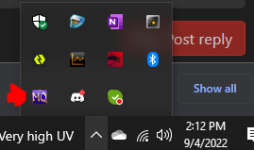
The icon is not on my taskbar. Ive downloaded, and logged in a character and it loads fine. Just cant find it on the task bar anywhere.
 
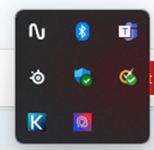
The icon would be in systray, not task bar. Systray is where you find the sound icon and network.
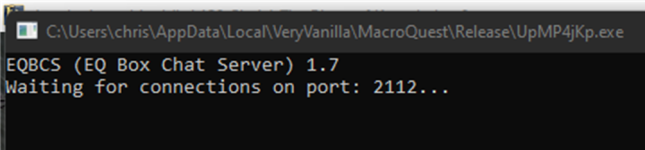
Still not there. I noticed that when i clicked on "Launch MQ" from the laucher, i get a window that pops up stating "Waiting for connection to port:..." and MQ doesnt show up on my taskbar as it says in Video 1

1662315481972.png
 
Still not there. I noticed that when i clicked on "Launch MQ" from the laucher, i get a window that pops up stating "Waiting for connection to port:..." and MQ doesnt show up on my taskbar as it says in Video 1

View attachment 41743
I don't know what video 1 and video 2 are without reference links.

That EQBCS is a service which runs along side of MQ which is used commonly by people who run more than 1 toon at a time. I see EQ running in the back ground, I see EQBCS running (which you can minimize). I do not see reference of systray being shared to confirm that MQ is not running there nor taskbar images, so I'll assume that you know what you're talking about.

1662315821583.png

Did you enable that then click "Launch MQ" ? or did you load this application from the folder? More information up front to reduce how many questions we have to ask you in order to help you, will help us help you quicker.

Try to provide as much information as you can so we don't have to ask further questions.
 
Problem - MQ2 is not showing up on my taskbar
Status
Not open for further replies.

Users who are viewing this thread

Back
Top
Cart