• Hail, we're RedGuides. We want you to play six (yes, 6!) EverQuest characters at once. We have scripts and a friendly community to help, please join our playstyle and say hello! 👋
  • We've added LLM sections to our Terms & Rules and Resource Rules, for everyone's sanity & in-game safety.
    Read more
    a. Do not replace your voice with an LLM. This goes for your posts and your scripts. Drafting and editing with a tool is fine, but don't take you out of what you share.
    b. Do not replace your EQ character's voice with an LLM. We don't want scripts that speak over /ooc, /shout or other public channels. This has been an unwritten rule that's kept casino scripts off the site for decades, but we're now compelled to make it clear: keep automated communication private.

    Why Does RG Review Scripts?
    Nearly every LLM-written Lua script we see is making your character do impossible things, and rarely in a way that's beneficial to you. We've seen heavy server hammering, /target over impossible distances when /nav spawn would passively accomplish the same thing, a spawn search that fires 20+ times per second, and other pointless actions that are likely annoying GMs.

    You are welcome to use LLMs as a tool to structure, draft, and edit your work, but please read critically before hitting /lua run

Problem - MQ2 is not showing up on my taskbar

Status
Not open for further replies.
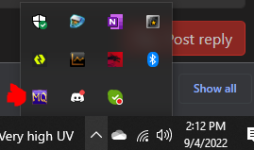
The icon would be in systray, not task bar. Systray is where you find the sound icon and network.
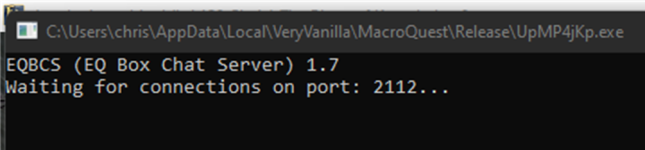
Still not there. I noticed that when i clicked on "Launch MQ" from the laucher, i get a window that pops up stating "Waiting for connection to port:..." and MQ doesnt show up on my taskbar as it says in Video 1

1662315481972.png
 
Still not there. I noticed that when i clicked on "Launch MQ" from the laucher, i get a window that pops up stating "Waiting for connection to port:..." and MQ doesnt show up on my taskbar as it says in Video 1

View attachment 41743
I don't know what video 1 and video 2 are without reference links.

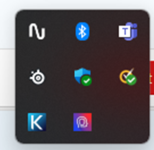
That EQBCS is a service which runs along side of MQ which is used commonly by people who run more than 1 toon at a time. I see EQ running in the back ground, I see EQBCS running (which you can minimize). I do not see reference of systray being shared to confirm that MQ is not running there nor taskbar images, so I'll assume that you know what you're talking about.

1662315821583.png

Did you enable that then click "Launch MQ" ? or did you load this application from the folder? More information up front to reduce how many questions we have to ask you in order to help you, will help us help you quicker.

Try to provide as much information as you can so we don't have to ask further questions.
 
Problem - MQ2 is not showing up on my taskbar
Status
Not open for further replies.

Users who are viewing this thread

Back
Top
Cart