• You've discovered RedGuides, an EverQuest multi-boxing and scripting community 🧙‍♀️⚙️. We want you to play several EQ characters at once, come join us and say hello! 👋

  • A TLP without truebox has thawed (Very Vanilla ready)
    Frostreaver

Question - Mesh not saving in Mesh Generator

Joined
May 13, 2007
RedCents
9,002¢
I have created some connection links in the Mesh Generator but when I select save mesh it doesnt seem to do anything and then when I reload it, the changes I made are gone. Am I missing a step somewhere? How can I get it to save my changes?
 
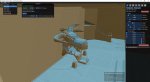
Are you clicking the save button at the top left after saving the stuff on the right side. Also not sure which mesh files you are editing but some zones have crystalcaverns and crystalcavernstwo. Also, tried running mesh generator as admin.
 
I am having the same issue. Ran it as admin and now I cannot even save files anymore. The Save Mesh is greyed out and the Save File with floppy disk icon are gone.
 
Are you clicking the save button at the top left after saving the stuff on the right side. Also not sure which mesh files you are editing but some zones have crystalcaverns and crystalcavernstwo. Also, tried running mesh generator as admin.

mesh.jpg

Can you clarify "right side" I dont see any save on the right, just the editing tools. I am selecting the "Save Mesh" under "Zone" in the top left there
 
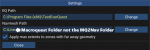
I figured out my issue. New PC had OneDrive installed on it and it was putting copies of MQ2,Nav,etc.. all in there. I removed it all and reinstalled MQ2Nav. It worked perfectly, except it created a new folder in MQ2Nav called "MQ2Nav". I just have to drag the edited zone mesh from there and drop it into the previous folder.
 
Change your path in the mesh generator for issue of creating the mq2nav inside the maq2nav folder. :) Glad you got it figured out.
 

Attachments

  • Untitled.png
    Untitled.png
    16.9 KB · Views: 19
I figured out my issue. New PC had OneDrive installed on it and it was putting copies of MQ2,Nav,etc.. all in there. I removed it all and reinstalled MQ2Nav. It worked perfectly, except it created a new folder in MQ2Nav called "MQ2Nav". I just have to drag the edited zone mesh from there and drop it into the previous folder.

Thank you! That was it!
 
Question - Mesh not saving in Mesh Generator

Users who are viewing this thread

Back
Top
Cart