• You've discovered RedGuides, an EverQuest multi-boxing and scripting community 🧙‍♀️⚙️. We want you to play several EQ characters at once, come join us and say hello! 👋

  • A TLP without truebox has thawed (Very Vanilla ready)
    Frostreaver
Very Vanilla MQ (Live Servers)

Vanilla - Very Vanilla MQ (Live Servers) (4 Viewers) 3.1.52471.11

No permission to download
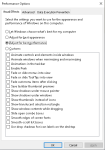
I assume you're referring to "Visual Effects" when you go to your system properties > Advanced > Performance. I've verified that resolved the visual appearance of window switching being more like an alt tab, but it is still extremely slow. Are you referring to animations somewhere else?
1635310071118.png
 
Window switching is extremely slow and feels like a window maximizing or minimizing instead of an already maximized window being made "on top". Is there a setting to control this behavior I'm missing? Alt tabbing between windows is extremely fast still.
https://gitlab.com/macroquest/next/mqnext/-/issues/380
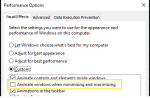
Settings --> Performance --> Settings --> Uncheck Animate Windows when minimizing or maximizing
1635332819260.png
1635332810796.png
 
I was told it was me but... Installed next, EQBCS wasn't working, used PS to migrate, then had to reinstall dx and vc... rebooted and my system boot sector wouldn't read. Reinstalled windows 10 pro et al and everything worked using.
I know Next is going to be current, "soon". Doesn't change the basic fact that people are paying to spend hours fixing things during beta, things that they would never have done except for the beta testing they are doing for redguides, and paying redguides to do for them.
Never liked paying to beta test for a company that's paying some "special" folks to beta test and letting others pay to beta test. Redguides is a for profit company, it's not like they would have the time or budget to focus on an issue affecting 1% of their customers.

I'm sorry you had those troubles getting set up. However I disagree with everything you said in your post. MQnext is not a beta test, it is an upgrade. Your installation troubles were not a result of bad software. Redguides is a community that spends an enormous amount of time to help each other cheat at a 22 year old video game. If anyone is having trouble using the software, there is always someone in Discord or on the forums to help set things straight, paying or not.
 
I was told it was me but... Installed next, EQBCS wasn't working, used PS to migrate, then had to reinstall dx and vc... rebooted and my system boot sector wouldn't read. Reinstalled windows 10 pro et al and everything worked using.
I know Next is going to be current, "soon". Doesn't change the basic fact that people are paying to spend hours fixing things during beta, things that they would never have done except for the beta testing they are doing for redguides, and paying redguides to do for them.
Never liked paying to beta test for a company that's paying some "special" folks to beta test and letting others pay to beta test. Redguides is a for profit company, it's not like they would have the time or budget to focus on an issue affecting 1% of their customers.
sorry to hear about the woes Sifter. I can understand that things not working as you'd expect is a frustrating experience.

Redguides != mq developers (despite any overlap in people/faces) and the MQ developers are developing mq "next" with or without redguides available open-source directly from git - Redguides is just adopting the updates, additions, and changes that the MQ developers are bringing and providing this pre-packaged to our "Red Buddies", and with that comes our forums and RG updater and community, and support etc.

The specific reason why it isn't "full stable build" quite yet, is to try and give the MQ devs time to try and work out those kinks, and challenges, and struggles, so MQ and thus Redguides can deliver a better experience.

I'm not sure if you were just sharing your experience, or saying that you thought that mq "next" messed your system's boot sector - but it sounds like you had/have some other computer challenges there.

If you have some specific things/issues/problems that you need help with, the MQ devs and others like myself are more than happy to work through your issues, and if there are reproducible steps that can illustrate something is broken or needs a change to accommodate things better - the MQ devs have been EXTREMELY responsive on those things.

Again, I hear you on the challenges, and we definitely don't want you to have that kind of experience. We want you to just be able to play the game and enjoy your time.

Thanks for the feedback, please keep it coming.

edit: i also want to add, I am sure that your perspective and experience isn't unique, and there are other folks who have a similar situation with similar levels of frustration, so thank you for taking the time to share and speak up about that. We (Redguides, MQ dev team, RG Community / fellow Red Buddies), we all appreciate and value your input.
 
Delete the entry for eqgame.exe

It seems the crash issue may be fixed, but i am experiencing a different issue. What I did notice is when the crash would happen, one account would go into, basically, a really shitty resolution. Then, produce a crash, adn everyone loaded woudl also crash. eqclient would revert, etc.

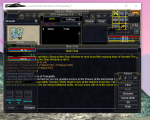
today, i just logged in 3 toons, not al at once, one at a time. What is interesting they loaded in full screen windowed mode this time, when usually they don't. The last toon i loaded up has this for a resolutions:

1635349836037.png

Obviously that isnt' correct. but, i didn't receive any crash messages like i normally would have.

the eqclient.ini file half reverted back. What i mean by that is the "good" version ahs, for example, UseLuclinHumanMale=0 (and all luclin models), but this version has UseLuclinHumanMale=FALSE.

Now, when i re-loaded that toon, this time, it loaded the account in the small version, allowing me to maximize the window, which it didn't do when it crashed.
1635350163692.png

Maximizing that game sessions then causes all my UI to be jacked up.
 
Correct. Check in your bios if the Onboard is still on. Just because it's on doesn't mean it will show up on the device list. It's something odd I saw on my client's computer.

i popped in the BIOS and didn't see any video options anywhere. The BIOS seemed half stripped down.
 
I was told it was me but... Installed next, EQBCS wasn't working, used PS to migrate, then had to reinstall dx and vc... rebooted and my system boot sector wouldn't read. Reinstalled windows 10 pro et al and everything worked using.
I know Next is going to be current, "soon". Doesn't change the basic fact that people are paying to spend hours fixing things during beta, things that they would never have done except for the beta testing they are doing for redguides, and paying redguides to do for them.
Never liked paying to beta test for a company that's paying some "special" folks to beta test and letting others pay to beta test. Redguides is a for profit company, it's not like they would have the time or budget to focus on an issue affecting 1% of their customers.
The DirectX reinstall is new information but I can’t think of a reason that you would need to reinstall DirectX. Are you still having a problem there?

However, you did report the issue with EQBCS.exe requiring components that you had missing and brainiac fixed it within a day or two of you reporting it. I appreciate the report and that was my fault for using the old project settings instead of going over them and reviewing them, but you were the only person to report and have that problem and we still fixed it very quickly. So I think it’s a bit misleading to imply that we don’t care about problems that only impact some people.

I mentioned before that your boot sector getting corrupted had nothing to do with Next at all. One of the main benefits of Next is the source is available for the majority of the components which is more than is available for MQ2. So you can actually go look at the code and see there’s nothing that would impact your boot sector. One of the reasons I did the powershell script as a powershell script even though it would have been faster for me in C# was also so that people could edit the script and see what it was doing. You can look at that and also see it would not have effected your boot sector, it’s just copying or moving files.

And while I can understand your frustration on migrating, calling Next Beta would make MQ2 Alpha software at this point. There are bugs in MQ2 that have been outstanding for years and never fixed (we have a list of them on the repo). So the issue here seems more to be with the change and your migration experience, which is valid — than it is with the stability of the software. But MQ is not more Beta than MQ2 is Alpha, it’s just iterations on development.

MQ is constantly being developed and you will absolutely run into issues. The developers for MQ are not RG employees. We do this because we enjoy doing it and we help out at RG because we like the community. RG is a business and you will absolutely get support when you ask questions, but as Sic pointed out that is separate from development of MQ. Any issues you have with being a “paying customer” have nothing to do with the core development of MQ (but, you can absolutely take that up with RG).

The only way for software not to have bugs is to not have software, but for sure Next (despite your issues) is less buggy than MQ2. It’s possible that for you specifically it’s buggier or you just don’t use the things that were fixed. That’s totally valid, but if you tell us how to reproduce the issues you’re having we almost always work on them. A great example of this is that we’ve had some consistent reports about the slowness of task switching since the windows update and brainiac fixed it himself last night as a result. That doesn’t impact a lot of people, but it Is something we care about because it impacts the user experience — if you compare that to MQ2 it still has a 5 year old bug where your alt key gets stuck when you task switch. As Sic said, if you can give us ways to reproduce things we’ll absolutely work on it.

All of that said, your experience doesn’t sound like you had a good experience and I’m sorry that happened.
 
today, i just logged in 3 toons, not al at once, one at a time. What is interesting they loaded in full screen windowed mode this time, when usually they don't. The last toon i loaded up has this for a resolutions:

View attachment 34505

Obviously that isnt' correct. but, i didn't receive any crash messages like i normally would have.

the eqclient.ini file half reverted back. What i mean by that is the "good" version ahs, for example, UseLuclinHumanMale=0 (and all luclin models), but this version has UseLuclinHumanMale=FALSE.

Now, when i re-loaded that toon, this time, it loaded the account in the small version, allowing me to maximize the window, which it didn't do when it crashed.
How do you launch EQ? Are you doing it through the patcher? Through a batch file? From the MQ tray icon? What is your EQ path?

There is a similar issue to this that occurs when you run the old settings exe that resets settings, but it should only happen the one time. I’m curious if there are artifacts left over from that, but I will be out of town for a bit so I can’t look. Might be worth reviewing though.
 
How do you launch EQ? Are you doing it through the patcher? Through a batch file? From the MQ tray icon? What is your EQ path?

There is a similar issue to this that occurs when you run the old settings exe that resets settings, but it should only happen the one time. I’m curious if there are artifacts left over from that, but I will be out of town for a bit so I can’t look. Might be worth reviewing though.

launching from MQ tray. Right click, go to my "raid" group, and either do load all, or select a name from the list. The EQ Path for all is this:

c:\users\public\daybreak game company\installed games\everquest

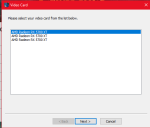
the regular patcher configuration gives me three choices for a video card, all the same:

1635352903890.png

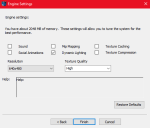
I leave resolution at 640x480, otherwise stuff gets really jacked up:

1635352947686.png

My monitor resolution is 3440x1440
 
The slow transition is a work in progress we hope to improve

One thing i noticed on the transition (although when all is running i think it's fine), is when one toon is zoning or loading, then you cant' swap to any other toons at all. I'll zone one guy, try to swap to another, then 2 or 3 other guys, remember that i have to wait for the first guy to zone, then it will swap to everyone i tried to swap to. MQ queues up the swaps then performs all swaps after the original guy is done loading.
 
One thing i noticed on the transition (although when all is running i think it's fine), is when one toon is zoning or loading, then you cant' swap to any other toons at all. I'll zone one guy, try to swap to another, then 2 or 3 other guys, remember that i have to wait for the first guy to zone, then it will swap to everyone i tried to swap to. MQ queues up the swaps then performs all swaps after the original guy is done loading.

This is actually the OS doing it because the game doesn't respond to windows messages while its loading.
 
make sense, but i don't remember it being a thing previous to Next. Maybe it was, just not as prominent or something.

in MQ2 the /foreground implementation used a hack that caused other issues like stuck keys and actually was relying on undefined behavior by microsoft. Windows has limitations as to how windows can steal focus (spoiler: they aren't allowed to). To fix some of the immediate problems, Knightly changed the implementation to use a clever trick which minimizes and restores the window at the same time, causing it to pop up in front.

I'm working on a more wholistic solution that actually has the windows talk to each other so that it can pass focus properly. Its currently implemented and in testing.
 
https://gitlab.com/macroquest/next/mqnext/-/issues/380
Settings --> Performance --> Settings --> Uncheck Animate Windows when minimizing or maximizing
View attachment 34501
View attachment 34500

This helped an issue somewhat I'm having with the fps limiter while using IS Boxer.

I have ISBoxer set on instant switch, and I have all the other boxes tiled on another screen with another screen as the "main" screen and full size.

At times I enable fps limiter because it can get a bit laggy with 18 boxes. Turning this setting helped me switch faster to windows while the limiter was on. It's still a bit funky but it is better.

Thanks!
 
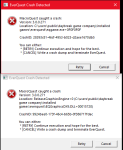
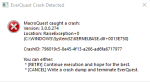
Still having issues, same as before, logged some in on auto login, crash half way through, screen goes to the large font crap resolution, then crash message. Remaining toons logging in have new eqclient.ini file. I have to camp everyone out and do it again cause i can't run all my toons with shitty eqclient ini file. This may make me revert away from next if can't figure it out, which would really suck, since next will soon be the only thing supported moving forward.

1635380216830.png

this time it crashed my already logged in banker toon also, don't think it ever crashed him before. I've also attached my eqclient.ini file to see if anything there is out of sorts causing it. this is the file directly after a crash
 

Attachments

Still having issues, same as before, logged some in on auto login, crash half way through, screen goes to the large font crap resolution, then crash message. Remaining toons logging in have new eqclient.ini file. I have to camp everyone out and do it again cause i can't run all my toons with shitty eqclient ini file. This may make me revert away from next if can't figure it out, which would really suck, since next will soon be the only thing supported moving forward.

View attachment 34520

this time it crashed my already logged in banker toon also, don't think it ever crashed him before. I've also attached my eqclient.ini file to see if anything there is out of sorts causing it. this is the file directly after a crash

Please reach out to me on discord so we can work through this in real time. What is happening to you is unique to you and only happening to you and I want to get down to the bottom of it without flooding this thread questions directed at you.
 
Hello, my BL account is freezing each time i right click on his BP. I've crashed maybe 5 times in a row trying to check his augs for upgrade. If i left click no problem, if i right click on another item no problem. Any idea ?
 
Hello, my BL account is freezing each time i right click on his BP. I've crashed maybe 5 times in a row trying to check his augs for upgrade. If i left click no problem, if i right click on another item no problem. Any idea ?
right-click for inspecting it? like a hold right-click? or right-click like using it?

what specific breast plate?

are you on the latest mq "next" version that you downloaded ~30m ago, or did you download after your issue?

does this happen with mq unloaded (as in some UI issue)?
 
I have the same problem, happening on my beastlord only. he is wearing snowbound bp
 
Hello, my BL account is freezing each time i right click on his BP. I've crashed maybe 5 times in a row trying to check his augs for upgrade. If i left click no problem, if i right click on another item no problem. Any idea ?
brainiac has found the issue and pushing the fix
 
Wasnt this a problem a few Patches ago - with the UI?
Something changed when they added the Item Comparison thingy.
 
Wasnt this a problem a few Patches ago - with the UI?
Something changed when they added the Item Comparison thingy.
nah, not the same issue, but brain got it sorted out and build 274 is live
 
switched to window 11 ... will report my attempts
1635531863127.png

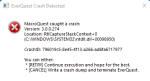
eq solo works fine, starting mqnext = crash
1 attempt: Reinstall MQNext .. no change
Dragon, I already moved your other post to the MQ "Next" Thread. no need to keep reposting and sending PMs. you can reply here
 
I run MQNext on Windows 11, so it isn't a situation of where it doesn't work, though I am running the English version. What error message do you get when Next crashes?
 
Dragon, I already moved your other post to the MQ "Next" Thread. no need to keep reposting and sending PMs. you can reply here
You have moved it about the same time I posted it. It wasn't shown where I posted it, so I thought it wasn't send and I sent it again. Sorry for the double-post, deleted one. Your fast reaction confused me.
 
You have moved it about the same time I posted it. It wasn't shown where I posted it, so I thought it wasn't send and I sent it again. Sorry for the double-post, deleted one. Your fast reaction confused me.
np, tho to be clear, your posts were over 20 minutes apart =)
 
Please leave the animate settings alone. Feel free to do whatever you want with your animation settings. The latest builds use the mq loader to control what has focus so this should no longer be an issue.
 
It’s a past MQ issue that I changed. It stole window focus by minimizing and restoring the window. It shouldn’t use that method anymore
 
When you say alt-tab, are you actually talking about using the buttons alt+tab or are you using that to mean “window switching”?
 
I sent a couple of crash-dups to sic yesterday. He told me, that this is done automatic and I don't need to sent dumps using MQNext. I am not aware of where I might switch crash reporting off, so I presume its on.

But: blame me for the errors.

Today I had serveral ours time at my hand. So I started to do further modifications/analysis.
After some ours I ran out of ideas what I shall do.
Than, all of a sudden it hit me like a truck .....

Some month ago I used Asus Ram Disk delivered with my mainboard, to create an 8gig ramdisk K:
As my new pc has only SSD I wanted to reduce the traffic on them by modifiing 2 Environment-Variables : "tmp" + "temp". I sat them to" k:\tmp"
I never used the ramdisk for other like those 2 variables, so I forgot about K: until some minutes ago.

The transistion to Windows 11 eliminated the Rog Ram Disk ... and with it the drive k: was gone.
The usualy way to modify system Environment-variables actually does not work on my PC as "Extended System-settings" does not open a dialog-box.
I found a way to achive the modifikation of "tmp" + "temp" by using regedit to point to to physical existing path.

After I sat those 2 variables to an exisiting path I rebooted, I started EQ and right after the Redguides Launcher. "Launch MQ" spinned up MQNext. No error anymore and the ingame-window appeared.

Problem solved.

Things learned: never change Environment variables to pathes which might can get lost in any future.
 
Vanilla - Very Vanilla MQ (Live Servers)

Users who are viewing this thread

Back
Top
Cart