Cool. Thank you.None of those items are listed in the files. Things I can't loot are high value like gallant items, Runes of Nokk, etc. I'll try the log level next time.

-
 Hail, we're RedGuides. We want you to play six (yes, 6!) EverQuest characters at once. We have scripts and a friendly community to help, please join our playstyle and say hello! 👋
 -
 We've added LLM sections to our Terms & Rules and Resource Rules, for everyone's sanity & in-game safety.
Read more
a. Do not replace your voice with an LLM. This goes for your posts and your scripts. Drafting and editing with a tool is fine, but don't take you out of what you share.
b. Do not replace your EQ character's voice with an LLM. We don't want scripts that speak over/ooc,/shoutor other public channels. This has been an unwritten rule that's kept casino scripts off the site for decades, but we're now compelled to make it clear: keep automated communication private.
Why Does RG Review Scripts?
Nearly every LLM-written Lua script we see is making your character do impossible things, and rarely in a way that's beneficial to you. We've seen heavy server hammering,/targetover impossible distances when/nav spawnwould passively accomplish the same thing, a spawn search that fires 20+ times per second, and other pointless actions that are likely annoying GMs.
You are welcome to use LLMs as a tool to structure, draft, and edit your work, but please read critically before hitting/lua run
You are using an out of date browser. It may not display this or other websites correctly.
You should upgrade or use an alternative browser.
You should upgrade or use an alternative browser.
Resource icon
Release Lootly 2024-01-24.1
- Thread starter SpecialEd
- Start date

Rare Spawn
Well-known member
Correct. Apologies for the ambiguous response. I was dog piling a suggestion on top of the previous suggestion about trade skill support. I would love it if lootly could dole out TS stuff where it belongs.I actually didn't see it as a snarky response. I took it as a literal suggestion for what you wanted. They are not current options, but may be something that can be added.
So reading your request a little more, and I'm thinking this may actually be more in line with adding per-character settings. Lootly isn't really set up to designate a specific character (hence why CLASS is its only 'sorting' option). It's something I've been thinking about adding to my own but haven't gotten around to it.Snarky response, while still not addressing all the issues. Classic.
I have a toon that isnt Master looter, that I want to send all TS marked items to, is there a way to do this?
So, if indeed these are options I was unaware of, thank you for this information, given its not in the instructions, commands, or FAQ on lootly.
Just another question. Are you in a raid group when this is happening? It really shouldn't be affecting it if you are still getting trash loot while in a raid group but I thought I would check.None of those items are listed in the files. Things I can't loot are high value like gallant items, Runes of Nokk, etc. I'll try the log level next time.
Also, another silly question, you mentioned Runes of Nokk and I was wondering if your party already had a ton of them in their bags?
So, (still in my copy) I'm in the process of adding a Tradeskill marker so that a designated group member can collect everything marked as a tradeskill item (still need time to test it).
I'm also brainstorming out efficiency with using a database. My goal is that the database will only need to be accessed when an item is first seen, and at that point any checks for no trade, tradeskill item, and what classes can use the item can be stored. Storing those values locally would speed up getting loot out. But my question is, do you guys think it would be better to try to convert the currently Lootly_Loot.ini file to include this info, or to add a second ini file that would contain just this info for each item? Pro for converting would be maintaining only 1 ini file. The con to it is that converting the original database would be 'fun' to say the least.
I'm also brainstorming out efficiency with using a database. My goal is that the database will only need to be accessed when an item is first seen, and at that point any checks for no trade, tradeskill item, and what classes can use the item can be stored. Storing those values locally would speed up getting loot out. But my question is, do you guys think it would be better to try to convert the currently Lootly_Loot.ini file to include this info, or to add a second ini file that would contain just this info for each item? Pro for converting would be maintaining only 1 ini file. The con to it is that converting the original database would be 'fun' to say the least.

WhyteTech
Ye Whom says Dumb things
Awesome news!So, (still in my copy) I'm in the process of adding a Tradeskill marker so that a designated group member can collect everything marked as a tradeskill item (still need time to test it).
I'm also brainstorming out efficiency with using a database. My goal is that the database will only need to be accessed when an item is first seen, and at that point any checks for no trade, tradeskill item, and what classes can use the item can be stored. Storing those values locally would speed up getting loot out. But my question is, do you guys think it would be better to try to convert the currently Lootly_Loot.ini file to include this info, or to add a second ini file that would contain just this info for each item? Pro for converting would be maintaining only 1 ini file. The con to it is that converting the original database would be 'fun' to say the least.
Personally, my lootly ini file isnt worth enough to me to spend time converting, and id just "start over" with the new system. myh RedCents anyways!
Thank you for your work!
I run across 4 computers, would like to have a single Lootly_Loot.ini file on main computer accessed by all. I mapped my MQ folder on main computer as a network drive on the other 3, and set that as the loot file in lootly.ini. However, if I have a full reset (log all the way out to desktop and back in), I get an error for the Lootly_Loot.ini file (Z:\Config\Lootly_Loot.ini). If I change it to point at the local file it works, then I can go in and edit the Lootly.ini after I am in game and change to the Z:\..... , do a /lootly reload, and then it seems to be happy, until I load from desktop again. Is there some different format for specifying an ini on a different drive/folder that Lootly is looking for on startup?
Poking around a bit, I found in the ini set sub (line 831)
local newIniPath = config_dir..tostring(val)
Which I think is basically setting the new path to C:\MQ\ConfigZ:\Config\Lootly_Loot.ini, something that obviously isn't going to work. That's changing the ini from ingame prompt i.e. /lootly ini Z:\Config\Lootly_Loot.ini
local newIniPath = config_dir..tostring(val)
Which I think is basically setting the new path to C:\MQ\ConfigZ:\Config\Lootly_Loot.ini, something that obviously isn't going to work. That's changing the ini from ingame prompt i.e. /lootly ini Z:\Config\Lootly_Loot.ini

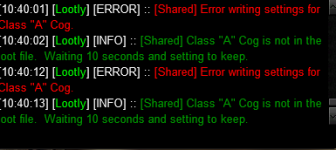
I can't get this item to be ignored. When it reaches the top of the loot list I have to right click and leave on corpse. I have it set to never. I have held on cursor and used /setitem destroy. I have typed /setitem destroy "Class "A" Cog". I even thought the quotations in the item name might be throwing it off so I tried removing those while typing the /setitem destroy but no luck. Any suggestions?
Spot on info! Thank you kindly.It has quotes in the name - need to manually add it to your Lootly_Loot.ini file.

drawthow
Well-known member
drawthow
Well-known member
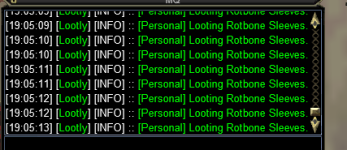
Also have a bunch of thing in my ini for destroy and ignore and doesn't seem to be working, items are still showing up in my inventory.
This format is correct?
Raw-Hide Gorget=Destroy
Raw-Hide Gloves=Destroy
Rusty Warhammer=Destroy
Rotbone Sleeves=Ignore
Rapier of Oriin=Ignore
Runed Brass Disk=Ignore
Just started using the mac today, running on test server.
This format is correct?
Raw-Hide Gorget=Destroy
Raw-Hide Gloves=Destroy
Rusty Warhammer=Destroy
Rotbone Sleeves=Ignore
Rapier of Oriin=Ignore
Runed Brass Disk=Ignore
Just started using the mac today, running on test server.

While doing normal loot the Lua works great with stacks of items dropped, but when I do raidloot it gets hung up. I modified
mq.cmdf('/advloot shared 1 giveto %s 1', name) to
mq.cmdf('/advloot shared 1 giveto %s', name)
and it seems to work by giving the full stack to a toon.
Any advice?
Thanks!
mq.cmdf('/advloot shared 1 giveto %s 1', name) to
mq.cmdf('/advloot shared 1 giveto %s', name)
and it seems to work by giving the full stack to a toon.
Any advice?
Thanks!
Ok got debug from it. Look like I'm getting a NULL back sometimes and sometimes a nil. And it's also asking for the wrong item number. BRD1 has 3 of the items already in his inventory but still gets the item.
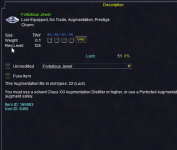
Code:
 [Lootly] (init.lua::167) [DEBUG] :: handle_master_looting - Fortuitous Jewel - setting: Keep|1; preference = Keep; quantity = 1; classes = nil; lore = nil
 [Lootly] (init.lua::209) [DEBUG] :: handle_master_looting - WAR1 - Free Inventory - Slots = 32; Count = 1; Stack Size = 1
 [Lootly] (init.lua::233) [DEBUG] :: handle_master_looting - WAR1 - Item Counts - Count = 1; Bank Count: 0;
 [Lootly] (init.lua::248) [DEBUG] :: handle_master_looting - WAR1 looting Fortuitous Jewel would put them over the specific quantity (1). Inventory = 1; Bank = 0;
 [Lootly] (init.lua::274) [DEBUG] :: handle_master_looting - loot = false; item = Fortuitous Jewel
 [Lootly] (init.lua::209) [DEBUG] :: handle_master_looting - WAR1 - Free Inventory - Slots = 32; Count = 1; Stack Size = 1
 [Lootly] (init.lua::233) [DEBUG] :: handle_master_looting - WAR1 - Item Counts - Count = 1; Bank Count: 0;
 [Lootly] (init.lua::248) [DEBUG] :: handle_master_looting - WAR1 looting Fortuitous Jewel would put them over the specific quantity (1). Inventory = 1; Bank = 0;
 [Lootly] (init.lua::274) [DEBUG] :: handle_master_looting - loot = false; item = Fortuitous Jewel
 [Lootly] (init.lua::212) [DEBUG] :: handle_master_looting - CLR1 - Free Inventory - Fortuitous Jewel - Save Slots = 3
 [Lootly] (helpers.lua::10) [DEBUG] :: Querying - mq.TLO.DanNet(CLR1).Q(Me.FreeInventory) = 102
 [Lootly] (helpers.lua::10) [DEBUG] :: Querying - mq.TLO.DanNet(CLR1).Q(FindItemCount[219043498079]) = 0
 [Lootly] (helpers.lua::10) [DEBUG] :: Querying - mq.TLO.DanNet(CLR1).Q(FindItem[219043498079].StackSize) = NULL
 [Lootly] (init.lua::236) [DEBUG] :: handle_master_looting - CLR1 - DanNet (Counts) - Fortuitous Jewel
 [Lootly] (helpers.lua::10) [DEBUG] :: Querying - mq.TLO.DanNet(CLR1).Q(FindItemCount[219043498079]) = 0
 [Lootly] (helpers.lua::10) [DEBUG] :: Querying - mq.TLO.DanNet(CLR1).Q(FindItemCount[Fortuitous Jewel]) = 1
 [Lootly] (helpers.lua::10) [DEBUG] :: Querying - mq.TLO.DanNet(CLR1).Q(FindItemBankCount[219043498079]) = 0
 [Lootly] (helpers.lua::10) [DEBUG] :: Querying - mq.TLO.DanNet(CLR1).Q(FindItemBankCount[Fortuitous Jewel]) = 0
 [Lootly] (init.lua::248) [DEBUG] :: handle_master_looting - CLR1 looting Fortuitous Jewel would put them over the specific quantity (1). Inventory = 1; Bank = 0;
 [Lootly] (init.lua::274) [DEBUG] :: handle_master_looting - loot = false; item = Fortuitous Jewel
 [Lootly] (init.lua::212) [DEBUG] :: handle_master_looting - SHM1 - Free Inventory - Fortuitous Jewel - Save Slots = 3
 [Lootly] (helpers.lua::10) [DEBUG] :: Querying - mq.TLO.DanNet(SHM1).Q(Me.FreeInventory) = nil
 [Lootly] (helpers.lua::10) [DEBUG] :: Querying - mq.TLO.DanNet(SHM1).Q(FindItemCount[219043498079]) = 54
 [Lootly] (helpers.lua::10) [DEBUG] :: Querying - mq.TLO.DanNet(SHM1).Q(FindItem[219043498079].StackSize) = NULL
 [Lootly] (init.lua::220) [DEBUG] :: handle_master_looting - SHM1 looting Fortuitous Jewel would put them over the configured save slots value.
 [Lootly] (init.lua::274) [DEBUG] :: handle_master_looting - loot = false; item = Fortuitous Jewel
 [Lootly] (init.lua::212) [DEBUG] :: handle_master_looting - PAL1 - Free Inventory - Fortuitous Jewel - Save Slots = 3
 [Lootly] (helpers.lua::10) [DEBUG] :: Querying - mq.TLO.DanNet(PAL1).Q(Me.FreeInventory) = 221
 [Lootly] (helpers.lua::10) [DEBUG] :: Querying - mq.TLO.DanNet(PAL1).Q(FindItemCount[219043498079]) = 0
 [Lootly] (helpers.lua::10) [DEBUG] :: Querying - mq.TLO.DanNet(PAL1).Q(FindItem[219043498079].StackSize) = nil
 [Lootly] (init.lua::236) [DEBUG] :: handle_master_looting - PAL1 - DanNet (Counts) - Fortuitous Jewel
 [Lootly] (helpers.lua::10) [DEBUG] :: Querying - mq.TLO.DanNet(PAL1).Q(FindItemCount[219043498079]) = 0
 [Lootly] (helpers.lua::10) [DEBUG] :: Querying - mq.TLO.DanNet(PAL1).Q(FindItemCount[Fortuitous Jewel]) = 1
 [Lootly] (helpers.lua::10) [DEBUG] :: Querying - mq.TLO.DanNet(PAL1).Q(FindItemBankCount[219043498079]) = 0
 [Lootly] (helpers.lua::10) [DEBUG] :: Querying - mq.TLO.DanNet(PAL1).Q(FindItemBankCount[Fortuitous Jewel]) = 0
 [Lootly] (init.lua::248) [DEBUG] :: handle_master_looting - PAL1 looting Fortuitous Jewel would put them over the specific quantity (1). Inventory = 1; Bank = 0;
 [Lootly] (init.lua::274) [DEBUG] :: handle_master_looting - loot = false; item = Fortuitous Jewel
 [Lootly] (init.lua::212) [DEBUG] :: handle_master_looting - BRD1 - Free Inventory - Fortuitous Jewel - Save Slots = 3
 [Lootly] (helpers.lua::10) [DEBUG] :: Querying - mq.TLO.DanNet(BRD1).Q(Me.FreeInventory) = 19
 [Lootly] (helpers.lua::10) [DEBUG] :: Querying - mq.TLO.DanNet(BRD1).Q(FindItemCount[219043498079]) = 0
 [Lootly] (helpers.lua::10) [DEBUG] :: Querying - mq.TLO.DanNet(BRD1).Q(FindItem[219043498079].StackSize) = NULL
 [Lootly] (init.lua::236) [DEBUG] :: handle_master_looting - BRD1 - DanNet (Counts) - Fortuitous Jewel
 [Lootly] (helpers.lua::10) [DEBUG] :: Querying - mq.TLO.DanNet(BRD1).Q(FindItemCount[219043498079]) = 0
 [Lootly] (helpers.lua::10) [DEBUG] :: Querying - mq.TLO.DanNet(BRD1).Q(FindItemCount[Fortuitous Jewel]) = nil
 [Lootly] (helpers.lua::10) [DEBUG] :: Querying - mq.TLO.DanNet(BRD1).Q(FindItemBankCount[219043498079]) = nil
 [Lootly] (helpers.lua::10) [DEBUG] :: Querying - mq.TLO.DanNet(BRD1).Q(FindItemBankCount[Fortuitous Jewel]) = nil
 [Lootly] (init.lua::264) [DEBUG] :: handle_master_looting - BRD1 - DanNet (Lore) - Fortuitous Jewel
 [Lootly] (helpers.lua::10) [DEBUG] :: Querying - mq.TLO.DanNet(BRD1).Q(FindItem[219043498079].Lore) = NULL
 [Lootly] (helpers.lua::10) [DEBUG] :: Querying - mq.TLO.DanNet(BRD1).Q(FindItemBank[219043498079].Lore) = nil
 [Lootly] (init.lua::274) [DEBUG] :: handle_master_looting - loot = true; item = Fortuitous Jewel
[Lootly] (init.lua::282) [INFO] :: [Shared] Giving Fortuitous Jewel to BRD1.Silverspaceman
Seasoned veteran member
Wish I'd thought to save the error message; I was too busy crying at the loss of a few years' worth of my filtered loot setup. I ran a sort the other night and Lootly hit me with an error and cleared the Lootly_loot.ini file. Remember to back up your key files 
drawthow
Well-known member
Trying to set some collectables using \setitem keep and getting a error.
Outpost Reclamation Order, "Beatings"
Outpost Reclamation Order, "Observation"
Outpost Reclamation Order, "Reminder"
Outpost Reclamation Order, "Work"
Outpost Reclamation Order, "Escape"
it did add them to the ini, but without the quotes. Always treated them as new.
Outpost Reclamation Order, Beatings=Keep
Outpost Reclamation Order, Work=Keep
Outpost Reclamation Order, Reminder=Keep
Outpost Reclamation Order, Observation=Keep
Outpost Reclamation Order, Escape=Keep
Outpost Reclamation Order, "Beatings"
Outpost Reclamation Order, "Observation"
Outpost Reclamation Order, "Reminder"
Outpost Reclamation Order, "Work"
Outpost Reclamation Order, "Escape"
it did add them to the ini, but without the quotes. Always treated them as new.
Outpost Reclamation Order, Beatings=Keep
Outpost Reclamation Order, Work=Keep
Outpost Reclamation Order, Reminder=Keep
Outpost Reclamation Order, Observation=Keep
Outpost Reclamation Order, Escape=Keep
Silverspaceman
Seasoned veteran member
Sic posted a fix for this: Add quotes manually to the names to get the match. That worked for me a while ago for an item that drops like candy in a zone I use for PLing more characters for myself.Trying to set some collectables using \setitem keep and getting a error.
Outpost Reclamation Order, "Beatings"=Keep
Outpost Reclamation Order, "Observation"=Keep
Outpost Reclamation Order, "Reminder"=Keep
Outpost Reclamation Order, "Work"=Keep
Outpost Reclamation Order, "Escape"=Keep
it did add them to the ini, but without the quotes. Always treated them as new.View attachment 62543View attachment 62543View attachment 62543View attachment 62543
Outpost Reclamation Order, Beatings=Keep
Outpost Reclamation Order, Work=Keep
Outpost Reclamation Order, Reminder=Keep
Outpost Reclamation Order, Observation=Keep
Outpost Reclamation Order, Escape=Keep
Outpost Reclamation Order, "Beatings"=Keep
Outpost Reclamation Order, "Observation"=Keep
Outpost Reclamation Order, "Reminder"=Keep
Outpost Reclamation Order, "Work"=Keep
Outpost Reclamation Order, "Escape"=Keep
Last edited:
drawthow
Well-known member
Silver Thank you.Sic posted a fix for this: Add quotes manually to the names to get the match. That worked for me a while ago for an item that drops like candy in a zone I use for PLing more characters for myself.
Outpost Reclamation Order, "Beatings"=Keep
Outpost Reclamation Order, "Observation"=Keep
Outpost Reclamation Order, "Reminder"=Keep
Outpost Reclamation Order, "Work"=Keep
Outpost Reclamation Order, "Escape"=Keep

Not sure if it is with this Lua or some underlying plugin, but it seems to have an issue with quotes in the loot file.
EDIT: I may have had a browser issue when posting this, or an idiot moment. I went to the end of the discussion without seeing something on the quotes, but after posting it show a bunch of things on what the error was, so sorry if it is already known.
drawthow
Well-known member
Having a problem with Lootly. I have this in the ini "Broken Key Bitting of the Jungle=Keep|1" (item is lore / no trade) , I have tried with Broken Key Bitting of the Jungle=Keep" as well same thing happens.
The first item is given to the master looter, then the rest of the items are given to the second looter. Advloot on this person at this point is locked up, I cannot click the keep or discard button in advloot. The only thing I have found to do is stop Lootly and do a /reloadui this allows me to reject the multiple items given.
The first item is given to the master looter, then the rest of the items are given to the second looter. Advloot on this person at this point is locked up, I cannot click the keep or discard button in advloot. The only thing I have found to do is stop Lootly and do a /reloadui this allows me to reject the multiple items given.

BlueBug
Seasoned veteran member
I'm not sure if I did something wrong.Have run into a problem involving lore items when you have one in real estate. Lootly just keeps trying to give it to the toon, rather than trying the next toon/leaving if no one is able to loot.
I'm using Lootly on a toon with KA. It'll loot but will not destroy unless I use "Cleanup" and will not loot no drop items that are the destroy list.
Any ideas on this or is just me?
Thanks,
BB
Last edited:
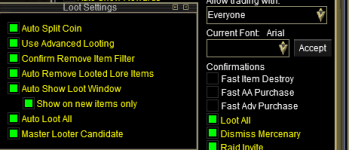
Hi does the EQ game advance loot settings need to be changed once you start using LOOTLY?
When i get a named with an item that i set up to loot 3 items i go over to that toon because i DONOT see him looting the item i want them to loot. I actually have to say to accept that item. If i do not, the item rotts.
i attached some pictures so hopefully you can help.
thanks again
Mod edit: please take care not to post toon names.
When i get a named with an item that i set up to loot 3 items i go over to that toon because i DONOT see him looting the item i want them to loot. I actually have to say to accept that item. If i do not, the item rotts.
i attached some pictures so hopefully you can help.
thanks again
Mod edit: please take care not to post toon names.
Last edited by a moderator:

First I would recommend removing or cropping those images as they have a toonname in them =)Hi does the EQ game advance loot settings need to be changed once you start using LOOTLY?
When i get a named with an item that i set up to loot 3 items i go over to that toon because i DONOT see him looting the item i want them to loot. I actually have to say to accept that item. If i do not, the item rotts.
i attached some pictures so hopefully you can help.
thanks again
This is not a lootly thing because it appears to be giving it to the toon you requested. It's a looting issue for that toon. I belive you need to modify your loot settings in your advloot options and toon options
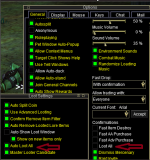
Auto loot all checked and iirc, uncheck loot all in your options. Removing that check prevents the pop-up box iirc.
Attachments
100% this.First I would recommend removing or cropping those images as they have a toonname in them =)
This is not a lootly thing because it appears to be giving it to the toon you requested. It's a looting issue for that toon. I belive you need to modify your loot settings in your advloot options and toon options
View attachment 66498
Auto loot all checked and iirc, uncheck loot all in your options. Removing that check prevents the pop-up box iirc.


there's quite a few reasons why that approach wouldn't really be the best approachHow hard would it be to add another variable to this to add a character name to skip? /setitem Keep|1|Burd
This would give everyone one item except for the character named Burd.
just off the cuff wouuld likely be better to have Keep|1|Skip|Burd, Sic, Kaen where the default is keep 1, and you skip Burd, Sic, and Kaen
feels a bit "bloatey"
is that the only solution for whatever circumstance you're in?
I guess I’m looking for a way to fix two things and speed up the raid looting when doing my progression. Lootly doesn’t handle multiple items of the same kind on a raid if there is a stack of 10 quest items it just stops.there's quite a few reasons why that approach wouldn't really be the best approach
just off the cuff wouuld likely be better to have Keep|1|Skip|Burd, Sic, Kaen where the default is keep 1, and you skip Burd, Sic, and Kaen
feels a bit "bloatey"
is that the only solution for whatever circumstance you're in?
Second. I still have issues with lore equipped items like the progression ring and augs that have been converted to the dps with proc aug.
If I do keep|1 and level the ring up it will loot the base ring again.

I am looking at an add-in for lootly to do the character specific looting, once I get time to finish it up. I have been noodling with what it would take to do this, and I dont think it would be too hard.
Main scenario is for looting new expansion items, once you have made the drop piece on a character, it wants to loot it again since it no longer has the base piece. The class doesnt work well because I have 2 of the same classes at different points in the loot gearing process (warrior and shamans specifically)
So I have been thinking of an auxiliary over-ride file that lsted how specific characters would get qty's for an item. Still playing around with the cleanest way to structure it so it makes sense, and is easy to maintain. That way we do not change the base lootly file structure, just do it as an add-on module.
Main scenario is for looting new expansion items, once you have made the drop piece on a character, it wants to loot it again since it no longer has the base piece. The class doesnt work well because I have 2 of the same classes at different points in the loot gearing process (warrior and shamans specifically)
So I have been thinking of an auxiliary over-ride file that lsted how specific characters would get qty's for an item. Still playing around with the cleanest way to structure it so it makes sense, and is easy to maintain. That way we do not change the base lootly file structure, just do it as an add-on module.
that free grab is good for progression items, where a stack drop, and each toon needs a few. free grab just lets you peel 1 at a time off the stack.Actually I just thought of something that could be a work around. How about if I set something as free grab, and if they need it they will click in the little hand to grab it?
psuedo code
if advloot window open and items of awesomeness, then for i = 1 to needed, do_click_free_grab
I guess I’m looking for a way to fix two things and speed up the raid looting when doing my progression. Lootly doesn’t handle multiple items of the same kind on a raid if there is a stack of 10 quest items it just stops.
Second. I still have issues with lore equipped items like the progression ring and augs that have been converted to the dps with proc aug.
If I do keep|1 and level the ring up it will loot the base ring again.
If I'm not mistaken, turning off "Apply Filters" in adv loot allows lootly to manage stacks of items, one at a time. For managing similar situations like your ring example, I currently have to just manually manage it, being on the lookout for items. If there was some Lootly base function or add-on that would either skip certain items, or wait for until you manually assign the item (/setitem manual as another option for example) I think that would be a decent way to manage this kind of situation.

Throg123mq2
New member
I've noticed this behavior with the 'sort' command...
By default there are alphabetical headers [A] through [Z] within the Lootly_Loot.ini file. Once there is a numeric header, say [1] and you run the 'lootly sort' command, it generates the error message below and wipes the ini file clean.
Error message:
Attempt to compare number with string
Stack traceback:
[C]: in function 'sort'
...al\VeryVanilla\MacroQuest\Release\Lua\lootly\lib/LIP.Lua:77: in function 'save'
...Local\VeryVanilla\MacroQuest\Release\Lua\lootly\init.Lua:704: in function 'sort_loot_ini'
...Local\VeryVanilla\MacroQuest\Release\Lua\lootly\init.Lua:845: in function <...Local\VeryVanilla\MacroQuest\Release\Lua\lootly\init.Lua:712>

By default there are alphabetical headers [A] through [Z] within the Lootly_Loot.ini file. Once there is a numeric header, say [1] and you run the 'lootly sort' command, it generates the error message below and wipes the ini file clean.
Error message:
Attempt to compare number with string
Stack traceback:
[C]: in function 'sort'
...al\VeryVanilla\MacroQuest\Release\Lua\lootly\lib/LIP.Lua:77: in function 'save'
...Local\VeryVanilla\MacroQuest\Release\Lua\lootly\init.Lua:704: in function 'sort_loot_ini'
...Local\VeryVanilla\MacroQuest\Release\Lua\lootly\init.Lua:845: in function <...Local\VeryVanilla\MacroQuest\Release\Lua\lootly\init.Lua:712>

ego_death
Member
so 2 days when test was down, i decided to purchased the epiclaziness Lua. (i know i wrote lootly, keep reading) the test servers were still down and i decided to to see how well that Lua did on my live toon. everything went flawless! until the next day.
test server VV got its update and i logged into my toons on test. i realized quickly that i wasnt looting anything. it would open the corpse, but loot nothing on it. through the night every now and then it would loot like lootly normally does. but 90% of the time i had to "leave on corpse" manually. when i say it would do like normal it would leave any unwanted items like i had designated, or keep others. when it didnt work, it would just open the corpse, get the coin and leave the loot window open until i selected leave on corpse.
at first i blamed epiclaziness, but then when it would randomly loot some corpses, i then was thinking i did something accidently in lootly that is making it do this. i dont think it has to do with offsets. but it happened directly after the update to test VV. im 99% sure its just coincidence it happened now, but im trying to give as much info as possible,
lastly, i tried running my live group and it is looting the exact same way as in test. opens ML will open corpse and get coin, but only 5-10 out of 100 mobs will they actually loot correctly.
any help is very appreciated, and any more info needed or testing needed, i will gladly provide.
test server VV got its update and i logged into my toons on test. i realized quickly that i wasnt looting anything. it would open the corpse, but loot nothing on it. through the night every now and then it would loot like lootly normally does. but 90% of the time i had to "leave on corpse" manually. when i say it would do like normal it would leave any unwanted items like i had designated, or keep others. when it didnt work, it would just open the corpse, get the coin and leave the loot window open until i selected leave on corpse.
at first i blamed epiclaziness, but then when it would randomly loot some corpses, i then was thinking i did something accidently in lootly that is making it do this. i dont think it has to do with offsets. but it happened directly after the update to test VV. im 99% sure its just coincidence it happened now, but im trying to give as much info as possible,
lastly, i tried running my live group and it is looting the exact same way as in test. opens ML will open corpse and get coin, but only 5-10 out of 100 mobs will they actually loot correctly.
any help is very appreciated, and any more info needed or testing needed, i will gladly provide.

Users who are viewing this thread
Total: 1 (members: 0, guests: 1)
Share: