
-
 Hail, we're RedGuides. We want you to play six (yes, 6!) EverQuest characters at once. We have scripts and a friendly community to help, please join our playstyle and say hello! 👋
 -
 We've added LLM sections to our Terms & Rules and Resource Rules, for everyone's sanity & in-game safety.
Read more
a. Do not replace your voice with an LLM. This goes for your posts and your scripts. Drafting and editing with a tool is fine, but don't take you out of what you share.
b. Do not replace your EQ character's voice with an LLM. We don't want scripts that speak over/ooc,/shoutor other public channels. This has been an unwritten rule that's kept casino scripts off the site for decades, but we're now compelled to make it clear: keep automated communication private.
Why Does RG Review Scripts?
Nearly every LLM-written Lua script we see is making your character do impossible things, and rarely in a way that's beneficial to you. We've seen heavy server hammering,/targetover impossible distances when/nav spawnwould passively accomplish the same thing, a spawn search that fires 20+ times per second, and other pointless actions that are likely annoying GMs.
You are welcome to use LLMs as a tool to structure, draft, and edit your work, but please read critically before hitting/lua run
You are using an out of date browser. It may not display this or other websites correctly.
You should upgrade or use an alternative browser.
You should upgrade or use an alternative browser.
Resource icon
Release Lootly 2024-01-24.1
- Thread starter SpecialEd
- Start date


I am not sure why but I found a work around that works for EMU. If I load up lootier.Lua it loads lootly with it without error. Reason I am trying to get to work with EMU, is the in screen loot list and it auto sells so much faster. Not sure if this helps with anything but I thought I would share,
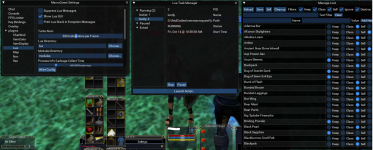

I was sad when this did not work:
The rogue did not get the item, the driver did. /sigh...
I was really hoping that it went by listed order, and not group order.
I am looking for a way to prioritize items to a certain class in the group first, but if they aren't there then it goes to whomever (driver is fine).
@SpecialEd any ideas?
=CLASS|99999|ROG,PAL,WAR,SK,CLR,SHM,DRU,MNK,BER,BRD,RNG,BST,ENC,WIZ,NEC,MAG
The rogue did not get the item, the driver did. /sigh...
I was really hoping that it went by listed order, and not group order.
I am looking for a way to prioritize items to a certain class in the group first, but if they aren't there then it goes to whomever (driver is fine).
@SpecialEd any ideas?

Add a new tag and implement your custom logic in the script.I was sad when this did not work:
The rogue did not get the item, the driver did. /sigh...
I was really hoping that it went by listed order, and not group order.
I am looking for a way to prioritize items to a certain class in the group first, but if they aren't there then it goes to whomever (driver is fine).
@SpecialEd any ideas?

Had another issue with Lootly:
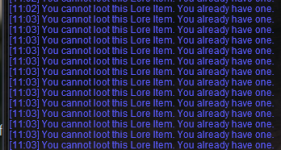
Whether using advloot or not, you can't loot a 2nd Lore item. Without setting this in the config file, it would be nice if Lootly could handle this message and take appropriate action to not spam the window/logs and hold off on looting anything after until this item poofs off the list in 15 minutes.
Whether using advloot or not, you can't loot a 2nd Lore item. Without setting this in the config file, it would be nice if Lootly could handle this message and take appropriate action to not spam the window/logs and hold off on looting anything after until this item poofs off the list in 15 minutes.
It's been a couple weeks since I was able to log in. I never saw any type of solution for this challenge. Should I just delete the Lua and start over? It looks like a really simple file but I don't know much about this stuff. Any assistance is greatly appreciated.Thanks for the response. It tells me the looted item would put them over the configured save slots value. It says 1 toon has 44 open slots and another has 131 yet it won't let them loot.
*Edit
If I give a toon an item, lootly will then give them any more that are found until I sell them. Then the process starts all over.
Is the issue save slots or the edit* note? Either way, turn on debug and post the appropriate section of your log after editing your character names out.It's been a couple weeks since I was able to log in. I never saw any type of solution for this challenge. Should I just delete the Lua and start over? It looks like a really simple file but I don't know much about this stuff. Any assistance is greatly appreciated.
I ran the debug but I can't find the file. I found "logs" in my "release" folder but it only has MacroQuest a bazillion#s files. Am I in the wrong spot?Is the issue save slots or the edit* note? Either way, turn on debug and post the appropriate section of your log after editing your character names out.
May need to turn logging on for whoever the driver is -/plugin mq2log- it should generate a server_charnacter.log file in logs folder.
Code:
[2022/10/20 13:19:33] [13:19:33] [Lootly] (lootly.lua::165) [DEBUG] :: handle_master_looting - Zombie Essence - setting: Sell; preference = Sell; quantity = nil; classes = nil; lore = nil

[2022/10/20 13:19:33] [13:19:33] [Lootly] (lootly.lua::206) [DEBUG] :: handle_master_looting -MasterLooter- Free Inventory - Slots = 55; Count = 0; Stack Size = 0

[2022/10/20 13:19:33] [13:19:33] [Lootly] (lootly.lua::217) [DEBUG] :: handle_master_looting - MasterLooter looting Zombie Essence would put them over the configured save slots value.

[2022/10/20 13:19:33] [13:19:33] [Lootly] (lootly.lua::265) [DEBUG] :: handle_master_looting - loot = false; item = Zombie Essence

[2022/10/20 13:19:33] [13:19:33] [Lootly] (lootly.lua::209) [DEBUG] :: handle_master_looting - Toon2 - Free Inventory - Zombie Essence - Save Slots = 131

[2022/10/20 13:19:33] [13:19:33] [Lootly] (helpers.lua::10) [DEBUG] :: Querying - mq.TLO.DanNet(Toon2).Q(Me.FreeInventory) = 59

[2022/10/20 13:19:33] [13:19:33] [Lootly] (helpers.lua::10) [DEBUG] :: Querying - mq.TLO.DanNet(Toon2).Q(FindItemCount[33957]) = 0

[2022/10/20 13:19:33] [13:19:33] [Lootly] (helpers.lua::10) [DEBUG] :: Querying - mq.TLO.DanNet(Toon2).Q(FindItem[33957].StackSize) = NULL

[2022/10/20 13:19:33] [13:19:33] [Lootly] (lootly.lua::217) [DEBUG] :: handle_master_looting - Toon2 looting Zombie Essence would put them over the configured save slots value.

[2022/10/20 13:19:33] [13:19:33] [Lootly] (lootly.lua::265) [DEBUG] :: handle_master_looting - loot = false; item = Zombie Essence

[2022/10/20 13:19:33] [13:19:33] [Lootly] (lootly.lua::209) [DEBUG] :: handle_master_looting - Toon3 - Free Inventory - Zombie Essence - Save Slots = 131

[2022/10/20 13:19:33] [13:19:33] [Lootly] (helpers.lua::10) [DEBUG] :: Querying - mq.TLO.DanNet(Toon3).Q(Me.FreeInventory) = 50

[2022/10/20 13:19:34] [13:19:34] [Lootly] (helpers.lua::10) [DEBUG] :: Querying - mq.TLO.DanNet(Toon3).Q(FindItemCount[33957]) = 0

[2022/10/20 13:19:34] [13:19:34] [Lootly] (helpers.lua::10) [DEBUG] :: Querying - mq.TLO.DanNet(Toon3).Q(FindItem[33957].StackSize) = NULL

[2022/10/20 13:19:34] [13:19:34] [Lootly] (lootly.lua::217) [DEBUG] :: handle_master_looting - Toon3 looting Zombie Essence would put them over the configured save slots value.

[2022/10/20 13:19:34] [13:19:34] [Lootly] (lootly.lua::265) [DEBUG] :: handle_master_looting - loot = false; item = Zombie Essence

[2022/10/20 13:19:34] [13:19:34] [Lootly] (lootly.lua::209) [DEBUG] :: handle_master_looting - Toon4 - Free Inventory - Zombie Essence - Save Slots = 131

[2022/10/20 13:19:34] [13:19:34] [Lootly] (helpers.lua::10) [DEBUG] :: Querying - mq.TLO.DanNet(Toon4).Q(Me.FreeInventory) = 52

[2022/10/20 13:19:34] [13:19:34] [Lootly] (helpers.lua::10) [DEBUG] :: Querying - mq.TLO.DanNet(Toon4).Q(FindItemCount[33957]) = 0

[2022/10/20 13:19:34] [13:19:34] [Lootly] (helpers.lua::10) [DEBUG] :: Querying - mq.TLO.DanNet(Toon4).Q(FindItem[33957].StackSize) = NULL

[2022/10/20 13:19:34] [13:19:34] [Lootly] (lootly.lua::217) [DEBUG] :: handle_master_looting -Toon4 looting Zombie Essence would put them over the configured save slots value.

[2022/10/20 13:19:34] [13:19:34] [Lootly] (lootly.lua::265) [DEBUG] :: handle_master_looting - loot = false; item = Zombie Essence

[2022/10/20 13:19:35] [13:19:35] [Lootly] (lootly.lua::209) [DEBUG] :: handle_master_looting - Toon5 - Free Inventory - Zombie Essence - Save Slots = 131

[2022/10/20 13:19:35] [13:19:35] [Lootly] (helpers.lua::10) [DEBUG] :: Querying - mq.TLO.DanNet(Toon5).Q(Me.FreeInventory) = 43

[2022/10/20 13:19:35] [13:19:35] [Lootly] (helpers.lua::10) [DEBUG] :: Querying - mq.TLO.DanNet(Toon5).Q(FindItemCount[33957]) = 0

[2022/10/20 13:19:35] [13:19:35] [Lootly] (helpers.lua::10) [DEBUG] :: Querying - mq.TLO.DanNet(Toon5).Q(FindItem[33957].StackSize) = NULL

[2022/10/20 13:19:35] [13:19:35] [Lootly] (lootly.lua::217) [DEBUG] :: handle_master_looting - Toon5 looting Zombie Essence would put them over the configured save slots value.

[2022/10/20 13:19:35] [13:19:35] [Lootly] (lootly.lua::265) [DEBUG] :: handle_master_looting - loot = false; item = Zombie Essence

[2022/10/20 13:19:35] [13:19:35] [Lootly] (lootly.lua::209) [DEBUG] :: handle_master_looting - Toon6 - Free Inventory - Zombie Essence - Save Slots = 131

[2022/10/20 13:19:35] [13:19:35] [Lootly] (helpers.lua::10) [DEBUG] :: Querying - mq.TLO.DanNet(Toon6).Q(Me.FreeInventory) = 43

[2022/10/20 13:19:36] [13:19:36] [Lootly] (helpers.lua::10) [DEBUG] :: Querying - mq.TLO.DanNet(Toon6).Q(FindItemCount[33957]) = 0

[2022/10/20 13:19:36] [13:19:36] [Lootly] (helpers.lua::10) [DEBUG] :: Querying - mq.TLO.DanNet(Toon6).Q(FindItem[33957].StackSize) = NULL

[2022/10/20 13:19:36] [13:19:36] [Lootly] (lootly.lua::217) [DEBUG] :: handle_master_looting - Toon6 looting Zombie Essence would put them over the configured save slots value.

[2022/10/20 13:19:36] [13:19:36] [Lootly] (lootly.lua::265) [DEBUG] :: handle_master_looting - loot = false; item = Zombie Essence

[2022/10/20 13:19:36] [13:19:36] [Lootly] (lootly.lua::287) [INFO] :: [Shared] No one was able to loot/wanted Zombie Essence. Leaving.Thanks Ed. I went back into my Lootly file and removed all excluded tradeskill bags. Things started going very smoothly then. Since I had a ton of open space it took a while to fill up. With my main inventory bags full I started getting loot stuck on my cursor again. I found that I had 6 open tradeskill slots so I filled those with stuff from other toons and it started working properly again.It looks like you have things configured to save 3 slots (the default) + 128 excluded bag slots for a total of 131 save slots. Because your free inventory is less than the configured save slots, it skips looting for those toons.
At this point, it looks like the open slots in TS bags while being full in regular bag slots is the last challenge I am having. Any idea what would be causing that? Or do I need to run another debug when I get into that position again?
I did more digging because I wound up still getting error. I found if I commented out this section on emu, it runs without issue. Been running it 10 days now with out issue on emu,I am not sure why but I found a work around that works for EMU. If I load up lootier.lua it loads lootly with it without error. Reason I am trying to get to work with EMU, is the in screen loot list and it auto sells so much faster. Not sure if this helps with anything but I thought I would share,
...
Starts at line 325 in lua file
Lua:
    --while enabled and mq.TLO.AdvLoot.PCount() > 0 do
        --if not mq.TLO.AdvLoot.LootInProgress() then
            --Write.Info(string.format('\ag[Personal] Looting %s.', tostring(mq.TLO.AdvLoot.PList(1).Name())))
            --mq.cmd('/advloot personal 1 loot')
            --check_lore_equip_prompt()
            --mq.delay(500)
        --end
--endLootly has a lore check - turn on debug and see what it says about this scenario.
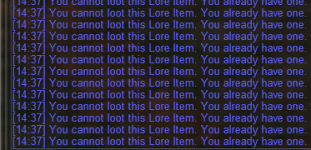
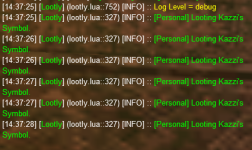
Is this toon the master looter as well?
pretty sure that is due to the changes to group.members returning 0 if you are solo instead of nil (this was back in like august)
and
also added an event
i did something like that to address a couple solo things (i msg'd ed but i doubt either of us solo much).
I imagine Ed would have a better/cleaner solutio
Lua:
local solo_looter = (mq.TLO.Group.Members() == nil or mq.TLO.Group.Members() == 0) or (mq.TLO.Group.Members() == 1 and mq.TLO.Me.Mercenary.ID())
Lua:
local solo_looter = mq.TLO.Raid.Members() == 0 and (mq.TLO.Group.Members() == nil or mq.TLO.Group.Members() == 0) or (mq.TLO.Group.Members() == 1 and mq.TLO.Me.Mercenary.ID())
Lua:
mq.event('LoreLeave', '#*#You cannot loot this Lore Item.#*#', event_lore_item)i did something like that to address a couple solo things (i msg'd ed but i doubt either of us solo much).
I imagine Ed would have a better/cleaner solutio
Last edited:
Yes, the driver / MA / MT / ML.Is this toon the master looter as well?
It also happens when the character is solo killing, no merc or group members.

Qnome
Active member
Greetings @SpecialEd , thank you for this awesome utility Lootly and Lootier.
When I manually sell new items to a vendor for the 1st time. (new vendor trash)
Is it possible to auto add those new items as
When I manually sell new items to a vendor for the 1st time. (new vendor trash)
Is it possible to auto add those new items as
/setitem sell in lootly_loot.ini ?
Last edited:

Those items that have quotes in them need to be added in your ini manually

simcoe
Well-known member
Still seeing 'DoCommand - Couldn't parse item sell' every time I zone, any ideas on how to correct this?Greetings; I'm not sure if this is the right place to post this, so forgive me if it needs to go elsewhere. I really have enjoyed using lootly the past week or so, but I believe I have entered a wrong command (or jacked it up somehow) and now when zoning I get the following message:
DoCommand - Couldn't parse 'item sell'
Everything seems to work correctly, but seeing the message every time I zone makes wonder if it needs correcting, and I have no idea where to begin.
I'm currently running VV, a handful of CWTN plugins, and lootly/lootier.
Any help would be appreciated, thanks.
Greetings @SpecialEd , thank you for this awesome utility Lootly and Lootier.
When I manually sell new items to a vendor for the 1st time. (new vendor trash)
Is it possible to auto add those new items as/setitem sellin lootly_loot.ini ?
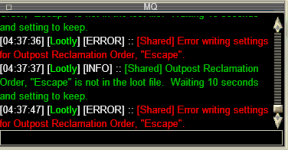
You can write a short Lua script with an event to watch for when you sell things and auto add them with /setitem sell <item name> - I don't want selling to modify my loot file.
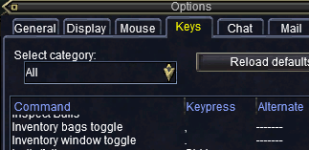
You have something (mac/Lua/holy/down/react) trying to run a command "item sell" - lootly shouldn't be trying to run sell commands unless you run the bind.Still seeing 'DoCommand - Couldn't parse item sell' every time I zone, any ideas on how to correct this?
Qnome
Active member
Greetings, @SpecialEd , noted with thanks.You can write a short lua script with an event to watch for when you sell things and auto add them with /setitem sell <item name> - I don't want selling to modify my loot file.
If you do end up writing a quick script for this, would you mind sharing it for those of us totally code inept?Greetings, @SpecialEd , noted with thanks.

- Commits
- 2
Target a Vendor and type /mac sellstuff
Will sell everything marked in your loot.ini file
Will add anything you sell to the vendor to the loot.ini file for next time.
Will sell everything marked in your loot.ini file
Will add anything you sell to the vendor to the loot.ini file for next time.
Qnome
Active member
Greetings @CannonballdexTarget a Vendor and type /mac sellstuff
Will sell everything marked in your loot.ini file
Will add anything you sell to the vendor to the loot.ini file for next time.
1. Yes, that's a function in Ninjadvloot.
AddNewSales=1 - This will mark all items you sell to a vendor as Sell in the ini file.
2. Here is Lootly discussion.
3. As Sic suggested it's better to use one loot utility at a time.
Last edited:

- Commits
- 2
This won't effect your lootly settings.Greetings @Cannonballdex
1. Yes, that's a function in Ninjadvloot.
AddNewSales=1 - This will mark all items you sell to a vendor as Sell in the ini file.
2. Here is Lootly discussion.
3. As Sic suggested it's better to use one loot utility at a time.
Qnome
Active member
Noted, thank you @CannonballdexThis won't effect your lootly settings.
simcoe
Well-known member
Thanks for the reply Ed; iirc I botched an attempt to do a dry run on sell items, but not exactly sure what I typed. Messing it up and not remembering howYou have something (mac/lua/holy/down/react) trying to run a command "item sell" - lootly shouldn't be trying to run sell commands unless you run the bind.



Hello,
I think if you have two of the same class, when it enters the routine and that toon already has the item it ends up leaving it on the corpse. I don't see a second check for how many of a class exists.
This happened with an aug today, first zerker was higher in the group order, left the aug on corpse since that first zerker had the aug already.
Best,
EQA
I think if you have two of the same class, when it enters the routine and that toon already has the item it ends up leaving it on the corpse. I don't see a second check for how many of a class exists.
This happened with an aug today, first zerker was higher in the group order, left the aug on corpse since that first zerker had the aug already.
Best,
EQA
It should just loop through the group - can you turn on logging for the ML and recreate the scenario?Hello,
I think if you have two of the same class, when it enters the routine and that toon already has the item it ends up leaving it on the corpse. I don't see a second check for how many of a class exists.
This happened with an aug today, first zerker was higher in the group order, left the aug on corpse since that first zerker had the aug already.
Best,
EQA
It should just loop through the group - can you turn on logging for the ML and recreate the scenario?
Let me try to find a fast dropping lore item, give me a bit and will try and recreate.
Users who are viewing this thread
Total: 1 (members: 0, guests: 1)
Share: