
-
 Hail, we're RedGuides. We want you to play six (yes, 6!) EverQuest characters at once. We have scripts and a friendly community to help, please join our playstyle and say hello! 👋
 -
 We've added LLM sections to our Terms & Rules and Resource Rules, for everyone's sanity & in-game safety.
Read more
a. Do not replace your voice with an LLM. This goes for your posts and your scripts. Drafting and editing with a tool is fine, but don't take you out of what you share.
b. Do not replace your EQ character's voice with an LLM. We don't want scripts that speak over/ooc,/shoutor other public channels. This has been an unwritten rule that's kept casino scripts off the site for decades, but we're now compelled to make it clear: keep automated communication private.
Why Does RG Review Scripts?
Nearly every LLM-written Lua script we see is making your character do impossible things, and rarely in a way that's beneficial to you. We've seen heavy server hammering,/targetover impossible distances when/nav spawnwould passively accomplish the same thing, a spawn search that fires 20+ times per second, and other pointless actions that are likely annoying GMs.
You are welcome to use LLMs as a tool to structure, draft, and edit your work, but please read critically before hitting/lua run
You are using an out of date browser. It may not display this or other websites correctly.
You should upgrade or use an alternative browser.
You should upgrade or use an alternative browser.

Release Lootier 1.0.6
- Thread starter Coldblooded
- Start date
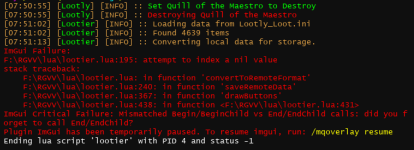
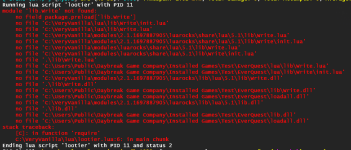

see the one a couple above as well.
Lootier ImGUI error on save
Been happening last couple weeks, all up to date
Code:
ImGui Failure:
...ublic\RGManager\Downloads\VanillaMQ_Live\lua\lootier.lua:195: attempt to index a nil value
stack traceback:
    ...ublic\RGManager\Downloads\VanillaMQ_Live\lua\lootier.lua: in function 'convertToRemoteFormat'
    ...ublic\RGManager\Downloads\VanillaMQ_Live\lua\lootier.lua:240: in function 'saveRemoteData'
    ...ublic\RGManager\Downloads\VanillaMQ_Live\lua\lootier.lua:367: in function 'drawButtons'
    ...ublic\RGManager\Downloads\VanillaMQ_Live\lua\lootier.lua:438: in function <...ublic\RGManager\Downloads\VanillaMQ_Live\lua\lootier.lua:431>
ImGui Critical Failure: Missing EndChild()
Been happening last couple weeks, all up to date

You may have to do the old school debug method of only loading half of your loot file to try and find where the missing part of the loot file s. I would think it had to do with that versus being a script issue, as I use Lootier all of the time. I know before when it had messed up like that for me, I had to start with an empty loot file and add each alphabetic section back manually until I found the bad section, then narrowed it down to a specific entry that had some problem (been too long since I did this though to remember the exact issue)
Thanks for this tip. I found the post below with a similar error message on page 2. Mine had some slight differences.Working fine for me, I think there was some mention of the lib.LIP file earlier in the thread. look on page 2 of this thread, maybe halfway down or so.
This post has a similar error to mine, but it was slightly different at the beginning, but I tried the suggestion from grimmier about that post and downloaded the lip.Lua file and placed it as instructed in his post:Trying to run the script. Getting an error module lib.LIP not found. Anything else I need to load just started using Luas scripts.
After doing this, I now get the error message in the attached picture...please help!make a folder called "lib" in your Lua folder.
put this file LIP.Lua inside that folder.
Attachments
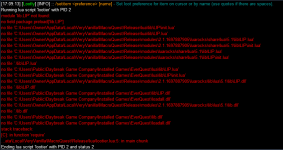
So I tried a few more things and still have had no luck getting Lootier to load. I deleted all files I could find in my macroquest folder that had anything to do with Lootly or Lootier. This did not help. I then placed the Lip.Lua file from the post on page 2 as directed there and it still did not work.
I was thinking my next step would be to delete everything relating to Macroquest and reinstalling it using the Red Guides patcher. My question is, are there any files associated with Macroquest in any other locations other than the main folder? I want clean everything out and start fresh to see if Lootier will work on a fresh install of everything. I am not sure that this is necessary, because every other Lua I run works fine.
I was thinking my next step would be to delete everything relating to Macroquest and reinstalling it using the Red Guides patcher. My question is, are there any files associated with Macroquest in any other locations other than the main folder? I want clean everything out and start fresh to see if Lootier will work on a fresh install of everything. I am not sure that this is necessary, because every other Lua I run works fine.

Uninstalling is not warranted.So I tried a few more things and still have had no luck getting Lootier to load. I deleted all files I could find in my macroquest folder that had anything to do with Lootly or Lootier. This did not help. I then placed the Lip.lua file from the post on page 2 as directed there and it still did not work.
I was thinking my next step would be to delete everything relating to Macroquest and reinstalling it using the Red Guides patcher. My question is, are there any files associated with Macroquest in any other locations other than the main folder? I want clean everything out and start fresh to see if Lootier will work on a fresh install of everything. I am not sure that this is necessary, because every other Lua I run works fine.
I'll try to revisit this when I get off work if @Coldblooded hasn't chimed in by then.
However, that 4th red line seems suspect in light of what you are saying.
Looking at my file structure, it's Release/Lua/Lib.
Release/Lua has the script Lootier.Lua
Release/Lua/Lib has LIP.Lua, and Write.Lua
There are a couple other folders in Lib, having to do with other scripts/plugins. LIP.Lua and Write.Lua are the ones called out in the lootier script. If you go down a couple posts from the one with LIP.Lua in it, there is another zipped file there, which, when unzipped into the release/Lua folder, will add that whole structure. might be worth doing that if you haven't already.
Release/Lua has the script Lootier.Lua
Release/Lua/Lib has LIP.Lua, and Write.Lua
There are a couple other folders in Lib, having to do with other scripts/plugins. LIP.Lua and Write.Lua are the ones called out in the lootier script. If you go down a couple posts from the one with LIP.Lua in it, there is another zipped file there, which, when unzipped into the release/Lua folder, will add that whole structure. might be worth doing that if you haven't already.
Woot! Downloading and placing all the folders and files in the second post appears to have worked to get it working! Thanks!There are a couple other folders in Lib, having to do with other scripts/plugins. LIP.Lua and Write.Lua are the ones called out in the lootier script. If you go down a couple posts from the one with LIP.Lua in it, there is another zipped file there, which, when unzipped into the release/Lua folder, will add that whole structure. might be worth doing that if you haven't already.

- Commits
- 192
If it's all working, I'll stand down.

Users who are viewing this thread
Total: 1 (members: 0, guests: 1)
Share: