Yeah, ive been around computers long enough, should have did that, fixed it, thank you for the timely help!you should use the Very Vanilla installer and "reinstall" with that. > HERE <


Yeah, ive been around computers long enough, should have did that, fixed it, thank you for the timely help!you should use the Very Vanilla installer and "reinstall" with that. > HERE <
Aug 20 2020 by RedGuides
- MQ2AFNuke (jimbob) Started on Enchanter buff support (it's not nearly done yet). Updated Ranger spell/aa order a bit.
Aug 20 2020
- Updated for LIVE
- Updated for TEST
- Fixed the CMerchantWnd class
- Fixed the findwindow feature
Aug 21 2020 by Redguides
- MQ2Gmail (Sic) Changed Oauth to work again, new video & guide posted on the resource page.
- MQ2DPSAdv (ChatWithThisName, Knightly, dannuic) Code cleanup, corrects an issue where sometimes SDPS would show 0 erroneously.
Had something weird happen today and was hoping someone can give me an idea of where or what to check next. I always use the Launcher to start MQ2 just to be sure all my stuff is up to date. Today when I opened the Launcher it brought up the "Do you want this allow this program to make changes" screen just like normal. When I click yes it just seems to end the process, nothing happens. I used it yesterday after the patch and it worked fine and updated all my stuff. I was able to load MQ2 from the directory and once in game all my macros loaded up just fine. I opened my Task Manager to see if the Launcher was open but hung up or something but saw no evidence of that. So from what I can see it starts to open but just does nothing after the permission screen. Any ideas on things to check out on my end? Thanks, AnotherJohn
I have continued to work on a solution to this by trying to re-download the Launcher. I used the "Repair" option which seemed to function. At least after the permission screen the download bar runs and the app then quits. I was hopeful this was going to work but I am still having the same problem of the Launcher not doing anything after the permission screen. I have also tried running as administrator, no help there. Will keep looking at it with my limited skills but if anyone has ideas in the meantime I am all ears.
When you shut down the PC could it have turned back on an antivirus/pop up blocker or other similar type program that could be affecting the launcher? Maybe one had been updated but not installed until you rebooted. Double check those areas and I hope the solution presents itself.I seem to have hit the wall on my Launcher problem:
I found an old thread that suggested to try to change the default browser. My browsers are not out of date but switched the default from Edge to Chrome. No luck.
My last shot was removing the Launcher completely and then reinstalling. Still nothing happening after the permission screen. All I know is that it worked perfectly the day after the patch. I shut down my computer for the night. Started it up the next day and the Launcher had stopped working. I really am at a loss for what can be going on and am hoping someone with more knowledge can point me in a direction to check. Thanks, AnotherJohn
Damn, I hoped it would help. Did you try disabling it and running the launcher just in case. You said it was marked properly but it doesn’t hurt to vheckBranson24,
Was a good idea. I didnt think about the chance that my virus protection setting may have been updated. I use Norton and double checked there and found that RGResourceManager is checked as "Allow". That appears to be the Launcher program according to the path given. So no luck there but was worth checking, Thanks.
I seem to have hit the wall on my Launcher problem:
Had something weird happen today and was hoping someone can give me an idea of where or what to check next. I always use the Launcher to start MQ2 just to be sure all my stuff is up to date. Today when I opened the Launcher it brought up the "Do you want this allow this program to make changes" screen just like normal. When I click yes it just seems to end the process, nothing happens. I used it yesterday after the patch and it worked fine and updated all my stuff. I was able to load MQ2 from the directory and once in game all my macros loaded up just fine. I opened my Task Manager to see if the Launcher was open but hung up or something but saw no evidence of that. So from what I can see it starts to open but just does nothing after the permission screen. Any ideas on things to check out on my end? Thanks, AnotherJohn
I have continued to work on a solution to this by trying to re-download the Launcher. I used the "Repair" option which seemed to function. At least after the permission screen the download bar runs and the app then quits. I was hopeful this was going to work but I am still having the same problem of the Launcher not doing anything after the permission screen. I have also tried running as administrator, no help there. Will keep looking at it with my limited skills but if anyone has ideas in the meantime I am all ears.
I found an old thread that suggested to try to change the default browser. My browsers are not out of date but switched the default from Edge to Chrome. No luck.
My last shot was removing the Launcher completely and then reinstalling. Still nothing happening after the permission screen. All I know is that it worked perfectly the day after the patch. I shut down my computer for the night. Started it up the next day and the Launcher had stopped working. I really am at a loss for what can be going on and am hoping someone with more knowledge can point me in a direction to check. Thanks, AnotherJohn
@AnotherJohn not sure what happened to this, I wrote you up a long response yesterday.I use Norton and double checked there and found that RGResourceManager is checked as "Allow". That appears to be the Launcher program according to the path given. I turned off Norton entirely and tried but got the same result. It just seems to quit with no visual reason after I click allow on the permission screen. It just doesnt continue from that point.
Additional thoughts, is there a log file that RedGuides Launcher would create when there is a problem with it? Is there a better place to post this problem I am having with RedGuides Launcher where it maybe more visable? Again, any ideas on where to check next would be very much appreciated. Thanks, AnotherJohn
Aug 26 2020 by RedGuides
- MQ2Mule (SwiftyMuse) Added .Classes TLO to cond builder
Aug 26 2026
- Updated for TEST
you can view dmps with a few things - but a real look into a .dmp file would require having symbols access from when they were built - if you are on live server you're not going to have access to those symbols, unfortunately. I would recommend sending it to [email protected] as the crash popup likely mentioned.I'm still running an IHC build from April and can go for days without issue. After updating today, my bard is going back to locking up.
What software do you all use to open the .dmp logs?
you can view dmps with a few things - but a real look into a .dmp file would require having symbols access from when they were built - if you are on live server you're not going to have access to those symbols, unfortunately. I would recommend sending it to [email protected] as the crash popup likely mentioned.
if you wanted to PM me 1 .dmp file i can take a quick peek and see if there is anything in there that is useful (keep in mind .dmp files will have information like your character name)
yeah unfortunately the eqgame dmp has absolutely nothing in your stack frame - so it could be a whole bunch of things that caused it, but nothing that i can see. best bet is to send to mule so he can do all his mule goodness on it.Sent it to ya Sic, thanks !
Sep 11 2020 by RedGuides
- MQ2AutoSize (dencelle) Fixed and working again. Offset pattern needed updating.
Sep 10 2020
- Fixed a crash on TEST in the tlos that call FindAffectSlot (.Stacks etc) last argument has been removed
- MQ2Main (drwhomphd) Made sure the other chat events in DataVars follow the same fix that eqmule put in for Tells in order to work on FV or different languages.
- MQ2Main (ChatWithThisName) fixed FindItem/FindItemCount, it will no longer report twice as many augments...
check the post above yoursHello All,
For about week MQ2 has been crashing with either a dmp file regarding "autosize" or "afnuke". I use multiple computers and I crash on them all. Also I use KA but AFNuke for dps in case that is pertinent but I would really appreciate any feedback. I don't have any hair to pull out so I don't know to do from here
folder shouldn't have disappeared, but yeah until patch is out, you can't re-patchHello. I've been having fun with mq2mule. There was a patch today - downtime was extended - and servers are acting up. I ran the redguides launcher and a popup let me know that mq2 is not installed now for some reason and the folder disappeared entirely. I'm guessing that this a normal thing on patch day and it will remedy when the redguides launcher update becomes available? (it says "patch day - unavailable" now).
Sep 16 2020 by RedGuides
- MQ2DPSAdv (Knightly) Fixed a naming collision crash.
Add HistoryLimit setting to the ini which allows you to specify how many mobs for which to keep a DPS history. This should help in those times where running the plugin for long periods of time eventually slows down or crashes. The default is 25.
Add /dps limit command to set the history limit for that character

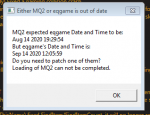
Updated both EQ and MQ2?After patch yesterday I keep getting this error. I'm a bit new here so maybe this happens every patch, would appreciate any advice on how to fix this. Thank you.

As far as I know. Ran the EQ patcher and hit the update button on MQ2, it said I have the most current version.Updated both EQ and MQ2?
this usually means you got a bad download - often due to slow internet. I would give a restart to your computer and perhaps your router and give it another try.View attachment 24367
This is my first update using MQ2 and I am receiving this message while MQ2 is updating.
Sep 19 2020 by RedGuides
- MQ2DPSAdv (Knightly, ChatWithThisName) Code cleanup, added UI option for History Limit (Thanks Sic)
Fixes the ini setting of History Limit to 1 (sorry, you'll have to fix that yourself)
Fixes a previous crash that I made happen a lot more frequently (dangling pointer)
Sep 21 2020 by RedGuides
- NEW PLUGIN! MQ2Ice (dewey2461) An addon to deal with skidding on ice. It forces "walk" on ice, and when skidding it will pause stick/Nav, allows movement keys to halt motion, and will resume stick/nav when skidding stops. Made for ToFS, but .ini settings can make it work anywhere.
- MQ2Status (Sic, Knightly) Added "/status macro" to report the macro you have running, and cleaned up subscription section
- MQ2DPSAdv (Knightly, Sic) Crash fixes
Oct 21 2020 by RedGuides
- NEW PLUGIN! MQ2Say (sl968) A customizable alert for /say messages that may otherwise be missed. This is important as a GMs will often use /say when contacting you, as will other players.
- New paid plugin! MQ2Enchanter (ChatWithThisName, Sic) a combat plugin for your enchanter. Please see MQ2Enchanter resource for commands and instructions. The current pre-release version is free.
- New paid plugin! MQ2Shaman (ChatWithThisName, Sic) a combat plugin for your...
Oct 30 2020
- MQ2Status (Sic) Added support for MQ2Enchanter/MQ2Shaman for /status
- MQ2XAssist (Knightly, eqmule) Fixes an issue where EQ doesn't clear assistname in the hitbyspell function (a likely bug in the EQ client)
Oct 29 2020
- Updated for BETA
Oct 28 2020
- Updated for BETA
Oct 25 2020
- Updated for BETA
Oct 24 2020
- Updated for BETA
Oct 23 2020
- Updated for BETA
Oct 22 2020
- Updated for BETA