• You've discovered RedGuides, an EverQuest multi-boxing and scripting community 🧙‍♀️⚙️. We want you to play several EQ characters at once, come join us and say hello! 👋

  • A TLP without truebox has thawed (Very Vanilla ready)
    Frostreaver
KissAssist

KissAssist Release KissAssist (4 Viewers) 12.002.039

No permission to download
The problem is that once loaded the ninjadvloot.inc has a number of EVENTS that fire from actions like foraging. Those events have nothing to do with KissAssist but they interfere with other forms of looting. If we don't want Ninjadvloot assistance we really need to quit loading it entirely.

I realize from earlier posts that people on EMU servers may still want it to be loaded. I don't know a clean way to deal with this other than fixing the Ninjadvloot.inc file itself.

I don't play live anymore after a brief stint on TLPs, just EMUs ,and so having those looting calls commented out (and the tremendous amount of commenting done in this version) have made it so much easier to use KA12. As for the Ninjadvloot.inc itself, I haven't had any issues yet...but I do miss advanced looting from live, so I get it.
 
Is there a way to test for how far away a toon is from a mob?

With my ranger, i have it set to do a command:/autofire on as the first DPS
I would like to add a condition to only do it if the mob is a certain distance away

I am not sure what check to implement
 
Is there a way to test for how far away a toon is from a mob?

With my ranger, i have it set to do a command:/autofire on as the first DPS
I would like to add a condition to only do it if the mob is a certain distance away

I am not sure what check to implement

Dont use the dps section for that, the following is straight from my Ranger's ini

You can adjust the melee distance to suit your needs. and then use the dps section for spells and whatnot.

[Melee]
AssistAt=98
MeleeOn=0
FaceMobOn=1
MeleeDistance=75
StickHow=snaproll
AutoFireOn=1
UseMQ2Melee=1
TargetSwitchingOn=0


Hope that helps,


Hos..
 
Is there a way to test for how far away a toon is from a mob?

With my ranger, i have it set to do a command:/autofire on as the first DPS
I would like to add a condition to only do it if the mob is a certain distance away

I am not sure what check to implement

I am sure you will have to still have AutoFireOn turned on even if you use the command in DPS. To test for distance use ${Spawn[id ${MyTargetID}].Distance3D]}
 
I have been making some changes to the ninjaadvloot code and converting all the events, that can be converted, to Binds. That may help with some of the issues with the ninjaadvloot code and events. There have been several other change requests made so I am looking into, if I can figure out, if some of the changes can be incorporated into the include code.
 
2. Mez check for calling AE Mez when casting Single target mez.For this to happen Casting Interrupts had to be added for Mezzing.So I made a few changes so interrupts can be better controlled by the user.You can now determine What interrupts you want checked. Using 1 in the INI fileturns on all Interrupts by defaulting CastingInterruptOn=30. Each Interrupt check has been given a value:Buffs = 2, Heals = 4, DPS = 8, and Mez = 16.By doing this you are now able to control any of the interrupts you want turned on.To turn on more than one interrupt simply add the values together.Example:To Interrupt Mezzing(16) and DPS(8) set CastingInterruptOn=24To Interrupt Buffing(2) and Heals(4) set CastingInterruptOn=6To Interrupt Just Mezzing(16) set CastingInterruptOn=16

Im confused by this, So if I set it to 16 on my bard he will no longer mez? or if I set it to 4 on my cleric she becomes useless? Anyone have any practical examples of typical usage?


Thanks!

Hos..
 
Im confused by this, So if I set it to 16 on my bard he will no longer mez? or if I set it to 4 on my cleric she becomes useless? Anyone have any practical examples of typical usage?


Thanks!

Hos..

No. The quote you posted, is an explanation of how to turn on and off casting interrupts. By default all casting interrupts are turned on. If you want to turn one off you then have to calculate the value of CastingInterruptOn, and make the change in your ini.

All this change will do is ignore casting interrupts, it won't stop the routines from casting.

An example would be setting a healer to not check casting interrupts. Lets say you want your healer to cast through all heals even if the target goes to full HP while casting.

Then what you would do is take 30(Value for checking all casting interrupts)
Subtract 4(Value for checking healing interrupts)
So 30-4=26. That is what you would change CastingInterruptOn equal to in your ini file. CastingInterruptOn=26 will tell the casting routine to skip checking interrupt logic while you are casting a heal.

Hope that helps.
 
Stated another way: Right now if you have CastingInterrupts=1 in your ini file then internally the macro says ok, that means I use an interrupt definition equal to 30, and I'll interrupt any spell casting I'm doing if certain conditions are met, like the heal example Taylor posted, but for any of the four sections: buffing, healing, dps, or mezzing. If you want the macro to continue casting even *if* those conditions are met for one of the four sections in your ini then you'd need to redefine that internal value of "30" to either 2/4/8/16 or a sum of them to equal just one or two, or three of those criteria.
 
Last edited:
Bug in KA11 & KA12 with enchanter aura.
It is setting 3 different auras to the same 'fixed' value:
} else /if ( ${AuraSpell.Find[Mana Reverberation]} || ${AuraSpell.Find[Mana Repercussion]} || ${AuraSpell.Find[Mana Reiteration]}) {
| Enchanter exception for Mana Recursion Auras
/varset AuraName Mana Recursion Aura

This is preventing the correct fix a few lines down from applying:
} else /if (${AuraSpell.Find[Mana Repercussion Aura]}) {
/varset AuraName Mana Rep. Aura

I believe the fix is to remove:
} else /if ( ${AuraSpell.Find[Mana Reverberation]} || ${AuraSpell.Find[Mana Reiteration]}) {
| Enchanter exception for Mana Recursion Auras
/varset AuraName Mana Recursion Aura

This allows the correct check for each of those three spells to apply
 
I will take a look at it, but it looks like your correct.

All so looks like Mana Reverberation will have the same issue.
 
CT, if you got the bandwidth I'd like to suggest a change. If you use /memmyspells, your character sits and stands for each spell memmed. I did a mem in front of a friend who doesn't MQ where I had to completely change out every spell gem, so I sat and stood 13 times in rapid succession. My friend said it looked like I was doing squats. Funny now and thankfully he didn't pursue it further. But is there any way we can have the character sit once and mem all the spells?
 
@Ordell Are you sure your running the most recent version? The reason I ask is this has come up before and there is code in the memmyspells routine to sit you down, just before memming your 1st spell, and then stand you back up after all spells have been memmed.
 
Hi, long time player coming back, decided to box now as all my characters are WELL out of date :-) loving kissassist so far, makes my playing very enjoyable, I have downloaded Kissassist 12 (the beta) can I just ask where this file is saved to? thanks for the awesome work!!
 
Just used KA 12 on the aow raid in tov with my cleric. The cleric spent tons of time and mana trying to heal the adds. Watching it, it looks like it really wants to heal a raid person not in his group that is down on health but instead targets their target instead. I am not using a heal target of target spell, but rather the heal target damage target's target ones.

Edit to add additional stuff.
I looked at the game parse for the fight, and the number of casts recorded was abnormally low for what it should be. 540 casts total... where the other healer in the group (most likely not using mq) cast over 2500 times. It's basically a chain cast all the time type of fight.

There are at least some instances in the log where you can see him start to cast a heal... but there is no cooresponding heal landing message. It's a huge log and it's hard to find all of those.

I was watching the UI on the cleric during this, and the target was the add while the spell was casting everytime this happened. The targets target was always one of the offtanks. I am guessing the offtank that was tanking the mob in the target. It did seem to happen more as the add's health was lowered... but it could also be that it was triggered by the offtanks health in the target target... hard to say while it is happening.


[General] KissAssistVer=12.001 Role=assist CampRadius=30 CampRadiusExceed=400 ReturnToCamp=0 ChaseAssist=0 ChaseDistance=25 MedOn=1 MedStart=90 MedCombat=0 LootOn=0 RezAcceptOn=1|90 AcceptInvitesOn=1 GroupWatchOn=0 EQBCOn=1 IRCOn=0 CampfireOn=0 CharInfo=Cleric|115|GOLD DPSMeter=1 ScatterOn=0 Movewhenhit=1 DefaultUI=TRUE XTSlot=1 GroupWatchCheck=FALSE DanNetOn=0 DanNetDelay=20 SitToMed=1 MedStop=100 CorpseRecoveryOn=0 [Buffs] BuffsOn=1 BuffsSize=16 Buffs1=Divine Reaction Buffs2=Aura of the Reverent|Aura Buffs3=Aura of Divinity|Aura Buffs4=Unified Hand of Jorlleag Buffs5=Quiet Prayer|Managroup|40 Buffs6=Divine Intermediation|MA Buffs7=Saint's Unity|Cond12 Buffs8=Veturika's Perseverance|Mana|65|ME Buffs9=Rallied Greater Protection of Vie|MA Buffs10=Anticipated Intervention|MA Buffs11=Shining Aegis|MA Buffs12=Ward of Righteousness|MA Buffs13=Curate's Retort|MA Buffs14=Armor of Sincerity Buffs15=Komodo Dragon Saddle|Mount Buffs16=Divine Guardian|MA RebuffOn=1 CheckBuffsTimer=10 PowerSource=NULL [DPS] DPSOn=0 DPSSize=1 DPSSkip=1 DPSInterval=1 DebuffAllOn=0 DPS1=Yaulp|99|Cond7 [Aggro] AggroOn=1 AggroSize=4 Aggro1=Divine Retribution|80|> Aggro2=Divine Peace|50|> Aggro3=Sanctuary|30|> Aggro4=Blessing of Sanctuary|45|> Aggro2nd=0 [Heals] HealsOn=1 HealsSize=33 Heals1=Divine Resurrection|0|rez Heals2=Blessing of Resurrection|0|rez Heals3=Burst of Life|50 Heals4=Seventeenth Rejuvenation|25|MA Heals5=Divine Intermediation|100|MA Heals6=Shining Aegis|100|MA Heals7=Dissident Blessing|60|MA Heals8=Divine Arbitration|35 Heals9=Aegis of Superior Divinity|35|Cond9 Heals10=Celestial Rapidity|99|Cond11 Heals11=Healing Frenzy|99|Cond10 Heals12=Channeling the Divine|99|Cond10 Heals13=Ward of Purity|99|Cond10 Heals14=Exquisite Benediction|99|Cond10 Heals15=Flurry of Life|99|Cond10 Heals16=Spire of the Vicar|99|Cond10 Heals17=${InvSlot[Chest].Item.Name}|99|MA|Cond11 Heals18=Focused Celestial Regeneration|85|MA|Cond11 Heals19=Curate's Retort|99|MA|Once|Cond10 Heals20=Sincere Remedy|99|MA Heals21=Merciful Remedy|99|MA Heals22=Promised Redemption|99|MA Heals23=Beacon of Life|99|Cond6 Heals24=Sincere Intervention|99|MA Heals25=Celestial Regeneration|99|Cond4 Heals26=Merciful Intervention|85 Heals27=Aegis of Superior Divinity|99|Cond4 Heals28=Syllable of Soothing|99|Cond2 Heals29=Word of Greater Restoration|99|Cond3 Heals30=Sincere Remedy|80|!MA Heals31=Merciful Remedy|80|!MA Heals32=Promised Redemption|80|!MA Heals33=Celestial Regeneration|35|Me AutoRezOn=1 AutoRezWith=Blessing of Resurrection XTarHeal=1 XTarHealList=2,3,4 HealGroupPetsOn=0 Help=Format Spell|% to heal at i.e. Devout Light Rk. II|50 RezMeLast=0 [Cures] CuresOn=1 CuresSize=5 Cures1=Radiant Cure Cures2=Ward of Purity Cures3=Purified Spirits Cures4=Group Purify Soul ;Cures5=Word of Greater Replenishment Cures5=Word of Greater Restoration [Burn] BurnSize=1 BurnAllNamed=0 Burn1=NULL UseTribute=0 BurnText=Decepticons Attack [GoM] GoMSize=1 GoMSpell1=Dissident Blessing|MA GoMSHelp=Format - Spell|Target, MA Me or Mob, i.e. Rampaging Servant Rk. II|Mob [KConditions] ConOn=1 CondSize=12 Cond1=${Me.PctMana} > 20 && ${Target.PctHPs} > 20 && ${Group.MainTank.PctHPs} > 80 Cond2=(${Group.Injured[80]} >= 3) Cond3=(${Group.Injured[75]} >= 3) Cond4=(${Group.Injured[75]} >= 2) Cond5=(${Group.Injured[60]} >= 2) Cond6=(${Group.Injured[50]} >= 2) Cond7=!${Me.Mount.ID} && ${Spell[Yaulp].Stacks} Cond8=${Me.CombatState.Equal[Combat]} Cond9=!${Me.AltAbilityReady[Divine Arbitration]} Cond10=${Me.GroupAssistTarget.Named} Cond11=${Me.GroupAssistTarget.Named} || ${Me.XTarget} > 4 Cond12=(!${Me.Buff[Armor of the Merciful].ID} && ${Spell[Armor of the Merciful].Stacks}) || (!${Me.Buff[Armor of Sincerity].ID} && ${Spell[Armor of Sincerity].Stacks}) ;Cond13=!${Target.Buff[Righteousness].ID} && ${Spell[Righteousness].StacksTarget} [Spells] MiscGem=12 MiscGemLW=0 MiscGemRemem=1 CastingInterruptOn=0 LoadSpellSet=2 SpellSetName=KA Gem1=Sincere Remedy Gem2=Merciful Remedy Gem3=Promised Redemption Gem4=Sincere Intervention Gem5=Merciful Intervention Gem6=Curate's Retort Gem7=Divine Intermediation Gem8=Shining Aegis Gem9=Seventeenth Rejuvenation Gem10=Dissident Blessing Gem11=Syllable of Soothing ;Gem12=Word of Greater Replenishment Gem12=Word of Greater Restoration Gem13=Ward of Righteousness [Melee] AssistAt=99 MeleeOn=0 FaceMobOn=1 MeleeDistance=75 StickHow=snaproll rear AutoFireOn=0 UseMQ2Melee=1 TargetSwitchingOn=1 [GMail] GMailHelp=Events currently support - Dead,Drag,GM,Level,Named,Leftgroup,Tells GMailOn=0 GMailSize=1 GMail1=NULL [AE] AEOn=1 AESize=2 AERadius=50 AE1=Celestial Regeneration|3 AE2=Sanctuary|3 [Pull] PullWith=Melee PullMeleeStick=0 MaxRadius=350 MaxZRange=50 UseWayPointZ=0 PullWait=5 PullRadiusToUse=90 PullRoleToggle=0 ChainPull=0 ChainPullHP=90 PullPause=30|2 PullLevel=0|0 PullArcWidth=0 PullOnReturn=0 [AFKTools] AFKHelp=AFKGMAction=0 Off, 1 Pause Macro, 2 End Macro, 3 Unload MQ2, 4 Quit Game AFKToolsOn=1 AFKGMAction=1 AFKPCRadius=500 CampOnDeath=0 ClickBacktoCamp=0 [Merc] Help=To use: Turn off Auto Assist in Manage Mercenary Window MercOn=0 MercAssistAt=92 [KissError] LastCMD:=/endmacro ErrorDateTime:=08/13/2020 19:15:53 ErrorMsg:=Cannot end a macro when one isn't running. DataError:=NULL SyntaxError:=NULL RunningTime:=103692929 BuildDate:=20200716 CurrentUI:=oldspells
 
Last edited:
XTarHeal=1
XTarHealList=2,3,4

It looks like in your heal section you have it set to heal xtargets 2,3, and 4. You may want to just disable that or if you need it to heal a non grouped person make sure that you have them added to those Xtarget Slots. I personally use the xtar slots at the bottom for heals slots 10 - 13 and fill those in with out of group tanks.
 
I can not get this enchanter to meditate. Any ideas? (MedStart=95 is an attempt to get the character to med, but it didn't work. Worked on my BST, tho.)

INI:
[General]
KissAssistVer=11.005
Role=Assist
CampRadius=100
CampRadiusExceed=400
ReturnToCamp=0
ChaseAssist=0
ChaseDistance=15
MedOn=1
MedStart=95
MedCombat=0
LootOn=0
RezAcceptOn=1|90
AcceptInvitesOn=1
GroupWatchOn=0
GroupWatchCheck=FALSE
EQBCOn=1
DanNetOn=0
DanNetDelay=20
IRCOn=0
CampfireOn=0
CharInfo=Enchanter|36|GOLD
DefaultUI=TRUE
DPSMeter=0
ScatterOn=0
XTSlot=1

[Buffs]
BuffsOn=1
BuffsSize=9
Buffs1=Greater Shielding
Buffs2=Obscure
Buffs3=Intellectual Superiority|CLASS|ENC,CLE,WIZ
Buffs4=Endure Magic
Buffs5=Clarity|caster
Buffs6=Augmentation|melee
Buffs7=NULL
Buffs8=Ward of Alendar
Buffs9=Gift of Magic|CLASS|ENC,CLE,WIZ
PowerSource=NULL
RebuffOn=1
CheckBuffsTimer=10

[AE]
AEOn=0
AESize=3
AERadius=50
AE1=Color Shift|3
AE2=NULL
AE3=NULL

[DPS]
DPSOn=1
DPSSize=6
DPSSkip=20
DPSInterval=2
DPS1=Haunting Visage|98|MA
DPS2=Tashani|96
DPS3=Tepid Deeds|90
DPS4=Listless Power|85
DPS5=Anarchy|75
DebuffAllOn=0
DPS6=Sufocate|80

[Pet]
PetOn=1
PetCombatOn=1
PetSpell=Boltran's Animation
PetBuffsOn=1
PetBuffsSize=3
PetBuffs1=Augmentation
PetBuffs2=NULL
PetRampPullWait=0
PetSuspend=0
PetForceHealOnMed=0
PetShrinkOn=0
PetShrinkSpell=Tiny Companion
PetBuffs3=NULL
PetAssistAt=95
PetAttackDistance=115
PetToysSize=6
PetBreakMezSpell=NULL
MoveWhenHit=0
PetHoldOn=1
PetToysGave=

[Mez]
MezOn=1
MezRadius=80
MezMinLevel=31
MezMaxLevel=50
MezStopHPs=50
MezSpell=Entrance
MezAESpell=Entrancing Lights|3
MezDebuffOnResist=0
MezDebuffSpell=Your Debuff Spell

[Burn]
BurnSize=3
BurnAllNamed=0
Burn1=NULL
Burn2=NULL
Burn3=NULL
UseTribute=1

[GoM]
GoMSize=3
GoMSHelp=Format - Spell|Target, MA Me or Mob, i.e. Rampaging Servant Rk. II|Mob
GoMSpell1=NULL
GoMSpell2=NULL
GoMSpell3=NULL

[KConditions]
ConOn=0
CondSize=5
Cond1=TRUE
Cond2=TRUE
Cond3=TRUE
Cond4=TRUE
Cond5=TRUE

[MySpells]
Gem1=Tashani
Gem2=Listless Power
Gem3=Entrancing Lights
Gem4=Entrance
Gem5=Tepid Deeds
Gem6=Haunting Visage
Gem7=Anarchy
Gem8=Suffocate
Gem9=NULL
Gem10=NULL
Gem11=NULL
Gem12=NULL
Gem13=NULL

[Spells]
MiscGem=8
MiscGemLW=0
MiscGemRemem=1
CastingInterruptOn=0
LoadSpellSet=2
SpellSetName=KissAssist
Gem1=Tashani
Gem2=Listless Power
Gem3=Entrancing Lights
Gem4=Entrance
Gem5=Tepid Deeds
Gem6=Haunting Visage
Gem7=Anarchy
Gem8=Suffocate
Gem9=NULL
Gem10=NULL
Gem11=NULL
Gem12=NULL
Gem13=NULL

[Melee]
AssistAt=98
MeleeOn=0
FaceMobOn=1
MeleeDistance=75
StickHow=snaproll
AutoFireOn=0
UseMQ2Melee=1
TargetSwitchingOn=0

[GMail]
GMailHelp=Events currently support - Dead,Drag,GM,Level,Named,Leftgroup,Tells
GMailOn=0
GMailSize=5
GMail1=NULL
GMail2=NULL
GMail3=NULL
GMail4=NULL
GMail5=NULL

[Aggro]
AggroOn=0
AggroSize=5
Aggro1=NULL
Aggro2=NULL
Aggro3=NULL
Aggro4=NULL
Aggro5=NULL

[Heals]
Help=Format Spell|% to heal at i.e. Devout Light Rk. II|50
HealsOn=0
HealsSize=5
Heals1=NULL
Heals2=NULL
Heals3=NULL
Heals4=NULL
Heals5=NULL
XTarHeal=0
XTarHealList=Xtar slots here Example: 5|6|7
HealGroupPetsOn=0

[Cures]
CuresOn=0
CuresSize=5
Cures1=NULL
Cures2=NULL
Cures3=NULL
Cures4=NULL
Cures5=NULL

[Pull]
PullWith=Melee
PullMeleeStick=0
MaxRadius=350
MaxZRange=50
UseWayPointZ=0
PullWait=5
PullRadiusToUse=90
PullRoleToggle=0
ChainPull=0
ChainPullHP=90
ChainPullPause=30|2
PullPause=30|2
PullLevel=0|0
PullArcWidth=0
[AFKTools]
AFKHelp=AFKGMAction=0 Off, 1 Pause Macro, 2 End Macro, 3 Unload MQ2, 4 Quit Game
AFKToolsOn=1
AFKGMAction=1
AFKPCRadius=500
CampOnDeath=0
ClickBacktoCamp=0

[Merc]
Help=To use: Turn off Auto Assist in Manage Mercenary Window
MercOn=0
MercAssistAt=92

[KissError]
LastCMD:=/endmacro
ErrorDateTime:=08/12/2020 17:16:03
ErrorMsg:=NULL
DataError:=NULL
SyntaxError:=NULL
RunningTime:=1380174
BuildDate:=20200812
CurrentUI:=Default
 
Could we have explicit logic in the kissassist.mac file so that ninjadvloot.inc will not be loaded if Loot=0?

I ask this because the ninjadvloot.inc file has 15 specific Events defined that still cause subroutine execution even when we don't want it active.

I didn't review the KA macro to determine what Loot=0 affects. Maybe a new switch is required specifically to Ninjadvloot=0?

In the interim, I'm experimenting with a custom ninjadvloot.inc file that has all the logic stripped out except for the 3 documented calls that could be performed by kissassist.mac. With very minimal testing it's working so far...

[CODE lang="ini" title="BigDaddy's stripped down ninjadvloot.inc's stripped down ninjadvloot.inc"]| Ninjadvloot.inc v6.2 07/27/2020 Redguides.com
| Updated: Stripped file to render it useless 7/27/2020 by BigDaddy
|
| Usage: add the following to your macro for looting
| #include Ninjadvloot.inc
| /call SetupAdvLootVars
| /call LootMobs or /call UseAdvLoot

Sub SetupAdvLootVars(string ChangeIniFile)
/echo BD_NINJALOOT: Ninja Loot got called for intial setup!
/return

Sub LootMobs
/echo BD_NINJALOOT: Ninja Loot got called for looting mobs!
/return

Sub UseAdvLoot
/echo BD_NINJALOOT: Ninja Loot got called for using Advanced Loot!
/return
[/CODE]

KICK ASS! I will cherish forever!~
 
@tjk What @ateravest said, and KissAssist is not designed with raiding in mind, it is group focused with some flexibility to do some out of group stuff. Not Raid focused.
 
I know you guys have made significant improvements with characters recognizing invis and not breaking it.

I use sics bard invis hotkey. The dual invis/twist off thing. For some reason my bard running KA12 will run into an occasional problem where she can’t stop breaking invis once she has it.
Has anyone else run across this? Maybe there’s something I’m doing wrong
 
I know you guys have made significant improvements with characters recognizing invis and not breaking it.

I use sics bard invis hotkey. The dual invis/twist off thing. For some reason my bard running KA12 will run into an occasional problem where she can’t stop breaking invis once she has it.
Has anyone else run across this? Maybe there’s something I’m doing wrong
I know you guys have made significant improvements with characters recognizing invis and not breaking it.

I use sics bard invis hotkey. The dual invis/twist off thing. For some reason my bard running KA12 will run into an occasional problem where she can’t stop breaking invis once she has it.
Has anyone else run across this? Maybe there’s something I’m doing wrong
I always pause, then issue a twist off, and then the selos and then invis

sometimes twist feels like its caught in an "about to do this thing" situation, so i want to make sure the macro is paused so its not sending instructions, and then tell twist to knock-it-off
 
I've been seeing some issues with targeting. If the MA has something on target the assisters seem unable to maintain anything else on target. This really screws me up on the mage when I want to give some pet weapons using /pettoysplz. It will not work unless I have the group MA target that pet before doing the command on the mage.

This is when nothing is in combat mode. In fact I tried it just now and had not killed a single thing, just started the macro on all my chars.
 
In regards to KA12 going stable, on my end, I'm working on documentation. I've decided we need more than a forum post and should move to a wiki. I'm hoping by next week I'll have it ready for editing.
 
I've been seeing some issues with targeting. If the MA has something on target the assisters seem unable to maintain anything else on target. This really screws me up on the mage when I want to give some pet weapons using /pettoysplz. It will not work unless I have the group MA target that pet before doing the command on the mage.

This is when nothing is in combat mode. In fact I tried it just now and had not killed a single thing, just started the macro on all my chars.

You may have something else going on. From the mage giving the toys, they should maintain the pet on target. There is no code in the Give pet toys routine that reacquires a target and no /doevents. I would look at a plugin possibly causing the issue. You can always PM me a debug log while this is happening so i can take a look.
 
Ok,
I got a weird situation that I am hoping someone can give me a lead on. I am trying to set up some level 50 inis to run OMM monster missions. I have a total of 3 different ones atm. One necro and two mages. The only difference in the mage inis is the type of pet. Once I get into zone I can get the Necro and one of the Mage inis to load and work the way I want. However, the third character (always the same character) will look like it is loading the ini in the MQ2 window. It looks the same as the Mage that loads and I get no errors. So even though it shows as loaded and running it does not execute anything. I have even tried loading the mage macro that loads correctly on the other toon and it does the same thing, loads and just does not do anything. So I know that ini does work. I have never had any problems loading the that characters everyday ini but it seems to just be the one guy. Any ideas on where to check next on something that seems to be specific to this character and only in this mission?
 
@AnotherJohn in situations like this you would need to see what the macro is doing or where it is stuck. If you could get me a debug log from the character having the issue. I can take a look.
 
ctaylor,
Ok, I will get that next time I try the zone. I didnt want to post a bunch of useless info just because I am not sure what would be important and was hoping to get an area to look at. I will see if I can figure out how to create a debug log and get that to you. It maybe later today or tomorrow that I log back in. Thanks for responding, AnotherJohn
 
Alright, I've been using the Kissassist puller role for a month or so. I have experimented with "targeting mobs" but is is a bit wonky. I set mobs in a camp yesterday in GD and it did not work as puller ignored it. Okay I just manually pulled and it was fine for the namer camp I was at. Today I'm at a new namer camp and simply just pulling everything in range. Puller won't full keeps saying waiting for respawns even though there is a mob almost in agro range.

How do I get it to reset? I even tried logging the puller off, shutting down eq, and logging back in.

Update ********
I was able to get this to reset by deleting the entire file, logging out both characters on that instance of eq, I have 3 different eq executable's on my computer and run two toons each on a single instance, and restarting that instance of the software. Has to be an easier way and I just do not know it. Please educate me!!!!
 
Last edited:
Alright, I've been using the Kissassist puller role for a month or so. I have experimented with "targeting mobs" but is is a bit wonky. I set mobs in a camp yesterday in GD and it did not work as puller ignored it. Okay I just manually pulled and it was fine for the namer camp I was at. Today I'm at a new namer camp and simply just pulling everything in range. Puller won't full keeps saying waiting for respawns even though there is a mob almost in agro range.

How do I get it to reset? I even tried logging the puller off, shutting down eq, and logging back in.

Update ********
I was able to get this to reset by deleting the entire file, logging out both characters on that instance of eq, I have 3 different eq executable's on my computer and run two toons each on a single instance, and restarting that instance of the software. Has to be an easier way and I just do not know it. Please educate me!!!!
GD not very flat, prolly need to adjust the z parameter
 
@AnotherJohn in situations like this you would need to see what the macro is doing or where it is stuck. If you could get me a debug log from the character having the issue. I can take a look.

Ok, I hope this gets you the info you need. It would not let me run /debugall until after I started Kissassist and starting Kissassist looks normal but nothing happens so the /debugall may not have caught the problem, so I /end macro and restarted while all was running. I hoped that way you might pick something up at the restarting of the macro. Thanks for being willing to take a look at this and please let me know if additional info is needed and I can do that when I log on tomorrow. AnotherJohn

Edit: When looking up how to get the debug log I came across instructions for kissassit 11 (which is the one I am having trouble with) and also Kissassit 12. Gave me the idea to get you a debug log for Kissassist 12. Well I am not sure why but macro loads using KA 12 and works fine. Still wont work with KA 11 so would be interesting to see what the debug log for KA 11 shows. At least I have a work around by just using KA 12 and that looks like it is the future anyway.
 

Attachments

Last edited:
its seems if u have a healer class and turn Xtargets on for heals, but dont set one in Xtargets.... the Cleric wont use all healingspells. Just the one for MA

Maybe is a known issue
 
@benknobi No. it is based on how you have XTarHeals setup.

In all situations the healer will try and heal self and MA. XTargetHeals=1 will heal Group and Xtargets. XTargetHeals=2 will not check for group heals but only Xtargets. If you set XTarHeals on and don't set any Xargets to characters you want healed, then the problem isn't the macro.
 
ahh ok thx... that was the problem. i switched from ka11 to ka12 using the same(old) ini files. In KA11 is XTarHeal=0 instead you need XTargetHeals=0|1|2 in KA12. I didnt know that. Thanks for the quick answer
 
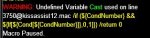
HI Guys, i have an issue on my rogue.

The KA12 stopped occasionally with a sentence below, while i dont have issue on other chars.
Is it a problem of INI? I cant anything with keyword "cast" in the ini tho.

KA12 - rog paused.JPG

Thanks
 
KissAssist Release KissAssist

Users who are viewing this thread

Back
Top
Cart