• Hail, we're RedGuides. We want you to play six (yes, 6!) EverQuest characters at once. We have scripts and a friendly community to help, please join our playstyle and say hello! 👋
  • We've added LLM sections to our Terms & Rules and Resource Rules, for everyone's sanity & in-game safety.
    Read more
    a. Do not replace your voice with an LLM. This goes for your posts and your scripts. Drafting and editing with a tool is fine, but don't take you out of what you share.
    b. Do not replace your EQ character's voice with an LLM. We don't want scripts that speak over /ooc, /shout or other public channels. This has been an unwritten rule that's kept casino scripts off the site for decades, but we're now compelled to make it clear: keep automated communication private.

    Why Does RG Review Scripts?
    Nearly every LLM-written Lua script we see is making your character do impossible things, and rarely in a way that's beneficial to you. We've seen heavy server hammering, /target over impossible distances when /nav spawn would passively accomplish the same thing, a spawn search that fires 20+ times per second, and other pointless actions that are likely annoying GMs.

    You are welcome to use LLMs as a tool to structure, draft, and edit your work, but please read critically before hitting /lua run

Tip - Joystick controller (1 Viewer)

Crash

Well-known member
Anyone have a link to a joystick that would work with EQ. I'm tired of using the keyboard to move around.
 
I use a Belkin N52TE. Works well. Can get one cheap on eBay. Drivers and software work on Win11 even though it's been out of production for awhile
 
Maybe a razer Tartarus? I had one when I was playing wow. It is amazing. My hands are pretty small, so it was *just* a little big for me
Ty I'm sold. I watched video with user mapping the a s w d keys to the thumb pad. Exactly what I have wanting to try.
 
Maybe a razer Tartarus? I had one when I was playing wow. It is amazing. My hands are pretty small, so it was *just* a little big for me
I have the older razer orbweaver model, but same basic type of product. It's great. Offloading movement to your thumb frees up 3 fingers to push other buttons. It's a game changer. But it has to be the tartarus/orbweaver style thumb pad and not the stick like the Logitech G13.
 
Update, I purchased the Tartarus V2. Still getting use to it but it does allow me not to be stuck in one position for long periods (medical reasons).
I'm not sure of terminology but I bought the mechanical one it is a little noisy on clicks.
Like Sic said it is a little big.
 
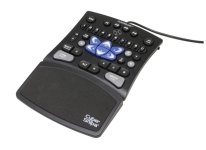
I found a game pad years ago and loved it. It wasn't perfect but for me it was close. I wore out two of them and when I tried to replace the second one it was no longer for sale. I've replaced it with some generic thing from Amazon.
Cyber Snipa CSGPBK01R Game Pad v2.jpg
 
I found a game pad years ago and loved it. It wasn't perfect but for me it was close. I wore out two of them and when I tried to replace the second one it was not longer for sale. I've replaced it with some generic thing from Amazon.
View attachment 65395
If its any help I have had 2 of these and each one burnt out a USB port on multiple machines. Proceed with caution.
 
You might want to try a Razer Nostromo (formerly Nostromo SpeedPad N52, formerly Nostromo SpeedPad N50).

A good while ago (as in pre /melody) I raided on a Bard. At the time (PoP), discussions among bards were how to avoid carpal tunnel syndrom from the 11 22 33 44 twisting for hours on end. (Scary, but that rythm is still in my left hand ...).

Based on several recommendations, I picked up a Nostromo SpeedPad N50, and never looked back. I bought the N52 when it came on, and I am currently using the Razer Nostromo - the form-factors are the same. The picture below is of a Nostromo N52, but the Razer Nostromo looks the same, but with updated driver software.
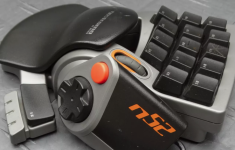
1728326764981.png

I have the movement keys mapped to the Thumb wheel, and use the Thumb pad to start/stop walking/running (the button presses L - mapped to start/stop running in EQ, IIRC).

FWIW, I have mapped small macros to the Pointer wheel/ridge to go Up/Down/Press to jump to specific toons (Ctrl-Alt-1, Ctrl-Alt-2, etc.), or just one for Alt-Tab when appropriate.

Of course, you have the whole (small) keyboard that can be mapped to any specific key, Function key, macro, etc.
----
While this is not a Joystick, I have found it very comforable for almost ~20 years now -- wife bought me the last one when I complained that I could not play EQ without it - love her much -- my best EQ Partner ever :-)

Good luck!
 
steamdeck / steam controller works fairly well with some customization, my profile should be listed as "shm wip" if you search for it under the "EverQuest Free To Play" listing on Steam, I only bothered to set up a spell wheel for the first 6 spell gems because everything else is reliably eaten up by multibinds/macros on all the chars I dare play on steam deck

regrettably there's no good way to permanently set up the right stick as the look-stick, it will default to a mouse cursor so you will have to get in the habit of holding whatever shoulder button is bound to right click when turning your camera around
 
Tip - Joystick controller

Users who are viewing this thread

Back
Top
Cart