
-
 Hail, we're RedGuides. We want you to play six (yes, 6!) EverQuest characters at once. We have scripts and a friendly community to help, please join our playstyle and say hello! 👋
You are using an out of date browser. It may not display this or other websites correctly.
You should upgrade or use an alternative browser.
You should upgrade or use an alternative browser.
Patch - Jan 2024 Patch Update (test 9th, live 17th) (1 Viewer)
- Thread starter Sic
- Start date

Bogreaper
Member
First try your video driver settings, ie, nvida has an app that gets installed when you put them in, and you can go into the nvidia settings and adjust Gamma for either Everything or just for EQ.
Second, windows in the control panel has a video setting adjustment where you can adjust gamma there also
Third almost all monitors have a gamma adjustment via their control panels using the buttons on the monitor.
Hope one of those helps.
Second, windows in the control panel has a video setting adjustment where you can adjust gamma there also
Third almost all monitors have a gamma adjustment via their control panels using the buttons on the monitor.
Hope one of those helps.

I went into my windows display settings ( seems to only happen on win11 on my boxes) and toggle " night light" on and off and it fixed my gamma issue.My eyes hurt with this new incredibly low brightness/ contrast/ gamma/ setup.. Incredibly frustrating. Any tips to get some of the love back besides maxing out Enhance vision? I'm running out of things to try
Bogreaper
Member
To do this in windows 11... go to Settings > System > Display > Advanced display settings > Display adapter properties for Display 1 > Color Management > Advanced tab. From there, you can adjust the contrast and gamma settings to your liking. Please note, this feature depends on the graphic card your computer has, so it can vary

Money dude! I was trying to remember this from memory. TY!!!To do this in windows 11... go to Settings > System > Display > Advanced display settings > Display adapter properties for Display 1 > Color Management > Advanced tab. From there, you can adjust the contrast and gamma settings to your liking. Please note, this feature depends on the graphic card your computer has, so it can vary
On a PC there are so many things to try...I tried Bogreaper's suggestion but mine doesn't have the sliders in there. There are several things you can do - here is what my game looks like post-patch AND it doesnt kill the gamma on my desktop if I properly log out with a camp desktop. Previously I had to use the task manager to kill them and not mess up my desktop gamma.
I have HDR "ON" in Windows, the Enhance Vision set to 100 in game and I have custom NVidia settings for the eq executable. This is a snip from a pic on my phone, and only one side of my screen it actually looks better than this pic. The camera jsut has issue focusing with the big curve on the monitor. In game so far I am not getting blinded by things and it isnt too dark now either.
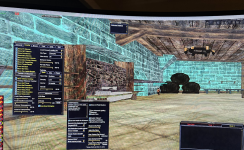
In Game there is the new "Enhance Vision" slider in the Options window. That makes a nice difference.
If you have NVidia you can do this (I recommend you do):
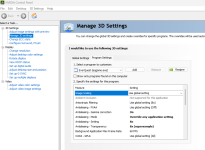
You also have this gamma setting here if you want, I leave mine in reference mode though.
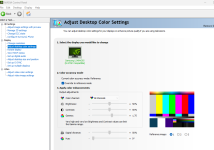
I have HDR "ON" in Windows, the Enhance Vision set to 100 in game and I have custom NVidia settings for the eq executable. This is a snip from a pic on my phone, and only one side of my screen it actually looks better than this pic. The camera jsut has issue focusing with the big curve on the monitor. In game so far I am not getting blinded by things and it isnt too dark now either.
In Game there is the new "Enhance Vision" slider in the Options window. That makes a nice difference.
If you have NVidia you can do this (I recommend you do):
You also have this gamma setting here if you want, I leave mine in reference mode though.

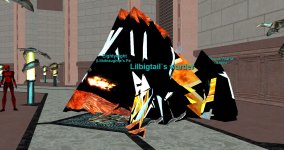
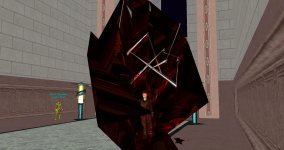
They can’t have intended the chase loot to have worse ratios than the T3 stuff… right?


Yes it should beThey can’t have intended the chase loot to have worse ratios than the T3 stuff… right?
They can’t have intended the chase loot to have worse ratios than the T3 stuff… right?
They are slightly better than T3 group but not as good as LS raid

MQ is taking longer to patch than the game did today!
Comments like this allow for the MQ gods to roll a d20 and extend the release time by that many hours. thanksMQ is taking longer to patch than the game did today!
Don't upset the dev!MQ is taking longer to patch than the game did today!
The dev's have jobs and family's just like most of us a little patience and understanding go a long way 

Lord Sivion
Ultimate seasoned veteran member
C'mon guys, go do something else while waiting for the MQ update. I am sure any sort of comment that points to the feeling of "OMG hurrrrryyy up GAWD!", comes across as ungrateful. And I am sure I speak for the entire forum when I say, we are ALL grateful for the work the guys put in for MQ and tools.


Atomic Bomb
Member
Thank you, Thank very much as always!

Give it time, everyone is doing the same thing at once.
plugins arnt loading
phillbilly
New member
Hello all, new to the community, just went through my first major update, anyone else having all of the MQ chatter go straight to main chat? I have tried moving "all" filters to a different window and still no change.
disable the plugin mq2chatHello all, new to the community, just went through my first major update, anyone else having all of the MQ chatter go straight to main chat? I have tried moving "all" filters to a different window and still no change.
phillbilly
New member
EXCELLENT!! Thank you so much! So far I am really enjoying everything I have seen!disable the plugin mq2chat
phillbilly
New member
Well dang, that did not fix the issue...EXCELLENT!! Thank you so much! So far I am really enjoying everything I have seen!
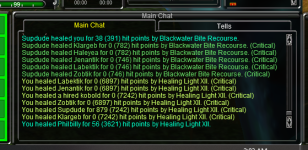

phillbilly
New member
I see, do you happen to know what they are labeled as? Like I said before, unfortunately I tried moving all filters to no availThose are from the new chat filters in game, you need to filter those to the window you use for spell/heal/whatever spam
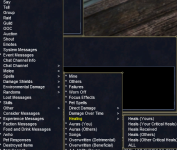
phillbilly
New member
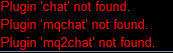
That got it, thank you all for your patience. They gotta make everything so dang complicated lolView attachment 56143
Using the all for spells does not select any of the DD DoT or Healing things, have to go into that one and hit all, or whatever you want it set to
I am using windows 10 (for some reason my comp/Microsoft won't allow me to DL Windows 11). The low brightness/contrast/gamma setup is now terrible. I have moved the bar to 100% on Enhance Vision but it did not help. I adjusted the Nvidia settings posted bhere by Magesrock but it did not help either. Anyone have a fix for this?
How do I do this?disable the plugin mq2chat
OMG so much got messed up with this patch. My inventory window is now GIANT sized. kinda looks like a safe mode window

OMG so much got messed up with this patch. My inventory window is now GIANT sized. kinda looks like a safe mode window
Under settings go to UI Scale in-game.
Settings where?Under settings go to UI Scale in-game.

Settings where?
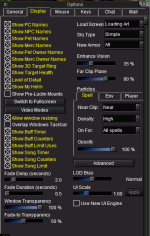
Found it, ty. That fixed it

Its right there at the bottom right. LOD Bias then under that is UI SCALE
You can also use the "/ui scale" command
But my understanding was The UI scale only works on windows that have been converted. At this time, that is the Inventory, Story, Quantity, and Window Selector windows.
@phillsphan to get your PC to take windows 11, older CPU/MB you have to manually go into the BIOS and enable TPM 4 (or greater, though highest atm is 4.2?). Then it should let you upgrade.
How do I do this?disable the plugin mq2chat

/plugin chat unloadHow do I do this?
/plugin chat unload
Attachments
Users who are viewing this thread
Total: 2 (members: 0, guests: 2)
Share: