- Joined
- Mar 23, 2019
- RedCents
- 8,987¢
- Pronouns
- He/Him
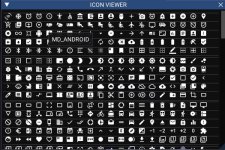
We have both the Material Design and Font Awesome fonts included in our ImGui integration. But I wanted an easy way to display fonts for buttons and displays in my Lua scripts.
I tracked down some old C header files for Material Design and Font Awesome (much easier to work with UTF-8 than Unicode in Lua). Took those and converted them. This file, when included (and you have some kind of autocompletion in VSCode will provide an easy way to choose and use icons in your ImGui apps.
Put the file in the "lib" subdirectory in your Lua script folder and include the file
[CODE lang="Lua" title="Lua include example"]local require ICON = require('lib.icons')[/CODE]
You'll get a full list of available Icons.
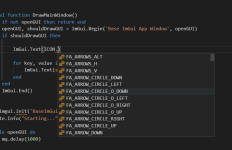
I wrote a quick loop to just run thru them all and display them on the screen with the code below:
[CODE title="Icon Display Gui"]--- @type Mq
local mq = require('mq')
--- @type ImGui
require 'ImGui'
local ICON = require('lib.icons')
local openGUI = true
local shouldDrawGUI = true
local function DrawMainWindow()
if not openGUI then return end
openGUI, shouldDrawGUI = ImGui.Begin('Example Icon App', openGUI)
if shouldDrawGUI then
for key, value in pairs(ICON) do
ImGui.Text(string.format('%s : %s', value, key))
end
end
ImGui.End()
end
mq.imgui.init('Icon Example', DrawMainWindow)
while openGUI do
mq.delay(1000)
end[/CODE]
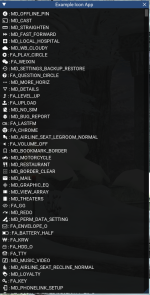
Which gives us output like this:
I tracked down some old C header files for Material Design and Font Awesome (much easier to work with UTF-8 than Unicode in Lua). Took those and converted them. This file, when included (and you have some kind of autocompletion in VSCode will provide an easy way to choose and use icons in your ImGui apps.
Put the file in the "lib" subdirectory in your Lua script folder and include the file
[CODE lang="Lua" title="Lua include example"]local require ICON = require('lib.icons')[/CODE]
You'll get a full list of available Icons.
I wrote a quick loop to just run thru them all and display them on the screen with the code below:
[CODE title="Icon Display Gui"]--- @type Mq
local mq = require('mq')
--- @type ImGui
require 'ImGui'
local ICON = require('lib.icons')
local openGUI = true
local shouldDrawGUI = true
local function DrawMainWindow()
if not openGUI then return end
openGUI, shouldDrawGUI = ImGui.Begin('Example Icon App', openGUI)
if shouldDrawGUI then
for key, value in pairs(ICON) do
ImGui.Text(string.format('%s : %s', value, key))
end
end
ImGui.End()
end
mq.imgui.init('Icon Example', DrawMainWindow)
while openGUI do
mq.delay(1000)
end[/CODE]
Which gives us output like this:


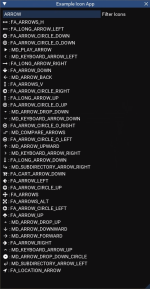


 Hover the icon for the name.