• Hail, we're RedGuides. We want you to play six (yes, 6!) EverQuest characters at once. We have scripts and a friendly community to help, please join our playstyle and say hello! 👋
  • We've added LLM sections to our Terms & Rules and Resource Rules, for everyone's sanity & in-game safety.
    Read more
    a. Do not replace your voice with an LLM. This goes for your posts and your scripts. Drafting and editing with a tool is fine, but don't take you out of what you share.
    b. Do not replace your EQ character's voice with an LLM. We don't want scripts that speak over /ooc, /shout or other public channels. This has been an unwritten rule that's kept casino scripts off the site for decades, but we're now compelled to make it clear: keep automated communication private.

    Why Does RG Review Scripts?
    Nearly every LLM-written Lua script we see is making your character do impossible things, and rarely in a way that's beneficial to you. We've seen heavy server hammering, /target over impossible distances when /nav spawn would passively accomplish the same thing, a spawn search that fires 20+ times per second, and other pointless actions that are likely annoying GMs.

    You are welcome to use LLMs as a tool to structure, draft, and edit your work, but please read critically before hitting /lua run
ImGui, Lua and Font Icons

Release ImGui, Lua and Font Icons 1.0

Coldblooded

Zero Fuchs Given
Creator
Commits
192
We have both the Material Design and Font Awesome fonts included in our ImGui integration. But I wanted an easy way to display fonts for buttons and displays in my Lua scripts.

I tracked down some old C header files for Material Design and Font Awesome (much easier to work with UTF-8 than Unicode in Lua). Took those and converted them. This file, when included (and you have some kind of autocompletion in VSCode will provide an easy way to choose and use icons in your ImGui apps.

Put the file in the "lib" subdirectory in your Lua script folder and include the file
Lua include example
Lua:
local require ICON = require('lib.icons')

You'll get a full list of available Icons.
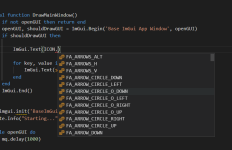
1645376483672.png

I wrote a quick loop to just run thru them all and display them on the screen with the code below:
Icon Display Gui
Code:
--- @type Mq
local mq = require('mq')

--- @type ImGui
require 'ImGui'

local ICON = require('lib.icons')

local openGUI = true
local shouldDrawGUI = true

local function DrawMainWindow()
    if not openGUI then return end
    openGUI, shouldDrawGUI = ImGui.Begin('Example Icon App', openGUI)
    if shouldDrawGUI then

        for key, value in pairs(ICON) do
            ImGui.Text(string.format('%s : %s', value, key))
        end

    end
    ImGui.End()
end

mq.imgui.init('Icon Example', DrawMainWindow)

while openGUI do
    mq.delay(1000)
end

Which gives us output like this:

1645376733286.png
 

Attachments

This is awesome, thank you!

I made a small modification adding a filter to the example which is helpful for me when cross-referencing icons on FA, etc since I am not using the EmmyLua autocompletions right now. I realize this is trivial but it might be helpful to someone.

1645399936081.png
 

Attachments

They are at the top of this thread, you can download them, or you can "watch" them and when you start your RedGuides launcher, I believe they are downloaded to the lib folder automagically.
 
where can I find for download the lib.icons file please? for line local ICON = require('lib.icons')
I too was a bit confused by this. The Download link downloads a ZIP that contains a lib\icons.Lua file. This is actually the example program and should not go in your lib folder. The attachment in the OP is the file that you want in the lib folder.
 
I started with my own simple table based view, then i found this.

Here is a few modifications.
locked the search bar to the top so you can scroll without it leaving your view.
right click any row and copy the name to clipboard, so you can just paste it into your script.
 

Attachments

Release ImGui, Lua and Font Icons

Users who are viewing this thread

Back
Top
Cart