• You've discovered RedGuides, an EverQuest multi-boxing and scripting community 🧙‍♀️⚙️. We want you to play several EQ characters at once, come join us and say hello! 👋

  • A TLP without truebox has thawed (Very Vanilla ready)
    Frostreaver

Lua - How to auto load a specific lua on all of your characters (1 Viewer)

hushed

Well-known member
Joined
Sep 25, 2021
RedCents
2,623¢
I had to spend some time searching down this solution. The information is out there, but I couldn't find it in a single spot, hopefully this will be helpful to someone else. Documenting also helps me learn it!

To load a Lua, you would use the code:
INI:
/lua run *lua name*
If you want this Lua to load every time any character enters the game, you will need to create a cfg file, in your config folder.
  1. Create the file ingame.cfg in your config folder. You can do this with Notepad if you like.
    1. For me, this can be found here: \\VeryVanilla\MQNext\Release\config\ folder.
  2. Add the code you want to automatically run when your character gets in game; /lua run lootly in my case.
  3. Save your new file.
  4. Load up a character, and see it is now working!

Where should you put that Lua you just downloaded? drop the Lua file in your Lua folder. For me, that's here: \VeryVanilla\MQNext\Release\Lua\.

There are many options when it comes to the config files CFG. Details can be found here: https://www.macroquest2.com/wiki/index.php/CFG_Files.

If you go crazy with adding luas, you might want want to consider adding delays. An example might look like this:

INI:
/timed 50 /lua run lootly
/timed 100 /lua run alertmaster
/timed 150 /lua run somethingfancy


Here is a guide by @Sic:

 
Last edited:
@hushed thank you as well, was wondering how to avoid loading each session, across all toons:)
 
Use the /kissassist and /end commands

then modify your INI files. This is the best for beginners using Red Guides

Bunch of INI files and examples in the Library
 
LOL I was just doing /bcaa //Lua run "insert script here" on my leader toon but this would be even easier. Thank you!!
 
I had to spend some time searching down this solution. The information is out there, but I couldn't find it in a single spot, hopefully this will be helpful to someone else. Documenting also helps me learn it!

To load a lua, you would use the code:
INI:
/lua run *lua name*
If you want this lua to load every time any character enters the game, you will need to create a cfg file, in your config folder.
  1. Create the file ingame.cfgin your config folder. You can do this with Notepad if you like.
    1. For me, this can be found here: \\VeryVanilla\MQNext\Release\config\ folder.
  2. Add the code you want to automatically run when your character gets in game; /lua run lootly in my case.
  3. Save your new file.
  4. Load up a character, and see it is now working!

Where should you put that lua you just downloaded? drop the lua file in your lua folder. For me, that's here: \VeryVanilla\MQNext\Release\lua\.

There are many options when it comes to the config files CFG. Details can be found here: https://www.macroquest2.com/wiki/index.php/CFG_Files.

If you go crazy with adding luas, you might want want to consider adding delays. An example might look like this:

INI:
/timed 50 /lua run lootly
/timed 100 /lua run alertmaster
/timed 150 /lua run somethingfancy
Thank you :)
 
Useful for specific characters as well:

Along with the ingame.cfg. you can also create server_Charactername.cfg files in your next/config folder. I use this for example on my driver for buttonmaster and boxhud, while the others just get the usual stuff.
 
I will show you how to automatically run a .Lua script upon entering the game!


Made a vid and merged into this stickied thread
 
Nice! And thanks for the little easter egg there at the end. I'm looking forward to my new Druid! 😇
 
For some reason your file explorer is set up wrong, this will help some of you guys.


1) Open File Explorer and press View on top of the window.
2) Click on the file name extension.

This will allow us to change it just by renaming it.
 
How would I go about setting this up so it only loads on startup for one character? I looked through the wiki and didn't see it mentioned.

For example I only use buttonmaster on my driver toon and don't want it auto loading on the other toons.

Thanks!

and set up a server_charname.cfg

so vox_coolguy.cfg

Lua:
/lua run coolstuff
 
Many thanks Sic!

Creating a notepad file and renamed it to .cfg didn't work so I found another cfg file in the folder and made a copy to server_toonname and it works amazing.
 
I had to spend some time searching down this solution. The information is out there, but I couldn't find it in a single spot, hopefully this will be helpful to someone else. Documenting also helps me learn it!

To load a lua, you would use the code:
INI:
/lua run *lua name*
If you want this lua to load every time any character enters the game, you will need to create a cfg file, in your config folder.
  1. Create the file ingame.cfgin your config folder. You can do this with Notepad if you like.
    1. For me, this can be found here: \\VeryVanilla\MQNext\Release\config\ folder.
  2. Add the code you want to automatically run when your character gets in game; /lua run lootly in my case.
  3. Save your new file.
  4. Load up a character, and see it is now working!

Where should you put that lua you just downloaded? drop the lua file in your lua folder. For me, that's here: \VeryVanilla\MQNext\Release\lua\.

There are many options when it comes to the config files CFG. Details can be found here: https://www.macroquest2.com/wiki/index.php/CFG_Files.

If you go crazy with adding luas, you might want want to consider adding delays. An example might look like this:

INI:
/timed 50 /lua run lootly
/timed 100 /lua run alertmaster
/timed 150 /lua run somethingfancy


Here is a guide by @Sic:


This answered a question I was about to ask and I just stumbled upon it.
I have a bunch of Lua's running and many of them try to clear your cursor and it seems the more you have running the faster it clears it. It was getting to the point that I couldn't pick up an item to destroy it before the Lua dropped it back in my inventory. It's very frustrating trying to race a computer to delete 12 no-drop trash books from the barren coast when you AE nuked a ship full of pirates and didn't have the settings for that zones loot table set yet, so it auto looted it all.

I was wondering how to see what was running and how to pause all the Lua's; the UI was what I needed so thanks.
 
Ok now that I’m running two groups regularly I’ve added some new tools like lootier and lootly.

This is more a general question but what luas are people running on the regular that they need it auto loaded?

I’m pretty simple at events manager, Loo tier and lootly, and buttonmsster. I feel like I might be missing out.
 
Last edited:
I automatically run mq2grind on my tanks, using the method I describe here.

I guess the UI is a lau but wasn’t really the point. I use MQ2grind but hardly something I would want to auto load since it doesn’t take long to max aa anymore.
mq2autogroup - set up atuomatically
lem
overseer - super helpful with lots of toons and do oversaeers
boxhud - a must have with multiple toons imo
Guildclicky
MGB for buffs
MQ2Boxr - for ease of commands across multiple type of automation
MQ2feedme - autofeed

This list goes on an on =)

Lootly, guildclicky, invisdisplay, lem

Thanks.

I haven’t setup auto group because it doesn’t seem much different to me then the invite hotkey setup. And since I have like 7-8 active groups I tend to change things a lot.

Boxhud I have followed but haven’t added yet def plan to begin using that. No guildclickies tht are useful so haven’t’ done. I‘m maxed on stat food so just started eating it regularly instead of the auto feed.

guess I’m not that far off in active lems. And when I narrow down my tank is always the one with buttonmaster or lootly no need to config I guess.
 
I guess the UI is a lau but wasn’t really the point. I use MQ2grind but hardly something I would want to auto load since it doesn’t take long to max aa anymore.


Thanks.

I haven’t setup auto group because it doesn’t seem much different to me then the invite hotkey setup. And since I have like 7-8 active groups I tend to change things a lot.

Boxhud I have followed but haven’t added yet def plan to begin using that. No guildclickies tht are useful so haven’t’ done. I‘m maxed on stat food so just started eating it regularly instead of the auto feed.

guess I’m not that far off in active lems. And when I narrow down my tank is always the one with buttonmaster or lootly no need to config I guess.
The UI is imgui, not Lua, the plugin is also a plugin
 
The UI is imgui, not lua, the plugin is also a plugin

Was aware of plugin but wasn't thinking about UI - should have realized since you type nothing in to pop it up. To your point though was looking to see what people are running regularly for Lua.
 
/timed 50 /lua run lootly
/timed 100 /lua run alertmaster
/timed 150 /lua run somethingfancy

Do you need /timed to be at increasing intervals like in the example above?

Or can you just do /timed 100 between each line like this

/timed 100 /lua run lootly /timed 100 /lua run alertmaster /timed 100 /lua run somethingfancy
 
Do you need /timed to be at increasing intervals like in the example above?

Or can you just do /timed 100 between each line like this

/timed 100 /lua run lootly /timed 100 /lua run alertmaster /timed 100 /lua run somethingfancy
a multiline fires all the things at the same time, so when you need to stagger them or use it like a sequential process, you use /timed (which is non-cumulative)
Code:
/multiline ; /echo hi; /timed 10 /echo hi 1 second after button press; /timed 50 /echo hi 5 seconds after button press; /timed 200 /echo hi 20 seconds after button press;
 
I spent literally six hours reading and trying to figure out how to use this program. all i ever get is spam messages. i cannot understand how to make this work and i hate the avatar of war so bad i wanna scream.
 
Is there a new way to autoload luas? I created the file ingame.cfg in my configs folder and none of my luas are loading.

I added the ingame.cfg file at this location: C:\Users\Owner\AppData\Local\VeryVanilla\MacroQuestTest\Release\Config
It has this in the file:

/Lua run lootly
/timed 20 /Lua run invisdisplay

When I load my group up, neither of the luas load.
 
Is there a new way to autoload luas? I created the file ingame.cfg in my configs folder and none of my luas are loading.

I added the ingame.cfg file at this location: C:\Users\Owner\AppData\Local\VeryVanilla\MacroQuestTest\Release\Config
It has this in the file:

/lua run lootly
/timed 20 /lua run invisdisplay

When I load my group up, neither of the luas load.
/timed 50 /lua run lootly
/timed 100 /lua run alertmaster
/timed 150 /lua run somethingfancy
so...yours would just need adding invisdisplay in place of alertmaster.
 
I made these changes and unfortunately, it still does not load anything. Just to be clear, my ingame.cfg now says:

/timed 50 /lua run lootly
/timed 100 /lua run invisdisplay
Double check and make sure its a .cfg file and not .ini

Also noticed you posted a link to a directory that seems to point to a custom folder for test server. Might need the .cfg file in multiple folders if you have more than one.

C:\Users\Owner\AppData\Local\VeryVanilla\MacroQuestTest\Release\Config
 
Double check and make sure its a .cfg file and not .ini
I double checked and it is .cfg.

Also noticed you posted a link to a directory that seems to point to a custom folder for test server. Might need the .cfg file in multiple folders if you have more than one.
I am not sure what you mean by this. I did not change anything on my MQ folders when I installed them using the Redguides launcher.
 
I double checked and it is .cfg.


I am not sure what you mean by this. I did not change anything on my MQ folders when I installed them using the Redguides launcher.
I think he’s saying make sure your .cfg that you’ve added those lines to is in the test folder you posted, and not in the live folder for MQ. You’ll have config and file structures in both.
 
I double checked and it is .cfg.


I am not sure what you mean by this. I did not change anything on my MQ folders when I installed them using the Redguides launcher.
Let's try this instead. Download the attached ingame.cfg file to your system


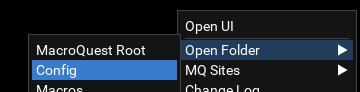
Run MQ and then right-click on the MQ icon on your taskbar1759675939772.png

Then choose open config folder 1759675966618.png

Then copy the ingame.cfg file you just downloaded into your that folder.

Launch away and gicve us the good news =)
 

Attachments

This worked! Looking at the file you gave me and the one I created, I think Sic was also correct. Mine shows as a text file type (even tho it had the correct extension) and yours shows as a cfg. Thanks guys!
 
This worked! Looking at the file you gave me and the one I created, I think Sic was also correct. Mine shows as a text file type (even tho it had the correct extension) and yours shows as a cfg. Thanks guys!
almost certainly wasn't actually the right file extension. it is a common problem if you're not showing extensions which is why i mentioned it.

you can compare at this mark in the video i made that is posted in this original post


Lua - How to auto load a specific lua on all of your characters

Users who are viewing this thread

  • O
Back
Top
Cart