• You've discovered RedGuides, an EverQuest multi-boxing and scripting community 🧙‍♀️⚙️. We want you to play several EQ characters at once, come join us and say hello! 👋

  • A TLP without truebox has thawed (Very Vanilla ready)
    Frostreaver
GuildClicky

Release GuildClicky 01/06/2026

No permission to download
Just loaded this. Super cool tool. I used to deal with guild clickies using Aliases, but this is waaaay better.

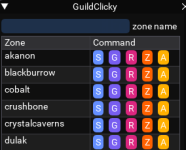
If I could have my ultimate version of this (not sure it's possible), I envision a UI that pops up displaying a list of "zone buttons", based on actual clickies in my guild hall. I click the button and the rest is how it works now. In a way, kind of similar to the way MQ2portalsetter works for changing guild port stones.

Regardless, this is super cool. Thank you Sic (space dog thanks you too).
 
Just loaded this. Super cool tool. I used to deal with guild clickies using Aliases, but this is waaaay better.

If I could have my ultimate version of this (not sure it's possible), I envision a UI that pops up displaying a list of "zone buttons", based on actual clickies in my guild hall. I click the button and the rest is how it works now. In a way, kind of similar to the way MQ2portalsetter works for handling changing guild port stones.

Regardless, this is super cool. Thank you Sic (space dog thanks you too).
There is already a guild clicky UI if I'm not mistaken that does pretty much this.

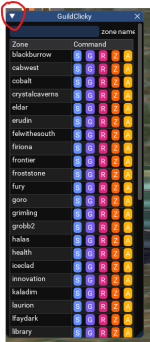
Try /gc ui
 
Food for thought. I was looking at the UI the other day and thought it might be nice to modify the tabs up top to have "group" first since most of us multi-box and want our group to go with us much more often than "self". I find myself always switching to group each time I open the UI so why not =)

Next edit if you're so inclined.
 
Last edited:
Sure does. Sic got real creative with that update and made it super simple to use....thank you!!
 
So simple, even a.. @ImGreg could use it..
hmm, that's questionable for sure.

Maybe super simple was not the right wording there but it's where my mind went because I was looking at the old version thinking it would be cool to be able to reorder the self, group, raid, etc tabs around so someone could leave it on the one they use the most. And as usual, when I mention ideas to dev's here, their mind goes far beyond where I ever imagined taking something and it's always very creative and intuitive. It proves why this community thrives and this modification was no exception as I thought it was a very creative way to upgrade it.
 
hmm, that's questionable for sure.

Maybe super simple was not the right wording there but it's where my mind went because I was looking at the old version thinking it would be cool to be able to reorder the self, group, raid, etc tabs around so someone could leave it on the one they use the most. And as usual, when I mention ideas to dev's here, their mind goes far beyond where I ever imagined taking something and it's always very creative and intuitive. It proves why this community thrives and this modification was no exception as I thought it was a very creative way to upgrade it.
I'm still waffling on making it so you can enable/disable button types (like maybe you never want to show raid or zone), but i really wanted to avoid a settings file
 
I'm still waffling on making it so you can enable/disable button types (like maybe you never want to show raid or zone), but i really wanted to avoid a settings file
Not sure you really need to imo. The way you did it compacted the design and the colors make the options pop. Let's also say the obvious that this is likely mostly there for those of us that don't always remeber the short names since we know you can type /dgga /gc laurion and your crew goes there. But for me, I use grp, raid, zone quite often and a simple /gc ui lets me decide quickly.

1720881149497.png
 
I do like the new look.
I find it amazing how hobbiest are better than DBG's staff at listening to feedback and making changes :dance:
 
On the new Guildclicky, if I try to collapse the window using the top left down arrow, it crashes the toon I am doing that on . Repeated about 6 times just to prove it was that doing it. No crash message, just the EQ windows disappears completely.
 
On the new Guildclicky, if I try to collapse the window using the top left down arrow, it crashes the toon I am doing that on . Repeated about 6 times just to prove it was that doing it. No crash message, just the EQ windows disappears completely.
I'll take a look, thanks
 
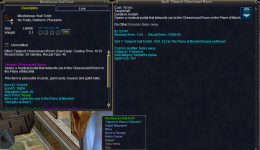
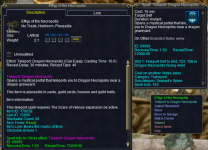
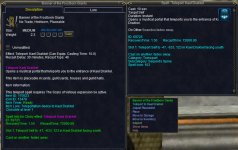
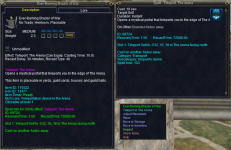
Not sure if you are adding suggestions or not, but this is missing at the moment (reward from a Vaniki achivement)
1721389896112.png
 
Not sure if you are adding suggestions or not, but this is missing at the moment (reward from a Vaniki achivement)
View attachment 63426
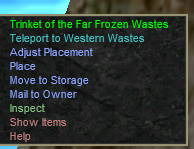
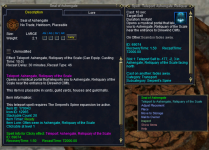
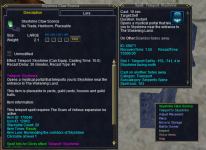
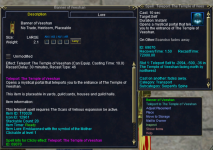
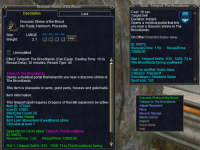
Q. There is a clicky missing?!?!
A. Inconceivable! Please post in the discussion thread with a screen snip of the item and of the right-click dialog. Yes, the right-click dialog. no, just the item inspect is not enough. Yes, I need the actual right-click dialog from right-clicking on the item. unfortunately, sometimes they are different. thanks dbg.

yep.

but need the information to be able to add it.
 
Q. There is a clicky missing?!?!
A. Inconceivable! Please post in the discussion thread with a screen snip of the item and of the right-click dialog. Yes, the right-click dialog. no, just the item inspect is not enough. Yes, I need the actual right-click dialog from right-clicking on the item. unfortunately, sometimes they are different. thanks dbg.

yep.

but need the information to be able to add it.
Updated post with spell
 
Updated post with spell
Q. There is a clicky missing?!?!
A. Inconceivable! Please post in the discussion thread with a screen snip of the item and of the right-click dialog. Yes, the right-click dialog. no, just the item inspect is not enough. Yes, I need the actual right-click dialog from right-clicking on the item. unfortunately, sometimes they are different. thanks dbg.

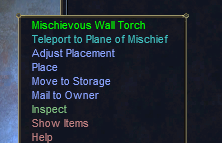
the right click dialog when you go to use the item
like this
1721390062279.png
 
I am still getting the entire EQ window closing without a crash message when I try to collapse the GuildClicky UI. I just tried it on a freshly rebooted and fully patched setup. Let me know if there is an more info I can provide.

1721427804213.png
 
I am still getting the entire EQ window closing without a crash message when I try to collapse the GuildClicky UI. I just tried it on a freshly rebooted and fully patched setup. Let me know if there is an more info I can provide.

View attachment 63436
Yep. I said I'd take a look, and I haven't had a chance yet. When it is updated, it'll be in patch notes
 
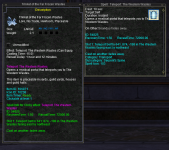
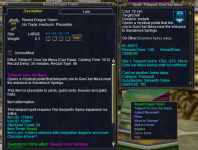
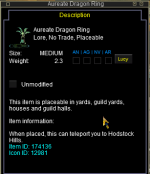
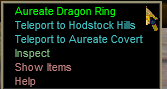
New hodstock hills clicky, and apparently Aureate Covert too. Just FYI, the Teleport to Aureate does not seem to be currently working, so that may have been a bug to have it on there.
1733257646551.png1733257663702.png
 
Last edited:
Release GuildClicky

Users who are viewing this thread

Back
Top
Cart