• You've discovered RedGuides, an EverQuest multi-boxing and scripting community 🧙‍♀️⚙️. We want you to play several EQ characters at once, come join us and say hello! 👋

  • A TLP without truebox has thawed (Very Vanilla ready)
    Frostreaver
Resource icon

Release Grouper 1.2

No permission to download
Joined
Nov 23, 2019
RedCents
1,410¢
vandersl submitted a new resource:

Grouper - A Swiss Army Knife for your group.

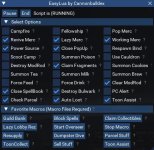
A group management tool for new folks or those looking to simplify. Avoids the need to create your own hot keys, and I dare say improves on what can be done with them. Has too many functions in a state of flux to list here. The window currently looks like this:
View attachment 43312
Group member names are clickable - left clicking targets and faces the member, then left-clicks them. If you are holding an item this will open a trade window (helpful when they are in a bunch)...

Read more about this resource...
 
This is a really great idea. I never thought of creating something like this, but now I can't help but think of all the things that could be done with it.

I have a couple friends that really struggle to control their groups because they never get their hotkeys working, for whatever reason. I think this will prove to be very useful for folks new to MQ.

Looking forward to future revisions :)
 
Pretty cool stuff. Similar but not the same thing I have been working on. Maybe some ideas to incorporate. :)
 

Attachments

  • Untitled.jpg
    Untitled.jpg
    83.7 KB · Views: 53
Very cool! Interested in this. I'll play with it over the weekend to give you some dumbdumb feedback :)

Dex, same deal, that looks great.
 
Hi all. Thanks to those who downloaded to give it a try. I've been using this as my primary group management tool on 2 groups, and have replaced all of my prior hotkeys with one-line /grouper commands.

I've made a couple tweaks to avoid the odd nil reference and to clean up the code to prevent unrecognized command spam, but nothing major. Rather than post an update with little changed, I was wondering if anyone that tried it has any issues or feedback so far?

I am going to try tweaking the invis algorithm to make it use background accounts for 2 casters (I read it works better than a FG/BG pair), but other than that am open to suggestions on what else to work on.
 
It has been great so far. I started a new group and used it with them so the Setup feature was very nice! A couple of things I would not mind seeing is the ability to change button color and add my own button. Once I get used to the layout button color is not as big a deal but I am used to Buttonmaster and the colors I set up. I am not a power user by any means but once I am done with the session I like to have everyone use the Throne of Heroes AA, which can just be put on a hot bar so no big deal. I will keep testing it out this weekend and I cannot thank you enough for such a great tool!
 
It has been great so far. I started a new group and used it with them so the Setup feature was very nice! A couple of things I would not mind seeing is the ability to change button color and add my own button. Once I get used to the layout button color is not as big a deal but I am used to Buttonmaster and the colors I set up. I am not a power user by any means but once I am done with the session I like to have everyone use the Throne of Heroes AA, which can just be put on a hot bar so no big deal. I will keep testing it out this weekend and I cannot thank you enough for such a great tool!
Thanks. Was thinking of adding some sort of relocate add-on.

As for colors and things - I haven't spent as much time as I could on making things configurable. I still need to look into a config file for things like the camp radius and other persistence.

I was thinking that many would access functionality by adding the binds to their own buttons, e.g. '/grouper invis' on standard buttons that can have key mappings (I prefer the keyboard for common actions). But making the layout a bit nicer is likely in the plans once the base functionality is solid.
 
Suggestion: I know you have a couple of formations listed and each is a separate button? What if you had 1 button, that randomized the formations. Saves space, and always different.
 
Suggestion: I know you have a couple of formations listed and each is a separate button? What if you had 1 button, that randomized the formations. Saves space, and always different.
Could do, but the circle and moon were intended for hand-offs or looking cool. The scatter formation is random, so not sure why I would randomize formation, unless missing your point. Distance for these is planned, though current one works for hand-offs.
 
Could do, but the circle and moon were intended for hand-offs or looking cool. The scatter formation is random, so not sure why I would randomize formation, unless missing your point. Distance for these is planned, though current one works for hand-offs.
Well, I was thinking one button. Formation. 1st click randomly chooses halfmoon, click it again - circle, again duck, again half moon, again 3 snaps in a z formation, again duck, etc. Randomizes the formation, utilizing 1 button. Varies...
 
Well, I was thinking one button. Formation. 1st click randomly chooses halfmoon, click it again - circle, again duck, again half moon, again 3 snaps in a z formation, again duck, etc. Randomizes the formation, utilizing 1 button. Varies...
Lol - probably a brain fart going on here. Trying to figure out why I if I wanted them in half-moon I would want to keep clicking an unknown number of times until I got them there. Now, a deterministic progression I can understand: 1st click random, 2nd circle, 3rd half, repeat. But a purely random outcome seems odd, given that sometimes I want random, and sometimes I want a circle.

BTW - what's duck?
 
Mighty duck formation, flying V. I thought the random to look less conspicuous is all. No worries.
 
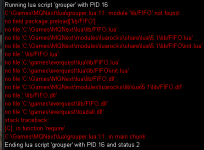
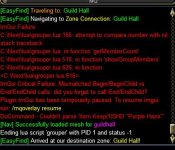
The only issue I ran into with Grouper while using it this weekend was it crashed about 75% of the time zoning into the Guild Hall. I tested it with just zoning in with no nav and using Magellan, it didn't seem to make a difference. Once I resumed and reloaded Grouper it worked fine until zoning back into the Guild Hall then it may or may not crash.
 

Attachments

  • GrouperCrash2.JPG
    GrouperCrash2.JPG
    45.1 KB · Views: 4
The only issue I ran into with Grouper while using it this weekend was it crashed about 75% of the time zoning into the Guild Hall. I tested it with just zoning in with no nav and using Magellan, it didn't seem to make a difference. Once I resumed and reloaded Grouper it worked fine until zoning back into the Guild Hall then it may or may not crash.
Thanks for the feedback @grovers. There were a few of those in there because the group info disappears when zoning, and I have corrected them. I will be putting out an update in the next day or two with the following:
- bug fixes and slightly improved functionality
- ability to set button text color
- ability to configure 6 custom buttons
- load/save settings to config file
- minimized mode that shows only group members / invis state
 
Wow, this is very nice. I liked showing who invis or not and what type you have on.

Can you put distance next to the group names? I keep losing my toons all over the place, lol. They are always getting stuck somewhere.
My custom UI numbers are very tiny.
 
I've been a bit idle on this for a bit. Will be out for a couple of weeks but there will be an update in the New Year with a few tweaks and enhancements. Happy New Year everyone.
 
vandersl updated Grouper with a new update entry:

Long delayed update.

This version has two functionality updates:

1) You can toggle invisibility modes by clicking the middle mouse button on the invisibility button. Always defaults to Dual on startup. Choices are:
Dual - existing behavior (Bard first, dual with casters second)​
Invis - will prefer caster permanent invisibility, Bard otherwise​
IVU - will prefer caster permanent IVU, Bard otherwise​

2) Will now auto-attack mobs within your camp radius if in...

Read the rest of this update entry...
 
Close the window and re-start it.
Thanks for posting this @Overtimer. I responded in a PM but didn't post it here.

Note that with the update (0.4) the program will automatically restart when run, but unfortunately this does not seem to follow the same close path as the 'X' button and will not save settings. I will have to come up with a better way.
 
I love this!

I run with a puller class. Are the buttons for camp on/off editable based on this? I'd rather leave the tank to do tank things, but camp off seems to put me into tank mode (cwtn) so everyone follows.

I made a custom one that puts everyone into chase mode with puller as MA for Camp Off type mode, while campon makes the MT into tank mode and everyone else assist.
 
I love this!

I run with a puller class. Are the buttons for camp on/off editable based on this? I'd rather leave the tank to do tank things, but camp off seems to put me into tank mode (cwtn) so everyone follows.

I made a custom one that puts everyone into chase mode with puller as MA for Camp Off type mode, while campon makes the MT into tank mode and everyone else assist.
Unfortunately, right now things are mostly fixed, and this prefers to run on your tank as driver (pretty standard). Camp On will put everyone else into assist mode and you in Sic Tank.

What is the specific setup you have? Who is driving/running Grouper, and who is tank/assist? Some specifics will help me to think through ways to incorporate something, as right now I am tunnel-visioned on my setup.

I suppose you could always set up a custom button that first does a '/grouper campon' followed by commands to change specific character modes.
 
Would love to see this without Boxr dependence. (its not available for emu build currently)
Not currently planned. Would have to recreate boxr functionality and I am not prepared to do it for all the various automations out there. But nothing is ever final, so you never know.
 
What do the +/- number fields to the left of Auto Attack, and Below Camp Off/Camp On? I scanned over the instructions and its a little unclear. I think these settings are messing with my CWTN Camp Radius upon login.
 
What do the +/- number fields to the left of Auto Attack, and Below Camp Off/Camp On? I scanned over the instructions and its a little unclear. I think these settings are messing with my CWTN Camp Radius upon login.
They adjust the camp radius. The ones to the left of the A change the radius for assisting toons. The ones to the left of the T change the radius for the tank. You can also just type directly into the edit boxes.

Edit: And yes, if you adjust the camp radius outside the program so it is not saved in the INI then it will reset the camp radius on startup.
 
I snapped my Grouper window to the "snap" button on the left side, and now I can't move the window at all. It will let me expand the window to the right, but I can't actually move it around anymore. It's "stuck" to the left side of my screen and taking up the whole left side of the UI.

I tried deleting and reinstalling the grouper Lua folder and deleting my Grouper character specific config file, but it's still stuck in that position.

How do I reset the window to default position?
 
@RylanZ123
Probably other ways to do this but try opening the console window (Ctrl+shift+~) and then move the snapped window.
 
I did a small change to remove assigning the MT tank on raids. I reused the Auto-Attack button. This was meant not to change to much of the main program function, till we get a real fix.

If that is disable you will not assigned the MT, MA stuff. When able it will assigned it again.
[CODE title="replace line 1094-1105"]-- MA is set, MT is not. Set MT.
elseif currentMA ~= nil and currentMT == nil and auto_attack_enabled then
sendCommand(currentLeader,string.format('/grouproles set %s 1',currentMA))

-- MT is set, MA is not. Set MA.
elseif currentMT ~= nil and currentMA == nil and auto_attack_enabled then
sendCommand(currentLeader,string.format('/grouproles set %s 2',currentMT))

-- Both MT and MA are set, but not the same. Set MT to MA.
elseif currentMT ~= currentMA and auto_attack_enabled then
sendCommand(currentLeader,string.format('/grouproles set %s 1',currentMA))
end[/CODE]
 
I have found one bug in grouper. When I have a toon go LD, and then reconnect to the game, the invis status does not update for that reconnected toon. Once I stop and restart Grouper, it will start working again. Not a big issue, just an annoyance.
 
vandersl updated Grouper with a new update entry:

Fix auto-attack

Hi all. It's been a long time since I've played, and longer since I updated Grouper. I recently noticed that Auto-Attack is no longer working as the name for the CWTN mode for Vorpal has changed to VorpalAssist and I was using a strict compare on the text. That should be fixed but in the short term I am posting an update with the mode name changed to VorpalAssist.

Hope this helps those still using this Lua. I hope to be doing some updates soon, now that winter has arrived and time shifts to...

Read the rest of this update entry...
 
Last edited:
I have found one bug in grouper. When I have a toon go LD, and then reconnect to the game, the invis status does not update for that reconnected toon. Once I stop and restart Grouper, it will start working again. Not a big issue, just an annoyance.
Yep. I am annoyed by that as well. Not sure exactly how to reset connection with DanNet in some cases - the observer just seems to crap out. I guess I either have to figure out what is going on or change the whole thing over to Lua actors, which look really cool.
 
Release Grouper

Users who are viewing this thread

Back
Top
Cart