• You've discovered RedGuides, an EverQuest multi-boxing and scripting community 🧙‍♀️⚙️. We want you to play several EQ characters at once, come join us and say hello! 👋

  • A TLP without truebox has thawed (Very Vanilla ready)
    Frostreaver
GiveItems.mac

Release GiveItems.mac (1 Viewer) v2.7.2

No permission to download
Request, a function that would allow you to retrieve tradeskill or collection stuff from bank (to assist with consolidating stuff OUT of the bank. the reverse of /giveitem ba tr say /giveitem br tr or something like that?
 
It's already in the works, but I've been slacking on the macro the past few months.
 
I plead the fifth.

February was insanely busy for me, I got diddly and squat done on anything. I think I'll be able to get back into things this month, but I'm not sure if I'll tackle this one right away. It's fairly involved. While the functions are similar to what I already have,it's still going to be nearly a doubling of code, so that's going to take some time. I've been busy most recently on a different macro, which I'd also like to finish polishing up, so it's a toss-up which one I work on first, but it's still on my radar for sure.
 
I Just wanted to say I love this mac. Save me a huge amount of time moving stuff around.
 
I plead the fifth.

February was insanely busy for me, I got diddly and squat done on anything. I think I'll be able to get back into things this month, but I'm not sure if I'll tackle this one right away. It's fairly involved. While the functions are similar to what I already have,it's still going to be nearly a doubling of code, so that's going to take some time. I've been busy most recently on a different macro, which I'd also like to finish polishing up, so it's a toss-up which one I work on first, but it's still on my radar for sure.

Well someone pointed out a feature I didn't know. Basically if you right click on the "AutoBank" button, you can select "tradeskill items" or "collection items". You can then click "Withdraw selected items to inventory" (or similar) and the next time you click on autobank MQ2 will automatically pull out all of that item type from the bank and put it in your inventory. Only downside is it's so fast it must be detectable...
 
Except that gets you all or nothing. Not downplaying it, I've used it too, and I like it, but it's limited. My functionality will do as stated above, it'll allow removal by ini category just like the give function does going the other way now. And of course it'll allow you to withdraw all as well, at least until your inventory is full. And the plugin function is going to be significantly faster too, that's the way those things work.
 
I'll try and test. never attempted that before. they may not carry the same flag designations, because I think they're considered pets, not npcs.
 
Yes, thank you. but if you target them and do /echo ${Target.Surname} it returns a blank, and that's where the issue lies, because that's how I was determining type banker. Standard bankers in the game carry a surname of Banker. That doesn't hold true for the summoned banker familiar. I'm not sure what I can do to fix it, but I'll need to play with it a bit to see. I think I can see a way, but it'll take me a bit of fiddling.
 
Last edited:
good point, thanks. Don't recall if this id predates me or not, but I can alter it's targeting.
 
I find a lot of times where i cannot get it to start giving items to a banker or a pc. It just starts spouting about no drop items and does nothing.
 
It's always going to return messages as it's parsing through your inventory when it finds nodrop items. Because you may have items that meet the criteria you're trying to match when giving them, but they're nodrop, so it's informing you that "hey, I tried to hand this over, but I cannot because it's NODROP". I could change the feedback to read that way I suppose, but it's only an issue if you have other items that match the criteria that are not nodrop and it's still not handing them over. If that's the case, could you give me some specifics of what they are, so I can try to test it on my end? I know older versions of the macro had some problems with that, but the latest revision on RG should be parsing those correctly. Having said that, I know I've identified a couple of unique case scenarios this past week where things don't work quite as intended, but it's a small subset of situations, and those are on my todo list.
 
With the,

/giveitem pc collection

command, it gives the entire stack of collectables to the PC rather than just one of each. Is this how it is meant to be or is there a way to just give the other toon one of each collectable so I can share them around my toons?
 
Did you type /giveitem fullstack first? That's the only time I've had the behavior you are describing Jetanroth.
 
Did you type /giveitem fullstack first? That's the only time I've had the behavior you are describing Jetanroth.

I started the mac with,

"/mac giveitems"

Then when it was running, I targeted the toon I wanted to had over a collection set to and typed,

"/giveitem pc collection"

It then started handing over all the stacks of collectables to the other PC. Is there something else I should type or change?
 
Looks like something has changed in the code from earlier version i use, downloaded the current version and looks like the Full stacks is enabled on at the start and the command to do full stacks isn't working properly. Going to require the dev to fix.

@toadwart @Sic
 
Looks like something has changed in the code from earlier version i use, downloaded the current version and looks like the Full stacks is enabled on at the start and the command to do full stacks isn't working properly. Going to require the dev to fix.

@toadwart @Sic

Do you have the working single item version still available? Would you be able to send it to me?
 
I'll dig through it. TS items are by default set to trade full stack, it's possible collectibles ended up that way too. I'm not sure offhand.

Edit: collectibles should not be setting it to force fullstack, it should be toggle-able. I will see what I can figure out, something may be askew.
Edit2: Fullstack is forced on if you have a collectible on your cursor when you execute, if you're putting them into the bank, or if the collectible is defined in the giveitems.ini file with a -1 value
"/giveitem fullstack" should toggle the option on/off, but if any of the above 3 conditions are set, it will toggle back to "on" again regardless.

Are any of the above the case with what you're trying to do? modifications to alter this behavior can be done, but it will take me a little time.
 
Last edited:
Do you have the working single item version still available? Would you be able to send it to me?
Go to page 1, Post 1, copy the code, paste the code into a text file, save it as what you want to name it. The original code is already available.
 
Trying to get this working but running into an issue where the macro doesn't pick the items up from my inventory. I tried the Lvl 1 snake sac quest using:

/giveitem np gr q1

Here's my ini file:

[General]
Debugging=TRUE
[q1]
Snake Sac=-1

Debug output shows a bunch of lines with "no drop" but nothing about the snake sacs I have in my inventory. Not sure if it matters but the debug also says the item type is a 3 which, from looking at the macro code, sounds like it's not implemented yet?

Anyway, just wanted to reach out and see if anyone has some ideas.
 
There are a few instances where the macro will not function, and it is related to plugins I do not have any control over. If the items you're trying to trade are in a container with an asterisk, such as a Backpack* for instance, (which you get from the starting tutorial) the macro will almost always fail to interact with items in that container. I am unsure why, but you'll have to move the snake sac's somewhere else in your inventory and/or replace those containers.
 
doable, but what would be the use case? how would to determine what to put in that bag via this macro, or do that do that manually, and just have a trigger in giveitems to allow you to give a specific bag in a specific slot to your intended target?
 
doable, but what would be the use case? how would to determine what to put in that bag via this macro, or do that do that manually, and just have a trigger in giveitems to allow you to give a specific bag in a specific slot to your intended target?

The tradesman.mac I referenced creates a shopping list. If you run that macro on a "mule" against a previously generated "shopping list" that macro will find every matching ingredient and move it to the bag in slot 10. The contents of the bag in slot 10 then need to be given to the character that generated the shopping list. That character then can proceed to do tradeskill combines based on the items it received. By this pre-sorting of components it saves the need to give the tradeskiller items which it doesn't currently need. This more specific method saves a lot of bag room and a lot of time over the method of just shot-gunning components.

Now a corollary use case would be to specifically exclude bags to be traded. For example, I might keep a number of tradeskill items in bag #9 for on-going use. Emeralds for a cleric perhaps or peridots for an enchanter. I could make sure and put all the items which I do NOT want to ever transfer to another character in bag #9 and have that bag excluded in the INI file. In using the macro recently I found the necessity to "exclude" many tradeskill tools so that they weren't being taken off the characters that would need them soon. I mean things like pie tins, dairy spoons, cake rounds, etc. I now have dozens of specific exclusions but I keep finding new things to exclude. It might be nice to just drop them into a specific bag and problem solved even for temporary exclusions.

Thanks for reading this and thanks for considering my request!
 
Any chance of a pull specific item types from the banker? Tradeskill, collections, quest, food/drink or things like that?
 
It just kinda dawned on my that if I used an Extraplanar Tradeskill Bag in slot 10 that I could just swap an entire bag full of TS items at a time. Please kindly disregard my request unless you find other merit in it!!!

Thanks!
 
Any chance of a pull specific item types from the banker? Tradeskill, collections, quest, food/drink or things like that?
I believe there're some macro's that currently do that, though I'd have to dig for them. This macro is designed primarily to give to a destination, not pull out. I had considered making more of a unified macro at some point that does both, but have not got there yet.
 
I've been working on getting tradeskills up to 350 on multiple characters. So I've been using this macro to move things around. I found an interesting problem. If the macro doesn't find anything to trade in the first bag it will end without doing anything more. I like to put all my static stuff in the first bag. All these items are excluded. It will not hand things over unless I move this bag down the character so the macro can find something tradeable in the first bag.
 
So help me understand what's happening. the first bag has nothing to trade, based on what you've designated so it's ending without trading anything at all? Unless you move the bag lower in your inventory, then it works? I know I've encountered issues with a few containers like the Backpack*, but my primary container is my TS satchel so I've almost always got something to trade out of that bag. I'll see if I can duplicate your results though.
 
So help me understand what's happening. the first bag has nothing to trade, based on what you've designated so it's ending without trading anything at all? Unless you move the bag lower in your inventory, then it works? I know I've encountered issues with a few containers like the Backpack*, but my primary container is my TS satchel so I've almost always got something to trade out of that bag. I'll see if I can duplicate your results though.

Yes, you stated the problem correctly. In my first bag I'll put my tradeskill trophys, my extra weapons, my food and drink, etc. I have many items excluded like water flask, emeralds, pearls, peridots. So the first bag will be full quite often with things that shouldn't be traded. It's not consistent however. I've found that if I use Shift +B to open all bags before doing the /giveitem pc tr command it will sometimes work. Other times, if I just keep using Shift + UP arrow and hit the enter key to invoke the command again and again it will sometimes work after multiple attempts.

I only ever do tradeskill items, I've never tried the command for collection items.
 
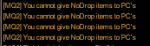
Lately been having an issue with giving items to another toon its been giving spam of
1599082203002.png
even tho the item in bags are not nodrop

even after removing ALL of the items and just putting the items im wanting to hand over i get same response.
interesting part is sometimes it will do it, and other times it wont so am at a loss of words.
 
@cotto8177 I have seen this also, I am not sure what caused it, but when this happens over and over, I put a TS item in my cursor and run the macro. That usually takes care of it.

If that does not work run the macro over and over :).
 
Try editing the macro, and making this change.
I tried it and did not reproduce the issue so it is hard for me to verify that this works.
It should print out the name of the item (I think)

@toadwart this this seem reasonable?

INI:
        /if (${InvSlot[pack${Bag}].Item.Item[${Slot}].NoDrop} && ${Target.Type.Equal[PC]}) {
            /echo You cannot give NoDrop items to PC's
            /return
        } else {

to

INI:
        /if (${InvSlot[pack${Bag}].Item.Item[${Slot}].NoDrop} && ${Target.Type.Equal[PC]}) {
            /echo You cannot give NoDrop items to PC's : ${InvSlot[pack${Bag}].Item.Item[${Slot}]
            /return
        } else {
 
Release GiveItems.mac

Users who are viewing this thread

Back
Top
Cart