Thanks Eqmule for the tip.
So for future reference (or anyone having trouble running this macro), here is what I had to do to get all my characters the Stein. I had EQBCS installed as a service on my PC. It starts up whenever I start my PC. I did this for the sake of convenience, one less thing to worry about. I followed the guide in this link to accomplish this, if anyone wants it.
Eqbc Idiot's Guide
So, if you read this whole thread, you will see where Blueadept was having trouble with the macro running and posted his fix for it. Use the link to download a different version (Eqmule's version) of EQBCS. And if you are like me and have yours already installed as a service, here are some steps to get things working right:
1. Go to the Start button and type in "services" in the search box.
2. In the Services window scroll down to find "MQ2 EQ Box Chat Services" listed there.
3. Right click on it and select Properties.
4. In the middle of the "General" tab you will see a drop down for "Startup type", select "disabled" and click "Apply" and then "OK".
5. Now right click on "MQ2 EQ Box Chat Services" again and select "Stop" from the menu. Note that the rest of the line will read "Stopped" and "Disabled".
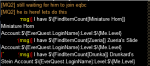
6. Now go to where you downloaded Eqmule's version and unzip it. And copy this file to your "Release" folder of MQ2. Then start that file by double clicking on it. There is a screen shot above here to show what it looks like, but mine was blank until I started using the macro DrunkA.
7. After you have all your characters done. Just close the EQBCS window and reverse what you did in Services. EQBCS should restart when you set it for "Automatic" but I re started it right there anyways cause I'm anal that way lol.
As in anything you do for the first time it is a little confusing until you actually go through it. And I want to thank EQmule for setting this macro up. While I was going through all my characters I was thinking to myself how much hassle and how long it would take me to do all this manually. Sheesh the macro took a pretty long time as it was, manually though? Hours and hours.
So for future reference (or anyone having trouble running this macro), here is what I had to do to get all my characters the Stein. I had EQBCS installed as a service on my PC. It starts up whenever I start my PC. I did this for the sake of convenience, one less thing to worry about. I followed the guide in this link to accomplish this, if anyone wants it.
Eqbc Idiot's Guide
So, if you read this whole thread, you will see where Blueadept was having trouble with the macro running and posted his fix for it. Use the link to download a different version (Eqmule's version) of EQBCS. And if you are like me and have yours already installed as a service, here are some steps to get things working right:
1. Go to the Start button and type in "services" in the search box.
2. In the Services window scroll down to find "MQ2 EQ Box Chat Services" listed there.
3. Right click on it and select Properties.
4. In the middle of the "General" tab you will see a drop down for "Startup type", select "disabled" and click "Apply" and then "OK".
5. Now right click on "MQ2 EQ Box Chat Services" again and select "Stop" from the menu. Note that the rest of the line will read "Stopped" and "Disabled".
6. Now go to where you downloaded Eqmule's version and unzip it. And copy this file to your "Release" folder of MQ2. Then start that file by double clicking on it. There is a screen shot above here to show what it looks like, but mine was blank until I started using the macro DrunkA.
7. After you have all your characters done. Just close the EQBCS window and reverse what you did in Services. EQBCS should restart when you set it for "Automatic" but I re started it right there anyways cause I'm anal that way lol.
As in anything you do for the first time it is a little confusing until you actually go through it. And I want to thank EQmule for setting this macro up. While I was going through all my characters I was thinking to myself how much hassle and how long it would take me to do all this manually. Sheesh the macro took a pretty long time as it was, manually though? Hours and hours.