• You've discovered RedGuides, an EverQuest multi-boxing and scripting community 🧙‍♀️⚙️. We want you to play several EQ characters at once, come join us and say hello! 👋

  • A TLP without truebox has thawed (Very Vanilla ready)
    Frostreaver

Problem - General PC Problem

Joined
Apr 12, 2023
RedCents
2,469¢
I have so many programs that I unloaded but still show up on my computer under the A-Z listings I had to unload EQ and everything else.

Can anyone tell me where the files are? Why they still load but won't uninstall or even appear there and how I can get them out? So I can reload EQ! Please. Thanks.
 
Hi Rob,
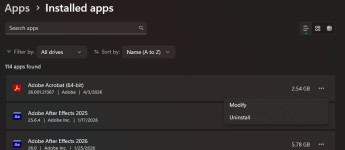
Do you mean your programs in the Start menu (A-Z)? Do you have Win 10/11? If you have Microsoft Access for example, it will show under A as Access. You can right click the icon and see Uninstall at the bottom of the right click menu. That should help you get rid of some if they did not uninstall properly. In Settings> Apps is best but either works. I'm not understanding what you mean by you unloaded but they still run. If you don;t know where your EQ files are, do a search in C: for eqgame.exe. That would find where eq files are.
 
I'm saying I have files in the A-Z menu that load programs. When I right click on them and click uninstall it takes me to the apps menu but the apps don't appear under the apps menu to uninstall. Does that make sense?
 
Assuming Win10?
Sounds looks like uninstalling something and still having it show up on the start menu might be a common thing. Try googling "win10 uninstalled apps still showing on menu"

I'd probably start with this:
 
Usually if i have uninstalled a program and it is still showing up - I will right click on the icon that I am seeing and select go to file location. Most often it is in a temp file location and is just holding there as an icon.
 
I think I figured it out guys. And I feel kinda dumb it took so long. I have a backup SSD card plugged in for storage. It's my D drive. I copied my main C drive to the D drive. So even though erased from one drive they are still on the other.

What I can't figure out is why programs I deleted off my C drive seem to still be taking up so much room. Anyone know a good free drive cleaner or something to free space?
 
I use WizTree to identify where the space is going, and then I delete or uninstall things using that info.

 
You can solve windows uninstall problems by uninstalling windows and switching to Linux.
 
I like to point folks to Glary Tools. They have an excellent collection of tools that are free for personal use, and include a "1 click maintenance" button for those not as tech savy as they would like to be. The only real downside is there is no "auto update" for the free version, you have to download and install it each time.

I also recommend using their "software update" (comes with the suite) and "driver manager" that also has an update, in order to keep your programs and drivers current.
 
Problem - General PC Problem

Users who are viewing this thread

Back
Top
Cart