
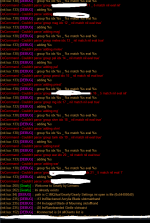
I don't know gearly, but some scripts want you not have the fullnames on dnet turned onYes and /dnet info spits out all my characters' <server_name> info as being connected.
Running /dgga and /dgge commands from my driver also are received by the other toons.
I do a /run lua gearly on all my toons.
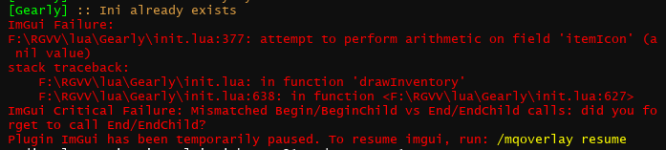
Hit "update all gear" and each time I either hit update all, or select one of the sub-classes in the dropdown right below it, it spits out the error in my chat window.
I'm looking at all the characters' individual .inis inside the gearly folder inside my lua folder. Lua > Gearly > Character Data > individual .inis

Install the app
How to install the app on iOS
Follow along with the video below to see how to install our site as a web app on your home screen.
Note: This feature may not be available in some browsers.
-
 You've discovered RedGuides, an EverQuest multi-boxing and scripting community 🧙♀️⚙️. We want you to play several EQ characters at once, come join us and say hello! 👋
You are using an out of date browser. It may not display this or other websites correctly.
You should upgrade or use an alternative browser.
You should upgrade or use an alternative browser.
Resource icon
Release Gearly - A Gear Management Tool (1 Viewer) 1.23
No permission to download
- Thread starter Lemons
- Start date
bitbreaker
Member
- Joined
- Jul 18, 2023
- RedCents
- 72¢
I don't know gearly, but some scripts want you not have the fullnames on dnet turned on
When I type /dnet fullnames it is set to off. The characters have a server_character configuration when I see their names broadcast in the chat.
edit: This fixed it. It was off to begin with. But I needed to take an extra step and toggle it off, then on, then off again. Now the Lua works 100%!!!!!!!!!

It's handled in the next version:
FYI the server_character means it was on. Typing /dnet fullnames toggles it, so seeing off there would indicate it was on.You have /dnet fullnames on
Do /dnet fullnames off to fix it.
I'll add in a check to account for this.
Lemons updated Gearly - A Gear Management Tool with a new update entry:
Minor fixes
Read the rest of this update entry...
Minor fixes
Handles a couple of crashes
Now supports dannet fullnames
Still does not support custom UIs
Read the rest of this update entry...
Hey Lemons - I really want to give this a run but every time I do, I crash to desktop.
I tried running with `/Lua run gearly debug` but see no log file just a bunch of debug to screen before the crash.
I'm running 20-30 toons, all connected to dannet and based on boxhud, everything appears "correct".
Any suggestions here?
I tried running with `/Lua run gearly debug` but see no log file just a bunch of debug to screen before the crash.
I'm running 20-30 toons, all connected to dannet and based on boxhud, everything appears "correct".
Any suggestions here?

SomeRandomDude
Well-known member
- Joined
- Jan 29, 2023
- RedCents
- 228¢
Hi Again Lemons. I'm still really loving gearly--for my raid of 30 it is very helpful. I have a suggestion that could make it even cooler. The idea is that when you right-click a gear item which triggers the filtering of the list down to just the folks that can use the item, it would be great if you could click on someone's name in the list (or perhaps a small new button) and the script would give the item to that character. There would need to be some filters, like ensuring that you're in the same zone and reasonably close together (so as to not train across the zone to hand it off). And to extend that idea even further, it would be even cooler if the recipient of the item could equip the item into the slot for which the button was pressed (i.e. if you're looking at a ring and you see that "bob" can make the best use of it in his left hand), it would be cool to just click on Bob's name in the gear row associated with the left hand and then automagically Bob would eventually be wearing the ring.
If you like the idea but lack the time to implement it then I'd volunteer to make this change. I've done a little Lua programming, however, I have yet to do any UI or DanNet stuff. I'm not 100% confident that I could pull off the second part to my satisfaction, but I'm pretty sure I could pull off the first part.
If you like the idea but lack the time to implement it then I'd volunteer to make this change. I've done a little Lua programming, however, I have yet to do any UI or DanNet stuff. I'm not 100% confident that I could pull off the second part to my satisfaction, but I'm pretty sure I could pull off the first part.
Running any custom UI elements?
Spell casting window is custom.
@hytiek try this:
Start with a clean slate by deleting your Character data contents. Then
Code:/dgae /lua run gearly once
This generates a character data for all online toons.
Then
Code:/lua run gearly
From your driver toon.
This issue is MQ2Dannet related.
Using a dirty fix by kaen has enabled me to be able to use it.
Sharing for others, replaced:
with
Sharing for others, replaced:
local items = stringToTable(mq.TLO.DanNet.Joined(),"|")with
local items = stringToTable("|all|brd|caster|clr|mag|melee|mnk|nec|pal|priest|shd|shm|tank","|")
- Joined
- Oct 22, 2022
- RedCents
- 7,272¢
To add, if there is anyone else out there who got wonky slotnames using
Changing the code this way (suggested by kaen, of course :-D) fixed it for me (be sure to also delete your charater data in the gearly directory!)
mq.TLO.Me.Inventory(i).InvSlot.Name():Changing the code this way (suggested by kaen, of course :-D) fixed it for me (be sure to also delete your charater data in the gearly directory!)
local function createInventoryData(doWrite,reloadIni)
    for i=0,22,1 do --Writes my gear stats to the invT[myName] table.
        Inv = mq.TLO.Me.Inventory(i)
        local slotName = mq.TLO.InvSlot(i).Name()
        if Inv() then --If I have an item in the slot
Lemons updated Gearly - A Gear Management Tool with a new update entry:
Fixed crash and slot mismatch
Read the rest of this update entry...
Fixed crash and slot mismatch
Fixed string overflow crash if using a lot of observers.
Slot mismatching/error fixed
Thanks for the investigation while I was gone. Here's a condor.
View attachment 50619
Read the rest of this update entry...
SomeRandomDude
Well-known member
- Joined
- Jan 29, 2023
- RedCents
- 228¢
Hi. I wanted to report a strange behavior that I've been encountering where not all characters are showing up in Gearly.
Up until now I had only used Gearly on a small scale (just 1 or 2 groups) and it worked well. Now I'm trying with my full raid force of 30 (temporarily 31 since I'm swapping one out). The characters are all on the same computer. I ran through the reset steps that @Szazor outlined above. I see that I have an .ini file for all characters. I see that all characters are responding to DanNet commands (by executing "/dgae /gu hi" and counting that all 31 respond). I launch one copy of Gearly on the guy that has the most gear to pass out. But when I scroll through the Gearly window anywhere from 18 to 22 characters showing up in the list (I tried this many times and got a slightly different number each time). I also Auto-Filter to an item that is All/All and that same subset of people show up.
Then the plot thickens....
I decided to run Gearly in debug mode (/Lua run Gearly debug) to see what I could see. Once I did that all of the characters show up fine.
So I guess I have a workaround, but I just wanted to report the issue.
Edit: One more piece of info... One of my several tries I had a situation also where I had the same character showing up multiple times when I Auto-Filtered on my All/All charm. I still had like 20 or so distinct people, but the list had like 29 people due to duplicates.
Up until now I had only used Gearly on a small scale (just 1 or 2 groups) and it worked well. Now I'm trying with my full raid force of 30 (temporarily 31 since I'm swapping one out). The characters are all on the same computer. I ran through the reset steps that @Szazor outlined above. I see that I have an .ini file for all characters. I see that all characters are responding to DanNet commands (by executing "/dgae /gu hi" and counting that all 31 respond). I launch one copy of Gearly on the guy that has the most gear to pass out. But when I scroll through the Gearly window anywhere from 18 to 22 characters showing up in the list (I tried this many times and got a slightly different number each time). I also Auto-Filter to an item that is All/All and that same subset of people show up.
Then the plot thickens....
I decided to run Gearly in debug mode (/Lua run Gearly debug) to see what I could see. Once I did that all of the characters show up fine.
So I guess I have a workaround, but I just wanted to report the issue.
Edit: One more piece of info... One of my several tries I had a situation also where I had the same character showing up multiple times when I Auto-Filtered on my All/All charm. I still had like 20 or so distinct people, but the list had like 29 people due to duplicates.
SomeRandomDude
Well-known member
- Joined
- Jan 29, 2023
- RedCents
- 228¢
Absolutely certain. There were exactly 31 .ini files, one for each of my characters. They showed up again and again each time I deleted them and subsequently re-ran the: /dgae /Lua run gearly once.Are you sure you deleted the ini files in the character Data folder?
Whenever i run different sets of toons I clear the folder and it rebuilds perfectly every time.
I may have spoke too soon about it working well when I ran in debug mode. I did see all of the characters, but there were some error messages upon launch of gearly on the one character that I was attempting to trade from. Sadly these are test characters and the test server is on "patch day" now, so I can't repro. Anyway, these one-time error messages started spamming endlessly once I traded some of the gear items to the other characters and equipped them. After trading 3 items there was so much spam slowness that I could no longer play at all. I needed to quit EQ (just killing Gearly didn't cause the messages to stop, perhaps because so many were queued up). The messages appeared to be DanNet communications related.
I will try to get better info once the test server is back up and running again.
You'll need to provide debug info and the full window along with who's missing when Test is up. I can't do anything with the info above. Use the Ctrl+` to use the new window and you can copy/paste or easily screenshot the error message you're getting.
Deleting character files shouldn't ever be necessary. Why do you delete them?
Deleting character files shouldn't ever be necessary. Why do you delete them?
Grpsmashin
Ranger Tank
- Joined
- Nov 8, 2017
- RedCents
- 1,447¢
With newest update for test, window box isnt correct with DX11 stuff.
Can only click on a few items. Any update for this soon?
Can only click on a few items. Any update for this soon?
dustinisgod
Active member
- Joined
- Dec 21, 2019
- RedCents
- 640¢
Heya,
Thanx a bunch for this awesome tool, just found it and already loving it. amazing!
Im not sure if Im just not seeing this? I usually compare my weapons by ratio except for some classes in some circumstances.. and I did not find how to compare ratio..
appreciate the help and all the best
Thanx a bunch for this awesome tool, just found it and already loving it. amazing!
Im not sure if Im just not seeing this? I usually compare my weapons by ratio except for some classes in some circumstances.. and I did not find how to compare ratio..
appreciate the help and all the best
Thank you for the amazing plugin.
I'm struggling with managing augs for one player, much less for multiples.
Any chance there is a quick way to add an Augments button that would display a sortable list of all augs?
I am addicted to Gearly, so hoping to find a solution here before looking elsewhere. Thanks!
I'm struggling with managing augs for one player, much less for multiples.
Any chance there is a quick way to add an Augments button that would display a sortable list of all augs?
I am addicted to Gearly, so hoping to find a solution here before looking elsewhere. Thanks!

- Joined
- Aug 19, 2020
- RedCents
- 30,871¢
Give me a few minutes, or until another user chimes in, but i think recently (last month or so) a aug checker Lua was published here?Thank you for the amazing plugin.
I'm struggling with managing augs for one player, much less for multiples.
Any chance there is a quick way to add an Augments button that would display a sortable list of all augs?
I am addicted to Gearly, so hoping to find a solution here before looking elsewhere. Thanks!
I may have messed up. ( My fault )
I noticed it started to hand out T1 group gear to my toons at random without rolling for it. My greatest fear is having a raid chest pop and my toons start snatching everything when the chest goes on free grab. Are my fears unfounded and this is just a group loot thing?
This is happening after I did a /Lua stop. If its just using advanced loot ( which I'm in the process of fixing now ) I'm cool with that.
I noticed it started to hand out T1 group gear to my toons at random without rolling for it. My greatest fear is having a raid chest pop and my toons start snatching everything when the chest goes on free grab. Are my fears unfounded and this is just a group loot thing?
This is happening after I did a /Lua stop. If its just using advanced loot ( which I'm in the process of fixing now ) I'm cool with that.
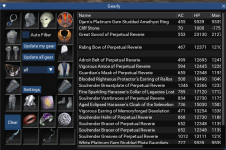
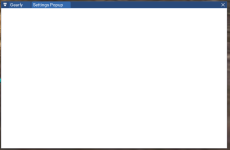

try shift clicking and drag the tab for settings and you should be able to split them back apart.Dear all
I accidentally pull the setting windows to the tab and it won't let me out now. I tried to reinstall the Gearly, but didn't help.
View attachment 65627
View attachment 65628
I tried press shift and left click on the setting tab, but nothing happened.try shift clicking and drag the tab for settings and you should be able to split them back apart.
Great! that works!
- Can try the reset all button on /mqsettings Overlay section.
- Another option is log out all toons. and find the windows settings in MacroQuest_Overlay.ini and delete the window information. this will reset the window.


Not intending to derail a suggestion but in case you were not aware - https://www.redguides.com/community/resources/augcheck.3014/ - super cool!Can you also manage augs?
It would be cool to see the augs integrated into this as well.
From the FAQ

Users who are viewing this thread
Total: 2 (members: 0, guests: 2)
Share: