
Thanks. I had forgotten about that. More meshes to add to my batch file to reset meshes when I need them active.That isn't a bug in the macro. It's an issue with the mesh (E/W Cab is the big stand-out example of this). Use the meshes I provide from my repo (https://github.com/BDeakins/DeneCore-Meshes) instead of the one from the downloader. This is also mentioned in the FAQ for the macro. (You can probably get away with just replacing E/W Cab and use the rest of the ones from the downloader.)

-
 Hail, we're RedGuides. We want you to play six (yes, 6!) EverQuest characters at once. We have scripts and a friendly community to help, please join our playstyle and say hello! 👋
You are using an out of date browser. It may not display this or other websites correctly.
You should upgrade or use an alternative browser.
You should upgrade or use an alternative browser.

Release Explore.Mac - An Explorer / Traveler Achievement Macro 1.3.1
- Thread starter Denethor
- Start date

I feel like that mesh should be added to the main repoThanks. I had forgotten about that. More meshes to add to my batch file to reset meshes when I need them active.

Good idea, remember having an issue with this, and have not run a guy through for awhile, so I tried it. Ran a guy through the ROK only part just to use the cabilis part. So the cabeast mesh IS on @Denethor 's Git. I used it and works well to nav me over. cab west is NOT in the Git (if there is supposed to be one), and I had trouble zoning back, had to manually take a few steps (this applies to both Cab East 1 and Cab East 2 nav choices when in West Cabilis). Sometimes depending on the route, you fall in the water and pop back out without user help and head to Lake of Ill Omen or somewhere. @Sic @wired420 just bringing it to attention if it helps. Here is the git version Denecore has:I feel like that mesh should be added to the main repo
Attachments
There are a ton of those meshes. I copied them in, then the MeshManager plugin went to town and updated all of them back. My guess is that all the work they did to the meshes for the Explorer, there has been such a divergence siince then that it would be very difficult to merge them back in. I think a lot of the meshes were 2-4 years old.
What would be great is if I could tell MQ2Nav where to load meshes from on a toon by toon basis, so on the toon running the macro, he can use those particular meshes
What would be great is if I could tell MQ2Nav where to load meshes from on a toon by toon basis, so on the toon running the macro, he can use those particular meshes

there is no current way to do that.What would be great is if I could tell MQ2Nav where to load meshes from on a toon by toon basis, so on the toon running the macro, he can use those particular meshes
We do have MQ2MeshManager which can ignore meshes you do not want overwritten. But for the sake of keeping original and special use meshes, I don;t believe we have any tool that can zip one in and then put the original back. I would imagine that its best to have a new mesh made and if tested and accepted it can become the default for all usage. Better if we are all reading the same sheet of music type thing. Just a frog's thoughts.There are a ton of those meshes. I copied them in, then the MeshManager plugin went to town and updated all of them back. My guess is that all the work they did to the meshes for the Explorer, there has been such a divergence siince then that it would be very difficult to merge them back in. I think a lot of the meshes were 2-4 years old.
What would be great is if I could tell MQ2Nav where to load meshes from on a toon by toon basis, so on the toon running the macro, he can use those particular meshes


Release - MQ2MeshManager
wired420 submitted a new resource: MQ2MeshManager - Manage MQ2Nav mesh update in game! Finally! MQ2MeshManager does exactly what it says in its name. Manage your meshes. MQ2MeshManager interfaces with https://mqmesh.com to keep your meshes up to date. Walked into a zone you don't have a mesh...
 www.redguides.com
I definitely agree, and would love to get some of the ones I have to copy in into the repository. Ones like the TCN mesh for POK comes to mind. My worry is the diff's between the modified navmesh and current versions, which one wins? Or is there a way to 'merge' the versions?We do have MQ2MeshManager which can ignore meshes you do not want overwritten. But for the sake of keeping original and special use meshes, I don;t believe we have any tool that can zip one in and then put the original back. I would imagine that its best to have a new mesh made and if tested and accepted it can become the default for all usage. Better if we are all reading the same sheet of music type thing. Just a frog's thoughts.
Release - MQ2MeshManager
wired420 submitted a new resource: MQ2MeshManager - Manage MQ2Nav mesh update in game! Finally! MQ2MeshManager does exactly what it says in its name. Manage your meshes. MQ2MeshManager interfaces with https://mqmesh.com to keep your meshes up to date. Walked into a zone you don't have a mesh...
Plus since I am definitely not the author of these meshes, I am very leery of submitting them myself.
there isn't.I definitely agree, and would love to get some of the ones I have to copy in into the repository. Ones like the TCN mesh for POK comes to mind. My worry is the diff's between the modified navmesh and current versions, which one wins? Or is there a way to 'merge' the versions?
Plus since I am definitely not the author of these meshes, I am very leery of submitting them myself.
and modifications should be build *upon* existing stuff.
we try and really take care to updates because take the pok mesh for example - the one in there takes into account the anniversary tents, but those are only there a few months out of the year - if you made a new mesh without those tents, you'd screw up people during anniversary.
some meshes have HOURS of work into them by folks like myself, chatwiththisname, hytiek, burd, wired, etc

RedQueen
Member
I'll check into that, I don't recall having any on my EXT.Set all of your extended targets to Auto. You have something hard-set in there and the macro is seeing a target on the list and thinking we have agro. So it is jumping into the combat handler.
Thanks for replying ♥
Any kind of error message would be helpful.Is Explore broken? It's not navigating to the zone it calls out. So if start in GL it should navigate to Pok but it just sits there?
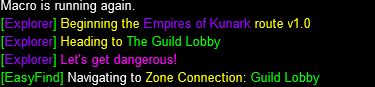
I always start Explorer either in the Guild lobby or in POK. I do not think it navigates through the bigger guild halls, or knows anything about your port clickies .
I have started it in both. the image I provided was from starting it in PokI always start Explorer either in the Guild lobby or in POK. I do not think it navigates through the bigger guild halls, or knows anything about your port clickies .

- Seller
- #815
Sorry, was out of town on business so I haven't been doing my usual checks on this thread.I have started it in both. the image I provided was from starting it in Pok
You have someone/something on your Xtar list. So the macro things we have something on aggro and is entering the combat handler subroutine.
Clear your XTar so all slots are Auto.

me thinks he explained whyWhy would I need to remove them
- Seller
- #818
As I said, ANYTHING on the XTar list triggers the combat handler. Also mentioned in the FAQ. You can set the xTar's back after you finish with the macro.I have toons on Xtarget for when I need to heal or help them, which have been the same for over a year? Why would I need to remove them as they aren't up? I don't have anything on target for mobs just saved xtargets for when i group with them now?

Again I understand what you said. But It has been the same for over a year and now it seems to pick it up. I guess something got fixed or changed in the underlying code. I will remove the xtargets and run it as you say.
Note: it is working as expected when all xtargets are cleared. Thanks again.
Note: it is working as expected when all xtargets are cleared. Thanks again.
Last edited:

I used it to get most of the LDON's done, but it took some babysitting to do it, and soem restarts as needed.
- Seller
- #822
Those notes are back from the alpha build of LDoN support. We're well past that.Running this for LDoN, and it's not kicking the adventure/dz. No errors, just stops doing anything. What am I doing wrong?
View attachment 72055
Not sure what'd it be, but I can DM you and we can set up a Zoom meeting to take a look at things. (I haven't played EQ now in several years, but I am still providing support for this macro.)
I can state I have a character running through the LDON's currently, and he frequently gets stuck before zoning in for Miraguls Menagerie(that being one of the zones I saw him zone into when I moved towards the entrance). All I have to do is press the forward key to get him to actually zone in and then go to the next LDON. This is getting the adventure in Everfrost Peaks, and also zoning in to the adventure in Everfrost Peaks.

holy shit my dude, at least put a little effort into your post
Users who are viewing this thread
Total: 1 (members: 0, guests: 1)
Share: