• You've discovered RedGuides, an EverQuest multi-boxing and scripting community 🧙‍♀️⚙️. We want you to play several EQ characters at once, come join us and say hello! 👋

  • A TLP without truebox has thawed (Very Vanilla ready)
    Frostreaver
Explore.Mac - An Explorer / Traveler Achievement Macro

Release Explore.Mac - An Explorer / Traveler Achievement Macro 1.3.1

Running a new toon through the macro. She got hung up getting into the hole but I was able to wiggle her in. She stopped at the portal in POK because it was asking which zone she wanted to go in (xxx or The Overthere). I had to manually choose Overthere.
She ran to an NPC in the Overthere called Gogu the Smasher then stopped and won't go further. In the MQ window, it says "Usage: /docommand <command>" but I am not sure what it wants. I did stop and start it a few times to see if that would get 'er going again (using your pause/resume hotkeys).
Any clue?
*edit - I looked and the closest zone was Tim. Deep so I ran her manually there and then it took off again and seems to be back on track.
*edit it does get 'hung up' for all the new POK travel stones when they ask WHICH zone you want to go to (I assume these were made after the macro was).
 
Last edited:
Running a new toon through the macro. She got hung up getting into the hole but I was able to wiggle her in. She stopped at the portal in POK because it was asking which zone she wanted to go in (xxx or The Overthere). I had to manually choose Overthere.
She ran to an NPC in the Overthere called Gogu the Smasher then stopped and won't go further. In the MQ window, it says "Usage: /docommand <command>" but I am not sure what it wants. I did stop and start it a few times to see if that would get 'er going again (using your pause/resume hotkeys).
Any clue?
*edit - I looked and the closest zone was Tim. Deep so I ran her manually there and then it took off again and seems to be back on track.
*edit it does get 'hung up' for all the new POK travel stones when they ask WHICH zone you want to go to (I assume these were made after the macro was).
Quite probably. I don't play EQ anymore so wasn't aware of new stone with Options such as Feerott has. I'll patch and load up soon to get an idea of what I need to update and start working on release.
Thanks for letting me know.
 
>Scrolls all the way to the top after reading<

Derp! Didn't see that.
Thanks Sic.

BB~
The post before yours is thanking denethor for an update, and the post before that is the update :p what do you mean "all the way to the top"?
 
The post before yours is thanking denethor for an update, and the post before that is the update :p what do you mean "all the way to the top"?
It means I'm having a few cocktails before bed and didn't read like I should before I posted. Then looked at the "Updates" banner when I read your post~
 
lol, anything tasty?
Bruh, I just found Jim Beam Honey. It's SOO good. It's like honey biscuts on ice. HAve to admit it doesn't help my EQ game but it;s fun as hell to tie one on and play.

But it seems like I have to rez my group a lot =(
 
So just tried to run this mac and am in guild lobby bound myself in west lobby typed /mac explore and the only thing happening is MQ window is displaying {explorer} Heading to The Plane of Knowledge and the toon just stands there. if i try to run to group member the toon will start a path explore will take over and toon just runs in a straight line into the furthers object. where do i need to start on fixing the issue?
 
So just tried to run this mac and am in guild lobby bound myself in west lobby typed /mac explore and the only thing happening is MQ window is displaying {explorer} Heading to The Plane of Knowledge and the toon just stands there. if i try to run to group member the toon will start a path explore will take over and toon just runs in a straight line into the furthers object. where do i need to start on fixing the issue?
Did you download / install DeneCore as well? (https://www.redguides.com/community/resources/denecore.1632/watch)
If I had to guess, it sounds like incorrect / bad meshes. Per the Requirements, if you have mesh issues, try the meshes available here: (https://github.com/BDeakins/DeneCore-Meshes) - These are the ones used during the testing of the macro. The Mesh Downloader has since changed meshes in it's repository, and some of those are not compatible. So I'd try using the ones at the link.
 
Did you download / install DeneCore as well? (https://www.redguides.com/community/resources/denecore.1632/watch)
If I had to guess, it sounds like incorrect / bad meshes. Per the Requirements, if you have mesh issues, try the meshes available here: (https://github.com/BDeakins/DeneCore-Meshes) - These are the ones used during the testing of the macro. The Mesh Downloader has since changed meshes in it's repository, and some of those are not compatible. So I'd try using the ones at the link.
Thanks Denethor for the reply

Dencor was downloaded/installed and that corrected the issue where it would not run the macro at all

if I had the mac running and was anywhere other then PoK or lobby it ran routes for SoV almost perfect (i was a gnome so had to hop over a couple things manually)

I am downloading the meshes now will load them and try again
 
Ran this last night. It gets hung between East Cabilis and West Cabilis. Just zoning back and forth over and over again till it crashes. no big deal just thought i would let someone know.
 
Ran this last night. It gets hung between East Cabilis and West Cabilis. Just zoning back and forth over and over again till it crashes. no big deal just thought i would let someone know.
Known issue unrelated to code, mentioned in the FAQ:
1691356651865.png
Also mentioned in the Requirements section of the main overview:
1691356750521.png
Thanks for the notice none the less.
 
Known issue unrelated to code, mentioned in the FAQ:
View attachment 50176
Also mentioned in the Requirements section of the main overview:
View attachment 50177
Thanks for the notice none the less.
Been looking to add "channels" to the updater. So you can select a different set of meshes in the in-game mesh manager. Can I have your permission to use your repo as the beta case? It'd check your git repo for updates twice a day.
 
Been looking to add "channels" to the updater. So you can select a different set of meshes in the in-game mesh manager. Can I have your permission to use your repo as the beta case? It'd check your git repo for updates twice a day.
Granted. Let me know if you need anything from me / my end.
And if folks would tell me what they need added to mine, I'll happily update them to accomodate other macros / needs.
 
Granted. Let me know if you need anything from me / my end.
And if folks would tell me what they need added to mine, I'll happily update them to accomodate other macros / needs.
Don't think I should need anything from your end. My scripts just pull from a git then the rest is on my end.
 
Most zones have at least a 2s delay in them JUST to try and force the game to recognize us being there. I didn't want to go longer (for fear of folks complaining the 'macro is slow'. I tried.
Is there a way to modify the time in the zone or do a check to see if the explore achievement has been updated? I have a garbage computer and several times per run, I zone into a place and it zones back out before my computer finishes loading so I get just a long 10-minute load screen and I don't get the update, and the macro finishes but there will be 4-5 zones that didn't updates and I have to manually run back to those zones.

And is there an efficient way to update with your chosen meshes? you linked your GitHub but I don't know how to work it besides manually clicking on the 50 or so meshes 1 at a time and saving them to my folder I don't even know if I'm putting them in the right place because I copied the cabalis meshes but it still zones back and forth, and my computer is so slow that it zones back before I see a screen to pause the mesh and the process took me 2 hours to individually download each mesh and save it to my computer. Is there a way to add a checkbox in the nav mesh updater in the launcher so it loads your meshes?

I want to run this on all my characters but with all the crashes and missed zone updates I have to revisit manually by the time I got done with just one character I wanted to kill myself rather than revisit that 2 days of pain for each character.

Finally is there a way to set the methods of invis/lev/shrink / gate before starting the macro? I ran it on my 111 lvl rogue and it still bought 15k worth of potions to invis, shrink, etc when I have steins, sneak/hide goblin illusions, permanent levitation, and a fresh spirit of falcons to speed up the running but the macro turns off those spells and runs sooooo slow (I think people on my server know this macro auto buys stuff so the prices are way overinflated to gouge us; I didn't prebuy them because I assumed it would use my gear and AA but it still bought potions).
 
Been looking to add "channels" to the updater. So you can select a different set of meshes in the in-game mesh manager. Can I have your permission to use your repo as the beta case? It'd check your git repo for updates twice a day.
OOH, this sounds very exciting. If you need someone to help run dudes around once you have it set, I purchased Den's awesome macro and happy to test it. Will it load up a mesh and reload in game? Anyways, COOL !
 
OOH, this sounds very exciting. If you need someone to help run dudes around once you have it set, I purchased Den's awesome macro and happy to test it. Will it load up a mesh and reload in game? Anyways, COOL !
If you have auto update on and Explorer selected in the drop down it'll auto update them when you zone in and nav auto reloads changes.
 
Hi Denethor, Thanks for this awesome macro. I encountered the following and am posting as requested. As you can see in the log, the error msg was posted several more times while I figured out where the log was :).

1691505629620.png
 
Is there a way to modify the time in the zone or do a check to see if the explore achievement has been updated? I have a garbage computer and several times per run, I zone into a place and it zones back out before my computer finishes loading so I get just a long 10-minute load screen and I don't get the update, and the macro finishes but there will be 4-5 zones that didn't updates and I have to manually run back to those zones.

And is there an efficient way to update with your chosen meshes? you linked your GitHub but I don't know how to work it besides manually clicking on the 50 or so meshes 1 at a time and saving them to my folder I don't even know if I'm putting them in the right place because I copied the cabalis meshes but it still zones back and forth, and my computer is so slow that it zones back before I see a screen to pause the mesh and the process took me 2 hours to individually download each mesh and save it to my computer. Is there a way to add a checkbox in the nav mesh updater in the launcher so it loads your meshes?

I want to run this on all my characters but with all the crashes and missed zone updates I have to revisit manually by the time I got done with just one character I wanted to kill myself rather than revisit that 2 days of pain for each character.

Finally is there a way to set the methods of invis/lev/shrink / gate before starting the macro? I ran it on my 111 lvl rogue and it still bought 15k worth of potions to invis, shrink, etc when I have steins, sneak/hide goblin illusions, permanent levitation, and a fresh spirit of falcons to speed up the running but the macro turns off those spells and runs sooooo slow (I think people on my server know this macro auto buys stuff so the prices are way overinflated to gouge us; I didn't prebuy them because I assumed it would use my gear and AA but it still bought potions).
Sorry for the delayed response. My wife was having surgery yesterday, so I was unavailable. Unfortunately, the delay isn't a generalized function. It's just a delay command on each zone, so there's no one central point to alter it. At the time of authoring there wasn't a way to check the zone achievements (or if there was, I was unaware of it), so there wasn't a way for me to tell the difference between a zone that already had been visited and a zone that was lagging about giving it's achievement. The compromise I came to was a 2sec delay. Unfortunately, awarding that also isn't a client-side function. It's server-side. Other than crawling all 14k lines, there's not much I can think of that I can do to help. :( (If someone else has an idea, I'm open to suggestions.)

At this time, my meshes are downloaded individually. The idea was you'd only download the one or two files that you needed. The most common being the Cabilis files. But it sounds like Wired is working on a proper solution.

As for the potion buying, there are a number of solutions built in. Shrink, for example, is checked via Explore.mac, line 621. It checks if you have ability Group Shrink, Shrink, or Cunning Disguise: Goblin. Similar checks are made from lev on line 622:
/varset levAbility ${Select[TRUE,${Me.AltAbilityReady[Group Perfected Levitation]},${Me.AltAbilityReady[Perfected Dead Men Floating]},${Me.AltAbilityReady[Shauri's Sonorous Clouding]},${Me.AltAbilityReady[Perfected Levitation]},${Me.AltAbilityReady[Perfected Dead Man Floating]},${Me.AltAbilityReady[Bobbing Corpse]},${Me.AltAbilityReady[Elemental Form: Air]},${Me.AltAbilityReady[Noteworthy Disguise: Blue Drake II]},${Me.AltAbilityReady[Divine Steed]},${Me.AltAbilityReady[Steed of Souls]}]}

For invis, the mechanisms are more complex, but actually more thorough. It will use any of the class-native invis abilities: Camoflage for druid/rangers, Silent Presense for Shaman, Perfected Invisibility for Enc/mag/wiz's (Explore.mac, line 619). For general melee classes, I can all items in your inventory to see if there is a invis clickie (DeneCore-Utils.inc, line 481-596). For rogues, there is a special call out for their abilities (DeneCore-Utils.inc, lines 1556-1579).

I made every effort to use items before purchasing additional. It will not buy cloudy pots, as they are purchased from Chef Denrun for a known value. However, back around v1.2, I also added a value to the INI file that sets a max price paid per potion and there is a set value it defaults to. I forget off what offhand. I'm not sure why your rogue would behaved as you ascribe, there were plenty of mechanisms to check and doublecheck behavior. My appologies.
 
Sorry for the delayed response. My wife was having surgery yesterday, so I was unavailable. Unfortunately, the delay isn't a generalized function. It's just a delay command on each zone, so there's no one central point to alter it. At the time of authoring there wasn't a way to check the zone achievements (or if there was, I was unaware of it), so there wasn't a way for me to tell the difference between a zone that already had been visited and a zone that was lagging about giving it's achievement. The compromise I came to was a 2sec delay. Unfortunately, awarding that also isn't a client-side function. It's server-side. Other than crawling all 14k lines, there's not much I can think of that I can do to help. :( (If someone else has an idea, I'm open to suggestions.)

At this time, my meshes are downloaded individually. The idea was you'd only download the one or two files that you needed. The most common being the Cabilis files. But it sounds like Wired is working on a proper solution.

As for the potion buying, there are a number of solutions built in. Shrink, for example, is checked via Explore.mac, line 621. It checks if you have ability Group Shrink, Shrink, or Cunning Disguise: Goblin. Similar checks are made from lev on line 622:
/varset levAbility ${Select[TRUE,${Me.AltAbilityReady[Group Perfected Levitation]},${Me.AltAbilityReady[Perfected Dead Men Floating]},${Me.AltAbilityReady[Shauri's Sonorous Clouding]},${Me.AltAbilityReady[Perfected Levitation]},${Me.AltAbilityReady[Perfected Dead Man Floating]},${Me.AltAbilityReady[Bobbing Corpse]},${Me.AltAbilityReady[Elemental Form: Air]},${Me.AltAbilityReady[Noteworthy Disguise: Blue Drake II]},${Me.AltAbilityReady[Divine Steed]},${Me.AltAbilityReady[Steed of Souls]}]}

For invis, the mechanisms are more complex, but actually more thorough. It will use any of the class-native invis abilities: Camoflage for druid/rangers, Silent Presense for Shaman, Perfected Invisibility for Enc/mag/wiz's (Explore.mac, line 619). For general melee classes, I can all items in your inventory to see if there is a invis clickie (DeneCore-Utils.inc, line 481-596). For rogues, there is a special call out for their abilities (DeneCore-Utils.inc, lines 1556-1579).

I made every effort to use items before purchasing additional. It will not buy cloudy pots, as they are purchased from Chef Denrun for a known value. However, back around v1.2, I also added a value to the INI file that sets a max price paid per potion and there is a set value it defaults to. I forget off what offhand. I'm not sure why your rogue would behaved as you ascribe, there were plenty of mechanisms to check and doublecheck behavior. My appologies.
Thanks for getting back to me (hope all goes well with your wife) I saw the post about Wired getting a solution so hopefully that works out. I have basically been doing my own workarounds by putting the potions on the character before starting the macro but some things caught me by surprise, I would put permanent levitate on my rogue and he would still buy potions but I assumed he wouldn't need to buy them with a permanent spell cast on him.

As far as the zoning issues, I just do workarounds again; all the zones where they are passing through to other zones work fine cause they are in the zone for a while but after running the macro a few times I just learned what zones they pop in and immediately zone back out and I pause the macro and manually walk into those zones and wait for the update before resuming the macro.

What would be a nice addition, would be succoring to get across zones faster but that's probably something that would have to be coded on a case-by-case basis i.e. you zone into a zone, and instead of running 5 minutes to get across the big zones just using spells or abilities to port to the succor spot at the far end of the zone that's right next to the zone you are headed for (if the class has the ability to warp over there) either that or adding support for having a wizard or druid in your group teleporting around with you to all the zones they have spells for as a shortcut.

Oh, in Sics video on the macro, he says if you ran half a route and camp out it will check the .ini character file and resume the route and not repeat zones so I thought it was checking achievements to see where you have been but you mentioned you didn't know of a way to check that so is it possible to get a UI with radial buttons or checkboxes to manually tell the programs all the zones you already have done? most of my characters are 20-year-old characters and have 2/3 of the zones already visited from normal play but if I say run the whole explore package I spend 5 hours running to zones I have already been to and it's a toss-up as to what is faster; manually running the character to the final 6 of 20 zones in that expansion or just letting the whole program run.

Anyway sorry for talking your ear off. Thanks for all the work you did to make and test this macro.
 
this has probably been answered before but i cant seem to locate the info for it
when i run explore on my rogue it wants to go buy invis potions and the like.
how do I get explore to use the rogue SoS instead of buying invis potions?
 
this has probably been answered before but i cant seem to locate the info for it
when i run explore on my rogue it wants to go buy invis potions and the like.
how do I get explore to use the rogue SoS instead of buying invis potions?
Hi Ved,
Check if you downloaded the Denecore files as well for this:
Click 'Watch' on the main page (not the Discussion tab) and then go to launcher and refresh Macros, it auto installs. After than run it in game and a character ini is created where you can make a few choices if you wish.
 
ok denecore is installed
when i type in /mac explaore faydwer it gives me couldn't open macro file: ...enecore.mac
dataerror: NULL
SyntaxError: NULL

then opens the bazaar window and tries to purchase cloudy potions

it also makes the ini file and puts
ivnisclickie=cloudy potion
invisclickie2=cloudy potion

with soem other stuff in it
 
Last edited:
ok got it to work i let it make the ini then removed cloudy potion from it manually and it forced it to use the rogue sub routines.
really odd it should just check for that first
 
Chec
ok denecore is installed
when i type in /mac explaore faydwer it gives me couldn't open macro file: ...enecore.mac
dataerror: NULL
SyntaxError: NULL

then opens the bazaar window and tries to purchase cloudy potions

it also makes the ini file and puts
ivnisclickie=cloudy potion
invisclickie2=cloudy potion

with soem other stuff in it
Check if your setting in the launcher are correct:
1691637535241.png My MQ dir (NOT old MQ2 dir) is called Next. In Next will be Macro and Config folders. Both will have DeneCore files, these work WITH the Explore.mac.
I was unclear earlier, after installed, you run /mac explore (Not Denecore, its not a mac, its just helper files necessary)
When opening the baz window, is it buying IVU potions? Your rogue doesn't have that so it buys it.
 
aye i did /max explore and it went through its thing and then gave me that error bout not finding file: ...enecore.mac so was strange

eitherway i got it working i just gotta go find my stupid shrink clickie now hope i didnt destroy that thing
 
Finally got my feet wet with this after looking it over a few times....and a few times while drinking too much.
Man! This is GREAT!

If you've seen this and thought about it but are undecided. It's WELL worth the $15.

BB~
 
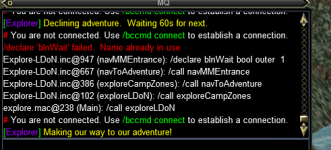
HI, two errors popping up when doing LoDN
looks like a duplicate name and trying to connect to eqbc which I'm fully Dannet. now
Doesn't really look like its detrimental but thought I would mention it.


1699199028586.png
 
Release Explore.Mac - An Explorer / Traveler Achievement Macro

Users who are viewing this thread

Back
Top
Cart