
-
 Hail, we're RedGuides. We want you to play six (yes, 6!) EverQuest characters at once. We have scripts and a friendly community to help, please join our playstyle and say hello! 👋
You are using an out of date browser. It may not display this or other websites correctly.
You should upgrade or use an alternative browser.
You should upgrade or use an alternative browser.

Release Explore.Mac - An Explorer / Traveler Achievement Macro (1 Viewer) 1.3.1
- Thread starter Denethor
- Start date



- Commits
- 1
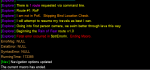
This Fatal error looks to be common in Next. There is also a error in the code.
File - DeneCore-Utils.ini
Line 430
- /error Fatal error occurred in \ay$strErrorIn. \ax Ending Macro.
+ /error Fatal error occurred in \ay${strErrorIn}. \ax Ending Macro.
Then the error message will give slightly more insight.
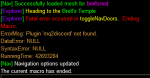
Have not dug any further into it.
File - DeneCore-Utils.ini
Line 430
- /error Fatal error occurred in \ay$strErrorIn. \ax Ending Macro.
+ /error Fatal error occurred in \ay${strErrorIn}. \ax Ending Macro.
Then the error message will give slightly more insight.
Have not dug any further into it.
- Seller
- #566
This Fatal error looks to be common in Next. There is also a error in the code.
File - DeneCore-Utils.ini
Line 430
- /error Fatal error occurred in \ay$strErrorIn. \ax Ending Macro.
+ /error Fatal error occurred in \ay${strErrorIn}. \ax Ending Macro.
Then the error message will give slightly more insight.
View attachment 33799
Have not dug any further into it.
I make absolutely no call to Discord, so I'm kinda clueless what's going on there. But also, I have made no effort to ensure functionality with NEXT. It wasn't around when this macro was written.

The error message is just showing the last command message, it’s an issue with any macro that outputs errors from commands (since that’s a globally stored error). You’ll get whatever the last user command that errored was.
My guess is there’s a null check in toggleNavDoors that failed.
My guess is there’s a null check in toggleNavDoors that failed.
- Commits
- 1
I know the discord message is nothing.
Every failure is on "toggleNavDoors"
My initial "off the top" uneducated, this has not been tested or verified thought: has to do with "..\MQ2Nav.ini" and how Next moved settings into the Config folder.
Every failure is on "toggleNavDoors"
INI:
| ----------------------------------
---------------------------------------------------
| SUB: toggleNavDoors - Use On or Off as strDesireSetting
| -------------------------------------------------------------------------------------
Sub toggleNavDoors(string strDesireSetting)
    |- Reading iniSetting on call of strDesireSetting.
    /declare iniSetting string local ${Ini[..\MQ2Nav.ini,Settings,OpenDoors]}
    /declare tempSetting string local null
    |- Check for proper syntax given, if not return failure message.
    /if (${Select[${strDesireSetting},off,on]}==0) /return notProperCommand
    /if (${strDesireSetting.Equal[${iniSetting}]}) /return toggleNavDoorsSuccessful

    |- Updating MQ2Nav Settings
    /squelch /nav ini OpenDoors ${strDesireSetting}
    /varset iniSetting ${Ini[..\MQ2Nav.ini,Settings,OpenDoors]}
    /if (${strDesireSetting.Equal[${iniSetting}]}) /return toggleNavDoorsSuccessful
/return unknownError
My initial "off the top" uneducated, this has not been tested or verified thought: has to do with "..\MQ2Nav.ini" and how Next moved settings into the Config folder.
- Commits
- 1
Small Update
Changing:
/varset iniSetting ${Ini[..\MQ2Nav.ini,Settings,OpenDoors]}
to
/varset iniSetting ${Ini[MQ2Nav.ini,Settings,OpenDoors]}
Seems to get me past the first stop it was crashing at.
Changing:
/varset iniSetting ${Ini[..\MQ2Nav.ini,Settings,OpenDoors]}
to
/varset iniSetting ${Ini[MQ2Nav.ini,Settings,OpenDoors]}
Seems to get me past the first stop it was crashing at.
- Seller
- #570
Are you running it on Next?Small Update
Changing:
/varset iniSetting ${Ini[..\MQ2Nav.ini,Settings,OpenDoors]}
to
/varset iniSetting ${Ini[MQ2Nav.ini,Settings,OpenDoors]}
Seems to get me past the first stop it was crashing at.
Because, again, NO EFFORT HAS BEEN MADE TO MADE IT COMPATIBLE WITH NEXT. NEXT is therefore unsupported.
Good find JerkChicken, any hardcoded path (even hardcoded relative) is probably going to be a problem anywhere. You would actually have this problem in MQ2 for anyone who moved their macro directory.Small Update
Changing:
/varset iniSetting ${Ini[..\MQ2Nav.ini,Settings,OpenDoors]}
to
/varset iniSetting ${Ini[MQ2Nav.ini,Settings,OpenDoors]}
Seems to get me past the first stop it was crashing at.
The old method of handling this would be the MacroQuest.Path TLO and the new method is defaulted to the config folder (but you could also use MacroQuest.Path[Config] as well).

eqsubi15
Ultimate seasoned veteran member
Appears the RoK expansion has an issue when trying to transition to Skyfire after exiting Chardok. It just sits there spamming the message. Couldn't get it to continue on its own until I zoned over to Skyfire manually.
- tried stopping/starting Nav.
- Tried moving out further into the open.
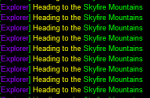
Appears it does the same thing when attempting to go to Bloodfields from Dranik Scar.
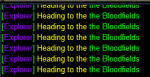
Additionally, the macro fails and ends when trying to do SoD expansion. This happens right after entering and exiting Kurn's Tower.
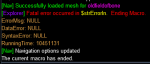
- tried stopping/starting Nav.
- Tried moving out further into the open.
Appears it does the same thing when attempting to go to Bloodfields from Dranik Scar.
Additionally, the macro fails and ends when trying to do SoD expansion. This happens right after entering and exiting Kurn's Tower.
Last edited:
- Seller
- #573
A few preliminary questions and standard suggestions, as the macro was fully tested and capable of doing the full 450+ zone run in a single go before release:
- Make sure you're using the meshes originally used for testing. Wired420's Repo (the one used by the Mesh Updater) has replaced some of my meshes with incompatible versions. (https://github.com/BDeakins/DeneCore-Meshes)
- Are you running on Next or MQ2?
eqsubi15
Ultimate seasoned veteran member
A few preliminary questions and standard suggestions, as the macro was fully tested and capable of doing the full 450+ zone run in a single go before release:
The point at which you're failing in the 3rd screenshot coincides with a known issue when attempting to run this macro on Next.
- Make sure you're using the meshes originally used for testing. Wired420's Repo (the one used by the Mesh Updater) has replaced some of my meshes with incompatible versions. (https://github.com/BDeakins/DeneCore-Meshes)
- Are you running on Next or MQ2?
I'm running the meshes that the updater used. I'm using Next.

While doing the HoT Explore route...that popped up, Oh goodness, thank you for the laugh at whoever crazy maniac added that. I am guessing its you @Denethor , way too funny. I didn;t have a chance to screenshot it, and I didn;t have my glasses on, I was like 'did I just read that message correctly?' put my glasses on, and LOLOLOLOL
I was using Explore.mac and had to manually click a lot of doors, maybe I don't have all things copied over for 'Next' properly. but this laugh was too great. I need to go run it again with another character.
I was using Explore.mac and had to manually click a lot of doors, maybe I don't have all things copied over for 'Next' properly. but this laugh was too great. I need to go run it again with another character.
I had the issue with the doors not opening - remember to /nav ui and click the option for Setting>Automatically click nearby doors. I think it gets disabled by explore for some regions, like maybe Rain of Fear (which was still bonkers on Next (unsupported) but I got through it manually)
My post from just a bit ago was merged into here (not a prob) but the title of the post was what made me laugh, upon reading the pop up text during the HoT explore route 'Lol Surprise Buttsex for Cazic'. I'm just mentioning it here as my above post seems to make no sense without the joke line.
Separately, I now see Denethor has not yet (if he will, I hope so though) make Explore mac MacroQuest 'Next' fully compatible. This is such a great macro, I can only imagine how much smoother it will run 
Separately, I now see Denethor has not yet (if he will, I hope so though) make Explore mac MacroQuest 'Next' fully compatible. This is such a great macro, I can only imagine how much smoother it will run
- Seller
- #579
My post from just a bit ago was merged into here (not a prob) but the title of the post was what made me laugh, upon reading the pop up text during the HoT explore route 'Lol Surprise Buttsex for Cazic'. I'm just mentioning it here as my above post seems to make no sense without the joke line.
Separately, I now see Denethor has not yet (if he will, I hope so though) make Explore mac MacroQuest 'Next' fully compatible. This is such a great macro, I can only imagine how much smoother it will run
I’d actually forgottenI’d added that. So, thank you, for actually being at-keyboard and for reminding me of my own immature humor.



I've done a /reload, started the macro several times.
I am running Next. Starting with the RoF route the macro runs me to the normal/vanilla guild hall, gets close to the teleport gnome, and drops this error. 7+ mil plat isn't enough?
Is there something I am missing?
Are you running it on Next?
Because, again, NO EFFORT HAS BEEN MADE TO MADE IT COMPATIBLE WITH NEXT. NEXT is therefore unsupported.
Use the meshes at the link I provided. Some of the ones provided by the Updater are incompatible.
The macro is not designed to run on Next, and there are known issues (discussed in the last page or two of this thread).
Is there going to be an effort to make this fully Next compatible, especially once MQ2 sunsets into oblivion?
Edit: /unload'd Next, ran MQ2, macro works fine again. Money detection with this macro is somehow a problem in Next.
Stuff like this sadly never got ironed out:

Last edited:
had a issue other night in ew it didnt use my ivu potion kept defaulting to invis click getting aggro and dieing....
- Seller
- #582
I do not know, as I have moved away from EQ ever since "The Great Betrayal". Most likely, yes, I will.Is there going to be an effort to make this fully Next compatible, especially once MQ2 sunsets into oblivion?
No, MQNext does money detection differently apparently. As the macro wasn't written with Next in mind, as Next wasn't even started. Sorry, but you're framing this like it's the macro's fault when it's not. That may not be your intention, but it is how your post comes across.Edit: /unload'd Next, ran MQ2, macro works fine again. Money detection with this macro is somehow a problem in Next.
Seeing as there has never been a report of such a bug before, and you provide no detail as to how this occurred, it's kind of hard for me to fix what I haven't been told is occurring or been given any context for.Stuff like this sadly never got ironed out:
View attachment 34936

Ran out of gate potions, stein / throne were on cooldown. The macro seizes up because it can't get home now, and tells me to get to PoK and unpause. So I origin and run to PoK. Unpause, that error generates, not realizing that we're in PoK now. I went one zone away from PoK and unpaused, same error. Once you're out of gate potions (they were not available to purchase) and throne/stein are down, there's no way for the macro to recover.Seeing as there has never been a report of such a bug before, and you provide no detail as to how this occurred, it's kind of hard for me to fix what I haven't been told is occurring or been given any context for.
This error occurred with MQNext as I ran the macro with the RoF route. It may be similar with other routes involving the regular guildhall as its starting point.money detection hasn’t changed. Any info on what the problem is would be appreciated. I started running the macro and so far have made it to the planes without any issues
Found a bug:
DoOpen is a method. It does not return anything. so this /if is an error. It just magically happened to work in MQ2 but wasn't designed or intended to.
It should be:
Code:
/if (${Window[InventoryWindow].DoOpen}) {DoOpen is a method. It does not return anything. so this /if is an error. It just magically happened to work in MQ2 but wasn't designed or intended to.
It should be:
Code:
/invoke ${Window[InventoryWindow].DoOpen}
/if (${Window[InventoryWindow].Open}) {First part true, second part not. More accurate to say Next wasn't released.As the macro wasn't written with Next in mind, as Next wasn't even started.
i never got a response on my invis/ ivu issue in EW is there a setting for what items to use
- Seller
- #588
PM'd you a solution idea. Let me know.i never got a response on my invis/ ivu issue in EW is there a setting for what items to use
- Seller
- #589
Ran out of gate potions, stein / throne were on cooldown. The macro seizes up because it can't get home now, and tells me to get to PoK and unpause. So I origin and run to PoK. Unpause, that error generates, not realizing that we're in PoK now. I went one zone away from PoK and unpaused, same error. Once you're out of gate potions (they were not available to purchase) and throne/stein are down, there's no way for the macro to recover.
The macro will attempt nine (9) different abilities / items in order to get you back to PoK. Only if all nine are unavailable will it throw up hands and pause. I admit, thinking back, I don't know that I ever tested the behavior upon unpausing because I don't know that I ever hit a time when ALL NINE were exhausted. I'll open that as a possible bug, but the simple workaround is this:
Buy more gate potions. They're not expensive, they stack, and its not like they're not handy.

next is "MQ" - legacy is MQ2. I think you meant MQ2AS I also don't use MQ any more as well, I also don't feel that being required to run this on MQ would be safe. I hope you get around to enhancing this to work on Next. Thanks, Tshadow
- Seller
- #593
AS I also don't use MQ any more as well, I also don't feel that being required to run this on MQ would be safe. I hope you get around to enhancing this to work on Next. Thanks, Tshadow
I fully understand. Please understand my side. I've walked away from EQ. I haven't played since the news about MQ2 broke. And writing this macro took me six months (and gave me a stroke :P ). I don't relish the idea of digging into 14K+ lines of code to update it. I'm sure I'll do it, but it's not something I'm eager to do.
I think in this scenario just open the code to whoever wants to maintain it. I get where you’re coming from and I don’t disagree with your reasons for walking away, everyone has other things going on and I have a ton of stuff I’ve written and don’t care to maintain. But in that case either take it down or open it up rather than let it sit outdated.I fully understand. Please understand my side. I've walked away from EQ. I haven't played since the news about MQ2 broke. And writing this macro took me six months (and gave me a stroke :P ). I don't relish the idea of digging into 14K+ lines of code to update it. I'm sure I'll do it, but it's not something I'm eager to do.
easy to get setup in less than 10mMostly, I was waiting for Next to come out of beta and last I'd heard it hadn't. If that's changed, I'll install it and see about updating the code soon.
the INI location caused no problems for me. Obviously it didn't update the right values, but it didn't need to anyways.
Hardcoding the MQ2Nav ini is kinda dumb though, there is a TLO and command for changing the values in nav.
I posted one of the bugs above but I feel like nobody read it...
Hardcoding the MQ2Nav ini is kinda dumb though, there is a TLO and command for changing the values in nav.
I posted one of the bugs above but I feel like nobody read it...
- Seller
- #600
I noted it, brainiac. It didn't fall on deaf ears.the INI location caused no problems for me. Obviously it didn't update the right values, but it didn't need to anyways.
Hardcoding the MQ2Nav ini is kinda dumb though, there is a TLO and command for changing the values in nav.
I posted one of the bugs above but I feel like nobody read it...
@Knightly - I haven't played in almost a year now. :P
Users who are viewing this thread
Total: 2 (members: 0, guests: 2)
Share: