• You've discovered RedGuides, an EverQuest multi-boxing and scripting community 🧙‍♀️⚙️. We want you to play several EQ characters at once, come join us and say hello! 👋

  • A TLP without truebox has thawed (Very Vanilla ready)
    Frostreaver
Chase

Release Chase v1.1.1

Download
Joined
Sep 13, 2019
RedCents
15,633¢
aquietone submitted a new resource:

Chase - MQ2Nav based Lua for chasing a PC.

Chases the specified player using MQ2Nav, because who likes that pesky afollow. Not much else to it. It will chase if the chase distance is exceeded and you are not currently:
- Casting (unless you're a bard)
- Auto attack on
- AutoFire on
- Hovering (dead)
- Sticking to something
- Already nav'ing somewhere

Intended for use when running something without an available chase mode, or characters outside of group or some other situation where your only option is typically afollow. Don't try to...

Read more about this resource...
 
Kickass! this was on my list of to-do's, thank you very much, one less thing to futz with! I love it.
 
After I got used to it, I don't feel the need of a command to minimize anymore, as it seems the state is persistent. If I log out with the tool minimized it will be minimized on login.
It's really a tool which added a new pice of comfort for me, as there is no need to press "follow me" anymore after each zoning.
Ontop the chars don't get stuck anymore running through narrow caves.
I created 3 Buttons on Buttonmaster to launch, hold and resume chase and like the ease of using it.
 
This thing is freaking awesome for having my healer out of group. Afollow wil eff up his casting when they move. This waits, 5 out of 5 would use again!
 
the chase distance seems to work to trigger the nav, but then they run right into the character. Is there a way to make them keep their distance from the chase target?
 
- /luachase distance 20 I could find as a command
- /luachase stopdistance reports actual stop distance
- /luachase stopdistance 5 seems not yet inplemented
In narrow places I would like to be able to set the stop distance to 5
Any possibillity this could be added?
 
- /luachase distance 20 I could find as a command
- /luachase stopdistance reports actual stop distance
- /luachase stopdistance 5 seems not yet inplemented
In narrow places I would like to be able to set the stop distance to 5
Any possibillity this could be added?
Anyway to add a command to set the stop distance without having to press the buttons

Setting stopdistance command was supposed to be there, just a typo.
 
Well written code that saved me the time of writing this function into my Lua.
 
@aquietone Does this work on Lazarus? can't seem to get it to work
 
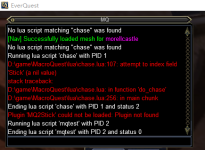
Hi there! I'm trying to help a friend setup this chase.Lua on a fresh MQ install. He's just starting and wanted a better autofollow. He has his MQ up and running and his MQ2nav accessing his meshes. His MQ2lua is loaded, but he is getting an odd error when he does /Lua run chase and I'm not sure if he's missing a plugin or not. I tried to take a look at what I'm using and what he's using and couldn't make the connection. The chase.Lua is working for me, but I have redguides.
 

Attachments

  • lua.chase error.png
    lua.chase error.png
    40.2 KB · Views: 0
Hi there! I'm trying to help a friend setup this chase.lua on a fresh MQ install. He's just starting and wanted a better autofollow. He has his MQ up and running and his MQ2nav accessing his meshes. His MQ2lua is loaded, but he is getting an odd error when he does /lua run chase and I'm not sure if he's missing a plugin or not. I tried to take a look at what I'm using and what he's using and couldn't make the connection. The chase.lua is working for me, but I have redguides.
Stick is from the mq2moveutils plugin
 
Release Chase

Users who are viewing this thread

Back
Top
Cart