
-
 Hail, we're RedGuides. We want you to play six (yes, 6!) EverQuest characters at once. We have scripts and a friendly community to help, please join our playstyle and say hello! 👋
 -
 We've added LLM sections to our Terms & Rules and Resource Rules, for everyone's sanity & in-game safety.
Read more
a. Do not replace your voice with an LLM. This goes for your posts and your scripts. Drafting and editing with a tool is fine, but don't take you out of what you share.
b. Do not replace your EQ character's voice with an LLM. We don't want scripts that speak over/ooc,/shoutor other public channels. This has been an unwritten rule that's kept casino scripts off the site for decades, but we're now compelled to make it clear: keep automated communication private.
Why Does RG Review Scripts?
Nearly every LLM-written Lua script we see is making your character do impossible things, and rarely in a way that's beneficial to you. We've seen heavy server hammering,/targetover impossible distances when/nav spawnwould passively accomplish the same thing, a spawn search that fires 20+ times per second, and other pointless actions that are likely annoying GMs.
You are welcome to use LLMs as a tool to structure, draft, and edit your work, but please read critically before hitting/lua run
You are using an out of date browser. It may not display this or other websites correctly.
You should upgrade or use an alternative browser.
You should upgrade or use an alternative browser.

Release Button Master 2026-10-29-9806f31
- Thread starter SpecialEd
- Start date

Derple updated Button Master with a new update entry:
09/17/2024
Read the rest of this update entry...
09/17/2024
 Commits
Read the rest of this update entry...

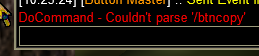
Did we lose the /btncopy command? I use that to position the buttons on all my toons to the same position and size.
I get this when I try to use /btncopy in the MQ window. This is on my new RGManager test environment, so I am wionderign if there is an alias or something involved?
Derple updated Button Master with a new update entry:
09/29/2024
Read the rest of this update entry...
09/29/2024
Read the rest of this update entry...
is button master even running?I get this when I try to use /btncopy in the MQ window. This is on my new RGManager test environment, so I am wionderign if there is an alias or something involved?
View attachment 65139
Definitely running, it is on the screen.
Nothing found in the init.Lua
When I look at the version of the init.Lua in my original MQNext folder, I can see it in there, but the version is all saying 2.3.
Is the version being downloaded by RGManager an incorrect version?
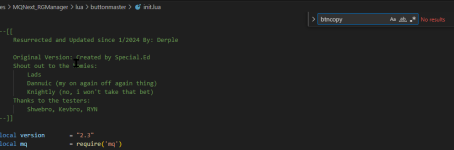
When I look at the version of the init.Lua in my original MQNext folder, I can see it in there, but the version is all saying 2.3.
Is the version being downloaded by RGManager an incorrect version?
I just ran the updater on the RGManager, and it showed an update, now the version I have does have the /btncopy command in it. Wierd stuff, as I have been running the Update All button daily on the RGManager.

@Derple Found a broke'd thing I was fooling around importing from the Shard Repo and I could not delete the Derple's Silly Buttons Set. Crashes every time.
Removed set from the active buttons, and even tried deleting the 3 buttons that import gives. Still crashes and gives the following error:
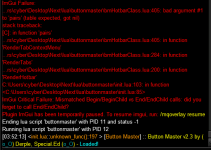
Restarting IM GUI shows the set still in the non displayed list.
Removed set from the active buttons, and even tried deleting the 3 buttons that import gives. Still crashes and gives the following error:
Restarting IM GUI shows the set still in the non displayed list.
Fixed next patch!@Derple Found a broke'd thing I was fooling around importing from the Shard Repo and I could not delete the Derple's Silly Buttons Set. Crashes every time.
Removed set from the active buttons, and even tried deleting the 3 buttons that import gives. Still crashes and gives the following error:
View attachment 65310
Restarting IM GUI shows the set still in the non displayed list.
Derple updated Button Master with a new update entry:
10/06/2024
Read the rest of this update entry...
10/06/2024
Read the rest of this update entry...

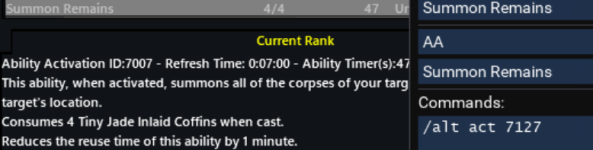
Bug: When dragging an EQ-created AA hotkey to BM, the alt act number listed in BM seems to be increased by 120 (on live, at least).
EditButtonPopup, line 71. Guessing just the cursor index isn't offset (even though the check for it is), but don't know enough about it to feel comfy PRing.
EditButtonPopup, line 71. Guessing just the cursor index isn't offset (even though the check for it is), but don't know enough about it to feel comfy PRing.

Robban
Ultimate seasoned veteran member
Bug: When dragging an EQ-created AA hotkey to BM, the alt act number listed in BM seems to be increased by 120 (on live, at least).
EditButtonPopup, line 71. Guessing just the cursor index isn't offset (even though the check for it is), but don't know enough about it to feel comfy PRing.
View attachment 65482
Yep, same for me, also mentioned this before but had forgotten about itadding AA hotbuttons by clicking makes the AA number wrong by 120
for example, Origin is 331 but this is what is added.
View attachment 64441
@Derple
Derple updated Button Master with a new update entry:
10/14/2024
Read the rest of this update entry...
10/14/2024
Read the rest of this update entry...

I am hitting a wall with Button Master and at this point it is to be something I have done or I am not doing. When I load in Button Master all I get is a gui window that says Button Master - 1 but no buttons and the options gear icon does nothing. This is unfamiliar territory for myself and I have read everything I could find so far but nothing has seemed to help but I do fully realize this may just be a real simple stupid issue that I am just not grasping so apologies if that is the case. What I have been able to observe is that Button Master will not make a config .ini and when I do load up button master this is the line in MQ console "<init.Lua::unknown_fun():197 > [Button Master] :: Button Master v2.3 by (o_O) Derple, Special.Ed (o_O) - Loaded!" Now if the error on 197 is line 197 in the init.Lua then that the is the Setup () function call (may be wrong jargon here). I really do try to fix the issues myself but I am pulling my hair out on this one, please let me know if I have done something super silly to cause this, this is the literal first time I have tried to use button master. Appriciate any insite anyone may have on this, Thank you!
Images below:

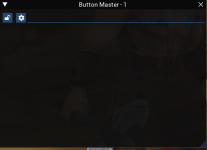
Images below:
Right click the gear and add set, or create new set. A set is a tab for the windows.
Glad you got it sorted, just wanted to let you know that the "unknown function" is not an error, it just more or less means that the function doing the work there did not report it's name to the logging function. It's a Derple thing.I am hitting a wall with Button Master and at this point it is to be something I have done or I am not doing. When I load in Button Master all I get is a gui window that says Button Master - 1 but no buttons and the options gear icon does nothing. This is unfamiliar territory for myself and I have read everything I could find so far but nothing has seemed to help but I do fully realize this may just be a real simple stupid issue that I am just not grasping so apologies if that is the case. What I have been able to observe is that Button Master will not make a config .ini and when I do load up button master this is the line in MQ console "<init.lua::unknown_fun():197 > [Button Master] :: Button Master v2.3 by (o_O) Derple, Special.Ed (o_O) - Loaded!" Now if the error on 197 is line 197 in the init.lua then that the is the Setup () function call (may be wrong jargon here). I really do try to fix the issues myself but I am pulling my hair out on this one, please let me know if I have done something super silly to cause this, this is the literal first time I have tried to use button master. Appriciate any insite anyone may have on this, Thank you!
Images below:
View attachment 66067
View attachment 66066
It depends on what you are trying to do. The first will send multiple commands to the local client, the second will send those commands to all of the DanNet connected clients.I think i just discovered I'm using the `/multi ;` command incorrectly.
I've been using ``/multi ; `` instead of `/dgae /multi ; `

- Commits
- 2
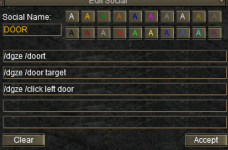
All toons in zone target and click doorSo I'm trying to enter info i have in a hotkey but am not sure how it needs to look in the Button Master box.
This is the hotkey:
View attachment 66063
When I type those lines in a Button Master box it doesn't work at all.
How should it be done in Button Master?
Code:
/dgza /doortarget
/multiline ; /timed 25 /dgza /click left doorSo I just went through and moved all my eq hotkeys into buttonmaster - Drag and Drop worked on almost everything, with the exception of disciplines - Drag the hotkey over a BM key, click, and... nothing. Button edit window opens, nothing is pasted into it. Had to manually type each one in. Also noted that timer for Discs requires full name with rank in order to work, although the command is just fine with only the name. Not sure if there is any way to change that or not. If the drag and drop worked, would be a non-issue.
The timer requires the rank because the name of the ability includes the rank for disciplines. This isn't a Button Master limitation.So I just went through and moved all my eq hotkeys into buttonmaster - Drag and Drop worked on almost everything, with the exception of disciplines - Drag the hotkey over a BM key, click, and... nothing. Button edit window opens, nothing is pasted into it. Had to manually type each one in. Also noted that timer for Discs requires full name with rank in order to work, although the command is just fine with only the name. Not sure if there is any way to change that or not. If the drag and drop worked, would be a non-issue.
Thought that might be the case.The timer requires the rank because the name of the ability includes the rank for disciplines. This isn't a Button Master limitation.
I create tabs (set) specific for each toon, and global ones, like travel or maintenance ones.Probably a super dum question - how do i have different profiles for button master with my different drivers? when i load it up on a new driver it makes changes on my main drivers button master profile
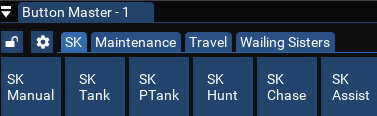
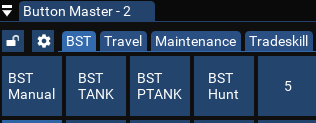
Ignore the 2 part, that is just remnants from an older version of BM.
Keep in mind there is great versatility, and you should make it your own. I have seen screen shots of amazing looking ones, mine is very basic.
I love buttonmaster and appreciate the work you have put into it. The problem I am having is when I switch to a different toon, one of the buttons in button master will get stuck on the cursor. Then, if I do not notice and click a button it will swap spots. It also stops the toon from casting spells because it thinks it ha something on the cursor. nothing will work until I left click the mouse in an empty space to get rid of it.
Thank you for an awesome Lua!
Thank you for an awesome Lua!

Jarhead32
Active member
Oh hell yeah!
I got this up and running after some learning curves cause well, I dont read shit. LOL I freed up like 15 slots on my hotbar space. I leave some stuff on the bars in case I need that oh shit moment and need to play in manual mode though. But still....dont need 8 hotbars like the old days.
Now to go learn some more.
Thanks much.
I got this up and running after some learning curves cause well, I dont read shit. LOL I freed up like 15 slots on my hotbar space. I leave some stuff on the bars in case I need that oh shit moment and need to play in manual mode though. But still....dont need 8 hotbars like the old days.
Now to go learn some more.
Thanks much.

Killing it bro. Nice jobOh hell yeah!
I got this up and running after some learning curves cause well, I dont read shit. LOL I freed up like 15 slots on my hotbar space. I leave some stuff on the bars in case I need that oh shit moment and need to play in manual mode though. But still....dont need 8 hotbars like the old days.
Now to go learn some more.
Thanks much.
Hey dude, I sometimes have issues like this and it has to do with the way that I click into windows and imgui capturing my mouse, generally.I love buttonmaster and appreciate the work you have put into it. The problem I am having is when I switch to a different toon, one of the buttons in button master will get stuck on the cursor. Then, if I do not notice and click a button it will swap spots. It also stops the toon from casting spells because it thinks it ha something on the cursor. nothing will work until I left click the mouse in an empty space to get rid of it.
Thank you for an awesome lua!
If it is the same thing that happens to me, you can try a non-mouse method to switch windows, or clicking a slightly different area (happens to me when i remote in and use task view to switch windows, and the mouse is in the general area of the window BM is in).
Chiming in because it does seem to make sense to me that locking the window from moving would also lock button dragging, maybe @Derple can add it at some point.
Derple updated Button Master with a new update entry:
11/21/2024
Read the rest of this update entry...
11/21/2024
Read the rest of this update entry...
Users who are viewing this thread
Total: 1 (members: 0, guests: 1)
Share: