I run on Laz emu and my primary tools are Buttonmaster, RGMercs, Lem, Boxhud and the plugins that support those programs, as well as a couple of nice to haves.
Today something has changed with Buttonmaster evaluating the toggle buttons I use to control RGMercs.
I have not changed the button, and buttonmaster has not been updated for a week(?), but the change in behaviour is new today.
In in need of some direction as to help identify what the cause is and hopefully something that I can fix, or if its a do date undiscovered error with buttonmaster provide appropriate information for the devs that maintain that program.
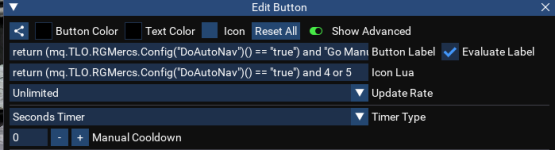
Heres a button that Derple provided (which I edited to remove a single setting when I set it up a few weeks ago).
View attachment 77118
Button Label
Lua:
return (mq.TLO.RGMercs.Config("DoAutoNav")() == "true") and "Go Manual" or "Go Auto"
Button Icon/s
Lua:
return (mq.TLO.RGMercs.Config("DoAutoNav")() == "true") and 4 or 5
Button Content
Code:
--lua

local settings = { 'DoAutoNav', 'DoAutoStick', 'HandleCantSeeTarget', 'HandleTooClose', 'HandleTooFar' }
 --  'FaceTarget'

local cmd = "/rgl set "
local state = "true"

if mq.TLO.RGMercs.Config("DoAutoNav")() == "true" then
    state = "false"
end

for _, setting in ipairs(settings) do
    mq.cmdf("%s %s %s", cmd, setting, state)
    printf("\awExec: \ay%s %s %s", cmd, setting, state)
end
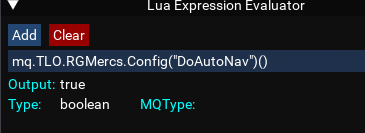
Now, when I manually evaluate the condition
mq.TLO.RGMercs.Config("DoAutoNav")() it resolves correctly:
View attachment 77117
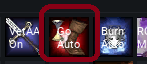
But the icon in buttonmaster doesnt change, and when clicked, it runs the script as if
mq.TLO.RGMercs.Config("DoAutoNav")() had returned false.
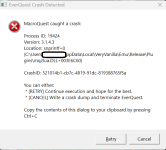
Script runs correctly
View attachment 77120
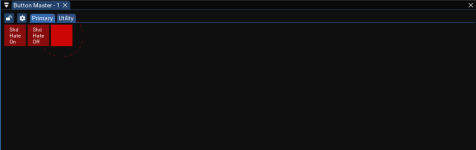
Button does not update
View attachment 77119
And anytime the button is clicked, it set the properties to true believing that they are false.
All I can guess so far is that for some reason, buttonmaster is not evaluating the label nor the icons correctly.
This is happening to all my toggle buttons. All my toggle buttons are for RGMercs.
Any help would be greatly appreciated.




Commits








 *****
*****