
-
 Hail, we're RedGuides. We want you to play six (yes, 6!) EverQuest characters at once. We have scripts and a friendly community to help, please join our playstyle and say hello! 👋
You are using an out of date browser. It may not display this or other websites correctly.
You should upgrade or use an alternative browser.
You should upgrade or use an alternative browser.

Release Button Master (1 Viewer) 2026-10-03
- Thread starter SpecialEd
- Start date


Idk, every time I get it to show up, it's a tiny little window, I go to stretch it out a little and it crashes complaining about line 446 in buttonmaster.Lua
I took a look using VS code but did not see anything obvious.
Screen shot:
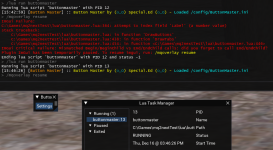
I'm probably just doing something wrong.
--Taz
Code:
> /mqoverlay resume
ImGui Failure:
C:\Games\mq2nextTest\lua\buttonmaster.lua:364: attempt to index field 'Label' (a number value)
stack traceback:
    C:\Games\mq2nextTest\lua\buttonmaster.lua: in function 'DrawButtons'
    C:\Games\mq2nextTest\lua\buttonmaster.lua:438: in function 'DrawTabs'
    C:\Games\mq2nextTest\lua\buttonmaster.lua:454: in function <C:\Games\mq2nextTest\lua\buttonmaster.lua:446>
ImGui Critical Failure: Mismatched Begin/BeginChild vs End/EndChild calls: did you forget to call End/EndChild?
Plugin ImGui has been temporarily paused. To resume imgui, run: /mqoverlay resume
Ending lua script 'buttonmaster' with PID 12 and status -1
> /lua run buttonmaster
Running lua script 'buttonmaster' with PID 13
[15:46:26] [Button Master] :: Button Master by (o_O) Special.Ed (o_O) - Loaded /config/ButtonMaster.ini
/mqoverlay resume
I took a look using VS code but did not see anything obvious.
Code:
local ButtonGUI = function()
    if not openGUI then return end
    openGUI, shouldDrawGUI = ImGui.Begin('Button Master', openGUI, ImGuiWindowFlags.NoFocusOnAppearing)
    if openGUI and shouldDrawGUI then
        if initialRun then
            ImGui.SetWindowSize(280, 318)
            initialRun = false
        end
        DrawTabs()
    end
    ImGui.End()
end
Screen shot:
I'm probably just doing something wrong.
--Taz

You have a button in your ini with an empty label (or a label with a number)Idk, every time I get it to show up, it's a tiny little window, I go to stretch it out a little and it crashes complaining about line 446 in buttonmaster.lua
Thank you Lua Slayer, this worked.You have a button in your ini with an empty label (or a label with a number)
Buttonmaster position of gui jumps to center of screen, once swapping focus to another char and come back.
/Lua stop buttonmaster + /Lua run Buttonmaster let the gui pop up at the position where I want it to be.
When dropping focus to another char and coming back to the char running Lua the buttonmaster-gui flipped to the center of screen.
Different from usual user: I am running is-boxer to set the screenposition of all toons on the screens. When changing focus to another char. the 2 chars swap their position.
When changing back the focus to the char running Buttonmaster, the 2 swap again their position, so the char is back to the position where it was.
After this "operation" the buttonmaster-gui is flipped to the center.
This happens also, when only 1 char is running any Lua.
Would be great if I could create a hotbutton with a command like: "/buttonmaster setpos x:840 y: 655"
/Lua stop buttonmaster + /Lua run Buttonmaster let the gui pop up at the position where I want it to be.
When dropping focus to another char and coming back to the char running Lua the buttonmaster-gui flipped to the center of screen.
Different from usual user: I am running is-boxer to set the screenposition of all toons on the screens. When changing focus to another char. the 2 chars swap their position.
When changing back the focus to the char running Buttonmaster, the 2 swap again their position, so the char is back to the position where it was.
After this "operation" the buttonmaster-gui is flipped to the center.
This happens also, when only 1 char is running any Lua.
Would be great if I could create a hotbutton with a command like: "/buttonmaster setpos x:840 y: 655"
Addendum: the Lua "boxhud" keeps its position when swapping focus the same way

- Commits
- 1
Buttonmaster would bounce around on me as well. Never out any effort to figure out why, or any common reason behind it.
Once I moved it outside my eq window it stopped moving, it’s not my preferred solution.
Using IsBoxer as well, no FX display.
if you find a solution I’d be interested in it
Once I moved it outside my eq window it stopped moving, it’s not my preferred solution.
Using IsBoxer as well, no FX display.
if you find a solution I’d be interested in it

I use ISB and its fine for position when I relogNo idea on the positioning issue. I don't use ISB - button master stays wherever I leave it when swapping between windows.

Tituba
Well-known member
You literally can go around claiming everyone pushes your buttons!
With ISB when changing focus, the 2 accounts are swapped in position and the resolution of the viewport is swapped as well. Where I like to have it positioned I see the small graphic on the right border which may indicates that the position will be referenced from the right border. So when size and position of the eq window is swapped, the relative position from the top left changes.
The possibility to have a command like "setpos" would be a nice Workaround.
A solution could be, to be able to define the reference-edges within the settings, indipendend which edge is the closest to the actual position.
The boxhud I Ave close to the upper-left corner, which might be the reason, it stays in position after the swaps.
The possibility to have a command like "setpos" would be a nice Workaround.
A solution could be, to be able to define the reference-edges within the settings, indipendend which edge is the closest to the actual position.
The boxhud I Ave close to the upper-left corner, which might be the reason, it stays in position after the swaps.
Should just be move it, size it, stop it, start it.
I'm late to the party but starting to use it now. I cannot get the window to persist in it's location, expanded. When I camp out / log in and run the script, it starts in a collapsed view in the upper left quadrant of my screen which I had it bottom middle when I camped out. Am I not doing something to preserve it's location?

Tangtown
Well-known member
As per a previous post use /Lua stop buttonmaster + /Lua run Buttonmaster after it was in the position you want and it stays.I'm late to the party but starting to use it now. I cannot get the window to persist in it's location, expanded. When I camp out / log in and run the script, it starts in a collapsed view in the upper left quadrant of my screen which I had it bottom middle when I camped out. Am I not doing something to preserve it's location?


- Commits
- 2
What's the recommended way to do a /pause 25 in the hotbuttons?
Code:
/multiline ; /timed 250 /say That was a 25 second wait
timed is in decisecondsCode:/multiline ; /timed 25 /say That was a 25 second wait
- Commits
- 2
yah, something like that. loltimed is in deciseconds
Code:
/multiline ; /timed 100 /say Was about a 10 second delayNot sure what you are fighting for the color pickers - pick color, click out and hit save.It seems like a real fight with the UI to edit button/text colors, is that normal?
My OCD self would also love it if the button names were (or could optionally be) centered
Centering would be nice, but doesn't seem to be readily available...
If you hit reset at the wrong time if fucks up the ui, makes it poof and you cant get it back without relogging?Not sure what you are fighting for the color pickers - pick color, click out and hit save.
Centering would be nice, but doesn't seem to be readily available...
Give it a try and let me know how to fix that?
- Commits
- 2
I just got done setting up a bunch of hotkeys and colors. The color picker is a little bit to get use too. The best method for me was to select the color and move the box out of the way and hit save. Sometimes I did have to hit reset to get the color to to change (seemed like it was stuck on a color and the slider wouldn't move). Other than that haven't had the ui go poof at all until I started messing with the script. If the ui goes poof I usually run /mqoverlay resume
When changing colors after you have all ready saved it once for a custom color. The slider will snap back to were it was but it will change the color to were you had clicked it before it snaps back .(seemed like it was stuck on a color and the slider wouldn't move)
Appears you have to reset to default color first then change the color, then that doesn't happen.
Or at least that is one way to avoid that behavior.
- Commits
- 2

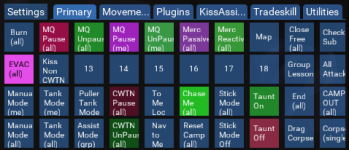

I play in window mode (tried in non windowed mode also) and I can not drag it on another monitor. Is there a setting or something to make this happen?oh, i like this idea, i wonder if you could have mouse over and faded levels - that would be legit.
also, in case this helps you with real estate grimlock - you can actually drag it OUTSIDE of everquest, like onto another monitor
I play in window mode (tried in non windowed mode also) and I can not drag it on another monitor. Is there a setting or something to make this happen?
/mqsettings overlay then select "Enable Viewports"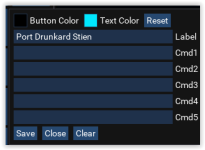
Shadowfinger
Member
Request to be able to split buttons into distinct windows. so that you can break them up and not have them all in one block.
cfg files have always been around - there was just some goofy behavior previously that tripped some people up. Ingame.cfg is the ideal way to launch macros, load/unload plugins and start lua scripts when you load into the world.
Note: launching multiple lua scripts from cfg files one after another is currently causing crashes for some
Instead of something like this -
Bad Example
Code:/lua run myfirstscript /lua run mysecondscript /plugin mq2something unload
Do something like this -
Good Example
Code:/lua run myfirstscript /timed 100 /lua run mysecondscript /plugin mq2something unload
Hello All, where do I need to put this ingame.cfg file? In the Release directory or in the config directory? And can I simply use any text editor to create it?
Config directory - any text editor to create it, just make sure it has the right file extension.Hello All, where do I need to put this ingame.cfg file? In the Release directory or in the config directory? And can I simply use any text editor to create it?
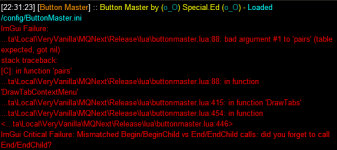
Running into this suddenly after zoning. I havent made any changes/added any new buttons in the past couple of weeks, and this popped up today:
View attachment 37291
I ran into the same thing. I redid all my buttons, it was painful. Well worth it though.

njsx
Active member
Had to do the same thing, completely restarted from scratch.I ran into the same thing. I redid all my buttons, it was painful. Well worth it though.
All of my config is now in git, needless to say, and i prettied it up while I was at it.
This may have been already discussed, but I didn't see it. Is there a way to alter the config to where the buttons 1. Stay where I put them in the screen instead of moving to their default location every time I tab out? 2. To keep it up all the time so where you don't have to manually start it each time you log in?
This may have been already discussed, but I didn't see it. Is there a way to alter the config to where the buttons 1. Stay where I put them in the screen instead of moving to their default location every time I tab out? 2. To keep it up all the time so where you don't have to manually start it each time you log in?
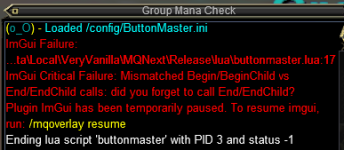
im getting this error when ever i try to edit a button. ive reloged and restarted mq. i edited several buttons about 3 days ago and it was fine. using the buttons still works.
edit - i was able to edit the button through the config. and it also happens if i select anything after right clicking a button not just edit.
Last edited:
right click itIs the setting tab suppose to do anything right now? Not sure if I got it installed correctly but doesn't seem to do anything for me when I clicked on it.
Thank you. Is there a way to save the buttons live when multiple clients have it up? Right now when I make changes on one client, the other one won't see it and if i try to restart it, I lose my new buttons.right click it
Users who are viewing this thread
Total: 2 (members: 0, guests: 2)
Share: