
-
 Hail, we're RedGuides. We want you to play six (yes, 6!) EverQuest characters at once. We have scripts and a friendly community to help, please join our playstyle and say hello! 👋
You are using an out of date browser. It may not display this or other websites correctly.
You should upgrade or use an alternative browser.
You should upgrade or use an alternative browser.

Release (YALM) Yet Another Loot Manager 0.12.7
- Thread starter fuddles
- Start date

- Commits
- 2
Some commands that I use.
/yalm setitem Destroy all (with item on cursor is global)
/yalm setitem Destroy me (with item on cursor is individual)
/yalm setitem Guild all
/yalm setitem Sell all
/yalm setitem Keep all
/yalm setitem Tribute all
/yalm setitem Destroy all
/yalm Guild (for guild deposits items marked Guild)
/yalm Tribute (for tribute items marked Tribute)
/yalm Sell (sell all sell items marked sell)
/yalm Destroy (destroy items in inventory marked Destroy)
/yalm setitem Destroy all (with item on cursor is global)
/yalm setitem Destroy me (with item on cursor is individual)
/yalm setitem Guild all
/yalm setitem Sell all
/yalm setitem Keep all
/yalm setitem Tribute all
/yalm setitem Destroy all
/yalm Guild (for guild deposits items marked Guild)
/yalm Tribute (for tribute items marked Tribute)
/yalm Sell (sell all sell items marked sell)
/yalm Destroy (destroy items in inventory marked Destroy)
Last edited:
- Commits
- 2
Yah, it would make sense. But then again /yalm Tribute would make sense too. hahaWould making all the default value make sense?
That I can't really help you with. Some people have problems with Luarocks install while a lot of other people don't.CTD 4x on lfs.dll install.

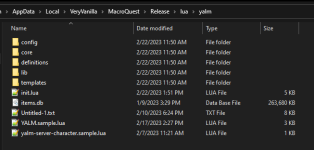
The global YALM.Lua and character settings are in your MQ config directory.If my yalm folder looks like this, does this suggest that the global/character files are not being created?
View attachment 46494
fuddles updated (YALM) Yet Another Loot Manager with a new update entry:
Feexis
Read the rest of this update entry...
Feexis
Bug fixes:
- Buy was broken due to previous code changes to fix looting
- Simulate was broken due to previous code changes to fix looting
Enhancements:
- setitem by default will use
all- Working on code refactors to start implementing full config commands
Read the rest of this update entry...
OK I know I'm really bulldogging this, but I'm adamant about getting this working.
What I did:
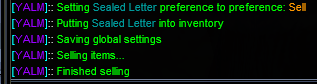
I have 8 of this item in my inventory right now and this is an item I can sell manually without issue. I'm updated to the latest version of YALM.
What's the best way for me to troubleshoot this?
What I did:
- Put a Sealed Letter on my cursor
- Type /yalm setitem sell all
- Stood in Guild Lobby next to and targeting A Vendor of Reagents
- Typed /yalm sell
- YALM would mark the Sealed Letter as Sell in the global file
- YALM would drop the Sealed Letter in my inventory
- YALM would open the merchant window with A Vendor of Reagents
- YALM would sell all Sealed Letters in my inventory
- YALM would close the merchant window
I have 8 of this item in my inventory right now and this is an item I can sell manually without issue. I'm updated to the latest version of YALM.
What's the best way for me to troubleshoot this?
- Commits
- 2
Just a possible scenario. /yalm setitem sell all (places the setting in the global) Is that toon using a personal loot.ini file?OK I know I'm really bulldogging this, but I'm adamant about getting this working.
What I did:
What I expected to happen:
- Put a Sealed Letter on my cursor
- Type /yalm setitem sell all
- Stood in Guild Lobby next to and targeting A Vendor of Reagents
- Typed /yalm sell
Here's what actually happened:
- YALM would mark the Sealed Letter as Sell in the global file
- YALM would drop the Sealed Letter in my inventory
- YALM would open the merchant window with A Vendor of Reagents
- YALM would sell all Sealed Letters in my inventory
- YALM would close the merchant window
View attachment 46555
I have 8 of this item in my inventory right now and this is an item I can sell manually without issue. I'm updated to the latest version of YALM.
What's the best way for me to troubleshoot this?
config/yalm/yalm-server-yourtoon.Lua
try aOK I know I'm really bulldogging this, but I'm adamant about getting this working.
What I did:
What I expected to happen:
- Put a Sealed Letter on my cursor
- Type /yalm setitem sell all
- Stood in Guild Lobby next to and targeting A Vendor of Reagents
- Typed /yalm sell
Here's what actually happened:
- YALM would mark the Sealed Letter as Sell in the global file
- YALM would drop the Sealed Letter in my inventory
- YALM would open the merchant window with A Vendor of Reagents
- YALM would sell all Sealed Letters in my inventory
- YALM would close the merchant window
View attachment 46555
I have 8 of this item in my inventory right now and this is an item I can sell manually without issue. I'm updated to the latest version of YALM.
What's the best way for me to troubleshoot this?
/yalm check with the item on your cursor. it could be something else taking precedence. Also post that character's config file.Does the item get selected and show in the merchant window?
Last edited:
Just a possible scenario. /yalm setitem sell all (places the setting in the global) Is that toon using a personal loot.ini file?
config/yalm/yalm-server-yourtoon.lua
OK this was it.
So when I did a /yalm check, this is what I got:
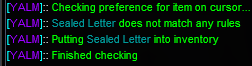
I then did
/yalm setitem sell me (with the item on the cursor), did /yalm sell, and it did work after that.Is there anything I can do to make
/yalm sell fallback to the global file if nothing matches for the personal file?It should fallback to the global file. Can you message me your config files and i can look?OK this was it.
So when I did a /yalm check, this is what I got:
View attachment 46556
I then did/yalm setitem sell me(with the item on the cursor), did/yalm sell, and it did work after that.
Is there anything I can do to make/yalm sellfallback to the global file if nothing matches for the personal file?
- Commits
- 2
I thought the design was to check the individual file first then check the global, but you would have to see what Fuddles says. I do remember having a conversation about it.OK this was it.
So when I did a /yalm check, this is what I got:
View attachment 46556
I then did/yalm setitem sell me(with the item on the cursor), did/yalm sell, and it did work after that.
Is there anything I can do to make/yalm sellfallback to the global file if nothing matches for the personal file?
- Commits
- 2
Bah beat me to it, as I was looking for the conversation. haha
fuddles updated (YALM) Yet Another Loot Manager with a new update entry:
Small bug fixes
Read the rest of this update entry...
Small bug fixes
Bug fixes:
- implemented better delay logic for sell command. Sometimes it would stop.
- small fix to setitem. If you supplied an item name in the command and didin't supple all or me, it would fail.
Read the rest of this update entry...
Yes it does. You can take a look atDoes YALM have the ability to set newly discovered items so that they are only distributed to classes that can use the item?
yalm/config/rules/Defiant.lua as an example of what you can do.fuddles updated (YALM) Yet Another Loot Manager with a new update entry:
Fixed solo loot
Read the rest of this update entry...
Fixed solo loot
Solo loot was broken in the same way the buy command was.
Read the rest of this update entry...
fuddles updated (YALM) Yet Another Loot Manager with a new update entry:
Config Change
Read the rest of this update entry...
Config Change
Breaking Change
This is a pretty big update as it paves the way for getting a GUI working.
The main change is thatRulesare no longer separate files. They will live only inconfig/YALM.LUA. Helper functions now must be defined inlua/yalm/config/functions/and must be underfunctionsinYALM.LUA. Here's an example
{
      functions = {
         GetClassList = {
            name = "GetClassList",
         }...
Read the rest of this update entry...
Last edited:
fuddles updated (YALM) Yet Another Loot Manager with a new update entry:
Fixed crash from previous release
Read the rest of this update entry...
Fixed crash from previous release
Fixed crashing when setitem or reloading configs.
Read the rest of this update entry...
fuddles updated (YALM) Yet Another Loot Manager with a new update entry:
Bank Preference/Command Added
Read the rest of this update entry...
Bank Preference/Command Added
Added Bank item preference and /yalm bank command.
Needed to make a defiant gear bank toon for the 5 groups i took to 85 working on YALM so far.
Read the rest of this update entry...
fuddles updated (YALM) Yet Another Loot Manager with a new update entry:
Performance Improvement
Read the rest of this update entry...
Performance Improvement
mq.pickle() now properly supports keys with spaces. This means I was able to get rid of the lua based persistence libraries. Now if you have thousands of items from converting from lootly,/yalm setitemand other commands will finish MUCH faster. Almost instantly compared to the 20+ seconds it took.
This does require updating to the latest MQ version though.
Read the rest of this update entry...
You should be making conditions and rules. I have several already included if you take a look in yalm/config/rules and yalm/config/conditionsAny suggestions on how to set an item preference with a partial name match... for example, if I wanted to destroy all fine steel items I loot... is there a way to </yalm setitem "fine steel*" destroy me> ?
They are a little more DIY right now but there is /yalm condition create and /yalm rule create to help.

manydills
Well-known member
I'd love to see a more detailed explanation / documentation of how these work once you've got the core functionality where you'd like it to be! Are the conditions called when an item is looted? Sold? Banked? Do you need to make a /yalm something something function call to apply a rule? Do rules check conditions or does YALM check conditions as part of its core functionality?You should be making conditions and rules. I have several already included if you take a look in yalm/config/rules and yalm/config/conditions
They are a little more DIY right now but there is /yalm condition create and /yalm rule create to help.
I'm not trying to be presumptuous or critical; apologies if I'm coming across that way. I think a tool as powerful as YALM can be would benefit from some robust documentation. (Again, once the functionality is more settled than it is at the moment.) I appreciate your vision for YALM.
Core functionality is done. Right now I'm working on the configuration aspect to make it easier.I'd love to see a more detailed explanation / documentation of how these work once you've got the core functionality where you'd like it to be! Are the conditions called when an item is looted? Sold? Banked? Do you need to make a /yalm something something function call to apply a rule? Do rules check conditions or does YALM check conditions as part of its core functionality?
I'm not trying to be presumptuous or critical; apologies if I'm coming across that way. I think a tool as powerful as YALM can be would benefit from some robust documentation. (Again, once the functionality is more settled than it is at the moment.) I appreciate your vision for YALM.
As for how it works, whenever a preference is checked for an item it will:
- check if item is in the character configuration under items
- check if item is in the global configuration under items
- evaluate each rule in order they are listed for a character configuration
- check if item is in the rule under items
- evaluate conditions in order they are listed to see if the item passes the condition
- if none of these apply, then the character's default preference is used
- if the character doesn't have a default preference, then it will use the global configuration preference
For example, i have this configuration on a DRU that i'm leveling:
Lua:
return {
    items = {},
    rules = {
        {
            name = "DRU",
            enabled = true,
        },
        {
            name = "Defiant",
            enabled = true,
        },
        {
            name = "Leveling",
            enabled = true,
        },
    },
    settings = {
        unmatched_item_rule = {
            setting = "Sell",
        },
    },
}
By default, everything will be marked as sell if it doesn't pass one of the rules above. As for those rules, lets looka t leveling:
Lua:
        ['Leveling'] = {
            ['category'] = '',
            ['items'] = {},
            ['name'] = 'Leveling',
            ['conditions'] = {
                [1] = {
                    ['name'] = 'NoValue',
                    ['setting'] = 'Destroy',
                },
                [2] = {
                    ['name'] = 'Tradeskill',
                    ['setting'] = 'Sell',
                },
                [3] = {
                    ['name'] = 'Quest',
                    ['setting'] = 'Sell',
                },
                [4] = {
                    ['name'] = 'Augmentation',
                    ['setting'] = 'Destroy',
                },
                [5] = {
                    ['name'] = 'Poisons',
                    ['setting'] = 'Destroy',
                },
                [6] = {
                    ['name'] = 'FoodDrink',
                    ['setting'] = 'Keep',
                },
                [7] = {
                    ['name'] = 'Temporary',
                    ['setting'] = 'Destroy',
                },
                [8] = {
                    ['quantity'] = 1,
                    ['name'] = 'Collectible',
                    ['setting'] = 'Keep',
                },
            },
        },
If an item isn't in the DRU list (right now it's just Fire Beetle Eye set to buy), or a Defiant item, it will evaluate these rules going in order.
- Items that have no value will be set to destroy
- Tradeskill items will be sold
- Quest items set to sell
- Augmentations set to destroy
- Poisons set to destroy
- Keep food or drink items
- Destroy temporary items
- Keep collectibles.
Here's an example of a condition, this one is "Temporary" which will match temporary items.
Lua:
local function(item)
    return item.NoRent()
end

return { condition_func = condition }manydills
Well-known member
This was really great to read; thank you so much for taking the time to explain.Core functionality is done. Right now I'm working on the configuration aspect to make it easier.
As for how it works, whenever a preference is checked for an item it will:
Anything that requires getting an item preference will go through this list. So all the commands you mentioned along with looting as well.
- check if item is in the character configuration under items
- check if item is in the global configuration under items
- evaluate each rule in order they are listed for a character configuration
- check if item is in the rule under items
- evaluate conditions in order they are listed to see if the item passes the condition
- if none of these apply, then the character's default preference is used
- if the character doesn't have a default preference, then it will use the global configuration preference
For example, i have this configuration on a DRU that i'm leveling:
Lua:return { items = {}, rules = { { name = "DRU", enabled = true, }, { name = "Defiant", enabled = true, }, { name = "Leveling", enabled = true, }, }, settings = { unmatched_item_rule = { setting = "Sell", }, }, }
By default, everything will be marked as sell if it doesn't pass one of the rules above. As for those rules, lets looka t leveling:
Lua:['Leveling'] = { ['category'] = '', ['items'] = {}, ['name'] = 'Leveling', ['conditions'] = { [1] = { ['name'] = 'NoValue', ['setting'] = 'Destroy', }, [2] = { ['name'] = 'Tradeskill', ['setting'] = 'Sell', }, [3] = { ['name'] = 'Quest', ['setting'] = 'Sell', }, [4] = { ['name'] = 'Augmentation', ['setting'] = 'Destroy', }, [5] = { ['name'] = 'Poisons', ['setting'] = 'Destroy', }, [6] = { ['name'] = 'FoodDrink', ['setting'] = 'Keep', }, [7] = { ['name'] = 'Temporary', ['setting'] = 'Destroy', }, [8] = { ['quantity'] = 1, ['name'] = 'Collectible', ['setting'] = 'Keep', }, }, },
If an item isn't in the DRU list (right now it's just Fire Beetle Eye set to buy), or a Defiant item, it will evaluate these rules going in order.
If the item doesn't pass one of these conditions, it will default to Sell.
- Items that have no value will be set to destroy
- Tradeskill items will be sold
- Quest items set to sell
- Augmentations set to destroy
- Poisons set to destroy
- Keep food or drink items
- Destroy temporary items
- Keep collectibles.
Here's an example of a condition, this one is "Temporary" which will match temporary items.
Lua:local function(item) return item.NoRent() end return { condition_func = condition }
fuddles updated (YALM) Yet Another Loot Manager with a new update entry:
Fix with grouped with merc
Read the rest of this update entry...
Fix with grouped with merc
There was an issue if you were grouped with a merc
Read the rest of this update entry...
manydills
Well-known member
YALM seems to kill itself in the tutorial zone whenever it encounters one of the LORE metal chunks: "Chunk of Iron" or "Chunk of Bronze". After that, YALM is killing itself when restarting. Here's the log:
YALM crash log
YALM crash log
Code:
[2023/03/04 12:55:49] Ending lua script 'yalm' with PID 14 and status -1
[2023/03/04 12:57:18] MQ2Log :: Logging is ON
[2023/03/04 12:57:22] Running lua script 'yalm' with PID 15
[2023/03/04 12:57:22] [YALM]:: Sqlite version: 3.37.1
[2023/03/04 12:57:22] [YALM]:: Registering commands: Rule
[2023/03/04 12:57:22] [YALM]:: Registering commands: Simulate
[2023/03/04 12:57:22] [YALM]:: Registering commands: Condition
[2023/03/04 12:57:22] [YALM]:: Registering commands: Command
[2023/03/04 12:57:22] [YALM]:: Registering commands: Character
[2023/03/04 12:57:22] [YALM]:: Registering commands: Buy
[2023/03/04 12:57:23] [YALM]:: Registering commands: Destroy
[2023/03/04 12:57:23] [YALM]:: Registering commands: Convert
[2023/03/04 12:57:23] [YALM]:: Registering commands: Bank
[2023/03/04 12:57:23] [YALM]:: Registering commands: Sell
[2023/03/04 12:57:23] [YALM]:: Registering commands: Guild
[2023/03/04 12:57:23] [YALM]:: Registering commands: SetItem
[2023/03/04 12:57:23] [YALM]:: Registering commands: Check
[2023/03/04 12:57:23] [YALM]:: Registering commands: Category
[2023/03/04 12:57:23] [YALM]:: Registering commands: Tribute
[2023/03/04 12:57:23] [YALM]:: Registering functions: GetEquipmentQuantity
[2023/03/04 12:57:23] [YALM]:: Registering functions: GetClassList
[2023/03/04 12:57:23] [YALM]:: Registering subcommands: Edit
[2023/03/04 12:57:23] [YALM]:: Registering subcommands: Rename
[2023/03/04 12:57:23] [YALM]:: Registering subcommands: Create
[2023/03/04 12:57:23] [YALM]:: Registering subcommands: Delete
[2023/03/04 12:57:23] [YALM]:: Registering subcommands: Remove
[2023/03/04 12:57:23] [YALM]:: Registering subcommands: Help
[2023/03/04 12:57:23] [YALM]:: Registering subcommands: Add
[2023/03/04 12:57:23] [YALM]:: Registering subcommands: Set
[2023/03/04 12:57:23] [YALM]:: Registering subcommands: List
[2023/03/04 12:57:23] ...VeryVanilla\MacroQuest-Live\lua\yalm\config\settings.lua:66: attempt to index a nil valuestack traceback:    ...VeryVanilla\MacroQuest-Live\lua\yalm\config\settings.lua: in function 'load_char_settings'    ...VeryVanilla\MacroQuest-Live\lua\yalm\config\settings.lua:37: in function 'init_char_settings'    ...s\VeryVanilla\MacroQuest-Live\lua\yalm\core\evaluate.lua:173: in function 'get_member_char_settings'    ...s\VeryVanilla\MacroQuest-Live\lua\yalm\core\evaluate.lua:15: in function 'check_can_loot'    ...es\VeryVanilla\MacroQuest-Live\lua\yalm\core\looting.lua:90: in function 'get_member_can_loot'    ...es\VeryVanilla\MacroQuest-Live\lua\yalm\core\looting.lua:119: in function 'handle_master_looting'    D:\Games\VeryVanilla\MacroQuest-Live\lua\yalm\init.lua:122: in function 'main'    D:\Games\VeryVanilla\MacroQuest-Live\lua\yalm\init.lua:132: in main chunk
[2023/03/04 12:57:23] Ending lua script 'yalm' with PID 15 and status -1fuddles updated (YALM) Yet Another Loot Manager with a new update entry:
Error Handling
Read the rest of this update entry...
Error Handling
Some reason, lfs is giving error trying to read file attributes for character settings. I don't know why, but I added some error handling for that and maybe we can figure out why.
Read the rest of this update entry...
This has been the hardest error to track down. I've just uploaded a new version with some better error handling. Post here with the new error message if you get it again.YALM seems to kill itself in the tutorial zone whenever it encounters one of the LORE metal chunks: "Chunk of Iron" or "Chunk of Bronze". After that, YALM is killing itself when restarting. Here's the log:
YALM crash log
Code:[2023/03/04 12:55:49] Ending lua script 'yalm' with PID 14 and status -1 [2023/03/04 12:57:18] MQ2Log :: Logging is ON [2023/03/04 12:57:22] Running lua script 'yalm' with PID 15 [2023/03/04 12:57:22] [YALM]:: Sqlite version: 3.37.1 [2023/03/04 12:57:22] [YALM]:: Registering commands: Rule [2023/03/04 12:57:22] [YALM]:: Registering commands: Simulate [2023/03/04 12:57:22] [YALM]:: Registering commands: Condition [2023/03/04 12:57:22] [YALM]:: Registering commands: Command [2023/03/04 12:57:22] [YALM]:: Registering commands: Character [2023/03/04 12:57:22] [YALM]:: Registering commands: Buy [2023/03/04 12:57:23] [YALM]:: Registering commands: Destroy [2023/03/04 12:57:23] [YALM]:: Registering commands: Convert [2023/03/04 12:57:23] [YALM]:: Registering commands: Bank [2023/03/04 12:57:23] [YALM]:: Registering commands: Sell [2023/03/04 12:57:23] [YALM]:: Registering commands: Guild [2023/03/04 12:57:23] [YALM]:: Registering commands: SetItem [2023/03/04 12:57:23] [YALM]:: Registering commands: Check [2023/03/04 12:57:23] [YALM]:: Registering commands: Category [2023/03/04 12:57:23] [YALM]:: Registering commands: Tribute [2023/03/04 12:57:23] [YALM]:: Registering functions: GetEquipmentQuantity [2023/03/04 12:57:23] [YALM]:: Registering functions: GetClassList [2023/03/04 12:57:23] [YALM]:: Registering subcommands: Edit [2023/03/04 12:57:23] [YALM]:: Registering subcommands: Rename [2023/03/04 12:57:23] [YALM]:: Registering subcommands: Create [2023/03/04 12:57:23] [YALM]:: Registering subcommands: Delete [2023/03/04 12:57:23] [YALM]:: Registering subcommands: Remove [2023/03/04 12:57:23] [YALM]:: Registering subcommands: Help [2023/03/04 12:57:23] [YALM]:: Registering subcommands: Add [2023/03/04 12:57:23] [YALM]:: Registering subcommands: Set [2023/03/04 12:57:23] [YALM]:: Registering subcommands: List [2023/03/04 12:57:23] ...VeryVanilla\MacroQuest-Live\lua\yalm\config\settings.lua:66: attempt to index a nil valuestack traceback: ...VeryVanilla\MacroQuest-Live\lua\yalm\config\settings.lua: in function 'load_char_settings' ...VeryVanilla\MacroQuest-Live\lua\yalm\config\settings.lua:37: in function 'init_char_settings' ...s\VeryVanilla\MacroQuest-Live\lua\yalm\core\evaluate.lua:173: in function 'get_member_char_settings' ...s\VeryVanilla\MacroQuest-Live\lua\yalm\core\evaluate.lua:15: in function 'check_can_loot' ...es\VeryVanilla\MacroQuest-Live\lua\yalm\core\looting.lua:90: in function 'get_member_can_loot' ...es\VeryVanilla\MacroQuest-Live\lua\yalm\core\looting.lua:119: in function 'handle_master_looting' D:\Games\VeryVanilla\MacroQuest-Live\lua\yalm\init.lua:122: in function 'main' D:\Games\VeryVanilla\MacroQuest-Live\lua\yalm\init.lua:132: in main chunk [2023/03/04 12:57:23] Ending lua script 'yalm' with PID 15 and status -1
fuddles updated (YALM) Yet Another Loot Manager with a new update entry:
Fixed crashing from loading character settings
Read the rest of this update entry...
Fixed crashing from loading character settings
FIxed issue where yalm would crash in settings.lua:66. It was due to character file actually not being created.
Read the rest of this update entry...
manydills
Well-known member
Code:
[2023/03/04 19:13:47] Running lua script 'yalm' with PID 6
[2023/03/04 19:13:47] [YALM]:: Sqlite version: 3.37.1
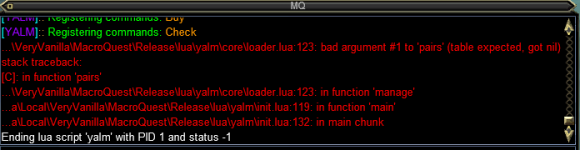
[2023/03/04 19:13:47] ...mes\VeryVanilla\MacroQuest-Live\lua\yalm\core\loader.lua:123: bad argument #1 to 'pairs' (table expected, got nil)stack traceback:    [C]: in function 'pairs'    ...mes\VeryVanilla\MacroQuest-Live\lua\yalm\core\loader.lua:123: in function 'manage'    D:\Games\VeryVanilla\MacroQuest-Live\lua\yalm\init.lua:120: in function 'main'    D:\Games\VeryVanilla\MacroQuest-Live\lua\yalm\init.lua:132: in main chunk
[2023/03/04 19:13:47] Ending lua script 'yalm' with PID 6 and status -1
This didn't seem to be related to the lore metal chunks; it's handling those okay now. This is just what happens on start.
fuddles updated (YALM) Yet Another Loot Manager with a new update entry:
Maybe crash fix
Read the rest of this update entry...
Maybe crash fix
Hopefully this fixes some crashes
Read the rest of this update entry...
Posted a new version. Hopefully this fixes it. If you still get crashes PM your YALM.Lua file.
So far so good! Thanks!Posted a new version. Hopefully this fixes it. If you still get crashes PM your YALM.lua file.
Users who are viewing this thread
Total: 1 (members: 0, guests: 1)
Share: