• You've discovered RedGuides, an EverQuest multi-boxing and scripting community 🧙‍♀️⚙️. We want you to play several EQ characters at once, come join us and say hello! 👋

  • A TLP without truebox has thawed (Very Vanilla ready)
    Frostreaver
Resource icon

Release XTarget Xtended v1.25

No permission to download
Joined
Jan 6, 2024
RedCents
10,935¢
Pronouns
She/They
xlcclx submitted a new resource:

XTarget Xtended - Takes targets on your XTarget list and provides a more readable and slightly more useful interface.

Provides a more readable interface for the XTarget window.

Slow% only applies to your currently targeted enemy (or an enemy that was slowed when you targeted it last), as I am using CachedBuffs to get this information.

The names are buttons to target the enemy.

Mostly this was just a learning exercise.

View attachment 56527

Read more about this resource...
 
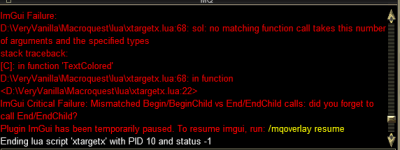
Looks pretty neat! Thanks for putting this out here! I ran into an issue:
1706415918487.png
 
This is really cool and gave me the inspiration to work on learning how to do this kind of stuff on my own.

In the meantime...🙄

Have you put any consideration into having preexisting numbered rows with blank cells waiting to be populated instead of populating only when a mob is on xtarget?

This would give us the option to completely replace the current xtarget window with this. Kind of like how alphabuff/song can replace buff and song windows.

😁 The numbered rows I'm especially interested in as we use xtarget numbers a lot on raids.
 
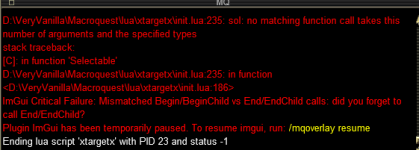
Loving the new design and info. It looks like the same error as above.

Will be a great tool for sure!!

1706424227158.png
 
This is really cool and gave me the inspiration to work on learning how to do this kind of stuff on my own.

In the meantime...🙄

Have you put any consideration into having preexisting numbered rows with blank cells waiting to be populated instead of populating only when a mob is on xtarget?

This would give us the option to completely replace the current xtarget window with this. Kind of like how alphabuff/song can replace buff and song windows.

😁 The numbered rows I'm especially interested in as we use xtarget numbers a lot on raids.

While not something I would use personally, it is definitely something I could look to adding as a setting. I'll take a look at it in the next few days.
 
This is really cool and gave me the inspiration to work on learning how to do this kind of stuff on my own.

In the meantime...🙄

Have you put any consideration into having preexisting numbered rows with blank cells waiting to be populated instead of populating only when a mob is on xtarget?

This would give us the option to completely replace the current xtarget window with this. Kind of like how alphabuff/song can replace buff and song windows.

😁 The numbered rows I'm especially interested in as we use xtarget numbers a lot on raids.

Just a few questions on what you are looking for here.

Do you want friendly targets that may have been assigned to the window as well?

If so what information would you like for friendly targets?

Do you want manually assigned targets? (Raid Assist's target, targets target, etc?)

Thanks!
 
Just a few questions on what you are looking for here.

Do you want friendly targets that may have been assigned to the window as well?

If so what information would you like for friendly targets?

Do you want manually assigned targets? (Raid Assist's target, targets target, etc?)

Thanks!
What I'm thinking is that I'd use it as a replacement xTarget window entirely. (I think others would too)

So the ability to set friendly targets as well as populate enemy targets.

For individual xTarget information the basics you already have (mezzed status was a very nice addition btw).

In addition to the basics, I'd look to have distance and the xTarget # identification added.

So the columns would read |XTar#|Distance|Name|Level|HP%|Aggro%|Slow%|Mez|

The |XTar#| column would be static so we'd have 1-20 listed and those would never change or reorder.

As mobs die they naturally move up on the list and that is just an understood aspect of even the current xTarget window.

This way we can see what xTar# the mobs are, so when I assign someone in raid xtargets 5/6 they don't have to
count on their toes to figure it out.

The ability to have manually assigned targets would be helpful as well for xTarget healing and outside of MAYBE adding Mana% I'm not sure there
is any other information that wouldn't already be displayed by the list above for friendly targets. Too much and it'll just be a big mess of info.

However! I don't know if this will work with plugins and/or kissassist since we won't be populating the actual xTarget window.
(EDIT: I suppose this is just pulling information from the xTarget window hidden or not so this might not matter at all)

It might be that the /xtarget set 1 would still apply to the xTarget window even though it would be hidden and this would be in it's place.

Much like https://www.redguides.com/community/resources/alphabuff-lua.2731/

Maybe we can get someone to weigh in on this that knows more about how those aspects work.

Thank you for taking the time to consider making these changes and hearing me out on what I'm looking for.
It is very much appreciated.
 
Cool Lua. Have a question. In the future maybe you can make it that u can link xtarget to spell gems and abilities. So if u click on xtarget 1 u can tash and slow it right away. You can do a lot of cool stuff with this.
 
xlcclx updated XTarget Xtended with a new update entry:

Feature Additions

--Added settings window
--Added column for distance
--Added settings for various colors
--Added settings to determine thresholds for some colors
--Added column for row #
--added column for MP % (this will only display for players in your party)
--added the ability to display friendly targets on xtarget list
--New command: '/xtx settings' to open settings window

A few notes:
Friendlies will be displayed if 'Show Friendlies' or 'Show Empty Rows' is selected.
This version has not been...

Read the rest of this update entry...
 
Cool lua. Have a question. In the future maybe you can make it that u can link xtarget to spell gems and abilities. So if u click on xtarget 1 u can tash and slow it right away. You can do a lot of cool stuff with this.

This is not a thing I plan to implement at the moment. Perhaps at some point in the unforeseen future.
 
Sweet that was quick!

I noticed that when swarm pets end up on xTarget the corresponding column in xtx disappears from view in the window and the window adjusts size.
I have a feeling this might be the same for charmed players and their pets during events like the blob raid or new PoM raid.

I think the next step might be making the columns toggle on/off for those that don't want all that info and to also make the window resizeable.

Kudos dude, liking it more and more.
 
Sweet that was quick!

I noticed that when swarm pets end up on xTarget the corresponding column in xtx disappears from view in the window and the window adjusts size.
I have a feeling this might be the same for charmed players and their pets during events like the blob raid or new PoM raid.

I think the next step might be making the columns toggle on/off for those that don't want all that info and to also make the window resizeable.

Kudos dude, liking it more and more.

Columns can be toggled off by right clicking the header row. It will bring a context menu up that you can uncheck the various columns to have them not be visable.

Columns can also be drug around in the header row to reorder them as you see fit.

I will look into the swarm pets/charmed players next time I work on this.
 
Columns can be toggled off by right clicking the header row. It will bring a context menu up that you can uncheck the various columns to have them not be visable.

Columns can also be drug around in the header row to reorder them as you see fit.
OH Sweet! I guess I didn't read into it enough awesome!
 
Lisie updated XTarget Xtended with a new update entry:

Bug fixes and code cleanup

--Pets should now display properly, with row coloring determined by their owner
--Changed the select region to target from name cell to full row
--Cleaned up row coloring code
--Added additional settings for heading row color, and row colors for non targeted/friendly entries.
--Added a button to the settings window to restore all settings to default

Read the rest of this update entry...
 
This addition is coming along quite nicely and I'm enjoying it and looking forward to it evolving. I had a couple of questions;

1) Any plans to make the window position toon specific? I run more than one group and I see you have the following entry in the macroquest_overlay.ini file

[Window][XTargetX Settings]
Pos=977,439
Size=501,241
Collapsed=0

Some Lua's have toon specific position memory like the cwtn plug ins. Is there something I can change on my end so all tanks have it in their desired position or is it part of the Lua?

2) The mez display does not seem to be functioning 90% of the time. I run with an enc/brd in several groups and with multiple mobs pulled and mezzed, the green "mezzed" words only show up occasionally. I realize this is not much to go on and I am trying to find more details to narrow it down but I wondered if anyone else was seeing this?

3) The display seems to have a sizing issue on one of my tanks (I'll provide photos next time I am on as a reference). If I place it on the right side of the screen without a mob on xtarget, the window sits perfectly where I want it. Once a mob is pulled and placed on xtarget, it extends all the way across the screen and even futher. I have to drag the window far left on the screen to get it to auto resize back to normal. It only appears to happen when placed on the right side of the screen. This is in a setup of 3 monitors where the window is on the far left monitor of the 3. Would it be possible to stop autosizing or make sizing selectable? This way we can make it the size we want regardless of what information populates.
 
This addition is coming along quite nicely and I'm enjoying it and looking forward to it evolving. I had a couple of questions;

1) Any plans to make the window position toon specific? I run more than one group and I see you have the following entry in the macroquest_overlay.ini file

[Window][XTargetX Settings]
Pos=977,439
Size=501,241
Collapsed=0

Some lua's have toon specific position memory like the cwtn plug ins. Is there something I can change on my end so all tanks have it in their desired position or is it part of the lua?

2) The mez display does not seem to be functioning 90% of the time. I run with an enc/brd in several groups and with multiple mobs pulled and mezzed, the green "mezzed" words only show up occasionally. I realize this is not much to go on and I am trying to find more details to narrow it down but I wondered if anyone else was seeing this?

3) The display seems to have a sizing issue on one of my tanks (I'll provide photos next time I am on as a reference). If I place it on the right side of the screen without a mob on xtarget, the window sits perfectly where I want it. Once a mob is pulled and placed on xtarget, it extends all the way across the screen and even futher. I have to drag the window far left on the screen to get it to auto resize back to normal. It only appears to happen when placed on the right side of the screen. This is in a setup of 3 monitors where the window is on the far left monitor of the 3. Would it be possible to stop autosizing or make sizing selectable? This way we can make it the size we want regardless of what information populates.

I will look into #1.

#2 is a bit of a pain in the ass. AE mez does not populate the mez list. And I have definitely noticed that even with single target mez it is sometimes not populating either. I am going to look into it further and see if I can improve the reliability of the function, and if not, probably scrap the whole column.

#3 is driving me absolutely insane. The auto sizing randomly increases in size, and if it increases off the bounds of the screen it really messes things up. Autosizing seems rather flakely, and I am already intending to scrap it and go to adjustable column widths.
 
#2 is a bit of a pain in the ass. AE mez does not populate the mez list. And I have definitely noticed that even with single target mez it is sometimes not populating either. I am going to look into it further and see if I can improve the reliability of the function, and if not, probably scrap the whole column.
Not sure if the Lua populates off the xtar window in game info but I believe I recall this being stated in a previous post. If so, maybe the custom ui I am using is causing issues? Sparxx

#3 is driving me absolutely insane. The auto sizing randomly increases in size, and if it increases off the bounds of the screen it really messes things up. Autosizing seems rather flakely, and I am already intending to scrap it and go to adjustable column widths.
Ok, so it's not just me and my setup/imagination. good to know

You are definitely onto something that I think can be a great replacement for the xtar window, if that's possible with the data provided by the game and can be captured. This can provide so much more info that is quite helpful in both group and raid use with mez, slow, distance, etc. Super cool and I'm happy to help with testing some changes if you like. Most of my crews are max now anyway so playing around with "beta" changes in various situations/zones is no problem. I know this may have started as "learning exercise" but it seems like it could be more imo.
 
Not sure if the lua populates off the xtar window in game info but I believe I recall this being stated in a previous post. If so, maybe the custom ui I am using is causing issues? Sparxx


Ok, so it's not just me and my setup/imagination. good to know

You are definitely onto something that I think can be a great replacement for the xtar window, if that's possible with the data provided by the game and can be captured. This can provide so much more info that is quite helpful in both group and raid use with mez, slow, distance, etc. Super cool and I'm happy to help with testing some changes if you like. Most of my crews are max now anyway so playing around with "beta" changes in various situations/zones is no problem. I know this may have started as "learning exercise" but it seems like it could be more imo.

The slow and mez information are populated by running a background script on all the other loaded characters. Those characters when they slow or mez a target pass the information to the main script via actors. Due to the way buff/debuff checking work on spawns (and members of the xtarget list) their buff information (cachedbuffs) is only updated when targeted. I am going to look over the functions that send/receive information regarding mez and see if I can clean them up to be more reliable. That part was very thrown together initially, and I have not had the time or energy to work on improving it.

I am glad that you, and others, seem to be finding this useful. And I am always open to any ideas, suggestions, or advice anyone may have on how to improve upon it.
 
Lisie updated XTarget Xtended with a new update entry:

Cleanup, functionality, settings

--Added the ability to display aggro and HP as progress bars (Thank you grimmier!)
--Set most columns to fixed widths.
--Added ability to show title bar on window (for docking purposes, Thank you grimmier again)
--Added ability to manually size window
--Added ability to lock window size
--Added ability to lock window position
--Moved settings over to be per character (On first run, if no character specific settings file is located it will load the old general settings file if it exists)...

Read the rest of this update entry...
 
This version took a bit longer than I had planned to get released. I managed to somehow implement a bug that crashed upon zoning in to instances such as neighborhoods or guild halls, but not elsewhere. I believe I have tracked this bug down and eliminated it, but it is possible that it may still be lurking in the shadows. If you do happen to run into this bug please let me know where you were zoning into, and what you had been doing previously. Also please tell me what settings you had enabled (titlebar, lock position, auto resize, aggro/hp bar display, etc).

I hope no one runs into any issues.

Thanks!
 
Lisie updated XTarget Xtended with a new update entry:

Another Major Overhaul

Cleaned up the unnecessary use of global variables

Moved all settings nonsense to the settings lua

Corrected a bug with targeting when multiple mobs with the same name were on the xtarget list

Set hp/aggro bars to have centered text

Improved detection of slowed/mezzed mobs (This is still not perfect. Broken mezzes will not be indicated. AE mezzes are assumed to have hit all targets. Enchanter AA Beam of Slumber is ignored)

Read the rest of this update entry...
 
Release XTarget Xtended

Users who are viewing this thread

Back
Top
Cart