
Install the app
How to install the app on iOS
Follow along with the video below to see how to install our site as a web app on your home screen.
Note: This feature may not be available in some browsers.
-
 You've discovered RedGuides, an EverQuest multi-boxing and scripting community 🧙♀️⚙️. We want you to play several EQ characters at once, come join us and say hello! 👋
You are using an out of date browser. It may not display this or other websites correctly.
You should upgrade or use an alternative browser.
You should upgrade or use an alternative browser.
Problem - When my computer turns off screen (10 minutes idle) all of my Eq instances close...
- Thread starter Granditos
- Start date


eq itself doesn't like computer screens going to sleep and can often have problems depending on how your computer does thatThis is brand new. This happens when im making combines in PoK... this isn't an AFK automation thing. After about AFK 10 minutes, when I come back all of my EQ applications are closed... No idea why this is happening. Anyone have any ideas?

Check your Windows settings to see if your screen and hard drives are both going to sleep. Screens are ok, I have mine go off in 20 minutes of no activity and EQ still going fine, I come back and all is good. Windows Power settings might help you.This is brand new. This happens when im making combines in PoK... this isn't an AFK automation thing. After about AFK 10 minutes, when I come back all of my EQ applications are closed... No idea why this is happening. Anyone have any ideas?

- Joined
- Feb 9, 2017
- RedCents
- 2,456¢
Same, I have my screen to sleep after 15 minutes, but you never want the hard drive to sleep or you go poof.
I've seen this before - what you can do to avoid it is look at your videocard and see an unused input. It might be an HDMI, or a Displayport, or if it's older a VGA/DVI port. Then go to Amazon and buy a dummy plug (like this but for the unused plug type you have) for the type of plug you have - that'll make your videocard think it has a monitor attached even though it doesn't, and prevent crashing when there's no valid displays connected and it's still rendering 3D content. I then disable turning the monitor off entirely, set the two displays to mirror each other in display settings (the real monitor and the one that doesn't really exist), and just use the power button on the monitor.

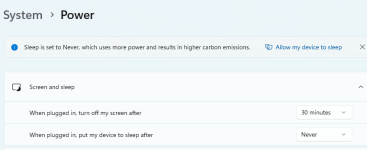
I dont have device go to sleep or hard drive stop. I haven't changed my settings at all and display turning off has never been an issue. This just started happening in the last 2 days. Windows 11. intel Iris XE Graphics.Check your Windows settings to see if your screen and hard drives are both going to sleep. Screens are ok, I have mine go off in 20 minutes of no activity and EQ still going fine, I come back and all is good. Windows Power settings might help you.
View attachment 44690
I dont have device go to sleep or hard drive stop. I haven't changed my settings at all and display turning off has never been an issue. This just started happening in the last 2 days. Windows 11. intel Iris XE Graphics.What version of Windows?
What graphics card?
What's your power settings currently at?
I dont have device go to sleep or hard drive stop. I haven't changed my settings at all and display turning off has never been an issue. This just started happening in the last 2 days. Windows 11. intel Iris XE Graphics.eq itself doesn't like computer screens going to sleep and can often have problems depending on how your computer does that
My guess was some update to MQ2 over the last couple of days seeing that EQ wasn't updated. I did install the new Cat Pat macro.... That's when I first noticed it.
well you said your screen goes off - so something is going to sleep / turning off =p
I sincerely don't think the cat pat macro that isn't even running is causing your issue =p and the MQ builds were rebuilt for plugins - not for any updates done to MQ recently.
Strongly points towards windows and or your computer settings changed
> here is another thread with similar < are you running afterburner or any other such software?
I sincerely don't think the cat pat macro that isn't even running is causing your issue =p and the MQ builds were rebuilt for plugins - not for any updates done to MQ recently.
Strongly points towards windows and or your computer settings changed
> here is another thread with similar < are you running afterburner or any other such software?
You mentioned about making manual combines in PoK...meaning not using automated tools like TCN. But you mention it happens AFTER 10 min of AFK...so does not sound like anything MQ related.
You must have some program doing something to close the connections or your internet has dropped perhaps? Look at what programs you have loaded, if its anything that controls connections.. maybe start looking at its settings.
As an off chance, this is a standard computer setup (Desktop with Monitor and Keyboard/Mouse) or a computer being remote controlled by software?
You must have some program doing something to close the connections or your internet has dropped perhaps? Look at what programs you have loaded, if its anything that controls connections.. maybe start looking at its settings.
As an off chance, this is a standard computer setup (Desktop with Monitor and Keyboard/Mouse) or a computer being remote controlled by software?
yeah, no idea. I can just be sitting there and walk away from my computer and this will happen. But again, brand new... I dont have afterburner either. I'll try changing a bunch of settings.You mentioned about making manual combines in PoK...meaning not using automated tools like TCN. But you mention it happens AFTER 10 min of AFK...so does not sound like anything MQ related.
You must have some program doing something to close the connections or your internet has dropped perhaps? Look at what programs you have loaded, if its anything that controls connections.. maybe start looking at its settings.
As an off chance, this is a standard computer setup (Desktop with Monitor and Keyboard/Mouse) or a computer being remote controlled by software?
I'll dig more into it but I dont have afterburner or any similar software. All of my settings doesn't have the hard drive turning off. Again, this is brand new, last couple of days, and I haven't changed anything else. I'll let everyone know if I figure it out.well you said your screen goes off - so something is going to sleep / turning off =p
I sincerely don't think the cat pat macro that isn't even running is causing your issue =p and the MQ builds were rebuilt for plugins - not for any updates done to MQ recently.
Strongly points towards windows and or your computer settings changed
> here is another thread with similar < are you running afterburner or any other such software?

knave23
Cookie Champion 2022
- Joined
- Sep 10, 2019
- RedCents
- 6,374¢
this thread might be helpful too
Update. Turns out that my docking station charging was disconnecting randomly and my computer was going on battery power. On battery power i did have my HD set to turn off after 10 minutes. I cleared that setting and updated the docking station firmware. I think it is fixed now. Thank you all for your suggestions.

- Joined
- Aug 19, 2020
- RedCents
- 30,871¢
Glad you got it fixed, and 100% thank you for providing feedback on what it was. 
Still happening- anyone have any ideas....:
Faulting application name: eqgame.exe, version: 0.0.0.0, time stamp: 0x63916241
Faulting module name: wdmaud.drv, version: 10.0.22621.1, time stamp: 0xb67df683
Exception code: 0xc0000005
Fault offset: 0x0000000000022f2a
Faulting process id: 0x0x48DC
Faulting application start time: 0x0x1D91F11D99E9A1A
Faulting application path: C:\Users\Public\Daybreak Game Company\Installed Games\EverQuest\eqgame.exe
Faulting module path: C:\WINDOWS\SYSTEM32\wdmaud.drv
Report Id: d8f7e25c-bb94-47ab-b1d2-db05e637ea99
Faulting package full name:
Faulting package-relative application ID:
Fault bucket 1626391115087764333, type 4
Event Name: APPCRASH
Response: Not available
Cab Id: 0
Problem signature:
P1: eqgame.exe
P2: 0.0.0.0
P3: 63916241
P4: wdmaud.drv
P5: 10.0.22621.1
P6: b67df683
P7: c0000005
P8: 0000000000022f2a
P9:
P10:
Attached files:
\\?\C:\ProgramData\Microsoft\Windows\WER\Temp\WER.e73c10d5-7bb8-4b94-91de-8f1736caec05.tmp.dmp
\\?\C:\ProgramData\Microsoft\Windows\WER\Temp\WER.3901a0a3-3d4b-4e08-a6b1-57670a76eea4.tmp.WERInternalMetadata.xml
\\?\C:\ProgramData\Microsoft\Windows\WER\Temp\WER.2322c247-b539-4452-936e-17972de3da20.tmp.csv
\\?\C:\ProgramData\Microsoft\Windows\WER\Temp\WER.3297fc1f-8563-4c85-a473-2ebb0437bf82.tmp.txt
\\?\C:\ProgramData\Microsoft\Windows\WER\Temp\WER.9411081f-abde-407d-b92a-710a309e5219.tmp.xml
These files may be available here:
\\?\C:\ProgramData\Microsoft\Windows\WER\ReportArchive\AppCrash_eqgame.exe_5010caa1d080793adf324c17bd38d7a6efabc14_36d64266_d9d4f482-e350-4bc8-b637-e75e8817b316
Analysis symbol:
Rechecking for solution: 0
Report Id: d8f7e25c-bb94-47ab-b1d2-db05e637ea99
Report Status: 268435456
Hashed bucket: 4f3418a4ba504db716921a1a28a85b6d
Faulting application name: eqgame.exe, version: 0.0.0.0, time stamp: 0x63916241
Faulting module name: wdmaud.drv, version: 10.0.22621.1, time stamp: 0xb67df683
Exception code: 0xc0000005
Fault offset: 0x0000000000022f2a
Faulting process id: 0x0x48DC
Faulting application start time: 0x0x1D91F11D99E9A1A
Faulting application path: C:\Users\Public\Daybreak Game Company\Installed Games\EverQuest\eqgame.exe
Faulting module path: C:\WINDOWS\SYSTEM32\wdmaud.drv
Report Id: d8f7e25c-bb94-47ab-b1d2-db05e637ea99
Faulting package full name:
Faulting package-relative application ID:
Fault bucket 1626391115087764333, type 4
Event Name: APPCRASH
Response: Not available
Cab Id: 0
Problem signature:
P1: eqgame.exe
P2: 0.0.0.0
P3: 63916241
P4: wdmaud.drv
P5: 10.0.22621.1
P6: b67df683
P7: c0000005
P8: 0000000000022f2a
P9:
P10:
Attached files:
\\?\C:\ProgramData\Microsoft\Windows\WER\Temp\WER.e73c10d5-7bb8-4b94-91de-8f1736caec05.tmp.dmp
\\?\C:\ProgramData\Microsoft\Windows\WER\Temp\WER.3901a0a3-3d4b-4e08-a6b1-57670a76eea4.tmp.WERInternalMetadata.xml
\\?\C:\ProgramData\Microsoft\Windows\WER\Temp\WER.2322c247-b539-4452-936e-17972de3da20.tmp.csv
\\?\C:\ProgramData\Microsoft\Windows\WER\Temp\WER.3297fc1f-8563-4c85-a473-2ebb0437bf82.tmp.txt
\\?\C:\ProgramData\Microsoft\Windows\WER\Temp\WER.9411081f-abde-407d-b92a-710a309e5219.tmp.xml
These files may be available here:
\\?\C:\ProgramData\Microsoft\Windows\WER\ReportArchive\AppCrash_eqgame.exe_5010caa1d080793adf324c17bd38d7a6efabc14_36d64266_d9d4f482-e350-4bc8-b637-e75e8817b316
Analysis symbol:
Rechecking for solution: 0
Report Id: d8f7e25c-bb94-47ab-b1d2-db05e637ea99
Report Status: 268435456
Hashed bucket: 4f3418a4ba504db716921a1a28a85b6d

- Joined
- Oct 7, 2015
- RedCents
- 495¢
Faulting module wdmaud.drv points at something related to audio. Perhaps you're using HDMI audio through the monitor and when the monitor goes into sleep mode it kills the audio output device?
yep, eq will absolutely crash with audio devices getting "unplugged" or turning offFaulting module wdmaud.drv points at something related to audio. Perhaps you're using HDMI audio through the monitor and when the monitor goes into sleep mode it kills the audio output device?
Hmmm.... so kill monitor speakers and use laptop speakers or other speaker option? Let me try that.Faulting module wdmaud.drv points at something related to audio. Perhaps you're using HDMI audio through the monitor and when the monitor goes into sleep mode it kills the audio output device?
Silverspaceman
Seasoned veteran member
- Joined
- Jul 9, 2018
- RedCents
- 808¢
lol....Windows LOVES to default to monitor speakers for some reason. Always frustrating to chase down those kind of error chains. Glad there are such helpful people around here to provide assistance.
Users who are viewing this thread
Total: 1 (members: 0, guests: 1)
Share: