
-
 Hail, we're RedGuides. We want you to play six (yes, 6!) EverQuest characters at once. We have scripts and a friendly community to help, please join our playstyle and say hello! 👋
-
 We've added LLM sections to our Terms & Rules and Resource Rules, for everyone's sanity & in-game safety.
Read more
a. Do not replace your voice with an LLM. This goes for your posts and your scripts. Drafting and editing with a tool is fine, but don't take you out of what you share.
b. Do not replace your EQ character's voice with an LLM. We don't want scripts that speak over/ooc,/shoutor other public channels. This has been an unwritten rule that's kept casino scripts off the site for decades, but we're now compelled to make it clear: keep automated communication private.
Why Does RG Review Scripts?
Nearly every LLM-written Lua script we see is making your character do impossible things, and rarely in a way that's beneficial to you. We've seen heavy server hammering,/targetover impossible distances when/nav spawnwould passively accomplish the same thing, a spawn search that fires 20+ times per second, and other pointless actions that are likely annoying GMs.
You are welcome to use LLMs as a tool to structure, draft, and edit your work, but please read critically before hitting/lua run
You are using an out of date browser. It may not display this or other websites correctly.
You should upgrade or use an alternative browser.
You should upgrade or use an alternative browser.
Poll - What UI resolution do you use?
- Thread starter LamahHerder
- Start date




1920x1080 borderless windowed mode using ISBoxer to control stacking.


Sum1
Warriors are inferior (read: crybaby) tanks
Daaaaaamn.... that set you back a buck or three thousand!3440x1440 Curved Samsungs (2 of them).
https://www.newegg.com/p/pl?N=100898493 50001077 600554755Daaaaaamn.... that set you back a buck or three thousand!
$774.99 each. Not to bad.
Sum1
Warriors are inferior (read: crybaby) tanks
ohhhh... i might have an idea for a new christmas present!
W
Wolfborn
3 each Dell 30" 2560 x 1600.
One window on center monitor, 7 smaller windows on right, browser, notepad++ etc.. on left.
One window on center monitor, 7 smaller windows on right, browser, notepad++ etc.. on left.

My resolution is 2560x1080. It is called ultra-wide, it is just like a 1080p monitor but about 5 inches wider or so. I looove it. Movies fit the entire screen with no black bars, in their native resolution. Games looks great, especially when there is a lot of UI. My PC can handle games at max settings without it costing too much. I would like a 4k eventually but I'll have to wait for graphics cards that can handle it easily to come down in price some more. I'd also like 144hz. I'll upgrade in a few years.
Sum1
Warriors are inferior (read: crybaby) tanks
My resolution is 2560x1080. It is called ultra-wide, it is just like a 1080p monitor but about 5 inches wider or so. I looove it. Movies fit the entire screen with no black bars, in their native resolution. Games looks great, especially when there is a lot of UI. My PC can handle games at max settings without it costing too much. I would like a 4k eventually but I'll have to wait for graphics cards that can handle it easily to come down in price some more. I'd also like 144hz. I'll upgrade in a few years.
make/model?
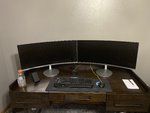
AOC Q2963PM 29 inch. One of the best things I ever bought because I got it so cheap and it is way better than my previous screen which cost twice as much! Quite a few years old now though, there is probably a lot better now.make/model?

Soomeone at work selling https://www.amazon.co.uk/gp/product/B01BV1XB2K?th=1 real cheap, quite tempted although it's not a massive upgrade at only an extra 2 inches (but I only run 1680x1050 currently)

Akatora
Well-known member
I had the AOC one like that for years now, i upgraded in oct to my samsung but I still use it for my other desktop computerAOC Q2963PM 29 inch. One of the best things I ever bought because I got it so cheap and it is way better than my previous screen which cost twice as much! Quite a few years old now though, there is probably a lot better now.
I have a Dell Ultrasharp 34" ultrawide in the closet, currently using 2 Dell 27's , 1 vertical 1 horizontal.
At the time I was having too many issues with games + ultrawide compatibility and was tired of messing with it, mainly for streaming games to nvidia shield on TV.
I dont do the streaming anymore so considering swapping it out as the vertical is just not wide enough to be comfortable with so many apps and web layouts using predominately horizontal space
I run 3650x2190ish on a 65" 4k tv, using isboxer I have 2 main profile sets, one for a group of toons that is wider and 5 windows along the bottom so I can see all toons. Another is my mini raid with 25 accounts wrapped along the bottom and up the right side all visable. I either run my modded ayatbl UI or default UI. My screen is 6' in front of my desk and I use a fiber-optic HDMI cable to reach the 20' long cable run from PC to tv.
should post a camera pic of that with your ISBOXER layout up, would look coolI run 3650x2190ish on a 65" 4k tv, using isboxer I have 2 main profile sets, one for a group of toons that is wider and 5 windows along the bottom so I can see all toons. Another is my mini raid with 25 accounts wrapped along the bottom and up the right side all visable. I either run my modded ayatbl UI or default UI. My screen is 6' in front of my desk and I use a fiber-optic HDMI cable to reach the 20' long cable run from PC to tv.
This is what I came up with for 24 toons on my ultrawide 34" 3440 x 1440 2 years ago before I switched to dual monitors
Last edited:
Do you have to move your head a lot to see the edges of the screen?
redhero1000
Active member
If you don't go with a resolution that adheres to the original games designed height/width screen ratio, you will always crop off the top section of the game with wide screens it would seem.
Akatora
Well-known member
mine doesnt do that at allIf you don't go with a resolution that adheres to the original games designed height/width screen ratio, you will always crop off the top section of the game with wide screens it would seem.
Users who are viewing this thread
Total: 1 (members: 0, guests: 1)
Share: