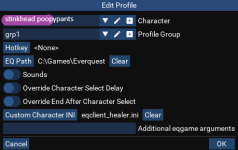
ahh ok my first updateif you're using redfetch to update MQ you'll need to be level 2, yep it didn't get moved there just fyi
but yes, that message says your mq is not updated


Follow along with the video below to see how to install our site as a web app on your home screen.
Note: This feature may not be available in some browsers.



ahh ok my first updateif you're using redfetch to update MQ you'll need to be level 2, yep it didn't get moved there just fyi
but yes, that message says your mq is not updated

6/12/2026
Bug Fixes
- Fix an issue where clicking on the right side of dropdown boxes in the loader would not open the dropdown.
Other Changes
- Made modal dropdown boxes more clearly dropdown boxes in the loader
6/23/2026
Features
- Added a UI Settings menu to the loader
- The loader's UI will now persist between sessions (if you had it open it remembers where you were). You can disable this in the new UI menu.
Bug Fixes
- Fix loader showing edit dialogs twice in modals (popups)
Changes
...
- Toggle Sliders will now behave like checkboxes in the loader
Automated release for live
Automated release for live
Automated release for live
6/24/2026
Features
- Added a
namekeyword to spawn searches for searching by name when the name would otherwise be interpreted as a class. For example,name magiciansearches for a spawn containing the name "magician" instead of matching the Magician class. Prefix the name with=for an exact match (e.g.name =Magician).
Automated release for live
Automated release for live
It's down cuz eq patched yesterday it says so at the top of the page and to the rightI'm sure I'm doing something wrong, as I'm a new user. But I was able to subscribe, download and install the Very Vanilla MQ and have been using it for under a month. After this update (I'm assuming it's done from what I can read here, it shows 'up') redfetch shows it's kicking off VMQ and it shows running in task manager. However, there is no MQ window with which to interact. I'm hoping this is expected behavior and I'm just missing some key combo or the like to bring it up? Again, it shows executing in task manager but there is no related MQ window available. Thank you for the help!
well. you just downloaded, so assuming you updated eq - you should be goodI'm sure I'm doing something wrong, as I'm a new user. But I was able to subscribe, download and install the Very Vanilla MQ and have been using it for under a month. After this update (I'm assuming it's done from what I can read here, it shows 'up') redfetch shows it's kicking off VMQ and it shows running in task manager. However, there is no MQ window with which to interact. I'm hoping this is expected behavior and I'm just missing some key combo or the like to bring it up? Again, it shows executing in task manager but there is no related MQ window available. Thank you for the help!
There is not normally an 'MQ Window' to interact with. take a look in your system tray(Lower right hand corner) and look for an MQ icon there - Right click for a menu. If want configuration options - Open Config.I'm sure I'm doing something wrong, as I'm a new user. But I was able to subscribe, download and install the Very Vanilla MQ and have been using it for under a month. After this update (I'm assuming it's done from what I can read here, it shows 'up') redfetch shows it's kicking off VMQ and it shows running in task manager. However, there is no MQ window with which to interact. I'm hoping this is expected behavior and I'm just missing some key combo or the like to bring it up? Again, it shows executing in task manager but there is no related MQ window available. Thank you for the help!
you should always try and use redfetch. this is just bad advice to give someone who's having trouble - the people who have trouble with things like this, wouldnt know where their folder is.You can download it manually here https://www.redguides.com/community/threads/very-vanilla-mq-live-servers.77019/ and copy plugins to your folder if its not working.
you should make sure to use redfetch and not the old rg launcherthank you both, trying now
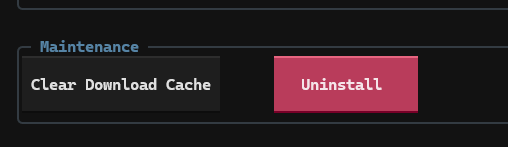
Just go to settings and point it to the location you want, then hit the "clear download cache" button and updateI am using redfetch, I don't know how but it made a new location (there are now two seperate MQ2vanilla folders, but only one redfetch and I never changed the download location) so i'm trying to save my configs before I get rid of one and update the other
Automated release for live
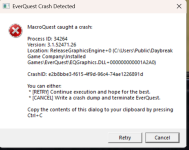
Id start with the basics:View attachment 78222
Is this being caused by something i do? Or is it a setting i need to change? I used to be able to reliably 3 box on my computer, but now this pops up randomly on 1 of the 3 boxes. Would love to figure out what is causing it so i can 3 or 4 box on one computer reliably again.
Thanks in advance for any help or insight.
Framelimiter bypasses that, you should be using framelimiterIn the EQ settings i had it set to Unlimited for "Max frames per Second" i reduced that to 80 now.
Automated release for live
Automated release for live
Automated release for live
Automated release for live
Automated release for live
Automated release for live
Automated release for live
Automated release for live
Automated release for live