
-
 Hail, we're RedGuides. We want you to play six (yes, 6!) EverQuest characters at once. We have scripts and a friendly community to help, please join our playstyle and say hello! 👋
You are using an out of date browser. It may not display this or other websites correctly.
You should upgrade or use an alternative browser.
You should upgrade or use an alternative browser.

Vanilla - Very Vanilla MQ (Live Servers) (4 Viewers) 3.1.52471.42
- Thread starter Knightly
- Start date

- Commits
- 191
Sounds like you probably have multiple installs of the game.So I used my EQ Launcher for each of my accounts and checked that it was showing that All Files were up to date. I've logged in through the launcher to all my characters. But when I am using AutoLogin I'm getting the version mismatch error for all but my main.
EverQuest version: Jan 16 2024 15:49:32
MacroQuest version: Feb 1 2024 12:35:06
Trying to figure out why it is still thinking the EQ version is the old one.
Yeah, I suddenly remembered I used a tool so I could have different ui settings between two different login profiles.Sounds like you probably have multiple installs of the game.

Redbot updated Very Vanilla MQ (Live Servers) with a new update entry:
20240202
Read the rest of this update entry...
20240202
Feb 2, 2024:
- Add Social TLO (#825)
Feb 1, 2024
- live: Updated for latest patch
Read the rest of this update entry...
Redbot updated Very Vanilla MQ (Live Servers) with a new update entry:
20240203
Read the rest of this update entry...
20240203
Automated release. Commit hashes:
vv: e139d5951d953a37683d6d2a435dbf7f898201d6
cwtn: dd38ddd95b0cdb1c5b0d82d2c0784c13d25364bc
eqlib: be8dca8c9cdb743569eeecf08a9de85f619a1913
Read the rest of this update entry...
Redbot updated Very Vanilla MQ (Live Servers) with a new update entry:
20240211
Read the rest of this update entry...
20240211
Automated release. Commit hashes:
vv: 71ce6207e6d6e59d06834cd70cb513f46ea29ad5
cwtn: dd38ddd95b0cdb1c5b0d82d2c0784c13d25364bc
eqlib: be8dca8c9cdb743569eeecf08a9de85f619a1913
Read the rest of this update entry...
I've been running Very Vanila for a few months and haven't had an issue w/ Red Guides launching. This worked yesterday (Feb 11, 2024) without issue, however this morning when I tried to launch MQ I got the following debug logs through the console:
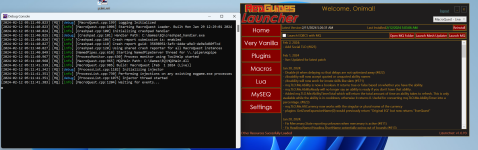
Debug file logs:
D 2024-02-12 05:03:12.646561 [MQ] Logging Initialized (C:\agent\_work\1\s\src\loader\MacroQuest.cpp:199)
I 2024-02-12 05:03:12.647512 [MQ] Starting MacroQuest Loader. Built Mon Jan 29 12:29:01 2024 (C:\agent\_work\1\s\src\loader\MacroQuest.cpp:1006)
I 2024-02-12 05:03:12.650698 [MQ] Initializing crashpad handler (C:\agent\_work\1\s\src\loader\Crashpad.cpp:100)
D 2024-02-12 05:03:12.650950 [MQ] Handler Path: C:\Games\EQ\crashpad_handler.exe (C:\agent\_work\1\s\src\loader\Crashpad.cpp:101)
I 2024-02-12 05:03:12.651529 [MQ] Crash report submission is: enabled (C:\agent\_work\1\s\src\loader\Crashpad.cpp:106)
I 2024-02-12 05:03:12.652300 [MQ] Crash report guid: 35698951-3afc-4dde-a9e3-de9e3d60f7cd (C:\agent\_work\1\s\src\loader\Crashpad.cpp:110)
I 2024-02-12 05:03:12.652667 [MQ] Using shared crash reporter for all MacroQuest instances (C:\agent\_work\1\s\src\loader\Crashpad.cpp:120)
I 2024-02-12 05:03:12.673149 [MQ] Starting NamedPipeServer thread for \\.\pipe\mqpipe (C:\agent\_work\1\s\src\routing\NamedPipes.cpp:610)
I 2024-02-12 05:03:12.775679 [MQ] Process monitor using ToolHelp started (C:\agent\_work\1\s\src\loader\ProcessMonitor.cpp:430)
I 2024-02-12 05:03:12.776079 [MQ] MQ2Main Path: C:\Games\EQ\MQ2Main.dll (C:\agent\_work\1\s\src\loader\MacroQuest.cpp:965)
I 2024-02-12 05:03:12.789307 [MQ] Build: MacroQuest [Feb 1 2024 (Live)] (C:\agent\_work\1\s\src\loader\MacroQuest.cpp:985)
D 2024-02-12 05:03:12.790917 [MQ] Initializing injector (C:\agent\_work\1\s\src\loader\ProcessList.cpp:1182)
I 2024-02-12 05:03:12.796784 [MQ] Performing injections on any existing eqgame.exe processes (C:\agent\_work\1\s\src\loader\ProcessList.cpp:730)
D 2024-02-12 05:03:12.796887 [MQ] Injector thread started (C:\agent\_work\1\s\src\loader\ProcessList.cpp:1075)
I 2024-02-12 05:03:12.811705 [MQ] Waiting for events... (C:\agent\_work\1\s\src\loader\MacroQuest.cpp:1204)
Sometimes the log files end here (same spot all the time):
D 2024-02-12 05:17:56.264347 [MQ] Logging Initialized (C:\agent\_work\1\s\src\loader\MacroQuest.cpp:199)
I 2024-02-12 05:17:56.265022 [MQ] Starting MacroQuest Loader. Built Mon Jan 29 12:29:01 2024 (C:\agent\_work\1\s\src\loader\MacroQuest.cpp:1006)
I 2024-02-12 05:17:56.265798 [MQ] Initializing crashpad handler (C:\agent\_work\1\s\src\loader\Crashpad.cpp:100)
D 2024-02-12 05:17:56.269814 [MQ] Handler Path: C:\Games\EQ\crashpad_handler.exe (C:\agent\_work\1\s\src\loader\Crashpad.cpp:101)
I 2024-02-12 05:17:56.270347 [MQ] Crash report submission is: enabled (C:\agent\_work\1\s\src\loader\Crashpad.cpp:106)
I 2024-02-12 05:17:56.276675 [MQ] Crash report guid: 35698951-3afc-4dde-a9e3-de9e3d60f7cd (C:\agent\_work\1\s\src\loader\Crashpad.cpp:110)
I 2024-02-12 05:17:56.281588 [MQ] Using shared crash reporter for all MacroQuest instances (C:\agent\_work\1\s\src\loader\Crashpad.cpp:120)
What I've tried:
Re-installing MQ
Restarting
Full Shutdown
Ran EQ Launch Pad to verify no issues in loading.
I installed windows 11 on Friday, however I had no issues on Saturday running this game.
Debug file logs:
D 2024-02-12 05:03:12.646561 [MQ] Logging Initialized (C:\agent\_work\1\s\src\loader\MacroQuest.cpp:199)
I 2024-02-12 05:03:12.647512 [MQ] Starting MacroQuest Loader. Built Mon Jan 29 12:29:01 2024 (C:\agent\_work\1\s\src\loader\MacroQuest.cpp:1006)
I 2024-02-12 05:03:12.650698 [MQ] Initializing crashpad handler (C:\agent\_work\1\s\src\loader\Crashpad.cpp:100)
D 2024-02-12 05:03:12.650950 [MQ] Handler Path: C:\Games\EQ\crashpad_handler.exe (C:\agent\_work\1\s\src\loader\Crashpad.cpp:101)
I 2024-02-12 05:03:12.651529 [MQ] Crash report submission is: enabled (C:\agent\_work\1\s\src\loader\Crashpad.cpp:106)
I 2024-02-12 05:03:12.652300 [MQ] Crash report guid: 35698951-3afc-4dde-a9e3-de9e3d60f7cd (C:\agent\_work\1\s\src\loader\Crashpad.cpp:110)
I 2024-02-12 05:03:12.652667 [MQ] Using shared crash reporter for all MacroQuest instances (C:\agent\_work\1\s\src\loader\Crashpad.cpp:120)
I 2024-02-12 05:03:12.673149 [MQ] Starting NamedPipeServer thread for \\.\pipe\mqpipe (C:\agent\_work\1\s\src\routing\NamedPipes.cpp:610)
I 2024-02-12 05:03:12.775679 [MQ] Process monitor using ToolHelp started (C:\agent\_work\1\s\src\loader\ProcessMonitor.cpp:430)
I 2024-02-12 05:03:12.776079 [MQ] MQ2Main Path: C:\Games\EQ\MQ2Main.dll (C:\agent\_work\1\s\src\loader\MacroQuest.cpp:965)
I 2024-02-12 05:03:12.789307 [MQ] Build: MacroQuest [Feb 1 2024 (Live)] (C:\agent\_work\1\s\src\loader\MacroQuest.cpp:985)
D 2024-02-12 05:03:12.790917 [MQ] Initializing injector (C:\agent\_work\1\s\src\loader\ProcessList.cpp:1182)
I 2024-02-12 05:03:12.796784 [MQ] Performing injections on any existing eqgame.exe processes (C:\agent\_work\1\s\src\loader\ProcessList.cpp:730)
D 2024-02-12 05:03:12.796887 [MQ] Injector thread started (C:\agent\_work\1\s\src\loader\ProcessList.cpp:1075)
I 2024-02-12 05:03:12.811705 [MQ] Waiting for events... (C:\agent\_work\1\s\src\loader\MacroQuest.cpp:1204)
Sometimes the log files end here (same spot all the time):
D 2024-02-12 05:17:56.264347 [MQ] Logging Initialized (C:\agent\_work\1\s\src\loader\MacroQuest.cpp:199)
I 2024-02-12 05:17:56.265022 [MQ] Starting MacroQuest Loader. Built Mon Jan 29 12:29:01 2024 (C:\agent\_work\1\s\src\loader\MacroQuest.cpp:1006)
I 2024-02-12 05:17:56.265798 [MQ] Initializing crashpad handler (C:\agent\_work\1\s\src\loader\Crashpad.cpp:100)
D 2024-02-12 05:17:56.269814 [MQ] Handler Path: C:\Games\EQ\crashpad_handler.exe (C:\agent\_work\1\s\src\loader\Crashpad.cpp:101)
I 2024-02-12 05:17:56.270347 [MQ] Crash report submission is: enabled (C:\agent\_work\1\s\src\loader\Crashpad.cpp:106)
I 2024-02-12 05:17:56.276675 [MQ] Crash report guid: 35698951-3afc-4dde-a9e3-de9e3d60f7cd (C:\agent\_work\1\s\src\loader\Crashpad.cpp:110)
I 2024-02-12 05:17:56.281588 [MQ] Using shared crash reporter for all MacroQuest instances (C:\agent\_work\1\s\src\loader\Crashpad.cpp:120)
What I've tried:
Re-installing MQ
Restarting
Full Shutdown
Ran EQ Launch Pad to verify no issues in loading.
I installed windows 11 on Friday, however I had no issues on Saturday running this game.
Seems I fixed this by:
Renaming the /EQ/ Directory (Where Macroquest is) to EQ_ and doing another full install.
The full install works and I can run EQ.
When I start copying the Config folder over, it breaks.
After going through each file in the Config folder, the culprit is MacroQuest.ini
I'm pasting mine here:
MacroQuest Ini
Renaming the /EQ/ Directory (Where Macroquest is) to EQ_ and doing another full install.
The full install works and I can run EQ.
When I start copying the Config folder over, it breaks.
After going through each file in the Config folder, the culprit is MacroQuest.ini
I'm pasting mine here:
MacroQuest Ini
INI:
[MacroQuest]
MacroQuestWinClassName=__MacroQuestTray
MacroQuestWinName=MacroQuest
ToggleConsoleKey=ctrl+`
BossMode=
CycleNextWindow=
CyclePrevWindow=
ShowLoaderConsole=1

[Crash Handler]
; RedGuides Default (on) - Whether to automatically submit crashes (note this may contain information like
;                           your character name or other things in memory during the crash.  For example: computer name and
;                           EverQuest/MacroQuest file paths.)
EnableCrashSubmissions=1

[ItemDisplay]
LootButton=1
LucyButton=1

[Aliases]
/tloc=/echo ${If[${Target.ID},${Target.DisplayName}'s Location is ${Target.Y} ${Target.X} ${Target.Z},You do not have a target!]}
/yes=/multiline ; /squelch /notify LargeDialogWindow LDW_YesButton leftmouseup ; /squelch /notify LargeDialogWindow LDW_OKButton leftmouseup ; /squelch /notify ConfirmationDialogBox CD_Yes_Button leftmouseup ; /squelch /notify ConfirmationDialogBox CD_OK_Button leftmouseup ; /squelch /notify TradeWND TRDW_Trade_Button leftmouseup ; /squelch /notify GiveWnd GVW_Give_Button leftmouseup ; /squelch /notify ProgressionSelectionWnd ProgressionTemplateSelectAcceptButton leftmouseup ; /squelch /notify TaskSelectWnd TSEL_AcceptButton leftmouseup ; /squelch /notify RaidWindow RAID_AcceptButton leftmouseup
/no=/multiline ; /squelch /notify LargeDialogWindow LDW_NoButton leftmouseup ; /squelch /notify ConfirmationDialogBox CD_No_Button leftmouseup ; /squelch /notify ConfirmationDialogBox CD_Cancel_Button leftmouseup ; /squelch /notify TradeWND TRDW_Cancel_Button leftmouseup ; /squelch /notify GiveWnd GVW_Cancel_Button leftmouseup ; /squelch /notify ProgressionSelectionWnd ProgressionTemplateSelectCancelButton leftmouseup ; /squelch /notify TaskSelectWnd TSEL_DeclineButton leftmouseup ; /squelch /notify RaidWindow RAID_DeclineButton leftmouseup
/ihcstart=/macro rgmercs\RGMERC.mac
/rgstart=/macro rgmercs\RGMERC.mac
/rgprofstart=/multiline ; /plugin mq2profiler load noauto ; /profile rgmercs\RGMERC.mac
/ihcgroup=/multiline ; /docommand /dgaex group_${EverQuest.Server}_${Group.Leader} /target ${Me.CleanName} ; /docommand /timed 10 /dgaex group_${EverQuest.Server}_${Group.Leader} /ihcstart
/rggroup=/multiline ; /docommand /dgaex group_${EverQuest.Server}_${Group.Leader} /target ${Me.CleanName} ; /docommand /timed 10 /dgaex group_${EverQuest.Server}_${Group.Leader} /rgstart
/rgraid=/multiline ; /docommand /dgraexecute  /target ${Me.CleanName} ; /docommand /timed 10 /dgraexecute  /rgstart
/rgzone=/multiline ; /docommand /dgzaexecute  /target ${Me.CleanName} ; /docommand /timed 10 /dgzaexecute  /rgstart
/mgx=/dggexecute
/mgax=/dggaexecute
/mgt=/dgtell group_${EverQuest.Server}_${Group.Leader}
/lootignore=/echo LootIniItem Ignore ${Cursor.Name}
/lootsell=/echo LootIniItem Sell ${Cursor.Name}
/lootkeep=/echo LootIniItem Keep ${Cursor.Name}
/lootdestroy=/echo LootIniItem Destroy ${Cursor.Name}
/lootquest=/echo LootIniItem Quest|${QuestKeep} ${Cursor.Name}
/sellstuff=/echo NinjadvLoot selling items to vendor
/depositstuff=/echo NinjadvLoot depositing items to guildbank
/debugall=/debug all on log
/medcombat=/togglevariable MedCombat
/rezallon=/togglevariable AutoRezAll 1
/rezalloff=/togglevariable AutoRezAll 0
/setbackoff=/backoff
/katwistpause=/togglevariable TwistHold 1
/katwistresume=/togglevariable TwistHold 0
/switchma=/switchma
/waithere=/togglevariable waithere
/trackme=/trackmedown
/afktoolson=/changevarint AFKTools AFKToolsOn
/assistat=/changevarint Melee AssistAt
/autofireon=/togglevariable AutoFireOn
/autorezon=/togglevariable AutoRezOn
/buffson=/togglevariable BuffsOn
/buffwhilechase=/togglevariable BuffWhileChasing
/camphere=/togglevariable ReturnToCamp
/campradius=/changevarint General CampRadius
/chase=/togglevariable ChaseAssist
/chasedistance=/changevarint General ChaseDistance
/chaseoff=/changevarint General ChaseAssist 0
/chaseon=/changevarint General ChaseAssist 1
/conditions=/togglevariable conditions
/conditionsoff=/togglevariable conditions off
/conditionson=/togglevariable conditions on
/debug=/togglevariable Debug
/debugbuffs=/togglevariable DebugBuffs
/debugbuff=/togglevariable DebugBuffs
/debugcombat=/togglevariable DebugCombat
/debugdps=/togglevariable DebugDPS
/debugheal=/togglevariable DebugHeal
/debugmez=/togglevariable DebugMez
/debugmove=/togglevariable DebugMove
/debugpull=/togglevariable DebugPull
/debugrk=/togglevariable DebugRK
/debugpet=/togglevariable DebugPet
/dpsinterval=/changevarint DPS DPSInterval
/dpsmeter=/togglevariable DPSMeter
/dpson=/changevarint DPS DPSOn
/dpsskip=/changevarint DPS DPSSkip
/dpsspam=/togglevariable DPSSpam
/dpswrite=/togglevariable DPSWriteOn
/healson=/changevarint Heals HealsOn
/interrupton=/togglevariable CastingInterruptOn
/ktdismount=/echo KTDismount
/ktdoor=/echo KTDoorClick
/kthail=/echo KTHail
/ktinvite=/echo KTInvite
/ktsay=/echo KTSay
/kttarget=/echo KTTarget
/looton=/changevarint General LootOn
/maxradius=/changevarint Pull MaxRadius
/maxzrange=/changevarint Pull MaxZRange
/medstart=/changevarint General MedStart
/meleedistance=/changevarint Melee MeleeDistance
/meleeon=/togglevariable MeleeOn
/mercassistat=/changevarint Merc MercAssistAt
/mezon=/changevarint Mez MezOn
/movewhenhit=/togglevariable MoveWhenHit
/pethold=/togglevariable PetHold
/peton=/togglevariable PetOn
/pettoyson=/togglevariable PetToysOn
/pettoysplz=/echo PetToysPlease
/rebuffon=/togglevariable RebuffOn
/returntocamp=/togglevariable ReturnToCamp
/scatteron=/togglevariable ScatterOn
/setae=/iniwrite AE
/setaggro=/iniwrite Aggro
/setbuffs=/iniwrite Buffs
/setburn=/iniwrite Burn
/setcure=/iniwrite Cure
/setdps=/iniwrite DPS
/setheals=/iniwrite Heals

[Plugins]
; MacroQuest Defaults
mq2autologin=1
mq2bzsrch=1
mq2chatwnd=1
mq2custombinds=1
mq2eqbugfix=1
mq2itemdisplay=1
mq2labels=1
mq2lua=1
mq2map=1
; RedGuides Defaults
mq2advpath=1
mq2autoaccept=1
mq2autobank=1
mq2camera=1
MQ2dannet=1
mq2easyfind=1
mq2groupinfo=1
mq2moveutils=1
mq2nav=1
mq2pluginmanager=1
mq2portalsetter=1
mq2posse=1
mq2rez=1
mq2targetinfo=1
mq2xtarinfo=1
MQ2AutoGroup=1
MQ2AFNuke=1
; Other Plugins

[Key Binds]
RANGED_Nrm=clear
RANGED_Alt=clear
MQ2CHAT_Nrm=.
MQ2CSCHAT_Nrm=/
NAVKEY_forward_Nrm=W
NAVKEY_forward_Alt=Up
NAVKEY_back_Nrm=S
NAVKEY_back_Alt=Down
NAVKEY_left_Nrm=A
NAVKEY_left_Alt=Left
NAVKEY_right_Nrm=D
NAVKEY_right_Alt=Right
NAVKEY_strafe_left_Nrm=clear
NAVKEY_strafe_left_Alt=clear
NAVKEY_strafe_right_Nrm=clear
NAVKEY_strafe_right_Alt=clear
NAVKEY_autorun_Nrm=\
NAVKEY_autorun_Alt=clear
NAVKEY_jump_Nrm=Space
NAVKEY_jump_Alt=clear
NAVKEY_run_walk_Nrm=ctrl+R
NAVKEY_run_walk_Alt=clear
NAVKEY_duck_Nrm=X
NAVKEY_duck_Alt=clear
MUTILS_FWD_Nrm=W
MUTILS_BCK_Nrm=S
MUTILS_LFT_Nrm=A
MUTILS_RGT_Nrm=D
MUTILS_STRAFE_LFT_Nrm=clear
MUTILS_STRAFE_RGT_Nrm=clear
MUTILS_AUTORUN_Nrm=\
MUTILS_FWD_Alt=Up
MUTILS_BCK_Alt=Down
MUTILS_LFT_Alt=Left
MUTILS_RGT_Alt=Right
MUTILS_STRAFE_LFT_Alt=clear
MUTILS_STRAFE_RGT_Alt=clear
MUTILS_AUTORUN_Alt=clear
MELEE_Nrm=Z
RANGE_Nrm=X
EQBC_Nrm=clear
[Internal]
SpawnedProcess=1gxf1Vhm.exe
[Caption Colors]
PC=OFF
PC-Color=ff00ff
PCCon=OFF
PCPVPTeam=OFF
PCRaid=OFF
PCRaid-Color=ff7f
PCClass=OFF
PCGroup=OFF
PCGroup-Color=ffff00
PCTrader=ON
PCTrader-Color=ff7f00
NPC=OFF
NPC-Color=ff0000
NPCCon=ON
NPCClass=OFF
NPCMerchant=ON
NPCMerchant-Color=ff7f00
NPCBanker=ON
NPCBanker-Color=c800ff
NPCAssist=ON
NPCAssist-Color=ffff00
NPCMark=ON
NPCMark-Color=ffff00
PetNPC=OFF
PetNPC-Color=ff0000
PetPC=OFF
PetPC-Color=ffff00
PetClass=OFF
PetClass-Color=ff0000
Corpse=OFF
Corpse-Color=ff0000
CorpseClass=OFF
CorpseClass-Color=ff0000
[Developer Tools]
String Inspector=0
EverQuest Data Inspector=0
Alt Abilities Inspector=0
Character Data Inspector=0
RealEstate Inspector=0
Zone Inspector=0
GameFace Inspector=0
InvSlot Inspector=0
Engine Inspector=0
Spells & Buffs Developer Tools=0
ItemContainer Inspector=0
Benchmarks=0
Macro Expression Evaluator=0
Last edited:


is the
maybe conflicting with the new exe from the new install? (would remove that referencve from the post here, in any case)
SpawnedProcess=xxx.exemaybe conflicting with the new exe from the new install? (would remove that referencve from the post here, in any case)
RedGuides launcher loads, but when trying to start MQ it halts at that spot on the console. Try icon shows, but you are unable to interact with it, or run any commands from it.Those are the loader logs. They look completely normal. I don’t know why you posted those. What’s your actual problem?
I reviewed the INI file and I can't find any syntax issues with it, but the INI i pasted is what was generated through MQ, and it doesn't let MQ load.
Did you install MQ into your EQ directory?RedGuides launcher loads, but when trying to start MQ it halts at that spot on the console. Try icon shows, but you are unable to interact with it, or run any commands from it.
I reviewed the INI file and I can't find any syntax issues with it, but the INI i pasted is what was generated through MQ, and it doesn't let MQ load.
Everything has been working fine for the past 3 months (since November).Did you install MQ into your EQ directory?
No changes on my machine have occurred since my last time playing and today. however, once I removed the MQ director and reinstalled through RedGuides launcher, it works.
I do have it working now, I re-installed, copied all configs and settings over, except the macroquest.ini file.

Redbot updated Very Vanilla MQ (Live Servers) with a new update entry:
20240221
Read the rest of this update entry...
20240221
Feb 21, 2024:
- live: Updated for latest patch
- Add EQ cursor emulation for ImGui windows. This can be toggled in overlay settings (on by default).
When this feature is enabled, the EQ cursor and its attachments will appear over imgui windows.
Feb 18, 2024:
- test: Updated for latest patch
Feb 16, 2024:
- Changes to AutoLogin:
- added sorting for characters that persists to context menu
- added filter to hide characters from context menu
- added ordering to profiles for login order and...
Read the rest of this update entry...
After the new update I have not been able to see my mouse when i launch the toons, any help? thank you

Is this only when MQ is loaded?After the new update I have not been able to see my mouse when i launch the toons, any help? thank you
yes
i can stillmove around Lua guis such as maui but isee nocursor as soon as i go across theeq console window.. never had thisprobelm before, thisis also on my laptop. my pc seems to beworking just fine after the update... any suggestions ?
i can stillmove around lua guis such as maui but isee nocursor as soon as i go across theeq console window.. never had thisprobelm before, thisis also on my laptop. my pc seems to beworking just fine after the update... any suggestions ?
go to mq settings -> overlay -> disable emulate eq cursor
does this have any effect?

JudeauChop
Member
So, with today's version, I no longer get a menu with I right click on MQ in the toolbar on my Linux box (I'm running in CrossOver). When I left click, it opens up the MacroQuest Info links (Website, Documentation, Github).
I'm able to use the AutoLogin plugin once if EQ is launched manually.
Everything seems to work after its up and running. I just don't have access to the Toolbar menu (sorry not 100% what its called).
Is there a way to turn off the new Toolbar GUI?
I'll keep messing with things, but figured I'd let ya'all know.
I'm able to use the AutoLogin plugin once if EQ is launched manually.
Everything seems to work after its up and running. I just don't have access to the Toolbar menu (sorry not 100% what its called).
Is there a way to turn off the new Toolbar GUI?
I'll keep messing with things, but figured I'd let ya'all know.
So, with today's version, I no longer get a menu with I right click on MQ in the toolbar on my Linux box (I'm running in CrossOver). When I left click, it opens up the MacroQuest Info links (Website, Documentation, Github).
I'm able to use the AutoLogin plugin once if EQ is launched manually.
Everything seems to work after its up and running. I just don't have access to the Toolbar menu (sorry not 100% what its called).
Is there a way to turn off the new Toolbar GUI?
I'll keep messing with things, but figured I'd let ya'all know.
no you can't "turn it off". sorry about your linux box. you can still launch through the launcher ui. no idea whats going on the the menus though.
Redbot updated Very Vanilla MQ (Live Servers) with a new update entry:
20240222
Read the rest of this update entry...
20240222
Feb 22, 2024:
- autologin: Fix crash that could occur when the MQ launcher starts up
- autologin: Fix remove profile showing group
- autologin: Fix tray icon disappearing if explorer crashes or restarts
- autologin: Fix an issue that might cause an extra instance of EQ to start unintentionally.
- autologin: Add "Launch All" item to profile menu
- autologin: Add first pass at online indicator to context menus. More to come in the future.
- autologin: Changed check marks in autologin ui to...
Read the rest of this update entry...
i just tried logging in again and went to theoverlay settings where "Emulate EQ Cursor" settings were checked. I unchecked the box and the mouse cursor is still not showing up. Not sure what else to dogo to mq settings -> overlay -> disable emulate eq cursor
does this have any effect?
i have no idea then. i've never seen something like this before. are you able to capture a video of what this looks like?i just tried logging in again and went to theoverlay settings where "Emulate EQ Cursor" settings were checked. I unchecked the box and the mouse cursor is still not showing up. Not sure what else to do
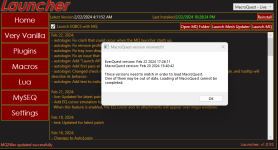
So I launched the EQ launcher which installed the hotfix from today. Now my MQ won't load because the version is older than the EQ version. How do I fix this?
if you have an eq install that hasn't installed todays hotfix, use that. otherwise you're stuck waiting until MQ has been updated to match the hotfix.
matthinson
Well-known member
I just made a post 2 minutes ago, EQ did another patch. You updated EQ. Now MQ wont work untill they do another complie and release the update.


Unfortunately, this won't help if you have updated eq with today's hotfix.This is going to sound crazy and maybe offensive but try restarting your PC that usually works to reset any sync
There was an ingame message?I knew that ingame message was a trap!
I defer to the smarter guy in chat here.Unfortunately, this won't help if you have updated eq with today's hotfix.
Redbot updated Very Vanilla MQ (Live Servers) with a new update entry:
20240222
Read the rest of this update entry...
20240222
Feb 22, 2024:
- live: updated for live patch
- autologin: Profile context menus can now toggle their state with ctrl+click
- autologin: Profile context menus now use a star instead of check mark. Functionality is the same.
- autologin: Profiles can now be freely re-ordered independent of star state.
- autologin: Increas default delay when launching multiple instances.
- autologin: Various improvements to context menus (still have issues with loaded state...)
- autologin: Add logged in...
Read the rest of this update entry...
Redbot updated Very Vanilla MQ (Live Servers) with a new update entry:
20240223
Read the rest of this update entry...
20240223
Feb 23, 2024:
- autologin: Fix ini import creating blank passwords when stationnames entries exist
- autologin: Add right click option to Characters UI to add a character to a profile group
Read the rest of this update entry...

Users who are viewing this thread
Total: 5 (members: 0, guests: 5)
Share: