• You've discovered RedGuides, an EverQuest multi-boxing and scripting community 🧙‍♀️⚙️. We want you to play several EQ characters at once, come join us and say hello! 👋

  • A TLP without truebox has thawed (Very Vanilla ready)
    Frostreaver
Very Vanilla MQ (Live Servers)

Vanilla - Very Vanilla MQ (Live Servers) (6 Viewers) 3.1.52471.11

No permission to download
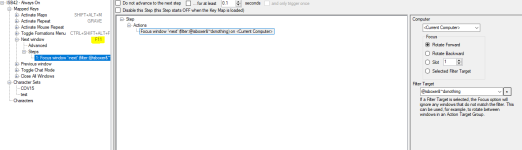
When using MQ, has anyone using ISBOXER had an issue with their "Next Window"Hotkey?

1639640921011.png
The Next window hotkey just does a very quick swap to the next toon. Making the Next toon the focused toon. I Use F11 key to cycle forward.

This works as expected using VV, but on MQ it actually jumps forward about 8 toons.

I am thinking it must be something to do with Framelimiter, and maybe My update settings are too quick or too slow.

Just interested to hear if anyone else has had this issue with IsBoxer and knows a good fix.

(I have turned of Windows animation stuff)
 
Last edited by a moderator:
Windows animation isn't related to that, it was related to a previous method that we had for switching using the MQ hotkeys, but brainiac resolved that issue. It is a workaround for a problem that is no longer a problem, so no need to mess with it. Regardless, the MQ switching and the IsBoxer switching are independent of each other.
 
It must be a framelimiter setting then. I will have a play with the background refresh rates because maybe I have them set too low.
 
I can't seem to run /bccmd autoreconnect, how do I get the toon's to autoreconnect on login?
 
The servers just went down and prior to that things were running smooth. I recently upgraded to MQNext about a week ago. I have noticed I cannot start my own server. It automatically starts it's own.

I can join the server with /bccmd connect and it says Connected and shows the server number on all my toons. However, it no longer shows their individual names as they join. It is like they are all on their own server even though it says the same number. I have tried going to the purple MQ button and right clicking it and srarting EQBC server but it just says it is already running. Is there a way to turn off the server and restart it so I get the window in my tray?

None of the "come to me" "Follow Me" "Mimic me commands seem to work even though they show. I can chase if I put all toons in Chase mode
 
The servers just went down and prior to that things were running smooth. I recently upgraded to MQNext about a week ago. I have noticed I cannot start my own server. It automatically starts it's own.

I can join the server with /bccmd connect and it says Connected and shows the server number on all my toons. However, it no longer shows their individual names as they join. It is like they are all on their own server even though it says the same number. I have tried going to the purple MQ button and right clicking it and srarting EQBC server but it just says it is already running. Is there a way to turn off the server and restart it so I get the window in my tray?

None of the "come to me" "Follow Me" "Mimic me commands seem to work even though they show. I can chase if I put all toons in Chase mode
you definitely only want 1 eqbc server running. you should restart your computer and then launch like normal so you only have 1
 
The servers just went down and prior to that things were running smooth. I recently upgraded to MQNext about a week ago. I have noticed I cannot start my own server. It automatically starts it's own.

I can join the server with /bccmd connect and it says Connected and shows the server number on all my toons. However, it no longer shows their individual names as they join. It is like they are all on their own server even though it says the same number. I have tried going to the purple MQ button and right clicking it and srarting EQBC server but it just says it is already running. Is there a way to turn off the server and restart it so I get the window in my tray?

None of the "come to me" "Follow Me" "Mimic me commands seem to work even though they show. I can chase if I put all toons in Chase mode
Ever since I downloaded next I’ve had a similar issue. The group logs in and groups up but when I start the macro for KA it tells me 1 or more are not connected. I have to go to each toon not connected and type /bccmd quit then /bccmd connect. No idea what the cause is so I just power through. Try that to see if it can at least get you playing until you figure out the main challenge.
 
Okay so I got it working even though I had already restarted a couple times. What I did was switch the launcher back to live and unchecked the launch EQBC server checkbox. then I switched back to Next again. restarted computer again and the server worked. I suspected that possibly the Live server was launching as well. I don't know for sure if that fixed it but now it is working again.

Branson: I did try that and it would reconnect but did not show names. Try what I did to make it work. hopefully that fixes that.
 
Last edited:
Do I download this version or the original one? Getting back into it and not sure which MQ to download?

Thanks.
 
Do I download this version or the original one? Getting back into it and not sure which MQ to download?

Thanks.
Download this version. Next is going to be the only version supported by redguides soon
 
I'm having a similar issue. I have adv path loaded but it's not moving any of my guys. I am connected to eqbc and updated all of the mesh files. any suggestions?
 
The default follow me command is: /bcg //multiline ; /afollow off;/nav stop;/timed 5 /afollow spawn ${Me.ID} So what you can do to test is type:

Code:
/afollow off
/nav stop
/afollow spawn ${Spawn[OtherCharName].ID}

And see what happens. Beyond that, you would want to then begin troubleshooting bcg.
 
Last edited:
Thanks, got the autofollow to work. but the pullertank part of sk plugin isn't working still.
you probably don't have meshes


:)
 
I tried unloading from all toons and then used the /tribute off, worked ok. Btw, it will keep assuming trash mobs in VexThal (Qua - Zov - Zun - etc) as nameds, so it will keep going and consumes tribute points.
 
[2021-12-29 20:14:40.747] [MQ2] [error] [ProcessList.cpp:573] Failed to open eqgame.exe with pid 4328: Access is denied.
[2021-12-29 20:14:40.747] [MQ2] [error] [ProcessList.cpp:577] Failed to inject: Access Denied. pid=4328

What did I do wrong?
It's not injecting into the open game sessions as well.
 
[2021-12-29 20:14:40.747] [MQ2] [error] [ProcessList.cpp:573] Failed to open eqgame.exe with pid 4328: Access is denied.
[2021-12-29 20:14:40.747] [MQ2] [error] [ProcessList.cpp:577] Failed to inject: Access Denied. pid=4328

What did I do wrong?
It's not injecting into the open game sessions as well.
if you run eq elevated - like from using isboxer, you need to elevate mq by running it as admin
 
I don't get a launcher. It just goes down to a little windows in my taskbar

I don't see hwere in my old RG launcher to DL it and install it. I dl from the forum post and it's was a copied directory?
 
So with the new way to travel in Next (like with the in game zone select window). is there a way to get everyone moving without having to tab around to them?
 
Vanilla - Very Vanilla MQ (Live Servers)

Users who are viewing this thread

Back
Top
Cart