• You've discovered RedGuides, an EverQuest multi-boxing and scripting community 🧙‍♀️⚙️. We want you to play several EQ characters at once, come join us and say hello! 👋

  • A TLP without truebox has thawed (Very Vanilla ready)
    Frostreaver
Very Vanilla MQ (Live Servers)

Vanilla - Very Vanilla MQ (Live Servers) (4 Viewers) 3.1.52471.11

No permission to download
Are you using the default skin or a different skin? Does /groupinfo show distance on change things? What does just typing /groupinfo show you for distance?

No I have a spell gem and bar with labels and big bank UI change. If I change to default it fixes it. Is there a way to switch that? The default UI sucks donkey balls.

Thanks!

Edit Nvm got it.

Under Mq2GroupInfo I found the custom UI folder and did a DynamicUI=1.
 
even with the default UI group window the distances won't show. I'll have to figure out how to add the voktar UI to the list.
 
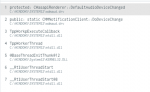
I have noticed a lot more crashes in the last few days.
I can not find the dump in MQ2Next.

I found this guid in the logs
b740484d-9a48-4d1d-89ff-6952cc909eaf

Is my guid always the same? or is it different every crash?

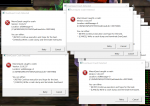
One new thing that I found a few times is that all of my guys crash.
I saw 12 popups and I would close them and all of my windows exited :(
It used to be 1 at a time.
 
Is my guid always the same? or is it different every crash?

It's going to be different for each crash. brainiac fixed a crash earlier and we're aware of one when you camp desktop that cropped up recently.

even with the default UI group window the distances won't show.

I believe the way that code is written, it goes based on your UI regardless of whether you're using it for the group window or not. Which is probably why people who modify bits of it have issues. If you echo your skin when you can't see the numbers does it say "default" or does it say some other UI? It should fall back to the default settings regardless, but maybe something there is missing.
 
Not sure if this has been reported before, but...

I play in windowed mode, and whenever I drag one of the UI windows (MQ Settings for example) and bump into the edge of the EQ window, that char's screen permanently freezes. The only way to unfreeze is to camp to desktop and relaunch the toon. The toon still responds to commands but the screen never changes, like its been permanently put in the background with the framelimiter turned on.
 
Not sure if this has been reported before, but...

I play in windowed mode, and whenever I drag one of the UI windows (MQ Settings for example) and bump into the edge of the EQ window, that char's screen permanently freezes. The only way to unfreeze is to camp to desktop and relaunch the toon. The toon still responds to commands but the screen never changes, like its been permanently put in the background with the framelimiter turned on.
I’ve had something close to this. The screen gets all choppy and doesn’t show all of the graphics.
 
/echo ${EverQuest.CurrentUI} comes back vok2. The name of my folder
Yes, so the issue here is that the default UI is dynamic but the default for the DynamicUI setting is false. This was specifically called out in the code as the way it should be, but I have no idea if that's right as I didn't write any of that, I just kept the settings the way they were and documented it. The quick fix is gonna be to create a [vok2] section in your UI and set DynamicUI=1. I put an issue for this up here: https://gitlab.com/redguides/plugins/MQ2GroupInfo/-/issues/1

Not sure if this has been reported before, but...

I play in windowed mode, and whenever I drag one of the UI windows (MQ Settings for example) and bump into the edge of the EQ window, that char's screen permanently freezes. The only way to unfreeze is to camp to desktop and relaunch the toon. The toon still responds to commands but the screen never changes, like its been permanently put in the background with the framelimiter turned on.
Can you go into further detail of what you mean by "bump into the edge of the EQ window"? Or better, if you have a video you can DM it to me. I play in windowed mode and I tried to reproduce this, but I can't. My guess however is that you have another overlay software that's interfering with it. Do you have the steam overlay or alienware or one of the many other overlays enabled?

I’ve had something close to this. The screen gets all choppy and doesn’t show all of the graphics.
This just sounds like how the frame limiter looks when you have it enabled but click off of the window. If you don't want it to do that, turn off the frame limiter. Is that not the case?
 
easyfind is in the latest. it is still in "beta" and you have to manually download the .yaml from the git, but it should be in the latest build just load it up
Ok reupdated and checke,d yaml is in the directory, but still wont run to locations, it acts just like the old Find did
 
if you forget, it actually tells you in the header of that find window (i keep on having to look here since i have old muscle memory)
 
Last edited:
That does not seem to be a plugin or Macro. Google search indicates an OS process. No idea what a fix might look like.
 
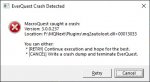
@Sic I woke up and it was like this. It was fine when I went to sleep.
I can not think of a USB device that I have unpluged, I do have the 9mm earbuds that I unplug and plug back in sometimes. But that would have been well before this happened.
 
@Sic I woke up and it was like this. It was fine when I went to sleep.
I can not think of a USB device that I have unpluged, I do have the 9mm earbuds that I unplug and plug back in sometimes. But that would have been well before this happened.
you didn't give much context.

is this happening just from the get-go, as in you can't log in? or did it crash while you were doing something - like your toons were already logged in?

have you tried the `ol re-boot-arino?

I've seen a similar msg from folks who had some certain devices reset like usb headsets that got unplugged, or even monitors that have audio connectivity.
is it possible you had a device like that that went to sleep or got disconnected?
 
you didn't give much context.

is this happening just from the get-go, as in you can't log in? or did it crash while you were doing something - like your toons were already logged in?

have you tried the `ol re-boot-arino?

I've seen a similar msg from folks who had some certain devices reset like usb headsets that got unplugged, or even monitors that have audio connectivity.
is it possible you had a device like that that went to sleep or got disconnected?

This has happened several times, and I have tried rebooting in the past.
I do not use the sound on the computer that plays everquest very frequently.
Maybe the audio was on set to the monitor audio and it went to sleep overnight.

I will try using the motherboard audio and see if that stops it.
 
This has happened several times, and I have tried rebooting in the past.
I do not use the sound on the computer that plays everquest very frequently.
Maybe the audio was on set to the monitor audio and it went to sleep overnight.

I will try using the motherboard audio and see if that stops it.
Go in and disable audio via device manager, reboot computer then re enable it and reboot again, your default windows audio media driver is having issues, could be a card problem but most of the time if you disable it and reboot then re enable it and reboot it will unstick it for awhile. but we aware that you DO have an audo issue going on. typically means an audio port on your MB is beginning to go bad
 
I’m getting a weird bug with setting up profiles.

The character name is being used as the login for a few accounts. It’s not all of them just one of my 8 profile sets.

I can reproduce it if you want to see it.

Thanks!
 
Has MQ2AutoLoot been ported over? Just using MQ and the normal plugins, to include MQ2AutoLoot, any time a toon gets to an item marked Destroy MQ crashes.


AutolootCrash.jpg
 
Has MQ2AutoLoot been ported over? Just using MQ and the normal plugins, to include MQ2AutoLoot, any time a toon gets to an item marked Destroy MQ crashes.


View attachment 32954
mq2autoloot has been ported over, as you are using it

autoloot definitely has issues (live and next)

SpecialEd has a Lua script Lootly to mimic autoloot without the suck, if that is something you are interested in > here <
 
mq2autoloot has been ported over, as you are using it

autoloot definitely has issues (live and next)

SpecialEd has a lua script Lootly to mimic autoloot without the suck, if that is something you are interested in > here <
I tried that, it doesn't pick up items marked destroy, it leaves them. It leaves piles of corpses for all to see. If you use hide corpse they are still there for others to see. I have never had a problem on Live with it.
 
When using the frame limiter to limit background frames, if you get hit with a blind effect, it blanks out your entire UI, even on the foreground window. Normally, the game still renders your UI and it's only the 3D game objects that don't get rendered. Is there a way to get the normal operation while under blind effects?
 
Having some issues with MQEasyFind after swapping to next today. whenever I load my toons in I have to unload/load mq2easyfind or else its not recognizing that the plugin is loaded, simple fix to unload/load plugin but not normal for plugin to not load up when its loaded on login without a reset
 
Also having same problem as Many_Whelps, with frame limiter running if blinded all in game ui also disappears
 
Vanilla - Very Vanilla MQ (Live Servers)

Users who are viewing this thread

Back
Top
Cart