• Hail, we're RedGuides. We want you to play six (yes, 6!) EverQuest characters at once. We have scripts and a friendly community to help, please join our playstyle and say hello! 👋
  • We've added LLM sections to our Terms & Rules and Resource Rules, for everyone's sanity & in-game safety.
    Read more
    a. Do not replace your voice with an LLM. This goes for your posts and your scripts. Drafting and editing with a tool is fine, but don't take you out of what you share.
    b. Do not replace your EQ character's voice with an LLM. We don't want scripts that speak over /ooc, /shout or other public channels. This has been an unwritten rule that's kept casino scripts off the site for decades, but we're now compelled to make it clear: keep automated communication private.

    Why Does RG Review Scripts?
    Nearly every LLM-written Lua script we see is making your character do impossible things, and rarely in a way that's beneficial to you. We've seen heavy server hammering, /target over impossible distances when /nav spawn would passively accomplish the same thing, a spawn search that fires 20+ times per second, and other pointless actions that are likely annoying GMs.

    You are welcome to use LLMs as a tool to structure, draft, and edit your work, but please read critically before hitting /lua run

Problem - Unable to open inventory window

Status
Not open for further replies.

Cannonballdex

Master Tinkerer
Creator
Anyone having random issues with opening inventory window? Seems like I have to zone before I can use the Inventory window on random toons. On the selector window or pressing 'I' does nothing, all other windows from the selector window open and close fine.
 
Anyone having random issues with opening inventory window? Seems like I have to zone before I can use the Inventory window on random toons. On the selector window or pressing 'I' does nothing, all other windows from the selector window open and close fine.
haven't seen/heard of that one - can you confirm you're not using the new eq ui engine?
 
Not using new UI.

Just had my inventory window stuck open. The button on the selector makes the changing highlighted motion when clicked and ends up back down again. Keypress I does not nothing but clicking the X in the top right corner did close the inventory window. Still unable to open back up.

If I open search and click an item it will open the back the item is located in.
I would start by making sure that in the options window that you still have the key "I" assigned to the inventory. While unlikely, it's possible due to some corruption or some such.
 
This happens randomly on different toons. Not sure if a specific Lua script is the culprit, but never happened in the past until this past week.

The thing is with the I key and the selector. When I click on the selector to open the inventory window, it shows the animation of the button going down then it come back up without the window opening. Almost like something is closing the window faster than I can open it. shrug. going to play around and see if I can find a culprit. Thanks for the suggestions.

When I search an item and it opens a bag. I can't pick anything up either.

So the toons have invisible shit stuck on their cursor. From summoning food or foraging. Once I zone I can open inventory and place all of the items.
 
Getting these when camping out now as well.
Code:
---------------------------
EverQuest Crash Detected
---------------------------
MacroQuest caught a crash:

Process ID: 9580
Version: 3.1.1.3185
Location: OnUnloadPlugin+0 (C:\MQNext\Plugins\mq2lua.DLL+000000000063FF00)

CrashID: 8215437d-8022-4328-9149-25c7aff6f714

You can either:
 * [RETRY] Continue execution and hope for the best.
 * [CANCEL] Write a crash dump and terminate EverQuest.

Copy the contents of this dialog to your clipboard by pressing Ctrl+C

---------------------------
Retry   Cancel   
---------------------------
 
Getting these when camping out now as well.
Code:
---------------------------
EverQuest Crash Detected
---------------------------
MacroQuest caught a crash:

Process ID: 9580
Version: 3.1.1.3185
Location: OnUnloadPlugin+0 (C:\MQNext\Plugins\mq2lua.DLL+000000000063FF00)

CrashID: 8215437d-8022-4328-9149-25c7aff6f714

You can either:
 * [RETRY] Continue execution and hope for the best.
 * [CANCEL] Write a crash dump and terminate EverQuest.

Copy the contents of this dialog to your clipboard by pressing Ctrl+C

---------------------------
Retry   Cancel  
---------------------------
Any chance to list the luas you have running when you log out and crash here?
 
Getting these when camping out now as well.
Code:
---------------------------
EverQuest Crash Detected
---------------------------
MacroQuest caught a crash:

Process ID: 9580
Version: 3.1.1.3185
Location: OnUnloadPlugin+0 (C:\MQNext\Plugins\mq2lua.DLL+000000000063FF00)

CrashID: 8215437d-8022-4328-9149-25c7aff6f714

You can either:
 * [RETRY] Continue execution and hope for the best.
 * [CANCEL] Write a crash dump and terminate EverQuest.

Copy the contents of this dialog to your clipboard by pressing Ctrl+C

---------------------------
Retry   Cancel  
---------------------------
Buttonmaster
Magellan
Overseer
Same ones I've run since lua came into mq. But my issue only started within the last week. Nothing updated or changed. stumped atm.

That is on main toon, The rest only run Overseer.
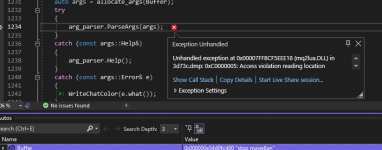
this crash appears to happen when /Lua stop magellan is executed

1751243996154.png

there's a whole bunch in the crash dmp that would need brainiac or knightly or dan to take a look at and explain
 
two issues in this thread


The crash - call stack is interesting, everything else isnt


The inventory window - can you run slash commands too or does it say you can’t do that right now? Sounds like you have an item or spell transaction pending which is a basically waiting for the server for a reply after moving an item or casting a spell and it never came
 
Yes defiantly narrowed it down to items invisible on the cursor from either foraging or summoning items. I was able to /useitem, however if it was to summon an item it was hit or miss if it would clear the cursor or not. Most of the time it would just cast the item and add the invisible item on the cursor. Nothing showed in overflow like it does when your bags are full.

No message about being able to do that right now.

If I open the search menu it shows items being held that arent on the cursor. Can't remove them, can't initiate a trade with target and /usetar , won't open parcel merchant.
 
Problem - Unable to open inventory window
Status
Not open for further replies.

Users who are viewing this thread

Back
Top
Cart