• You've discovered RedGuides, an EverQuest multi-boxing and scripting community 🧙‍♀️⚙️. We want you to play several EQ characters at once, come join us and say hello! 👋

  • A TLP without truebox has thawed (Very Vanilla ready)
    Frostreaver

Problem - Unable to open inventory window

Status
Not open for further replies.

Cannonballdex

Master Tinkerer
Joined
Feb 9, 2017
RedCents
1,387¢
Anyone having random issues with opening inventory window? Seems like I have to zone before I can use the Inventory window on random toons. On the selector window or pressing 'I' does nothing, all other windows from the selector window open and close fine.
 
Anyone having random issues with opening inventory window? Seems like I have to zone before I can use the Inventory window on random toons. On the selector window or pressing 'I' does nothing, all other windows from the selector window open and close fine.
haven't seen/heard of that one - can you confirm you're not using the new eq ui engine?
 
Not using new UI.

Just had my inventory window stuck open. The button on the selector makes the changing highlighted motion when clicked and ends up back down again. Keypress I does not nothing but clicking the X in the top right corner did close the inventory window. Still unable to open back up.

If I open search and click an item it will open the back the item is located in.
 
Not using new UI.

Just had my inventory window stuck open. The button on the selector makes the changing highlighted motion when clicked and ends up back down again. Keypress I does not nothing but clicking the X in the top right corner did close the inventory window. Still unable to open back up.

If I open search and click an item it will open the back the item is located in.
I would start by making sure that in the options window that you still have the key "I" assigned to the inventory. While unlikely, it's possible due to some corruption or some such.
 
Has anything changed with setup? Or new install? I had this issue after getting a new PC. Turned out EQ was opening it "off screen" had manually edit the ini file to get the window on screen.
 
This happens randomly on different toons. Not sure if a specific Lua script is the culprit, but never happened in the past until this past week.

The thing is with the I key and the selector. When I click on the selector to open the inventory window, it shows the animation of the button going down then it come back up without the window opening. Almost like something is closing the window faster than I can open it. shrug. going to play around and see if I can find a culprit. Thanks for the suggestions.

When I search an item and it opens a bag. I can't pick anything up either.

So the toons have invisible shit stuck on their cursor. From summoning food or foraging. Once I zone I can open inventory and place all of the items.
 
Getting these when camping out now as well.
Code:
---------------------------
EverQuest Crash Detected
---------------------------
MacroQuest caught a crash:

Process ID: 9580
Version: 3.1.1.3185
Location: OnUnloadPlugin+0 (C:\MQNext\Plugins\mq2lua.DLL+000000000063FF00)

CrashID: 8215437d-8022-4328-9149-25c7aff6f714

You can either:
 * [RETRY] Continue execution and hope for the best.
 * [CANCEL] Write a crash dump and terminate EverQuest.

Copy the contents of this dialog to your clipboard by pressing Ctrl+C

---------------------------
Retry   Cancel   
---------------------------
 
Getting these when camping out now as well.
Code:
---------------------------
EverQuest Crash Detected
---------------------------
MacroQuest caught a crash:

Process ID: 9580
Version: 3.1.1.3185
Location: OnUnloadPlugin+0 (C:\MQNext\Plugins\mq2lua.DLL+000000000063FF00)

CrashID: 8215437d-8022-4328-9149-25c7aff6f714

You can either:
 * [RETRY] Continue execution and hope for the best.
 * [CANCEL] Write a crash dump and terminate EverQuest.

Copy the contents of this dialog to your clipboard by pressing Ctrl+C

---------------------------
Retry   Cancel  
---------------------------
Any chance to list the luas you have running when you log out and crash here?
 
Buttonmaster
Magellan
Overseer
Same ones I've run since Lua came into mq. But my issue only started within the last week. Nothing updated or changed. stumped atm.

That is on main toon, The rest only run Overseer.
 
Getting these when camping out now as well.
Code:
---------------------------
EverQuest Crash Detected
---------------------------
MacroQuest caught a crash:

Process ID: 9580
Version: 3.1.1.3185
Location: OnUnloadPlugin+0 (C:\MQNext\Plugins\mq2lua.DLL+000000000063FF00)

CrashID: 8215437d-8022-4328-9149-25c7aff6f714

You can either:
 * [RETRY] Continue execution and hope for the best.
 * [CANCEL] Write a crash dump and terminate EverQuest.

Copy the contents of this dialog to your clipboard by pressing Ctrl+C

---------------------------
Retry   Cancel  
---------------------------
Buttonmaster
Magellan
Overseer
Same ones I've run since lua came into mq. But my issue only started within the last week. Nothing updated or changed. stumped atm.

That is on main toon, The rest only run Overseer.
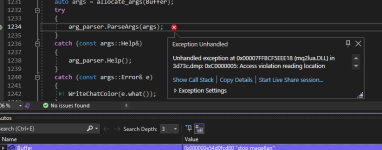
this crash appears to happen when /Lua stop magellan is executed

1751243996154.png

there's a whole bunch in the crash dmp that would need brainiac or knightly or dan to take a look at and explain
 
Is it also locking up your ability to manually cast spells or click hotkeys? Saying you cannot do this at this time when clicking them? Also, do you use the Feedme plugin by chance?
 
two issues in this thread


The crash - call stack is interesting, everything else isnt


The inventory window - can you run slash commands too or does it say you can’t do that right now? Sounds like you have an item or spell transaction pending which is a basically waiting for the server for a reply after moving an item or casting a spell and it never came
 
Yes defiantly narrowed it down to items invisible on the cursor from either foraging or summoning items. I was able to /useitem, however if it was to summon an item it was hit or miss if it would clear the cursor or not. Most of the time it would just cast the item and add the invisible item on the cursor. Nothing showed in overflow like it does when your bags are full.

No message about being able to do that right now.

If I open the search menu it shows items being held that arent on the cursor. Can't remove them, can't initiate a trade with target and /usetar , won't open parcel merchant.
 
Problem - Unable to open inventory window
Status
Not open for further replies.

Users who are viewing this thread

Back
Top
Cart