- Seller
- #321
I added a nil check for that section, can you update and verify if it's fixed? Thanks.yeah it instant crash if I go over the dots.



I added a nil check for that section, can you update and verify if it's fixed? Thanks.yeah it instant crash if I go over the dots.
Automated update: c47dd7ca93c3e1489738f55369363c8ca0c06d1d

---------------------------
EverQuest Crash Detected
---------------------------
MacroQuest caught a crash:

Process ID: 10364
Version: 3.1.0.2435
Location: RaiseException+0 (C:\WINDOWS\System32\KERNELBASE.dll+0000000000065340)

CrashID: 95207f92-89d9-4186-a3b5-691135b6dbe3
v2.2.3 2024-04-17
- Minor cosmetic fix
Automated update: c47dd7ca93c3e1489738f55369363c8ca0c06d1d
v2.2.3 2024-04-17
- Minor cosmetic fix
v2.2.2 2024-02-21
- Added nil check for inventories
v2.2.1 2024-02-08
- Squashed tidy up bugs from last update
v2.2.0 2024-02-05
- By popular request, added a "Tidy All" feature
v2.1.4 2024-01-19
- TSC now correctly skips over temporary items
v2.1.3 2024-01-06
- Various ImGui 1.90 updates
v2.1.2 2024-01-03
- Fixed UI formatting issue
v2.1.1 2023-12-17
- Fixed potential GUI crash when zoning.
v2.1.0 2023-12-17
- Added yellow dot for toons with...
Automated update: c47dd7ca93c3e1489738f55369363c8ca0c06d1d
Automated update: c47dd7ca93c3e1489738f55369363c8ca0c06d1d
v2.2.3 2024-04-17
- Minor cosmetic fix
v2.2.2 2024-02-21
- Added nil check for inventories
v2.2.1 2024-02-08
- Squashed tidy up bugs from last update
v2.2.0 2024-02-05
- By popular request, added a "Tidy All" feature
v2.1.4 2024-01-19
- TSC now correctly skips over temporary items
v2.1.3 2024-01-06
- Various ImGui 1.90 updates
v2.1.2 2024-01-03
- Fixed UI formatting issue
v2.1.1 2023-12-17
- Fixed potential GUI crash when zoning.
v2.1.0 2023-12-17
- Added yellow dot for toons with...
Hmmm. No. If you have an item in your inventory, and the same item in your depot, it will always move it to your depot.Hi Raw, I have a question. I might have missed it in the video.
Is there a way to automatically remove all item from TS Depot and put them in inventory instead of auto deposit in depot?
Thanks,
BB~
This is exactly what the Give function does. Or do you mean you'd like all toons to give to one toon with a single command??I have another quality of life improvement for this lua.
The tidy up all works great. Can we get a dump all inventory to a one toon? And then have it work for either Collectibles and Tradeskills.
Thanks!
Yes, I can see this making sense.... There are simply so many things that could be fine-tuned. I'm trying to strike a balance between "I just want TSC to clean it all up for me" and "I want to fine-tune everything to my preferences."Have one myself, I'd mentioned before, but don't think it was seen (around the time you were on vacation). Would love to have a "Priority to Depot" type setting, as in, a character will not pull items from depot to give to a toon that has more in inventory. And the character with the item(s) in depot receives all said items for storage in depot. Similar to how I imagine the "Prefer Plots" setting works.
Really do love this whole thing, it gets heavy use from me!
Thanks again for all the hard work!

Gotcha. I feel sorry for that 1 toon already. I'll add this to the backlog as something to consider for future development.Exactly

View attachment 62975
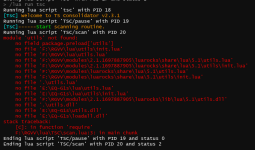
any idea what would cause this after the scan on my main but not anyone else i try running it on?

I don't see anything that says real estate. My dude is at his house right next to is, collectible selected and he runs the script and runs towards the house and gets stuck looking for a banker. I could of sworn reading that it now supports real-estate but I see nothing that says real estate.Hello all. I was hoping to get some help. I have my rogue who is my collections guy and his bags are completely full of collectibles. I took him to my mains house so he can consolidate all of the collectibles in his inventory and hopefully everything in the house. So he's there, and I do /lua run tsc and everything shows up. I select collectables instead of tradeskill. But in the leftovers section there is no selection for plot or house. How do I run this so my rogue consolidates all of hit collectables in inventory with the house? Thank you
TSC doesn't support using real estate as a left-over location.I don't see anything that says real estate. My dude is at his house right next to is, collectible selected and he runs the script and runs towards the house and gets stuck looking for a banker. I could of sworn reading that it now supports real-estate but I see nothing that says real estate.
v2.3.0 2024-09-29
- Added a full-auto mode to skip all confirmation boxes
v2.3.1 2024-10-04
- New default behavior: If a toon has an item in their depot, they will now win even if qty is lower
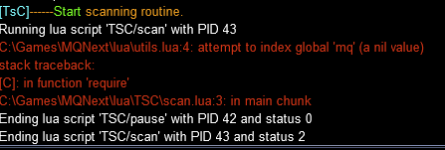
Doing this fixed part. Then it bugged out on tsc/selfmatch.Had to add the directory to the command in the scan.lua to get mine working
Code:local utils = require('TSC.utils')
Doing this fixed part. Then it bugged out on tsc/selfmatch.
I went through all the files and added TSC. to all the requires that are referencing files in the resource.
This might have to do to the recent update to MQ where the change note said it will scan the file structure when it can't find something. Not sure.
Looks like this has to do with the recent changes I made to made depot always win. I'll look into it.Been getting a lot of things showing that I have 99999 of something. Not sure what that represents.
View attachment 66337
Also lots of crashing while running
View attachment 66338
v2.4.0 2024-11-15
- Improvements to the matches decision tree fixing depot priority issues