• You've discovered RedGuides, an EverQuest multi-boxing and scripting community 🧙‍♀️⚙️. We want you to play several EQ characters at once, come join us and say hello! 👋

  • A TLP without truebox has thawed (Very Vanilla ready)
    Frostreaver
TsC – Automated Inventory Management & Consolidation For Your Whole Crew

Release TsC – Automated Inventory Management & Consolidation For Your Whole Crew 4.1.6

Feature request (or is there a setting I've overlooked?)

Can we have a "Depot Preferred" type setting, meaning that if a character has an item in Depot, they automatically receive all of said item from all other characters regardless of quantities.

What I'm seeing, during pursuit of maxxed Artisan Prizes, if a character has 46 of an item and running TCN, 34 are giving to the Artisan. I now see that I'm going to need more in the near future, so while that toon is making combines, I send another out to farm more of this item, and it gets 56 of them. Now when I run TSC, the character that has them in it's depot will pass it to the farming character, who now has more of them. I would prefer that they remain on the character that has them in the Depot.

And again, many thanks for all your efforts, TSC is awesome!
 
I'm now receiving the following when trying to run TSC
Code:
---------------------------
EverQuest Crash Detected
---------------------------
MacroQuest caught a crash:
Version: 3.1.0.1888
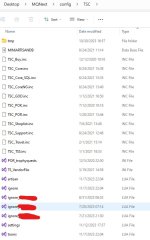
Location: luaopen_lfs+0 (C:\Users\dvrea\Desktop\MQNext\lua\tsc\lfs.dll+0000000000005B50)

CrashID: 5d4cb240-5bc2-4b53-b554-d8218518032a

You can either:
 * [RETRY] Continue execution and hope for the best.
 * [CANCEL] Write a crash dump and terminate EverQuest.

---------------------------
Retry   Cancel   
---------------------------
 
I'm now receiving the following when trying to run TSC
Code:
---------------------------
EverQuest Crash Detected
---------------------------
MacroQuest caught a crash:
Version: 3.1.0.1888
Location: luaopen_lfs+0 (C:\Users\dvrea\Desktop\MQNext\lua\tsc\lfs.dll+0000000000005B50)

CrashID: 5d4cb240-5bc2-4b53-b554-d8218518032a

You can either:
 * [RETRY] Continue execution and hope for the best.
 * [CANCEL] Write a crash dump and terminate EverQuest.

---------------------------
Retry   Cancel  
---------------------------

Did you update all, and run luarocks installer when prompted?
 
Did you update all, and run luarocks installer when prompted?

Based on the Red Guides installer, everything is up to date, the only changes that I've made are updates via the launcher to RG and corresponding updates to my luas. There hasn't been a recent update to TSC that I've seen. And after some of the recent RG updates, I did have to remove a file from my Lua folder and let luarocks re-install the file in the proper location.
 
I just deleted the TSC folder from the Lua folder, and hit re-install on the Red Guides Launcher, issued a "/Lua run tsc" and was prompted to install. It's working now :)
 
There is a macro named TSC??
Can you link it, I can't find anything.
I believe it was jb321's original tradeskill mac,
Code:
|TSC.mac 8/24/2021 jb321 3.73b
and the link is no longer available. Not too terribly long ago you could find it as (deleted). I've held onto it because it's much faster on the GoD freebies than the tcn Lua.
 
I believe it was jb321's original tradeskill mac,
Code:
|TSC.mac 8/24/2021 jb321 3.73b
and the link is no longer available. Not too terribly long ago you could find it as (deleted). I've held onto it because it's much faster on the GoD freebies than the tcn lua.
I had no idea TCN used to be called TSC. I would have thought of another acronym! @jb321
 
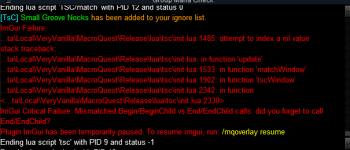
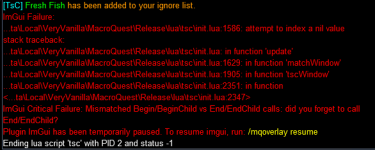
Seeing the following error when adding items to global ignore:

1700580490144.png
It does successfully add the item to global ignore immediately prior to crashing.
 
came into an issue when trying to consolidate tradeskill items and collectibles in one after the other, possibly want to have your Generous > Default > Greedy > Tiebreakers > Leftovers settings independent for TS and collectibles. Also, a "everyone give this person all your tradeskill stuff" button would save a lot of time when trying to clean up characters inventory over doing them one at a time. Anyhow, thanks for the tool, saves a ton of time.
 
Bought the Lua - and set it at watch but it doesnt upload when I run the launcher and its still saying purchase - what am I doing wrong to get it to upload (newb here) - tried dowloading and putting the folder into luas but that didnt work

1702767055741.png
 
Everything seems in oder with your license. Did you figure it out? PM me if you still need help.
 
Bought the lua - and set it at watch but it doesnt upload when I run the launcher and its still saying purchase - what am I doing wrong to get it to upload (newb here) - tried dowloading and putting the folder into luas but that didnt work

View attachment 54641
My guess is you have the discussion watched, Goto the "overview" tab and select watch there (all the watch for every resources is like this - you've told it to notify you about posts in the forums...not to watch the resource and add to your launcher)

The "buy now button" also still shows for me, but if you check one of your posts.... You should see its added an icon for valid license.

1702971332091.png
 
Everything seems in oder with your license. Did you figure it out? PM me if you still need help.
yes thanks, sorted, now we just ned it to work with depot lol, didnt realise that putting everything I had in depot was going to be such a problem
Also where can I change number of recipes from 30 to say 200 so my shopping list is not so small for farming - seems like I do five mins then have to go farming
 
yes thanks, sorted, now we just ned it to work with depot lol, didnt realise that putting everything I had in depot was going to be such a problem
Also where can I change number of recipes from 30 to say 200 so my shopping list is not so small for farming - seems like I do five mins then have to go farming
are you confusing trade skill consolidator with trade construction next? -
 
Getting stuck on the depot routine. I can manually click an item into my depot but the Lua will not deposit them. Keeps spitting out the "Soandso can't deposit. Be sure no Lua windows are obstructing their depot window."

I can confirm that no Lua windows, or any window at all, is obstructing the depot window.

Edit: Using the default UI skin. I noticed back in April another user had the same issue. Best to just ignore depot and make a mule for TS items I suppose??
 
Last edited:
Getting stuck on the depot routine. I can manually click an item into my depot but the lua will not deposit them. Keeps spitting out the "Soandso can't deposit. Be sure no Lua windows are obstructing their depot window."

I can confirm that no lua windows, or any window at all, is obstructing the depot window.

Edit: Using the default UI skin. I noticed back in April another user had the same issue. Best to just ignore depot and make a mule for TS items I suppose??
Hey. Sorry you're running into this. I'm out of the country at the moment on holiday. I'll PM you when I get back and see if I can figure out what's going on!
 
Hey. Sorry you're running into this. I'm out of the country at the moment on holiday. I'll PM you when I get back and see if I can figure out what's going on!
No rush at all :) enjoy your trip!
 
There is a small issue with the IMGUI display:
1704017209350.png

and also, putting items in the TS depot does no longer work for me, if I dont manually click the mouse button.
 
Release TsC – Automated Inventory Management & Consolidation For Your Whole Crew

Users who are viewing this thread

Back
Top
Cart