- Seller
- #3,481
You only have 1 of these containers in your inventory, correct, don't remember if I asked that...still has issue i did put mischief in where ya asked
View attachment 53517



/ooc, /shout or other public channels. This has been an unwritten rule that's kept casino scripts off the site for decades, but we're now compelled to make it clear: keep automated communication private./target over impossible distances when /nav spawn would passively accomplish the same thing, a spawn search that fires 20+ times per second, and other pointless actions that are likely annoying GMs./lua run
You only have 1 of these containers in your inventory, correct, don't remember if I asked that...still has issue i did put mischief in where ya asked
View attachment 53517
Please delete %appdata%/local/luarocks folder, and make sure not to run UAC or as adminI have deleted the TCN folder, shut down and re-started the computer and still cannot get TCN to run. Continue to get the Lua 5.1 interpreter not found message, lua rocks.exe has stopped working and then nothing. I used this previously on several toons with no issues and now cannot use it at all. Beating my head against the desk and have no idea what to try next.
I believe so, is it working now?i have deleted the luarocks folder but as soon as I load lua run tcn the folder is re-installed. I noticed this https://luarocks.macroquest.org/2.2.1697887905/ is where it trying to go, is that correct location?
thats not an error, it says that every time it runssame error everytime, can't find lua 5.1 interpreter
An alternative option is to create a new RG install and do everything in that..same error everytime, can't find lua 5.1 interpreter. In mq2 box get message "ending lua script tcn with PID 7 and status -1". box pop up and says luarocks.exe has stopped working and closes program
An alternative option is to create a new RG install and do everything in that..
If you create a new install you will not or should not lose the other folder that still has all your settings to migrate..what is the best way to un-install RG and will I lose all my settings (like all the zones I visited using Explore)
I'm having the same issue and tried the steps above to resolve the issue but unfortunately that didn't help. I did have TCN working on this machine a few months ago but haven't used it until today and it won't load. Any suggestions?That did it! Hooray!
I would try re-installing from the start with the line below:I'm having the same issue and tried the steps above to resolve the issue but unfortunately that didn't help. I did have TCN working on this machine a few months ago but haven't used it until today and it won't load. Any suggestions?

Thanks for the quick reply NM. Unfortunately I tried that and it didn't work. Is there a way to get rid of all traces of previous installation and start from scratch? How easy would that be?I would try re-installing from the start with the line below:
/lua run tcgsetup
I have deleted the TCN folder completely before, redownloaded it from the RG panel, then re-did the install. Thats solved one issue I was having at the time. You might have to do some cleanup for the SqlLite though, as that seems to be what the error message is related to. Possibly remove it using the Windows control panel, and re-install it?Thanks for the quick reply NM. Unfortunately I tried that and it didn't work. Is there a way to get rid of all traces of previous installation and start from scratch? How easy would that be?
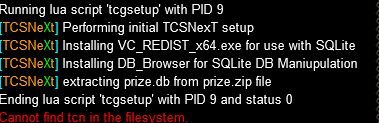
So I tried just that and after running the setup, "/Lua run tcn" command says can't be found in filesystem.I have deleted the TCN folder completely before, redownloaded it from the RG panel, then re-did the install. Thats solved one issue I was having at the time. You might have to do some cleanup for the SqlLite though, as that seems to be what the error message is related to. Possibly remove it using the Windows control panel, and re-install it?
Why can't it be forge!?Just a quick note on a database fix. Keen Metal Spike Action is Forge, and should be Forage (per eqtraders entry)
View attachment 53604
exit out of everythingSo I tried just that and after running the setup, "/lua run tcn" command says can't be found in filesystem.
I actually didn't have a luarocks folder or sqlite.dll. It tried to install luarucks when I run setup but it looks like it fails.exit out of everything
Try: deleting %appdata%/local/luarocks folder, and make sure not to run the Lua in UAC or as admin or the instances in UAC/Admin
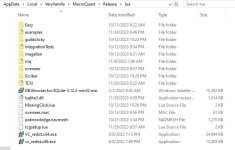
Also, if there is a sqlite.dll in any form , delete it from the lua folder itself.
If TCN is not installed or not there, be sure to "watch" the resource and install from the launcher.
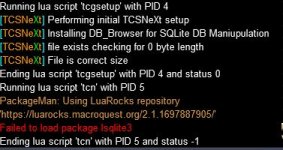
The main reasons to run tcgsetup are to:
1) Set up the prize file
2) Install the SQL Browser
3) Install the redist which allows for the sqlite dll to work ... (facile)
I am creating a new vm instance for testing,I actually didn't have a luarocks folder or sqlite.dll. It tried to install luarucks when I run setup but it looks like it fails.


I say it makes the version for Enchanters over and over.. based on what my DB tells me.. Which has been fixed.. next releaseFor Research it gets stuck on the spell Reflect, it just makes it over and over, even though I already know the recipe. I'm guessing there may be a version for each class, but the version it makes over and over is for Necros, and that's where the hang up is.
I was able to get this error when I didn't install from the launcher..So I tried just that and after running the setup, "/lua run tcn" command says can't be found in filesystem.
I was able to get this error when I didn't install from the launcher..
11/29/2023
3.996b (Again) - ChangeLog
Database:
Fixed: Scroll: Spear of Molten Steel Rk. II Container
Fixed: Spell: Reflect (Quill Of The Coercer) Recipe
Fixed: Action for Keen Metal Spike in FarmTable...

| Scorpion Meat | 1 | 12647 | Vendor | Shadow Haven| Tall Joe |
Man I don't even know, 1 recipe for a Scorpion Sandwich, you're killing me.On the Scorpion Meat for Baking, I think you can set it up to purchase from Thurgadin from Mordin Frostcleaver. It's much easier to find him and get the items. Plus you may be able to get the lua to run there and buy it if that works.
View attachment 53732
Scorpion Meat Vendor Shadow Haven| Tall Joe
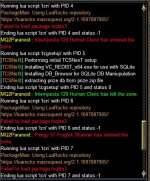
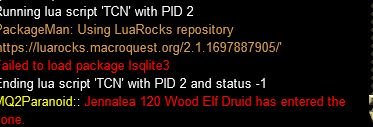
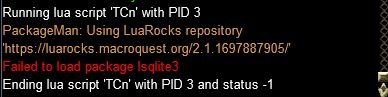
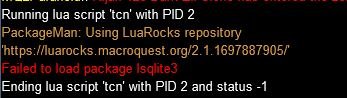
When something like this happens, I always suggest 2 things to determine if it is localized, Try a VM instance, or try another Box.. If those work, yes something is wrong with your system, or something you are doing.Also, getting the following error when trying to run Lua after trying all the steps above. I'm at a loss here and would really hate to have to do a system wipe in order to get this running again.
I've not forgotten about you, when LS launches I will be diving into mischief...
Yeah I just updated TCN through RG Launcher and copied the DLL file over to main Lua folder. I also updated MQ through launcher to today's update. Still getting the same results. Do you want to remote into my machine to see if I am missing something?When something like this happens, I always suggest 2 things to determine if it is localized, Try a VM instance, or try another Box.. If those work, yes something is wrong with your system, or something you are doing.
Did you copy the file I provided a couple of posts back into your Lua directory?
I've been trying to recreate the scenario with no success.
Looks like 2 of you are having or have had the same issue, I was wondering if there is anything common, or it is just a case of something getting corrupted.
Screengrabs for contextYeah I just updated TCN through RG Launcher and copied the DLL file over to main LUA folder. I also updated MQ through launcher to today's update. Still getting the same results. Do you want to remote into my machine to see if I am missing something?

11/30/2023
3.997b - ChangeLog
Fixed: If you wanted 1 item and were using the UI and learning, it would make that item and then go into the UI search and then make the item again It will now adhere to the count if it is achieved while experimenting/learning
Modified...
I actually don't have a luarocks directory at all anywhere on my system. I uninstalled all C++ Redist. files listed in apps and features and ran /Lua run tcn and received more of the same. Screen grab attached.Which issue, the can't load the dll or something similar?
Start with making sure there is not a sql type dll file in the lua directory, and if so delete it.
then delete %appdata%/local/luarocks folder
then /lua run tcn
-- Options
-- Re-install TCN (prolly won't do anything) as it has to do with Luarocks...
-- Re-install Redguides (in new location) or redo it all over.
-- Copy DLL I provided above to lua directory.
-- Wipe PC
-- Option D (Whatever hasn't been suggested) -- Knightly Magic.. AKA Luarocks Master
OR THIS:
This is what is installed by the packageman when using luarocks for the DLLl now:
View attachment 53766
If you have a different version of the C++ 2015-2019 Redist, please uninstall those. My latest guess is that the new SQL.DLL requires a different version of the Redist..
I checked for instances of the DLL (different versions) and there are many and I am wondering if one is overriding another..
Old versions can and have caused problems for many things..
As always make sure you are not doing anything UAC or as Admin
it is \release\modules where luarocks stuff should be downloaded to..I actually don't have a luarocks directory at all anywhere on my system. I uninstalled all C++ Redist. files listed in apps and features and ran /lua run tcn and received more of the same. Screen grab attached.

Downloaded it and installed it. I have absolutely nothing in my modules folder. Maybe this is the issue?it is \release\modules where luarocks stuff should be downloaded to..
View attachment 53779
You do have this folder right?
This shouldn't matter:
but you can get it and install it..