Click on the green missing tab in the new window and you'll have your answerWhen i click on info i get this window, and i bought everything listed, but it still wont do anything? do i then need to go to pottery first to craft the frying pan then?

-
 Hail, we're RedGuides. We want you to play six (yes, 6!) EverQuest characters at once. We have scripts and a friendly community to help, please join our playstyle and say hello! 👋
You are using an out of date browser. It may not display this or other websites correctly.
You should upgrade or use an alternative browser.
You should upgrade or use an alternative browser.
Resource icon
Release Tradeskill Construction Set NeXt (5 Viewers) 4.1991b
- Thread starter jb321
- Start date

Rare Spawn
Well-known member
Hi hoping for a little advice, which may well be covered elsewhere, but cant find it. i have used this to do the trophies, and am now trying to get my skills upto 300, How exactly do I do that, say in Baking?
a quick step by step guide would be really nice, or point me to one if its already here. This is where I am at and cant seem to go any further, shave bought all the components, but it wont do any thing else.
I am no expert, I've been stumbling my way through it for months, but here is what I learned along the way.
Step 1 = do the TSS tab, click ALL, and it will get all trades kills to 54 or so.
Step 2 = do the trophies next.
Step ? = At some point, I don't recall, do the GoD tab quests.
Step 3 = work on getting the core trade skills up to 300. (not research)
Step 4 = After the core are done, do the Merchant Alliance tab. This will give you the Combat Spellbook recipe that will help get you to 300 research.
Before you do a big batch of something, like Craft Tab, Artisan sub-tab, all unknown recipes... I like to "Generate Mass List", and then look at the list of items to be shopped... any not in PoK I like to manually make the run (/travelto zoneShortname then when in zone /nav spawn vendorName) and buy what's needed plus enough for all my needs/chars. This will prevent multiple long walks to Thurgadin or elsewhere to buy just enough for 1 combine.,
Then I look at the missing tab and sort it by quantity. My assumption is that the higher the quantity, the more recipes that need it. If its forage, I'll /travelto zoneShortname and /startforage. Note some items are summon by a enchanter, or healer. A trick someone shared for mass summoning is to use the /twist command intended for MQ bards. It will chain cast a spell over and over until you stop it.
Hope this helps kickstart your baking industry.

- Seller
- #3,083
Ya gotta click the green Missing tab..When i click on info i get this window, and i bought everything listed, but it still wont do anything? do i then need to go to pottery first to craft the frying pan then?

Thanks JB321 , Rare Spawn and Hellfyre will redcent you guys as soon as my ability to do so refreshes  much appreciated
much appreciated
Rare Spawn
Well-known member
BTW its important to do the trophies as early as possible, which I think skill 54 from the TSS tab works. Because ... the trophies get HARDER the higher skill level you are... so don't wait to get 300 and then decide to get the trophy, unless you like to play games on hard mode.
So after running this for several days (doing artisan prize stuff) my UI seems to be causing a bit of lag. Is there something I can move/remove that would be causing such long zone times? I keep my eq logs pretty cleaned up on the regular. Thanks.

if you are in a large guild, make sure you don't have "show offline members" checked in your guild window - this is an eq issue and will increase zoning timesSo after running this for several days (doing artisan prize stuff) my UI seems to be causing a bit of lag. Is there something I can move/remove that would be causing such long zone times? I keep my eq logs pretty cleaned up on the regular. Thanks.
Have noticed extreme UI lag (Using old ui checkbox) in both the new ui and old UI. The lag has been causing the Lua to fail to do combines, or fail to retrieve items from the bank. Or on failing to do a combine, it'll fill bags up with items instead of stacking them. ie: i have a 40 slot with 40 individual dream dust, instead of a stack of 40.
While this isn't a problem with the Lua and it's entirely on daybreak for messing up the UI... Is there a way we can temporarily fix/modify the Lua to induce more delay between searching for an item in the bank and retrieving it, and also between placing the first item into a TS container?
What i have seen, both in the old/new ui, in default ui and customs, is when doing a bank search, it'll open the bag and all items have a red cooldown on them (weird), and it seems to struggle pulling items out, error and goes about its business. The other day it ended up getting me several smithing chisels because it couldnt get one from my bank. and after a combine it's store it, and struggle to retrieve. I had 11 when it was done
The TS container issue seems related to the fixed TS containers. when clicking experiment, frequently it takes 1-5 seconds for the window to populate the actual container slots, so the Lua fails combines since it's expecting near immediate availability.
It's killing me, trying to work on my AP, and im not going to do these combines by hand, i'm not a savage =) But is there a way to increase those delays between actions quickly/easily, locally, without needing an update? Since this will be fixed, (i hope!) next months major patch.
While this isn't a problem with the Lua and it's entirely on daybreak for messing up the UI... Is there a way we can temporarily fix/modify the Lua to induce more delay between searching for an item in the bank and retrieving it, and also between placing the first item into a TS container?
What i have seen, both in the old/new ui, in default ui and customs, is when doing a bank search, it'll open the bag and all items have a red cooldown on them (weird), and it seems to struggle pulling items out, error and goes about its business. The other day it ended up getting me several smithing chisels because it couldnt get one from my bank. and after a combine it's store it, and struggle to retrieve. I had 11 when it was done
The TS container issue seems related to the fixed TS containers. when clicking experiment, frequently it takes 1-5 seconds for the window to populate the actual container slots, so the Lua fails combines since it's expecting near immediate availability.
It's killing me, trying to work on my AP, and im not going to do these combines by hand, i'm not a savage =) But is there a way to increase those delays between actions quickly/easily, locally, without needing an update? Since this will be fixed, (i hope!) next months major patch.

thought JB had patched a delay in last week to handle this?Have noticed extreme UI lag (Using old ui checkbox) in both the new ui and old UI. The lag has been causing the lua to fail to do combines, or fail to retrieve items from the bank. Or on failing to do a combine, it'll fill bags up with items instead of stacking them. ie: i have a 40 slot with 40 individual dream dust, instead of a stack of 40.
While this isn't a problem with the LUA and it's entirely on daybreak for messing up the UI... Is there a way we can temporarily fix/modify the lua to induce more delay between searching for an item in the bank and retrieving it, and also between placing the first item into a TS container?
What i have seen, both in the old/new ui, in default ui and customs, is when doing a bank search, it'll open the bag and all items have a red cooldown on them (weird), and it seems to struggle pulling items out, error and goes about its business. The other day it ended up getting me several smithing chisels because it couldnt get one from my bank. and after a combine it's store it, and struggle to retrieve. I had 11 when it was done
The TS container issue seems related to the fixed TS containers. when clicking experiment, frequently it takes 1-5 seconds for the window to populate the actual container slots, so the lua fails combines since it's expecting near immediate availability.
It's killing me, trying to work on my AP, and im not going to do these combines by hand, i'm not a savage =) But is there a way to increase those delays between actions quickly/easily, locally, without needing an update? Since this will be fixed, (i hope!) next months major patch.

- Seller
- #3,090
I did, but experiences may vary.. it seems they (The powers that be) even got it worse as I am trying to get things from the depot and it is skipping them.thought JB had patched a delay in last week to handle this?
Yeah, i'm not even using the tradeskill depot. Just my bags / actual bank. but it gets fussy. I dont know if adding a local pause in there would help, or not. and the tradeskill containers having no slots for up to 5 sec is ridiculous. Be super if they'd fix their ui broke-ness.
If there's a spot in the Lua i can add in, or increase the delay for fetching from the bank, and the first item into a container, i'd happily test to see if that'll fix it, til they fix their UI. Don't know where to look in the Lua for this, though.
[edit]
Im actually on 3.93b. I wasn't tracking an update a couple days ago. Let me see if it's still an issue on 3.94b. I had just updated the other day and kind of assumed it was... you know, up to date
[edit2]
Yep. Versioning makes the world of difference. Didn't expect an update right after i updated (granted im slow to update if it works). I'm dumb, nothing to see here folks. =)
If there's a spot in the Lua i can add in, or increase the delay for fetching from the bank, and the first item into a container, i'd happily test to see if that'll fix it, til they fix their UI. Don't know where to look in the Lua for this, though.
[edit]
Im actually on 3.93b. I wasn't tracking an update a couple days ago. Let me see if it's still an issue on 3.94b. I had just updated the other day and kind of assumed it was... you know, up to date
[edit2]
Yep. Versioning makes the world of difference. Didn't expect an update right after i updated (granted im slow to update if it works). I'm dumb, nothing to see here folks. =)
Last edited:
Kingfisher
Member
If i receive this message:: what does that mean?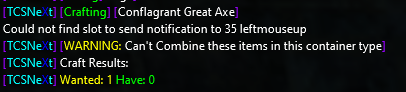
- Seller
- #3,093
Well, I have noticed some unfathomable lag today, so I would not give it too much credence unless it persists over the next few days. I noticed things were not working very well today that is for sure, but nothing changed on my Lua or MQ..If i receive this message:: what does that mean?View attachment 50649
Edit: seems to have cleared up, more or less on the live one I am on..
Jumped the proverbial gun. Still back end issues
Last edited:
For the past few days, I've been using this to improve my tradeskills. I started on the TSS tab and selected "All" from the dropdown menu before clicking "Do it." My character then worked on each skill, raising them to around 54. After completing the TSS tab, I moved on to the 300 Path tab and looked at Blacksmithing. Using the Craft tab, I used the text search function to find the Banded Gorget recipe and selected it. I set the threshold for 76 and enabled Skill so it stops when becomes trivial. For Qty I start with double or triple the required skill points for the item to become trivial. Click Info then the Missing tab to ensure I had all the necessary materials. If I need to gather materials, it tells me where to farm or I can check the bazaar. Finally, I clicked "Craft" and watch as my character completes the combines on one screen while I work on another. If anything goes wrong, I use the Utilities tab and click Restart. So far, I have alchemy, smithing, tailoring up to about 250.
Last edited:
JB, I seem to have a re-occuring issue. Prior to installation, I had zero issues with lag with any use of MQ. After running this program for several days, on raids especially, I seem to bog down with lag at an extreme clip, can't even move in a raid or click anything. After some trouble shooting with my friend, we have come to the conclusion that all fingers point towards this program,but definitely not the expert. Can we chat about the issue in detail so that maybe we can find a fix? I don't want to have to remove this program as I LOVE it, but it seems the next logical step. Thanks.
just for sake of furthering the conversation - do you have TCN running on raids?JB, I seem to have a re-occuring issue. Prior to installation, I had zero issues with lag with any use of MQ. After running this program for several days, on raids especially, I seem to bog down with lag at an extreme clip, can't even move in a raid or click anything. After some trouble shooting with my friend, we have come to the conclusion that all fingers point towards this program,but definitely not the expert. Can we chat about the issue in detail so that maybe we can find a fix? I don't want to have to remove this program as I LOVE it, but it seems the next logical step. Thanks.
I completely unload MQ while raiding. I also do a full reboot of my computer so that nothing is ever running in the background.just for sake of furthering the conversation - do you have TCN running on raids?
Not a code junkie, or the programmer for this, but I have it on 2 PC's and a laptop, I have never noticed this slowdown (even with it running), and I dont think it has any full time dependancies that should be running, with MQ OFF, and a reboot performed..I completely unload MQ while raiding. I also do a full reboot of my computer so that nothing is ever running in the background.

Yeah honestly nothing else on my system runs slow, so I know it isnt the system. I did a full re-install of EQ a few weeks back, and everything worked great for a couple of weeks...then the slow down began again. So I am systematically trying to eliminate problem children in the programming.Not a code junkie, or the programmer for this, but I have it on 2 PC's and a laptop, I have never noticed this slowdown (even with it running), and I dont think it has any full time dependancies that should be running, with MQ OFF, and a reboot performed..
cleaned those out already. still issues.Check your log files, when those get large things slow down.
Correct. Uneducated guess, but I haven't had any issues with lag until I got the TCN. When I reloaded EQ, everything worked great for a bit, then all of a sudden I am bogged way down again, primarily on raids. zoning is taking forever as well. I never had this issue prior to TCN being on my system. I thought it had to do with logging info etc, but I clean out my logs when they get over 1k.So that I understand, you run TCN, exit TCN (/lua stop), reboot, and then there is lag/delay in game?
- Seller
- #3,104
For me without running jack squat I have had lag issues and just complete unresponsiveness from EQ for the past week. I cannot definitively attribute that as a cause, for a few reasons, one being I don't know what server you play on, but on the live server I am on there is no way to differentiate. I've been waiting/hoping they would come out with a new patch to address *something*
*OPEN* Is there anyone else that can attest or is experiencing the same phenomena?
*OPEN* Is there anyone else that can attest or is experiencing the same phenomena?
Yes, since beta build started, we are bag to random crap lag...For me without running jack squat I have had lag issues and just complete unresponsiveness from EQ for the past week. I cannot definitively attribute that as a cause, for a few reasons, one being I don't know what server you play on, but on the live server I am on there is no way to differentiate. I've been waiting/hoping they would come out with a new patch to address *something*
*OPEN* Is there anyone else that can attest or is experiencing the same phenomena?
Lag on most raids happens even without mq at all much less tcn installed.
I'd look more at your in game settings and filters to turn off stuff you don't need to see and process while raiding.
I have models hidden and spell effects off for raids along with all other damage going a minimized window to help with it but i still get it and have to /clearall often.
Also check to make sure you've excluded all mq and eq folders from antivirus and sync software
I'd look more at your in game settings and filters to turn off stuff you don't need to see and process while raiding.
I have models hidden and spell effects off for raids along with all other damage going a minimized window to help with it but i still get it and have to /clearall often.
Also check to make sure you've excluded all mq and eq folders from antivirus and sync software
this does not sound like tcn at all.Correct. Uneducated guess, but I haven't had any issues with lag until I got the TCN. When I reloaded EQ, everything worked great for a bit, then all of a sudden I am bogged way down again, primarily on raids. zoning is taking forever as well. I never had this issue prior to TCN being on my system. I thought it had to do with logging info etc, but I clean out my logs when they get over 1k.
eq does have an issue if you have "show offline members" and are in a large guild - it will delay zone times pretty substantially
things "loaded on your system" don't do anything unless you run them.
this is absolutely nothing to do with tcn in that case.I completely unload MQ while raiding. I also do a full reboot of my computer so that nothing is ever running in the background.

I've got some sad news for you. If you are unloading MQ and THEN rebooting your computer before you start your raid. Your lag has absolutely NOTHING to do with TCN. TCN is a large set of text files in essence. If its not being launched / running while you are running MQ it will have 0 effect on your system.I completely unload MQ while raiding. I also do a full reboot of my computer so that nothing is ever running in the background.
- Seller
- #3,109
jb321 updated Tradeskill Construction Set NeXt with a new update entry:
Small Fix
Read the rest of this update entry...
Small Fix
9/15/2023
3.94b - ChangeLog
Fixed: When using Artisan crafting but UI was checked for Batch/Standard, it would try to use the UI for Artisan instead of experimenting. It now turns it off if you press go, but does not uncheck the box on the other tabs so it should persist based on the tab and checkbox.
Read the rest of this update entry...
Rare Spawn
Well-known member
For baking... there are 3 recipes for Ice, which is used in a metric ton of recipes... TCN is defaulting to prescribing the ice is made the hard ware, but a Tinkerer device... when there is an easier way to make it with Ice of Velious. The recipe is in the TCN DB too, its just not the one the software is choosing when calculating missing mats. I recommend setting the Velious Ice recipe to be the default.
For a manual override, users can make about 80 units if Ice by searching for ice, and scrolling down the one that uses Ice of Velious. This should unlock a bunch of ice cream and ice cream cake recipes for you.
For a manual override, users can make about 80 units if Ice by searching for ice, and scrolling down the one that uses Ice of Velious. This should unlock a bunch of ice cream and ice cream cake recipes for you.
- Seller
- #3,111
If I remember correctly you need 1 Ice of Velious to make the Glaciator thing which makes ice from water, removing the need for Ice of Velious save for the recipes that directly call for it, instead of the ones that call for Ice that could use IoV but use the tinkered item instead.For baking... there are 3 recipes for Ice, which is used in a metric ton of recipes... TCN is defaulting to prescribing the ice is made the hard ware, but a Tinkerer device... when there is an easier way to make it with Ice of Velious. The recipe is in the TCN DB too, its just not the one the software is choosing when calculating missing mats. I recommend setting the Velious Ice recipe to be the default.
For a manual override, users can make about 80 units if Ice by searching for ice, and scrolling down the one that uses Ice of Velious. This should unlock a bunch of ice cream and ice cream cake recipes for you.
Rare Spawn
Well-known member
Possibly, I see your point, I am glad you were able to decipher my typos. However, no access to a tinkerer (yet), don't possess the device, and devices in the bazaar include "Troll/Ogre/Barbarian Rape" as part of the package deal. Does TCN have any logic for picking alternative recipes for sub-components? Or is it a one way path?If I remember correctly you need 1 Ice of Velious to make the Glaciator thing which makes ice from water, removing the need for Ice of Velious save for the recipes that directly call for it, instead of the ones that call for Ice that could use IoV but use the tinkered item instead.
- Seller
- #3,113
I should or will add a new recipe (not really new) that uses IoV to make Ice..Possibly, I see your point, I am glad you were able to decipher my typos. However, no access to a tinkerer (yet), don't possess the device, and devices in the bazaar include "Troll/Ogre/Barbarian Rape" as part of the package deal. Does TCN have any logic for picking alternative recipes for sub-components? Or is it a one way path?
Could always make ice with the churn at the small bank in pokPossibly, I see your point, I am glad you were able to decipher my typos. However, no access to a tinkerer (yet), don't possess the device, and devices in the bazaar include "Troll/Ogre/Barbarian Rape" as part of the package deal. Does TCN have any logic for picking alternative recipes for sub-components? Or is it a one way path?
isn't it in the room with the Baking and Pottery vendors? Across from the small bank room.Could always make ice with the churn at the small bank in pok
Correct on the floor past scribe what'shisnameisn't it in the room with the Baking and Pottery vendors? Across from the small bank room.
- Seller
- #3,117
The book frog!Correct on the floor past scribe what'shisname

- Seller
- #3,119
the prize.db file was not extracted. it is in the prize.zip file in the TCN directoryWhen i load TCN, navigate to craft , then to Artisan, click down to a non 350 skill, i crash out, every time, with the below, any ideas?View attachment 51021
Without anything running the way it is setup is to /lua run tcgsetup
So I have been working tailoring 66% in, and my skill ups are not going up, stuck at 312. I know it is not TCN but is anyone else experiencing this issue? I sent a petition to DBG, just seeing if anyone else is having this issue.
Users who are viewing this thread
Total: 6 (members: 0, guests: 6)
Share: