• You've discovered RedGuides, an EverQuest multi-boxing and scripting community 🧙‍♀️⚙️. We want you to play several EQ characters at once, come join us and say hello! 👋

  • A TLP without truebox has thawed (Very Vanilla ready)
    Frostreaver

Problem - Toons lagging behind

Joined
Jun 16, 2017
RedCents
140¢
I'll do a /bcaa //travelto xyz zone, and i can watch the map and see toons start lagging behind. Everyone will be running with the same run speed, and there are no obstacles. When auto logging in, often times some won't completely login saying it took too long to load the character screen or something (I missed that pop-up). clicking ok, selecting the toon the enter world works fine at that point. I'll also notice my CWTN plugins sometimes have been getting stuck in the spellbook. I know all of this is caused by something on my PC, or a setting somewhere, but I'd like some general tips that can help. I'm hoping i turned off a plugin i shouldn't have, or i need to turn one off that shouldn't be on or something.

I'm running 12 now, and i used to run 42. When i ran 42 my toons ran better then when i run 12 now, and I don't recall making any changes. on Eqclient.ini i have ClientCore0-16 all set to -1


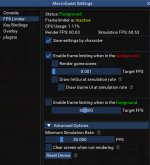
I have FPS frame limiter on and active, here are the settings for all toons:
1664973367124.png
1664973431136.png
 
Last edited by a moderator:
I'll do a /bcaa //travelto xyz zone, and i can watch the map and see toons start lagging behind. Everyone will be running with the same run speed, and there are no obstacles. When auto logging in, often times some won't completely login saying it took too long to load the character screen or something (I missed that pop-up). clicking ok, selecting the toon the enter world works fine at that point. I'll also notice my CWTN plugins sometimes have been getting stuck in the spellbook. I know all of this is caused by something on my PC, or a setting somewhere, but I'd like some general tips that can help. I'm hoping i turned off a plugin i shouldn't have, or i need to turn one off that shouldn't be on or something.

I'm running 12 now, and i used to run 42. When i ran 42 my toons ran better then when i run 12 now, and I don't recall making any changes. on Eqclient.ini i have ClientCore0-16 all set to -1


I have FPS frame limiter on and active, here are the settings for all toons:

Might help might not.

I have 40 toons running here.

https://www.redguides.com/community...t-and-frame-limiters-galore.79443/post-497840
 

Attachments

  • Untitled.jpg
    Untitled.jpg
    147.5 KB · Views: 6
cpuaffinity isn't a setting any longer, and the default is -1 for the new settings. and you should *definitely* let them be -1

everquest said:
- Renamed the "CPUAffinity" setting to "ClientCore" in the eqclient.ini file. The new default has been set to "-1" which allows the client to run on any and multiple cores. Setting a number other than the default will still force the client to run on a specific core.

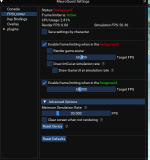
mx - those framelimiter settings aren't great --- note your target fps in background is 60 - you don't want that, the whole point is you want to limit frames in the background

check out my preview > here <

also make sure you're patched, brainiac recently (last update or two) fixed a bug where if you had your max background fps set to min, it wouldnt' get overriden by framelimiter

1664976748965.png
 
Last edited:
"mx - those framelimiter settings aren't great --- note your target fps in background is 60 - you don't want that, the whole point is you want to limit frames in the background" True that.

cpuaffinity isn't a setting any longer, and the default is -1 for the new settings


mx - those framelimiter settings aren't great --- note your target fps in background is 60 - you don't want that, the whole point is you want to limit frames in the background

check out my preview > here <

also make sure you're patched, brainiac recently (last update or two) fixed a bug where if you had your max background fps set to min, it wouldnt' get overriden by framelimiter

View attachment 42565
 
So I can almost guarantee i fat fingered that setting on a toon sometime. I changed to 0 (or as low as it goes) and so far so good! ram is super high, but don't really care, i have 128 so not an issue.
 
Problem - Toons lagging behind

Users who are viewing this thread

Back
Top
Cart