• Hail, we're RedGuides. We want you to play six (yes, 6!) EverQuest characters at once. We have scripts and a friendly community to help, please join our playstyle and say hello! 👋
  • We've added LLM sections to our Terms & Rules and Resource Rules, for everyone's sanity & in-game safety.
    Read more
    a. Do not replace your voice with an LLM. This goes for your posts and your scripts. Drafting and editing with a tool is fine, but don't take you out of what you share.
    b. Do not replace your EQ character's voice with an LLM. We don't want scripts that speak over /ooc, /shout or other public channels. This has been an unwritten rule that's kept casino scripts off the site for decades, but we're now compelled to make it clear: keep automated communication private.

    Why Does RG Review Scripts?
    Nearly every LLM-written Lua script we see is making your character do impossible things, and rarely in a way that's beneficial to you. We've seen heavy server hammering, /target over impossible distances when /nav spawn would passively accomplish the same thing, a spawn search that fires 20+ times per second, and other pointless actions that are likely annoying GMs.

    You are welcome to use LLMs as a tool to structure, draft, and edit your work, but please read critically before hitting /lua run

Problem - Toons lagging behind

mb4xy3

Well-known member
I'll do a /bcaa //travelto xyz zone, and i can watch the map and see toons start lagging behind. Everyone will be running with the same run speed, and there are no obstacles. When auto logging in, often times some won't completely login saying it took too long to load the character screen or something (I missed that pop-up). clicking ok, selecting the toon the enter world works fine at that point. I'll also notice my CWTN plugins sometimes have been getting stuck in the spellbook. I know all of this is caused by something on my PC, or a setting somewhere, but I'd like some general tips that can help. I'm hoping i turned off a plugin i shouldn't have, or i need to turn one off that shouldn't be on or something.

I'm running 12 now, and i used to run 42. When i ran 42 my toons ran better then when i run 12 now, and I don't recall making any changes. on Eqclient.ini i have ClientCore0-16 all set to -1


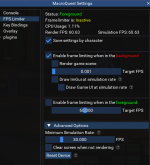
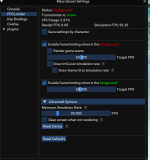
I have FPS frame limiter on and active, here are the settings for all toons:
1664973367124.png
1664973431136.png
 
Last edited by a moderator:
I'll do a /bcaa //travelto xyz zone, and i can watch the map and see toons start lagging behind. Everyone will be running with the same run speed, and there are no obstacles. When auto logging in, often times some won't completely login saying it took too long to load the character screen or something (I missed that pop-up). clicking ok, selecting the toon the enter world works fine at that point. I'll also notice my CWTN plugins sometimes have been getting stuck in the spellbook. I know all of this is caused by something on my PC, or a setting somewhere, but I'd like some general tips that can help. I'm hoping i turned off a plugin i shouldn't have, or i need to turn one off that shouldn't be on or something.

I'm running 12 now, and i used to run 42. When i ran 42 my toons ran better then when i run 12 now, and I don't recall making any changes. on Eqclient.ini i have ClientCore0-16 all set to -1


I have FPS frame limiter on and active, here are the settings for all toons:

Might help might not.

I have 40 toons running here.

https://www.redguides.com/community...t-and-frame-limiters-galore.79443/post-497840
 

Attachments

  • Untitled.jpg
    Untitled.jpg
    147.5 KB · Views: 6
cpuaffinity isn't a setting any longer, and the default is -1 for the new settings. and you should *definitely* let them be -1

everquest said:
- Renamed the "CPUAffinity" setting to "ClientCore" in the eqclient.ini file. The new default has been set to "-1" which allows the client to run on any and multiple cores. Setting a number other than the default will still force the client to run on a specific core.

mx - those framelimiter settings aren't great --- note your target fps in background is 60 - you don't want that, the whole point is you want to limit frames in the background

check out my preview > here <

also make sure you're patched, brainiac recently (last update or two) fixed a bug where if you had your max background fps set to min, it wouldnt' get overriden by framelimiter

1664976748965.png
 
Last edited:
"mx - those framelimiter settings aren't great --- note your target fps in background is 60 - you don't want that, the whole point is you want to limit frames in the background" True that.

cpuaffinity isn't a setting any longer, and the default is -1 for the new settings


mx - those framelimiter settings aren't great --- note your target fps in background is 60 - you don't want that, the whole point is you want to limit frames in the background

check out my preview > here <

also make sure you're patched, brainiac recently (last update or two) fixed a bug where if you had your max background fps set to min, it wouldnt' get overriden by framelimiter

View attachment 42565
 
So I can almost guarantee i fat fingered that setting on a toon sometime. I changed to 0 (or as low as it goes) and so far so good! ram is super high, but don't really care, i have 128 so not an issue.
 
Problem - Toons lagging behind

Users who are viewing this thread

Back
Top
Cart