• You've discovered RedGuides, an EverQuest multi-boxing and scripting community 🧙‍♀️⚙️. We want you to play several EQ characters at once, come join us and say hello! 👋

  • A TLP without truebox has thawed (Very Vanilla ready)
    Frostreaver

Question - Thoughts, advice, suggestions

jagar

Member
Joined
Jul 7, 2020
RedCents
110¢
Hello everyone, fairly new, finally gave the plunge from bugs (using that 6 years) to here, got 10 of the class plug ins so far, I run 12 guys at once, could use some guidance on the following, have searched around but not able to find what I need

1. auto overseer, do you have to type /mac overseer on each every time? It is what I have been doing all week since its not running auto, or should once cover them always to run automatically? if once is all that is needed, what am I missing?

2. all melee when attacking change their view to look up, is that normal? and have to hit the 5 key to look forward again

3. I read in a lot of places to change .ini to this or that, BUT all my ini files ONLY have rez option and nothing else in them, so there is nothing I can change, unless I need to make the line myself? I have check 16 different guys and they are all the same, have a rez accept line 96 and 0, which I changed to 1

4. how to have the 2nd group assist the first? group one main is sk set on pull tank, 2nd group has war, I have tried setting him to assist, tank, pull tank, but I have to send bcs a command to him to assist the sk to do anything, rather not do raid exp is low enough already ahha
would think set on tank he would go after anything in his circle, also put the sk on war ET line 1, still no go he would target sk and not line 2 the mob, moved sk to a line further down and still no assist

5 I run the sk solo on a computer, the rest on another one, the computer the sk is on, the group window does not have the additional buttons like the other, such as "come to me" "mimic", how to get that to show, I have reinstalled RG 2 times but didnt fix it, all plugins match on both computers, I installed it on a 3rd and all the functions are there as well

still trying to get used to the changes here vs bugs, hardest for me is the no warp or instant gate :) , sure made getting around so fast, but the abilities now for everyone is no comparison, just need to change my habits
thx for any and all help
 
Getting Started / Returning user

Welcome to RedGuides, fellow EQ multi-boxing enthusiast!

The best place to begin is our "New User Guide" video series, click this TV to watch:


This step-by-step series will teach absolute beginners how to control 6 characters at once while highlighting Nav, AutoLogin, and DanNet, which are fundamental plugins that will enhance every aspect of your game.

Returning users check out - MacroQuest Release Party: https://www.redguides.com/community/threads/macroquest-release-party.80628/ for information about changes from the legacy MQ2 to the new and awesome MQ
 
Hello everyone, fairly new, finally gave the plunge from bugs (using that 6 years) to here, got 10 of the class plug ins so far, I run 12 guys at once, could use some guidance on the following, have searched around but not able to find what I need

1. auto overseer, do you have to type /mac overseer on each every time? It is what I have been doing all week since its not running auto, or should once cover them always to run automatically? if once is all that is needed, what am I missing?

2. all melee when attacking change their view to look up, is that normal? and have to hit the 5 key to look forward again

3. I read in a lot of places to change .ini to this or that, BUT all my ini files ONLY have rez option and nothing else in them, so there is nothing I can change, unless I need to make the line myself? I have check 16 different guys and they are all the same, have a rez accept line 96 and 0, which I changed to 1

4. how to have the 2nd group assist the first? group one main is sk set on pull tank, 2nd group has war, I have tried setting him to assist, tank, pull tank, but I have to send bcs a command to him to assist the sk to do anything, rather not do raid exp is low enough already ahha
would think set on tank he would go after anything in his circle, also put the sk on war ET line 1, still no go he would target sk and not line 2 the mob, moved sk to a line further down and still no assist

5 I run the sk solo on a computer, the rest on another one, the computer the sk is on, the group window does not have the additional buttons like the other, such as "come to me" "mimic", how to get that to show, I have reinstalled RG 2 times but didnt fix it, all plugins match on both computers, I installed it on a 3rd and all the functions are there as well

still trying to get used to the changes here vs bugs, hardest for me is the no warp or instant gate :) , sure made getting around so fast, but the abilities now for everyone is no comparison, just need to change my habits
thx for any and all help
Hi Jagar and welcome to RG. I'm sure you will be amazed with the features and community here!

1) I use overseer.Lua and it works amazing for my 13. A small bit of setup and your're gtg - Overseer Lua

2) Stop using first person view =) Scroll out and you can use mq2camera as well for a better view

3) Are you referring to kissassist as automation or mq2rez

4) Other than making a hotkey to tell your other group MT/MA to attack your mains groups target, not sure there is another way other than raidmode. Maybe someone smarter has another option I am unaware of. I would also consider the optics of 12 toons running around together if you plan to do that. 6 draws enough attention =)

5) Do you have mq2group info loaded on that toon?

A bit more info below....as if you need more to digest :P

Always start here RG Video

Watch the vids in Sic's signature (I'm sure he will post soon if he has not done so already while I'm typing this).

Once you have an idea of how things work, you'll want to look into some automation options. Check out Kissassist Beginners Guide, Kissassist Commands , RGmercs, and especially cwtn plugins ( you can also /testcopy your toons and use the cwtn plugins there for free and you'll want to spend some time looking at CWTN Plugins Explained.).

I suggest getting your feet wet slowly and be patient as it takes time to absorb all this information. Try taking your toons somewhere safe and lower level at first and explore the automation options. It takes some time to get used to, so don't be surprised it if feels overwhelming at first.

Once you feel like your're getting the hang of it (or to get a more in depth idea of what this site can do), then check out the plugins, macros, and lua's available to complement your automation. Things like MQ2pluginmanager, buttonmaster, mq2autogroup, MQ2Autoaccept, MQ2Status, GuildClicky, Boxhud, MQ2Buffme , and more. You'll also want to see Lua event manager.

Don't forget about Red Cents!!! What the heck is a Red Cent you ask? Red Cents can you help with your subscription and it's the currency this site uses. Contribute helpful information (post here) and others will give you red cents and each red cent you give others returns one to you. check it out! Red Cents

Time to subscribe to level 2 and begin a journey you won't regret. Lots of info and a super helpful community here to help when you get stuck.
 
Hi Jagar and welcome to RG. I'm sure you will be amazed with the features and community here!

1) I use overseer.lua and it works amazing for my 13. A small bit of setup and your're gtg - Overseer Lua

2) Stop using first person view =) Scroll out and you can use mq2camera as well for a better view

3) Are you referring to kissassist as automation or mq2rez

4) Other than making a hotkey to tell your other group MT/MA to attack your mains groups target, not sure there is another way other than raidmode. Maybe someone smarter has another option I am unaware of. I would also consider the optics of 12 toons running around together if you plan to do that. 6 draws enough attention =)

5) Do you have mq2group info loaded on that toon?

A bit more info below....as if you need more to digest :P

Always start here RG Video

Watch the vids in Sic's signature (I'm sure he will post soon if he has not done so already while I'm typing this).

Once you have an idea of how things work, you'll want to look into some automation options. Check out Kissassist Beginners Guide, Kissassist Commands , RGmercs, and especially cwtn plugins ( you can also /testcopy your toons and use the cwtn plugins there for free and you'll want to spend some time looking at CWTN Plugins Explained.).

I suggest getting your feet wet slowly and be patient as it takes time to absorb all this information. Try taking your toons somewhere safe and lower level at first and explore the automation options. It takes some time to get used to, so don't be surprised it if feels overwhelming at first.

Once you feel like your're getting the hang of it (or to get a more in depth idea of what this site can do), then check out the plugins, macros, and lua's available to complement your automation. Things like MQ2pluginmanager, buttonmaster, mq2autogroup, MQ2Autoaccept, MQ2Status, GuildClicky, Boxhud, MQ2Buffme , and more. You'll also want to see Lua event manager.

Don't forget about Red Cents!!! What the heck is a Red Cent you ask? Red Cents can you help with your subscription and it's the currency this site uses. Contribute helpful information (post here) and others will give you red cents and each red cent you give others returns one to you. check it out! Red Cents

Time to subscribe to level 2 and begin a journey you won't regret. Lots of info and a super helpful community here to help when you get stuck.
Hey thanks for reply as far as
1 downloaded will look into how to set up
2 will try that view
3 am saying when I open anyones ini file, the ONLY file there is for auto accept rez at 96
4 part of the reason coming to RG is i needed 12 to do anything, it was always instant wipe on any name even if LB, cast agro dead, and have not been able to do any missions since EOK, so it was so much lost in game play
5 yes

have watched all those videos, some more than once
auto join, doesnt save, i have to re do autoaccept add "name" everytime i log on, shouldnt that save?
thx again
 
Look at your MQ2AutoAccept.ini file, and make sure the names you expect are in there.
 
Hey thanks for reply as far as
1 downloaded will look into how to set up
2 will try that view
3 am saying when I open anyones ini file, the ONLY file there is for auto accept rez at 96
4 part of the reason coming to RG is i needed 12 to do anything, it was always instant wipe on any name even if LB, cast agro dead, and have not been able to do any missions since EOK, so it was so much lost in game play
5 yes

have watched all those videos, some more than once
auto join, doesnt save, i have to re do autoaccept add "name" everytime i log on, shouldnt that save?
thx again

3 am saying when I open anyones ini file, the ONLY file there is for auto accept rez at 96
Are you navigating to your config folder and finding servername_toonname.in? MQ2Rez settings are the first lines in mine (see below)


INI:
[MQ2Rez]
Accept=1
RezPct=96
SafeMode=0
VoiceNotify=1
ReleaseToBind=0
SilentMode=0
Delay=1
Command Line=

auto join, doesnt save, i have to re do autoaccept add "name" everytime i log on, shouldnt that save?

For auto join/group, your mq2autogroup.ini file in your config directory should look like this;

INI:
[Settings]
Version=1.01
HandleMerc=1
NumberOfGroups=1
[Group1]
Server=SERVERNAME
Member1=<TANKTOONNAME>|Main Tank|Main Assist
Member2=NEXTTOONNAME
Member3=NEXTTOONNAME
Member4=NEXTTOONNAME
Member5=NEXTTOONNAME
Member6=NEXTTOONNAME
 
Are you navigating to your config folder and finding servername_toonname.in? MQ2Rez settings are the first lines in mine (see below)


INI:
[MQ2Rez]
Accept=1
RezPct=96
SafeMode=0
VoiceNotify=1
ReleaseToBind=0
SilentMode=0
Delay=1
Command Line=


For auto join/group, your mq2autogroup.ini file in your config directory should look like this;

INI:
[Settings]
Version=1.01
HandleMerc=1
NumberOfGroups=1
[Group1]
Server=SERVERNAME
Member1=<TANKTOONNAME>|Main Tank|Main Assist
Member2=NEXTTOONNAME
Member3=NEXTTOONNAME
Member4=NEXTTOONNAME
Member5=NEXTTOONNAME
Member6=NEXTTOONNAME
Hey Psy, thanks again for replying,..........there is not an autoaccept file, the plugin is loaded and shows green in the manager window, the autogroup file is there and looks similar to what you wrote, some wording is different, I went in and added names, still no go,
on all 3 computers, the config folder does not have autoaccept ini file, and all 3 have it loaded and in the green
overseer still have to type /mac overseer every time, doing that for everyone is annoying and takes too much time
at the point to give up on using this after 2 weeks of stuff not working, it takes 30 mins to set up and get going (group, join, overseer, etc)
only auto thing that is working is auto log on
thanks for trying man
 
Hey Psy, thanks again for replying,..........there is not an autoaccept file, the plugin is loaded and shows green in the manager window, the autogroup file is there and looks similar to what you wrote, some wording is different, I went in and added names, still no go,
on all 3 computers, the config folder does not have autoaccept ini file, and all 3 have it loaded and in the green
overseer still have to type /mac overseer every time, doing that for everyone is annoying and takes too much time
at the point to give up on using this after 2 weeks of stuff not working, it takes 30 mins to set up and get going (group, join, overseer, etc)
only auto thing that is working is auto log on
thanks for trying man
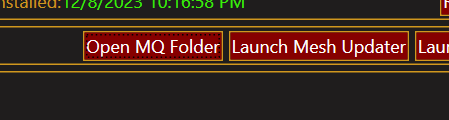
on launcher...
1702155554887.png
Click "Open MQ Folder"...

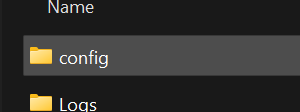
In explorer window that pops up... open "config" folder
1702155585395.png

In the "config" folder, MQ2AutoAccept.ini should be located there...
1702155630497.png

MQ2AutoGroup.ini should also be there...
1702155712666.png

These are the config files that contain the settings for auto grouping and auto accepting invites
 
on launcher...
View attachment 54328
Click "Open MQ Folder"...

In explorer window that pops up... open "config" folder
View attachment 54329

In the "config" folder, MQ2AutoAccept.ini should be located there...
View attachment 54330

MQ2AutoGroup.ini should also be there...
View attachment 54331

These are the config files that contain the settings for auto grouping and auto accepting invites
Hey thanks for reply, that file is not there, autogroup is but not accept, I have uninstalled and re loaded 3 x times now, also missing is the buttons in the group window, nothing looks like what it should by the videos and what others say
 

Attachments

  • IMG_5554.jpg
    IMG_5554.jpg
    20.9 KB · Views: 3
  • IMG_5555.jpg
    IMG_5555.jpg
    20.3 KB · Views: 3
Look at your MQ2AutoAccept.ini file, and make sure the names you expect are in there.
that file is not there, have installed RG 3x now, same with the buttons that should be in the group window
 

Attachments

  • IMG_5554.jpg
    IMG_5554.jpg
    20.9 KB · Views: 4
  • IMG_5555.jpg
    IMG_5555.jpg
    20.3 KB · Views: 4
My guess is that you're looking in the wrong folder. Many people install multiple copies of MacroQuest without realizing it. Are you sure the MQ you're launching is in the same folder you're inspecting? Open the redguides launcher and go to the settings tab. That will tell you the correct folder. Make sure you launch MQ from the "Very VAnilla" tab in the RG launcher.

Also, no need to take screenshots from a phone.

Take an easy screen snip:
  1. Shift+Windows Key+S
  2. Select the area you wish to copy
  3. Control+V to paste it into a forum message
 
My guess is that you're looking in the wrong folder. Many people install multiple copies of MacroQuest without realizing it. Are you sure the MQ you're launching is in the same folder you're inspecting? Open the redguides launcher and go to the settings tab. That will tell you the correct folder. Make sure you launch MQ from the "Very VAnilla" tab in the RG launcher.

Also, no need to take screenshots from a phone.

Take an easy screen snip:
  1. Shift+Windows Key+S
  2. Select the area you wish to copy
  3. Control+V to paste it into a forum message
Hey RB
Yes, I am doing it that way, launcher, vanilla, open mqfolder, and launching mq
all 3 computers folder/files look the same
1 computer, my main one with the sk running solo, the group window does not look like the other 2, with the extra tabs/buttons on, such as come here, mimic me etc
all 3 do not auto run overseer, have to do mac overseer 16 guys, 2 times a day, I tried sending that command by bcs but they do not run it by that, I would be ok with that
all 3 do not auto accept, once i type it in first time for the day, it works until logging off, then have to redo for all 12, and no autoaccept ini file on any of the 3 machines, autogroup is there
As you can imagine, takes a lot of time to get started and going, 30ish mins
have only installed it once on the other 2 machines, on the main one I have uninstalled and installed 3 x, still looks the same
thx for you time
 
Can you post the [plugin] section of your macroquest.ini from each computer? Last step before we do a video call
 
2. all melee when attacking change their view to look up, is that normal? and have to hit the 5 key to look forward again
a. cwtn plugins use MQ2MoveUtils /stick with the uw flag. This means UnderWater - it's specifically referring to look up/down towards the direction of the target. This means that when you are levitating and a target is below you, you will look down and move towards them, causing you to move down to their location. The same applies to when in water. Without the UW flag the character will run straight ahead and will be above/below the target when they arrive at the EQ X/Y coordinate, but be on a different Z height. Making it so you can be hit, but not hit back. The recommended suggestion was correct, just change views.

3. I read in a lot of places to change .ini to this or that, BUT all my ini files ONLY have rez option and nothing else in them, so there is nothing I can change, unless I need to make the line myself? I have check 16 different guys and they are all the same, have a rez accept line 96 and 0, which I changed to 1
a. There is different INI files for different plugins and each have settings done in different formats. This is evident by your own screenshot showing the names of different plugins INIs. If you want to change settings for MQ2Autogroup plugin you would open the MQ2AutoGroup.ini, and if you want to change the settings for MQ2Autoloot you could change the contents of the MQ2Autoloot.ini file.

4. how to have the 2nd group assist the first? group one main is sk set on pull tank, 2nd group has war, I have tried setting him to assist, tank, pull tank, but I have to send bcs a command to him to assist the sk to do anything, rather not do raid exp is low enough already ahha
would think set on tank he would go after anything in his circle, also put the sk on war ET line 1, still no go he would target sk and not line 2 the mob, moved sk to a line further down and still no assist.
a. cwtn plugins do not have out of group assisting by default. You will need to continue to use a hotkey to get the MA of the other group to engage so that it populates to the xtarget window as an autohater which will then cause the rest of the other group to assist.

5 I run the sk solo on a computer, the rest on another one, the computer the sk is on, the group window does not have the additional buttons like the other, such as "come to me" "mimic", how to get that to show, I have reinstalled RG 2 times but didnt fix it, all plugins match on both computers, I installed it on a 3rd and all the functions are there as well
/plugin mq2groupinfo load
 
Last edited:
Are you launching MQ2 on the SK computer? Also are you using persona's at all? Whenever I switch a persona it doesn't play nice with MQ2 and I have to log out to the server select screen and come back for all my MQ2 functionality to return, just another reason I hate personas.
 
I have extremely limited knowledge on this, but if you are running multiple computers is there anything special you need to do to ensure that they are all connected to danet or eqbcs? I only ever use one PC so I am able to issue commands to the others via eqbcs. This is such a handy tool. Maybe I will tinker around with adding in the laptop and see how that works out.
 
Are you launching MQ2 on the SK computer? Also are you using persona's at all? Whenever I switch a persona it doesn't play nice with MQ2 and I have to log out to the server select screen and come back for all my MQ2 functionality to return, just another reason I hate personas.
Using 2 machines, connected with bcs, after deleting and installing RG on the SK machine, it started working, took 4 installs, now is fine, although they still will not auto group without sending the command to auto accept every time then the will form up and overseer still will not auto start on first log in, I send everyone bcs msg to /mac overseer then it run all day
All my work arounds are fixed using bcs to send all a command, am ok with that, but still for some reason the group will not assist on the first mob of the day, after the first kill then they start doing their part, even though they are not invis, are set to tank, chase or assist etc, even if I manually target a mob they will untarget it till dead, then they start
 
You got some strange janky stuff going on there. Did yo umake sure you ran the mesh generator? Does this happen in all zones or a specific one?
 
Are you launching MQ2 on the SK computer? Also are you using persona's at all? Whenever I switch a persona it doesn't play nice with MQ2 and I have to log out to the server select screen and come back for all my MQ2 functionality to return, just another reason I hate personas.
Should be able to address changing personas with a reload of the UI as opposed to completely relogging.
 
good to know I'll try that next time. I seriously wish personas weren't so buggy. I just want them to delete my persona.
 
Question - Thoughts, advice, suggestions

Users who are viewing this thread

Back
Top
Cart