• You've discovered RedGuides, an EverQuest multi-boxing and scripting community 🧙‍♀️⚙️. We want you to play several EQ characters at once, come join us and say hello! 👋

  • A TLP without truebox has thawed (Very Vanilla ready)
    Frostreaver

Tech - Taskbar reorganizing help (1 Viewer)

Redfrog

Is now BlueFrog
Creator
Joined
Nov 29, 2017
RedCents
3,931¢
What I want help with:
To be able to load my EQ clients and drag/reorganize them to my preference. So example would be Tank, Healer, CC........if a client crashes like Tank (usually who I drive with), I can load back up and instead of being the last client on the taskbar, I can drag back into 1st place.


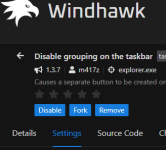
I use to use 7+ Taskbar Tweaker..but a patch some time ago rendered it broken for Win 11 taskbar. I currently use WindHawk, it kinda does what I want, but not exactly. With 7+ I could drag any window (browser, app, EQs) to wherever I wanted. I enjoyed using the Launcher and EQBCS window as 'spacers' between EQ groups. visually helps. With WindHawk, I seem to get all or not. I did see I can have all my browser windows out OR in one item that cascades up upon highlighting, but no dragging around to organize. or a giant clump of EQ clients, and again no reorder ability.

What do you guys use/do if you have this type playstyle? Thank you for any assistance/ideas.

EDIT: In my case, I use Win 11.
 
I used to use 7+ as well. I now use StartAllBack as it gives the same functionality as you are talking about. There may be other free options but this one works well and is really cheap. Think it was $5.
 
I use Win11 - I just drag the icon to its correct position. I load my characters individually so don't get them all in the same icon as I wait until the EQ icon is up before starting the next one. I don't use the Redguides loader at all. In fact, I don't use the EQ launchpad unless I need to patch (and then I use a clean machine). I run EQGame - patchme normally.

Not sure if that addresses your question!
 
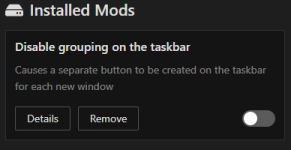
Do you have the Disable grouping on the taskbar mod installed for windhawk?
Yes, but I disabled it, because I have too many browser windows all taking up my taskbar (yes I know thats a ME problem, with 7+ I could manage them easily though).
1738004089735.png
I use Win11 - I just drag the icon to its correct position. I load my characters individually so don't get them all in the same icon as I wait until the EQ icon is up before starting the next one. I don't use the Redguides loader at all. In fact, I don't use the EQ launchpad unless I need to patch (and then I use a clean machine). I run EQGame - patchme normally.

Not sure if that addresses your question!
Hi Whodis, yes it does. I get what you're saying..to me that would defeat the purpose of automated Login though...hitting my profile and launching a group of 6 is my way. I also do not use the EQ launcher for anything but patch day. The RG Launcher though is something I do use. I do not have to, but I enjoyed the easy visual space of putting it between groups.
I used to use 7+ as well. I now use StartAllBack as it gives the same functionality as you are talking about. There may be other free options but this one works well and is really cheap. Think it was $5.
I have never tried it, but will take a look, Thanks for the advice Davros.
 
start all back for the win ... and yes win 11 sucks i wish theyd allow us to use different windows gui setups ...id personally use the old win xp desktop ;)
 
Update !! Thank you guys for the ideas and letting me ramble, got me trying crap and boom !🐸
I got what I wanted, and figured I'd share!
What I wanted..EQ clients to be able to be dragable on the taskbar to reorganize at will, helps a TON if a client crashes and clients get out or order. Other windows (basically browsers) that have many (I am a tab AND browser window hoarder... the worst of both habits) windows, can group up.
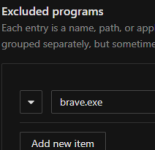
See the Brave clients are grouped up as a single icon on the taskbar, but mouse over will show my 20 windows (only can see 2 in the screengrab). My EQ clients (EMU..no worry about names) are currently in the order I prefer, Tank, Healer, CC. If one crashes.. no big deal..just drag back to position. Also, I can use MQ Profiles for Autologin. As I said before, I like to put my RG Launcher at the end of Group 1, and the EQBCS window at the end of group 2 if I have3 groups. Just something I like, nothing more than that.
1738216727637.png
On Win 11, using WindHawk:
1738216311215.png 1738216282908.png
and Win 11 taskbar setting:
1738216420920.png

If you like, enjoy as I do. 🐸🐸🐸
 
Tech - Taskbar reorganizing help

Users who are viewing this thread

Back
Top
Cart