• You've discovered RedGuides, an EverQuest multi-boxing and scripting community 🧙‍♀️⚙️. We want you to play several EQ characters at once, come join us and say hello! 👋

  • A TLP without truebox has thawed (Very Vanilla ready)
    Frostreaver

Problem - Spell Data Issue for Mages

Gnits

Active member
Joined
Mar 24, 2017
RedCents
674¢
[CODE title="Tests"]
/echo ${Spell[Burnout XV]}
Burnout XV
/echo ${Spell[Aegis of Rumblecrush].RankName}
Aegis of Rumblecrush Rk. II
/echo ${Spell[Iceflame Barricade]}
NULL
/echo ${Spell[Iceflame Barricade].RankName}
NULL
[/CODE]
I have rank 2 of Iceflame but neither come back with a string
 
howdy Gnits, I opened an issue for you > HERE <

I can confirm i see the same thing

ah, i figured it out

for some reason the spell is "Iceflame Barricade " with a space at the end
 
So how do you report a spell with a space on the end.... because of the spell string stuff?
 
did you read my reply?

use "Iceflame Barricade " with a space

same with "Renewal of Iilivina "
I tried putting a space after them ,but it still says unable to find the spells in my spellbook. I got the rk ii spells and updated the ini, it still says unable to find, but it actually uses the rk ii spells.
 
I tried putting a space after them ,but it still says unable to find the spells in my spellbook. I got the rk ii spells and updated the ini, it still says unable to find, but it actually uses the rk ii spells.
dunno

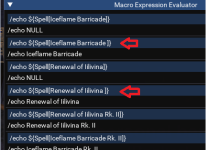
if you /echo ${Spell[Iceflame Barricade]} you get Null if you /echo ${Spell[Iceflame Barricade ]} it finds it (with the space). Rk. II works like normal. so not sure why it would fail on finding the rk. II as it is a correct spell without any extra spaces.

here you can see the trailing space

(btw, no need for /echo in that, just habit)

1639849586165.png
 
dunno

if you /echo ${Spell[Iceflame Barricade]} you get Null if you /echo ${Spell[Iceflame Barricade ]} it finds it (with the space). Rk. II works like normal. so not sure why it would fail on finding the rk. II as it is a correct spell without any extra spaces.

here you can see the trailing space

(btw, no need for /echo in that, just habit)

View attachment 36002
I understand the space, I got this info from the spells.txt file in the eq folder. I'm using kissassist ini file, even though I have the Rk. II listed it still looks for the rank one spell. But it does use the Rk. II spell. But won't use the rank one spell with a space in the ini file. I assume it has something to do with not having to clarify the rank of the spell at all.
 

Attachments

  • Untitled.png
    Untitled.png
    4.8 KB · Views: 5
I understand the space, I got this info from the spells.txt file in the eq folder. I'm using kissassist ini file, even though I have the Rk. II listed it still looks for the rank one spell. But it does use the Rk. II spell. But won't use the rank one spell with a space in the ini file. I assume it has something to do with not having to clarify the rank of the spell at all.
well that sounds like a situation with kiss (and tbf, not kisses fault)

you just said:
Renewal of Iilivina
Iceflame Barricade

Something I can't get either to work.

but maybe you mean to post in the kiss section that kiss doesn't find it?
 
If folks are using a macro that initializes variables from an INI, like spell names, ${Ini[]} does not pickup up trailing spaces, plus MQ2 variables (strings) do not hold trailing spaces. But I have a solution that may work for probably all macros that get their variables from an INI file or even initialize a Spell Name inside a macro (like a /declare or /varset).

Don't use the spell name, use the Spell ID. This solved the problem for the macros I use.

Rank 1:
Iceflame Barricade ID is 63745
Renewal of Iilivina ID is 63724.
 
Last edited:
How do we fix this with cwtn plugins? I'm not using next atm.
Hello Cillon,

this thread has nothing to do with the cwtn plugins. it has to do with dbg having some spell names that have a trailing space on the end of them, which would cause issues with something like ${Spell[name]} not returning the spell because it would need to be ${Spell[name ]} with the trailing space instead

if instead, you're asking "how do get cwtn plugins to use new spells" then it sounds like you already know the answer is to use next :)

in case you don't > Click here <
 
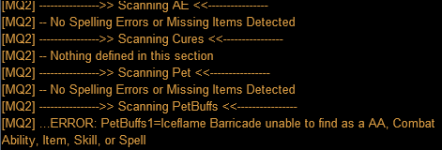
Hi, i got same problem:
PetBuffs1=Iceflame Barricade
NOT WORK i have put an space at the end of name but not works... any idea or help.
ERROR:1640338681005.png

Im using kissassist last update!
Thanks in advance
 
Hi, i got same problem:
PetBuffs1=Iceflame Barricade
NOT WORK i have put an space at the end of name but not works... any idea or help.
ERROR:View attachment 36187

Im using kissassist last update!
Thanks in advance
Like Sic said, this is a trailing space added to the spell in Everquest. The work around I used is buying the Rk. II spells and using
PetBuffs1=Iceflame Barricade Rk. II

This will still give the error that it can't find the spell, but it will use the Rk. II spell. (might only work on gold account)
 
118 MAG spell, does not appear to be working propery, KISS is not recognizing it as in the spell book and it cannot be activated via /casting "
Renewal of Iilivina".
 
118 MAG spell, does not appear to be working propery, KISS is not recognizing it as in the spell book and it cannot be activated via /casting "
Renewal of Iilivina".
yeah, need a space in the end

"Renewal of Iilivina "
same with
"Iceflame Barricade "
 
118 MAG spell, does not appear to be working propery, KISS is not recognizing it as in the spell book and it cannot be activated via /casting "
Renewal of Iilivina".
Merged into the thread with the explanation.
 
Problem - Spell Data Issue for Mages

Users who are viewing this thread

Back
Top
Cart